
CYCLAMI CY300T-US
CYCLAMI Bike Lights User Manual
Model: CY300T-US
1. Introduction
Thank you for choosing the CYCLAMI Smart Bike Lights. This set includes a smart headlight and a smart tail light designed to enhance your cycling safety and visibility. Featuring multiple lighting modes, smart brake sensing, automatic lighting, and convenient USB-C charging, these lights are built for durability and performance in various conditions.

Figure 1.1: CYCLAMI Bike Lights installed on a bicycle, providing enhanced visibility.
2. Safety Information
- Always ensure lights are securely mounted before riding.
- Do not look directly into the light beam to avoid temporary vision impairment.
- Keep the lights clean to maintain optimal brightness and visibility.
- While the lights are IPX6 waterproof, avoid prolonged submersion.
- Charge the lights using a compatible USB-C power source only.
- Regularly check battery levels to ensure sufficient power for your ride.
3. Package Contents
Please check the package to ensure all items are present:
- 1 x CYCLAMI Headlight
- 1 x CYCLAMI Tail Light
- USB-C Charging Cable(s)
- Mounting Brackets (Handlebar Mount for Headlight, Seatpost/Seat Mount for Tail Light)
- User Manual (this document)

Figure 3.1: Overview of the CYCLAMI Bike Lights package contents.
4. Setup
4.1 Charging the Lights
Before first use, fully charge both the headlight and tail light. The lights feature a built-in 600mAh rechargeable lithium battery and support Type-C fast charging.
- Locate the USB-C charging port on each light.
- Connect the provided USB-C cable to the light and to a compatible USB power source (e.g., computer, wall adapter).
- A flashing red light indicates charging. A green light indicates a full battery.
- Charging typically takes approximately 1.5 hours.

Figure 4.1: Charging the CYCLAMI Bike Light via USB-C.
4.2 Mounting the Headlight
The headlight is designed for handlebar mounting.
- Attach the handlebar mounting bracket to your bicycle's handlebar. Ensure it is secure and does not obstruct braking or shifting.
- Slide the headlight onto the mounting bracket until it clicks into place.
- Adjust the angle of the headlight to illuminate the path ahead without dazzling oncoming traffic.

Figure 4.2: Headlight mounted on a bicycle handlebar.
4.3 Mounting the Tail Light
The tail light offers dual stand options for seat or seatpost installation.
- Choose the appropriate mounting method:
- Seat Installation: Attach the seat mount to the rails under your bicycle seat.
- Seatpost Mounting: Use the seatpost strap to secure the light directly to the seatpost.
- Slide the tail light onto the chosen mounting bracket until it clicks securely.
- Ensure the tail light is facing directly backward for maximum visibility.

Figure 4.3: Tail light mounted on a bicycle seatpost.
5. Operating Instructions
5.1 Power On/Off
- To Power On: Press and hold the power button on each light for approximately 2 seconds.
- To Power Off: Press and hold the power button on each light for approximately 2 seconds.
5.2 Headlight Modes (11 Modes)
The headlight features 11 lighting modes. Single click the power button to control the main light, and double click to control the secondary light (outer ring light).
- Single Click (Main Light Control):
- High Light
- Low Light
- Flash / Daytime Running Light (DRL)
- Full Brightness
- Runners Light
- Double Click (Secondary Light Control):
- Snake (pulsing effect)
- Starlight (flickering effect)
- OFF (secondary light off)
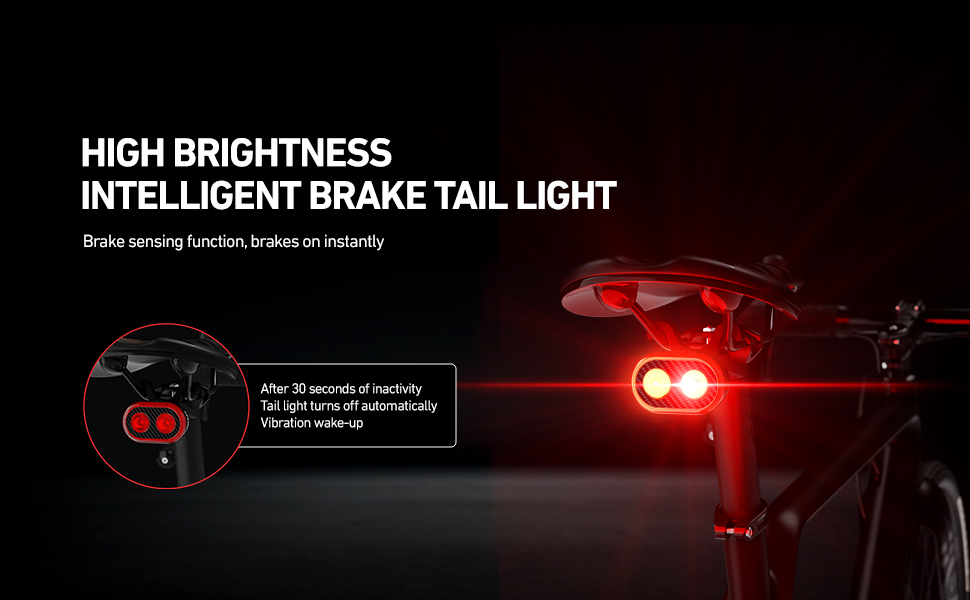
Figure 5.1: Headlight Mode Combinations.
5.3 Tail Light Modes (20 Modes)
The tail light offers 20 lighting modes. Single click the power button to control the inner ring light, and double click to control the outer ring light.
- Single Click (Inner Ring Light Control):
- Med
- Low
- Strobe
- Flash
- OFF (inner ring light off)
- Double Click (Outer Ring Light Control):
- Snake (pulsing effect)
- Running (sequential light)
- Starlight (flickering effect)
- Alternate (alternating lights)
- OFF (outer ring light off)
For a visual demonstration of all available light modes for both the headlight and tail light, please refer to the official product video below.
5.4 Smart Brake Sensing (Tail Light)
The tail light is equipped with a smart brake sensing function. When deceleration is detected, the tail light will automatically switch to a brighter, solid mode to alert following traffic, similar to a car's brake light.
Figure 5.2: Intelligent Brake Sensing in action.
5.5 Automatic Lighting and Power Off
The smart bike lights feature a photosensitive sensor and vibration sensor for automatic operation:
- Automatic On: The lights will automatically turn on when you enter a dark environment (e.g., tunnel) or at dusk while riding.
- Automatic Off: If the light detects a stationary state for approximately 30 seconds, it will automatically turn off to conserve battery.
- Vibration Wake-up: The light will automatically turn back on when it detects vibration (movement) again.
5.6 Official Product Video
Watch this official video from the seller for a demonstration of the CYCLAMI bike lights, including light modes and features.
Video 5.3: CYCLAMI CY300T Bike Light Demonstration.
6. Maintenance
- Cleaning: Wipe the lights with a soft, damp cloth. Do not use abrasive cleaners or solvents.
- Storage: Store the lights in a cool, dry place when not in use. For long-term storage, charge the battery to about 50% every 3-6 months to prolong battery life.
- Battery Care: Avoid fully discharging the battery frequently. Recharge promptly when the low battery indicator appears.
7. Troubleshooting
| Problem | Possible Cause | Solution |
|---|---|---|
| Light does not turn on. | Battery is depleted. | Charge the light fully. |
| Light turns off unexpectedly. | Low battery or automatic power-off activated. | Recharge the battery. Ensure the light is not stationary for too long if auto-off is undesired. |
| Brake sensing not working. | Light not securely mounted or sensor obstructed. | Ensure the tail light is firmly mounted and its sensor area is clear. |
| Light modes not changing. | Incorrect button press or temporary software glitch. | Ensure single/double clicks are distinct. Try turning the light off and on again. |
8. Specifications
| Feature | Detail |
|---|---|
| Model Name | CY300T-US |
| Brand | CYCLAMI |
| Material | ABS, Plastic |
| Power Source | Battery Powered (Built-in 600mAh Lithium Battery) |
| Charging Port | USB Type-C |
| Water Resistance Level | IPX6 Waterproof |
| Item Weight | Approx. 35g (each light) / 0.07 Pounds (total) |
| Product Dimensions | 1.3"L x 0.9"W x 2.2"H (approximate) |
| Headlight Brightness | 300 Lumen |
| Tail Light Brightness | 200 Lumen |
| Headlight Modes | 11 combinations |
| Tail Light Modes | 20 combinations |
| Smart Features | Brake Sensing, Automatic Lighting (Photosensitive & Vibration Sensor) |
9. Warranty and Support
The CYCLAMI Bike Lights come with a 1-Year Warranty from the date of purchase.
For warranty claims, technical support, or any questions regarding your product, please contact the manufacturer, CYCLAMI, or the seller, SoRider, through the platform where you purchased the product.
Please retain your proof of purchase for warranty purposes.
Ask a question about this manual
Ask about setup, troubleshooting, compatibility, parts, safety, or missing instructions. Manuals+ will review the question and use this page’s manual context to help answer it.