
1. Introduction
Thank you for choosing the TOPUTURE 2-in-1 Smart Treadmill. This manual provides essential information for the safe and effective use of your new fitness equipment. Please read it thoroughly before operation and keep it for future reference.
2. Safety Instructions
WARNING: To reduce the risk of serious injury, read all important precautions and instructions in this manual before using the treadmill.
- Always consult with a healthcare professional before starting any new exercise program.
- Place the treadmill on a flat, stable surface with at least 2 meters of clear space behind it and 0.6 meters on each side.
- Ensure the safety key is properly attached to your clothing before starting the treadmill. In case of emergency, the safety key will detach, stopping the machine.
- Do not allow children or pets near the treadmill while it is in use.
- Wear appropriate athletic footwear and clothing. Avoid loose clothing that could get caught in the machine.
- Do not step on or off the treadmill while the belt is moving.
- The maximum user weight capacity for this treadmill is 130 kg (286 lbs). Do not exceed this limit.
- Unplug the treadmill from the power outlet when not in use or before cleaning and maintenance.
- If you experience dizziness, nausea, chest pain, or any other abnormal symptoms, stop your workout immediately and consult a physician.
3. Product Overview
The TOPUTURE 2-in-1 Smart Treadmill offers versatile exercise options, functioning as both a walking pad and a traditional treadmill. Its compact design and advanced features make it ideal for home or office use.

This image illustrates the TOPUTURE 2-in-1 Smart Treadmill in both its running configuration with the handle upright and its under-desk walking pad configuration, highlighting its versatility for various exercise needs.
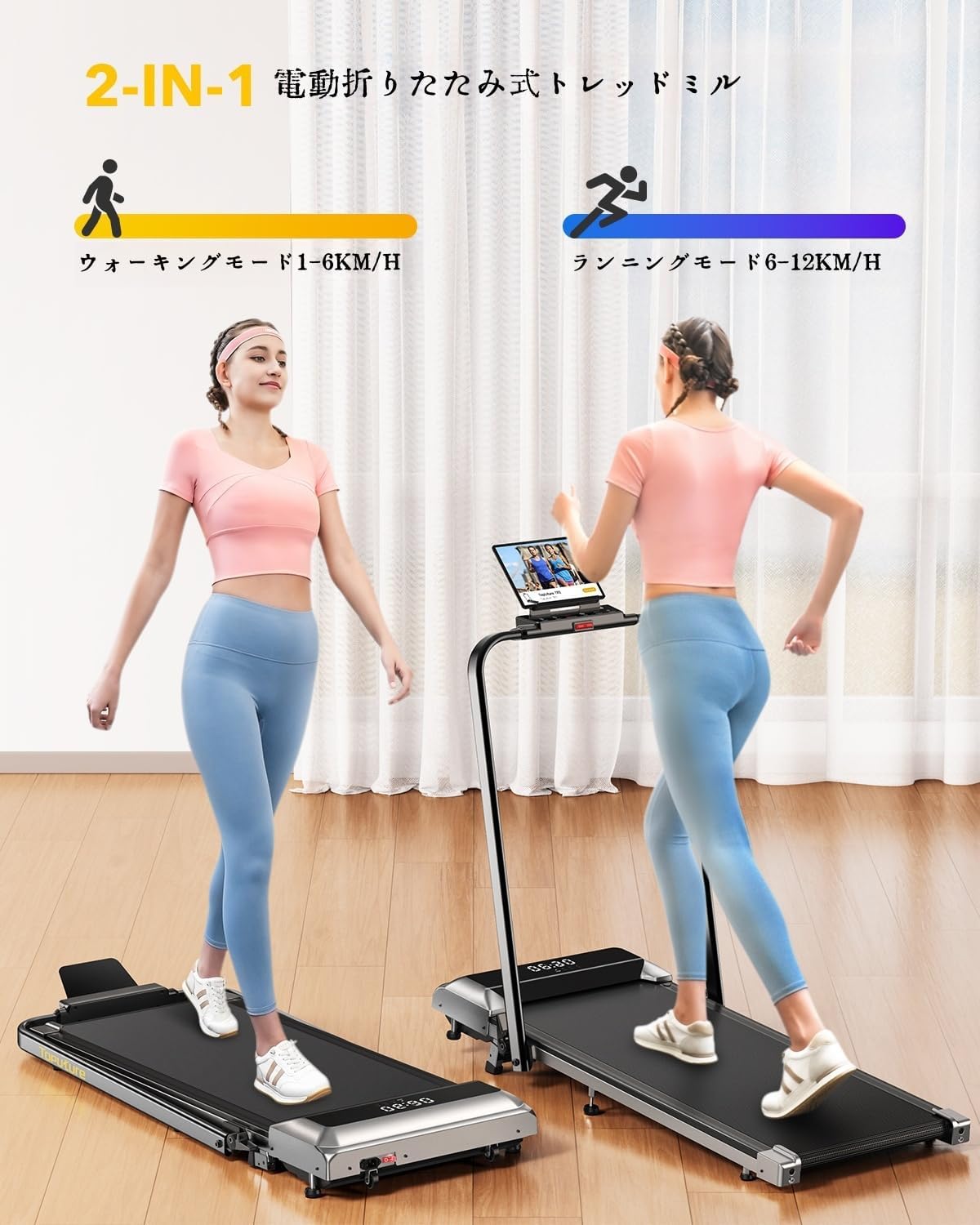
The treadmill supports two primary modes: a walking mode (1-6 km/h) and a running mode (6-12 km/h), catering to different fitness intensities.

Equipped with a powerful 2.5 HP motor, the treadmill operates quietly (below 45dB) and supports a maximum load of 130 kg, ensuring smooth and stable performance.

The 7-layer anti-slip running belt features internal silicone columns for powerful shock absorption, reducing impact on knees, muscles, and joints while minimizing noise.
4. Setup
The TOPUTURE 2-in-1 Smart Treadmill features a no-setup design, meaning it comes largely pre-assembled for your convenience.
4.1 Unboxing and Placement
- Carefully remove the treadmill from its packaging. It weighs approximately 23 kg, so it is recommended to have two people for lifting.
- Place the treadmill on a firm, level surface. Ensure there is adequate clear space around the unit for safe operation.
4.2 Initial Configuration
- Handlebar Setup: If using in running mode, simply lift the handlebar into the upright position until it locks securely.
- Incline Adjustment: The treadmill comes with a default incline of 2°. For an increased challenge, you can manually adjust the incline to 4.7° (equivalent to 7% incline) by inserting the provided screws into the designated holes at the rear of the treadmill. If no incline is desired, use it as is.
- Power Connection: Plug the power cord into a grounded electrical outlet.

The treadmill offers a manual incline adjustment up to 7%, allowing users to increase workout intensity and calorie burn.

Weighing 23 kg and equipped with transport wheels, the treadmill is designed for easy movement and convenient storage under beds or sofas when not in use.
5. Operating Instructions
Your TOPUTURE treadmill can be controlled via its integrated LED display, the remote control, or a smart application.
5.1 Power On/Off
- To power on, press the main power switch located near the base of the treadmill. The LED display will illuminate.
- To power off, press the main power switch again.
5.2 Starting and Adjusting Speed
- Start: Press the 'Start' button on the LED display or the remote control. The treadmill will begin at a low speed.
- Speed Adjustment: Use the '+' and '-' buttons on the display or remote to increase or decrease the speed. The speed range is 1-12 km/h.
- Pause: Press the 'Pause' button to temporarily stop your workout without losing your data. Press 'Start' to resume.
- Stop: Press the 'Stop' button to end your workout.
5.3 Program Selection
The treadmill features 12 preset programs to vary your workout intensity. Refer to the detailed program descriptions in the full manual for specific speed and duration profiles.
5.4 LED Display and Remote Control
The multi-functional LED display shows real-time data including speed, distance, time, and calories burned. The remote control provides convenient access to speed and mode adjustments. The remote features a magnetic attachment, allowing it to be easily stored on the treadmill's armrest when not in use.

The integrated LED display provides real-time feedback on speed, time, distance, and calories. The remote control allows for convenient speed and mode adjustments, and can be magnetically attached to the armrest.

The treadmill includes a phone/tablet holder, a magnetic remote for easy storage, a safety lock for emergency stops, and quick-release mechanisms for folding.
5.5 APP Connectivity
Enhance your training experience by connecting your treadmill to smart applications via Bluetooth (Bluetooth name: TP3). Compatible apps like 'FITSHOW' allow you to access various training courses and track your progress from your home or gym.
- Download the 'FITSHOW' app from your device's app store (App Store or Google Play).
- Enable Bluetooth on your smartphone or tablet.
- Open the 'FITSHOW' app and follow the on-screen instructions to connect to the treadmill (look for 'TP3').
- Once connected, you can control the treadmill, select programs, and monitor your workout data directly from the app.
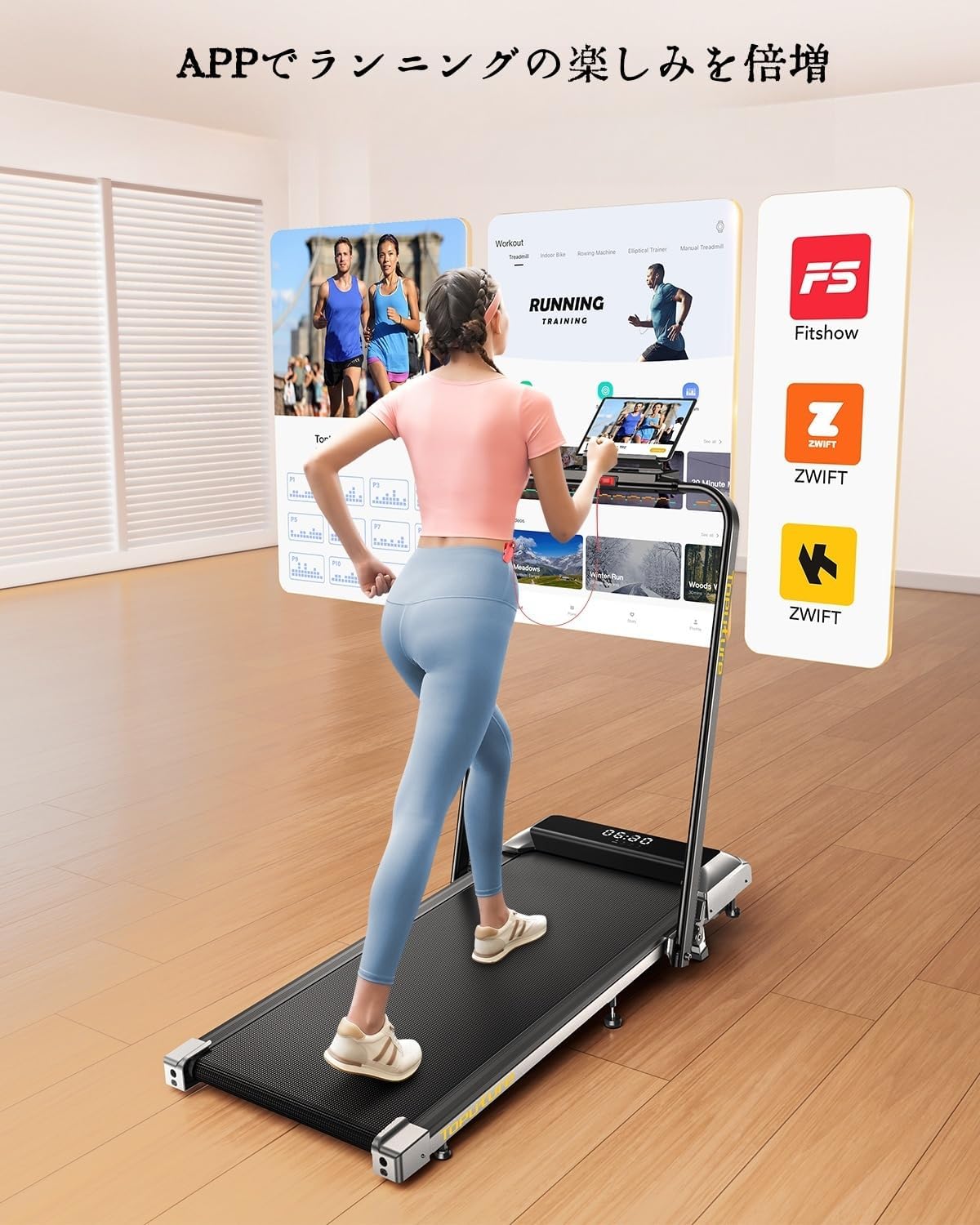
Connect your treadmill to fitness apps like FitShow or Zwift via Bluetooth to access guided workouts and enhance your exercise routine.
6. Maintenance
Regular maintenance ensures the longevity and optimal performance of your treadmill.
6.1 Lubrication
The running belt requires periodic lubrication to reduce friction and wear. Your treadmill features a convenient lubrication point for easy application.
- Use only 100% silicone treadmill lubricant.
- Refer to the full manual for specific lubrication frequency based on usage. Generally, lubricate every 3-6 months or after 50-100 hours of use.
- Apply a small amount of lubricant directly into the lubrication port.
6.2 Cleaning
- Always unplug the treadmill before cleaning.
- Wipe down the exterior surfaces with a soft, damp cloth. Avoid abrasive cleaners or solvents.
- Periodically vacuum under the treadmill to remove dust and debris.
6.3 Storage
When not in use, the treadmill can be folded and stored to save space.
- Ensure the treadmill is powered off and unplugged.
- Fold down the handlebar.
- Utilize the transport wheels at the base to easily move the treadmill for storage under a bed, sofa, or upright against a wall.
7. Troubleshooting
If you encounter any issues with your treadmill, please refer to the following common solutions. For problems not listed here, contact customer support.
- Treadmill not starting: Ensure the power cord is securely plugged in and the main power switch is on. Check if the safety key is properly placed.
- Belt slipping: The running belt may need tension adjustment or lubrication. Refer to the full manual for instructions on adjusting belt tension.
- Unusual noise: Check for loose parts or foreign objects under the belt. Ensure the treadmill is on a level surface. Lubrication may also be required.
- Display not working: Check power connection. If the display is still unresponsive, contact customer support.
- APP connectivity issues: Ensure Bluetooth is enabled on your device and the treadmill is powered on. Try restarting both the app and the treadmill.
8. Specifications
| Feature | Specification |
|---|---|
| Brand | TOPUTURE |
| Model | 2-in-1 Smart Treadmill |
| Speed Range | 1 - 12 km/h |
| Incline | Manual 7% (approx. 4.7°) |
| Motor Power | 2.5 HP |
| Maximum Load Capacity | 130 kg (286 lbs) |
| Running Surface Dimensions | 1000 mm x 400 mm |
| Product Dimensions (L x W x H) | 130 x 56 x 13.5 cm (folded height) |
| Product Weight | 23 kg (50.7 lbs) |
| Material | Steel |
| Noise Level | <45 dB |
9. Warranty and Support
For warranty information, technical support, or any inquiries regarding your TOPUTURE 2-in-1 Smart Treadmill, please refer to the warranty card included with your product or contact the seller/manufacturer directly. Keep your purchase receipt as proof of purchase.
