
Introduction
The LivePure LP520APHTR-SGE is a versatile 3-in-1 appliance designed to enhance your indoor environment. It functions as an air purifier, a fan, and an electric heater, providing year-round comfort and improved air quality. This manual provides essential information for the safe and efficient operation, maintenance, and troubleshooting of your device.

Image: The LivePure 3-in-1 Clean Heat Air Purifier, Fan, and Heater in a living room, demonstrating air circulation.
Important Safety Instructions
Please read all instructions carefully before using this appliance and retain them for future reference. Failure to follow these instructions may result in electric shock, fire, or serious injury.
- Always place the appliance on a firm, level surface.
- Do not operate the appliance with a damaged cord or plug.
- Keep the appliance away from water or other liquids.
- Do not insert objects into any openings.
- Unplug the appliance when not in use or before cleaning.
- This appliance features a built-in tip-over safety switch that automatically shuts off the unit if it is tipped over or placed on an uneven surface. Ensure the unit is upright and stable during operation.
- Do not cover the air inlet or outlet during operation.
- Keep children and pets away from the appliance during operation.
Product Components and Controls
Familiarize yourself with the various parts and controls of your LivePure 3-in-1 unit.

Image: Overview diagram highlighting key features such as the Filter Indicator, Air Purifier/Fan Mode, Heat Mode, Filtration System, and Rotation Function.
Functional Touch Control Panel
The unit features a touch control panel for easy operation. A remote control is also included for convenience.

Image: Detailed view of the touch control panel, showing buttons for On/Off, Fan Speed, Heating, Accent Light, Timer, Rotate, and Filter Indicator Light.
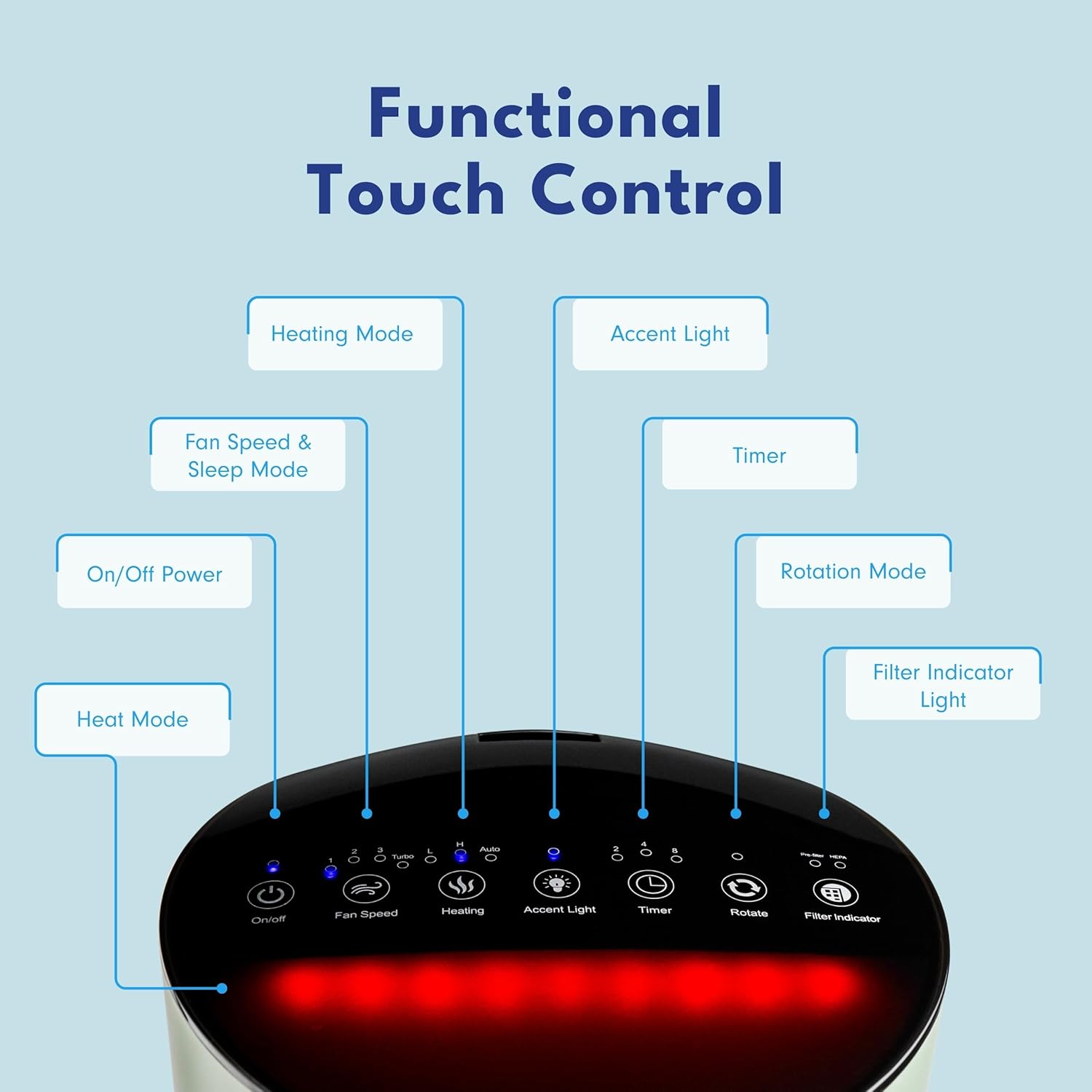
Image: Detailed view of the touch control panel, highlighting the Fan/Air Purifier Mode controls.
Setup
- Unpacking: Carefully remove the unit from its packaging. Retain packaging materials for future storage or transport.
- Placement: Place the unit on a firm, level, and stable surface. Ensure there is at least 12 inches (30 cm) of clear space around the air inlet and outlet for optimal airflow. Do not place the unit directly against walls or furniture.
- Filter Installation/Check: The unit comes with a filter pre-installed. Before first use, open the filter compartment (refer to the Maintenance section for instructions on accessing the filter) and ensure the filter is properly seated and any protective packaging has been removed.
- Power Connection: Plug the power cord into a standard electrical outlet.
Operating Instructions
Your LivePure 3-in-1 unit can be operated using the touch control panel on the device or the included remote control.
Power On/Off
- Press the On/Off button (power symbol) on the control panel or remote to turn the unit on or off.
Fan/Air Purifier Mode
- Press the Fan Speed button (fan symbol) to cycle through four fan speed options: Low, Medium, High, and Turbo. The selected speed will be indicated on the display.
- In this mode, the unit operates as an air purifier and fan, circulating and cleaning the air without heating.
Heating Mode
- Press the Heating button (three wavy lines symbol) to activate the heating function.
- Cycle through three heat settings: Low, High, and Auto.
- The unit will begin to emit warm air. The display will show the current temperature.
Oscillation Function
- Press the Rotate button (rotation symbol) to activate the 60-degree oscillation feature, distributing purified and/or heated air across a wider area. Press again to stop oscillation.
Timer Function
- Press the Timer button (clock symbol) to set the operating duration. The unit will automatically turn off after the set time.
Accent Light
- Press the Accent Light button (light bulb symbol) to turn the accent light on or off.
Maintenance
Regular maintenance ensures optimal performance and extends the lifespan of your LivePure unit.
Filter System
The unit utilizes a 2-stage filtration system:
- Coconut Carbon Pre-Filter: Captures large particles like dust, pet dander, and pollen. Also helps reduce odors from cooking, smoking, and pets.
- True HEPA Filter: Removes up to 99.97% of airborne particles as small as 0.3 microns, including smoke, dust, pollen, pet hair, dander, mold spores, and dust mites.

Image: Illustration of the 2-stage filtration system, detailing the function of the Coconut Carbon Pre-Filter and the True HEPA Filter.
Filter Replacement
- The Filter Indicator Light on the control panel will illuminate when it is time to replace the filter.
- To replace the filter:
- Unplug the unit from the power outlet.
- Locate the filter compartment cover (usually at the base of the unit).
- Remove the cover and carefully pull out the old filter.
- Insert a new LivePure replacement filter, ensuring it is properly seated.
- Replace the filter compartment cover.
- Plug the unit back in. After replacing the filter, press and hold the Filter Indicator button for 3-5 seconds to reset the filter timer.
- Filter lifespan varies based on usage and air quality. Replace filters as indicated or every 6-12 months for optimal performance.
Cleaning the Unit
- Always unplug the unit before cleaning.
- Wipe the exterior surfaces with a soft, damp cloth. Do not use abrasive cleaners or solvents.
- Use a soft brush or vacuum cleaner with a brush attachment to gently clean the air inlet and outlet grilles.
- Do not immerse the unit in water or allow water to enter the interior.
Troubleshooting
Refer to this section for common issues and their solutions.
| Problem | Possible Cause | Solution |
|---|---|---|
| Unit does not turn on. | Not plugged in; power outlet malfunction; tip-over switch activated. | Ensure power cord is securely plugged in. Test outlet with another device. Check if the unit is on a stable, level surface. |
| No heat output. | Heating mode not selected; fan mode active; safety cut-off activated. | Press the Heating button. Ensure the unit is not obstructed. Allow unit to cool down if safety cut-off was triggered. |
| Weak airflow or purification. | Clogged filter; obstructed air inlets/outlets. | Check and replace the filter if the indicator light is on. Ensure no obstructions around the unit. |
| Filter Indicator Light remains on after filter change. | Filter timer not reset. | Press and hold the Filter Indicator button for 3-5 seconds to reset the timer. |
If the problem persists after attempting these solutions, please contact customer support.
Specifications
Technical details for the LivePure LP520APHTR-SGE unit.
- Model Number: LP520APHTR-SGE
- Product Dimensions: 8.13 x 8.38 x 25.38 inches (D x W x H)
- Item Weight: 9.4 Pounds
- Power Source: AC/DC
- Control Method: Touch, Remote Control
- Filter Type: HEPA
- Floor Area Coverage: 100 Square Feet
- Particle Retention Size: 0.3 Micron
- Contaminant Filtration Capability: Dust, Odors, Pet Dander, Pollen, Volatile Organic Compounds (VOCs), Wildfire Smoke
- Special Features: Tip-Over Protection, 60-degree Oscillation, Timer, Accent Light
- Included Components: Air Purifier, Remote Control
- UPC: 810067454902

Image: Visual representation of the LivePure unit's air purification capabilities, targeting common airborne contaminants.
Warranty and Support
Warranty Information
This LivePure product is covered by a 1 Year Limited Warranty from the date of purchase. This warranty covers defects in materials and workmanship under normal use. It does not cover damage resulting from misuse, accident, modification, or unauthorized repair.
Please retain your proof of purchase for warranty claims.
Customer Support
For technical assistance, warranty claims, or to purchase replacement parts and filters, please visit the official LivePure website or contact their customer service department. Contact information can typically be found on the manufacturer's website or product packaging.
For more information, you may visit the LivePure Store on Amazon.