
Introduction
This manual provides instructions for the ZPSHYD Handheld Vacuum, Model JJ-107. This versatile 3-in-1 device functions as a vacuum cleaner, an air duster, and an inflator/vacuum sealer. Please read this manual thoroughly before operating the device to ensure safe and efficient use.
Safety Instructions
- Read all instructions before using the appliance.
- Do not immerse the device, charging cable, or plug in water or other liquids.
- Do not vacuum flammable or combustible liquids, hot ashes, or sharp objects.
- Keep the device out of reach of children.
- Use only the charging cable provided by the manufacturer.
- Do not operate the device if the charging cable or plug is damaged.
- Ensure the HEPA filter is properly installed before each use to prevent damage to the motor.
- Avoid blocking the air inlet or outlet during operation.
- Store the device in a dry place when not in use.
Product Overview
Familiarize yourself with the components of your ZPSHYD Handheld Vacuum.
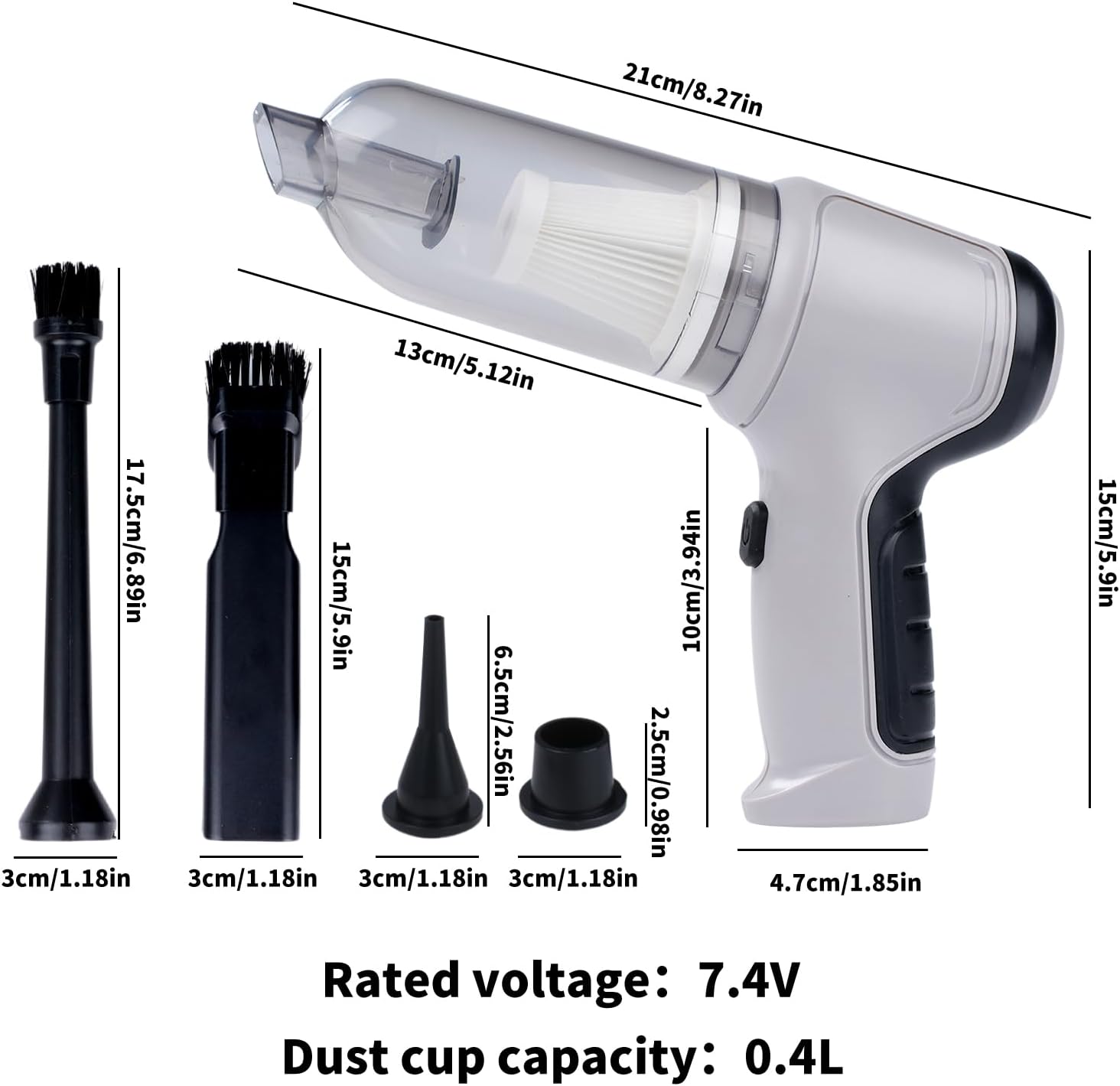
Figure 1: Main components of the ZPSHYD Handheld Vacuum.

Figure 2: Detailed view of key features including air outlet, handle, switch, and removable dustbin.
Included Components:
- 1 x Handheld Vacuum Cleaner Unit
- 1 x Dust Collector Cover
- 1 x HEPA Filter
- 2 x Inflation Nozzles (various sizes)
- 2 x Suction Nozzles (one with removable brush)
- 1 x USB Charging Cable
Setup
1. Charging the Device
Before first use, fully charge the vacuum cleaner. Connect the provided USB charging cable to the charging port on the device and plug the other end into a compatible USB power adapter (not included) or a USB port. The indicator light will show charging status (refer to device for specific light behavior, typically red for charging, green for full).
2. Attaching Accessories
Depending on the desired function, select the appropriate nozzle and firmly attach it to the device's inlet (for vacuuming) or outlet (for blowing/inflating).
Operating Instructions
1. Vacuuming Function
- Ensure the dust collection bin and HEPA filter are securely in place.
- Attach the desired suction nozzle to the vacuum inlet. For car interiors or tight spaces, use the narrow nozzle. For surfaces requiring agitation, use the brush nozzle.
- Press the power button (one-button switch) to turn on the vacuum.
- Direct the nozzle towards the area to be cleaned.
- After cleaning, press the power button again to turn off the device.

Figure 3: Using the vacuum for car interior cleaning.
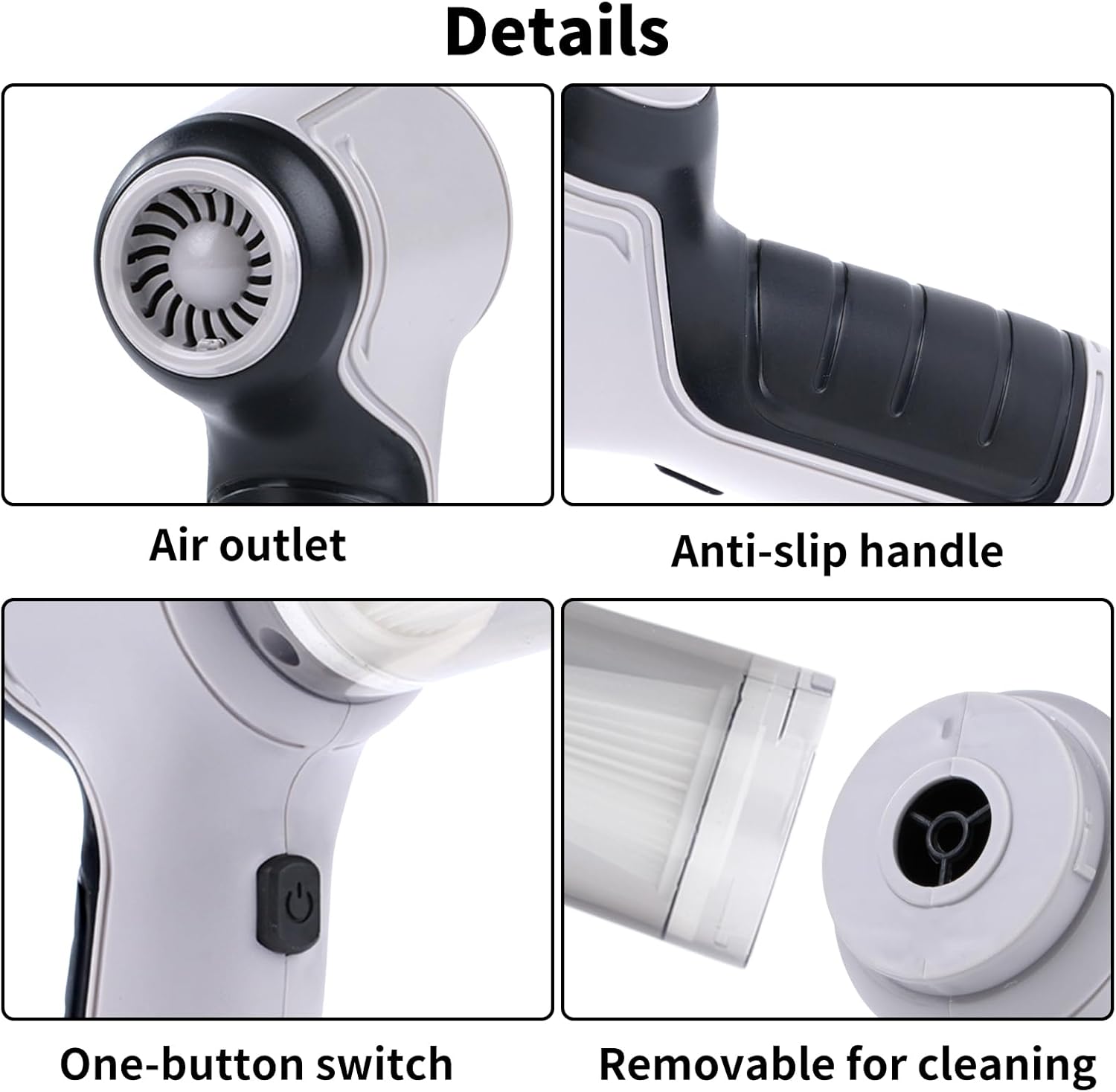
Figure 4: Demonstrating strong suction power for various debris.
2. Air Duster Function
- Attach a suitable nozzle to the air outlet of the device.
- Press the power button to activate the blowing function.
- Use the directed airflow to remove dust from keyboards, electronics, or other delicate surfaces.
- Press the power button to turn off.

Figure 5: Using the air duster for keyboard cleaning.
3. Inflator Function
- Select the appropriate inflation nozzle and attach it firmly to the air outlet.
- Insert the nozzle into the inflation valve of the item (e.g., swimming ring, small inflatable).
- Press the power button to begin inflation.
- Monitor the inflation and turn off the device once the item is adequately inflated.

Figure 6: Inflating a swimming ring with the device.
4. Vacuum Sealer Function
- Attach the vacuum sealing nozzle to the air outlet.
- Place the nozzle over the air valve of a compatible vacuum storage bag.
- Press the power button to start extracting air from the bag.
- Turn off the device once the desired vacuum level is achieved.

Figure 7: Using the device for vacuum sealing.
Maintenance
1. Emptying the Dust Collection Bin
The transparent dust collection bin allows for easy monitoring of its fill level. When full, detach the bin from the main unit and empty its contents into a waste receptacle. Reattach the bin securely.
2. Cleaning the HEPA Filter
The HEPA filter should be cleaned regularly to maintain optimal suction power. Remove the filter from the dust collection bin. Tap it gently to dislodge dust or rinse it under running water. Ensure the filter is completely dry before reinserting it into the device. Do not use the vacuum without a dry filter.
3. General Cleaning
Wipe the exterior of the vacuum cleaner with a soft, damp cloth. Do not use harsh chemicals or abrasive cleaners. Ensure the device is turned off and unplugged before cleaning.
Troubleshooting
| Problem | Possible Cause | Solution |
|---|---|---|
| Device does not turn on | Battery is depleted | Charge the device fully. |
| Power button not pressed correctly | Ensure a firm press on the power button. | |
| Weak suction power | Dust collection bin is full | Empty the dust collection bin. |
| HEPA filter is clogged | Clean or replace the HEPA filter. | |
| Nozzle attachment is loose or blocked | Check and secure the nozzle; clear any blockages. | |
| Device not charging | USB cable or power adapter faulty | Try a different USB cable or power adapter. |
| Charging port is dirty or damaged | Clean the charging port carefully or contact support. |
Specifications
Figure 8: Product dimensions and key specifications.
- Brand: ZPSHYD
- Model Number: JJ-107
- Power Source: Battery Powered (Lithium-Ion)
- Voltage: 5 Volts (Rated voltage: 7.4V from image)
- Wattage: 50 watts
- Suction Power: 6000 Pa
- Filter Type: HEPA Filter
- Dust Cup Capacity: 0.4 Liters
- Item Weight: 1.1 Pounds
- Item Dimensions (L x W x H): 8.6" x 6.3" x 2.6" (21cm x 16cm x 6.6cm)
- Connectivity Technology: USB
- Special Features: Cordless, 3-in-1 (Vacuum, Blower, Inflator/Vacuum Sealer)
- Recommended Uses: Car, Home
Warranty and Support
For warranty information, product registration, or customer support, please refer to the documentation included with your purchase or contact ZPSHYD customer service directly through their official website or the retailer where the product was purchased. Please have your model number (JJ-107) and purchase date available when contacting support.