
SYNCO XTALK Xpro
SYNCO XTalk XPro Wireless Intercom Headset Instruction Manual
Model: XTALK Xpro (Xpro2 Two Users) | Brand: SYNCO
Introduction
The SYNCO XTalk XPro Wireless Intercom Headset is designed for seamless team communication, offering enhanced signal reception and full-duplex capabilities. This manual provides comprehensive instructions for setting up, operating, maintaining, and troubleshooting your XTalk XPro headset system.
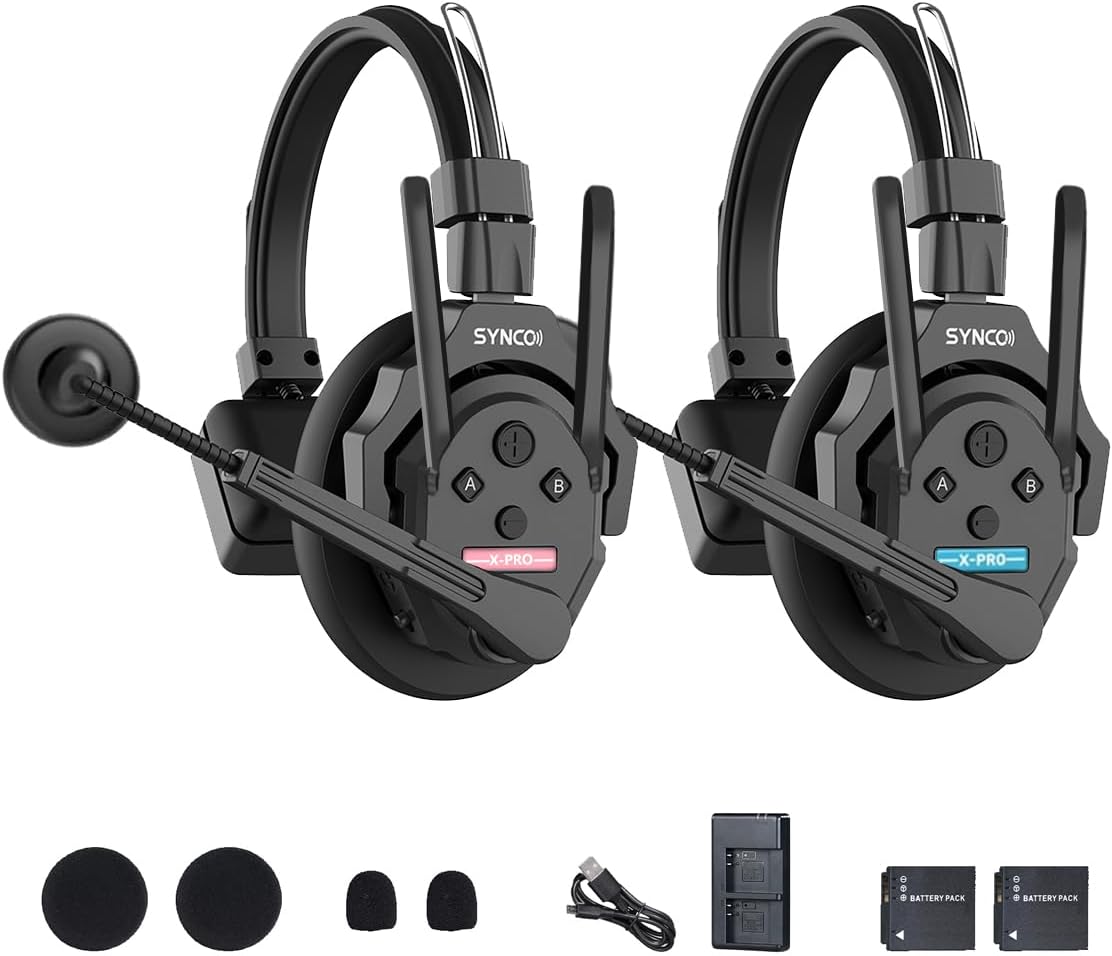
Image: Two SYNCO XTalk XPro headsets with accessories including ear cushions, mic windshields, USB-C cable, and battery charger.
Setup
What's in the Box (Xpro2 Two Users)
- 2 x SYNCO XTalk Xpro Headsets
- 2 x Mic Windshields
- 2 x One-Ear Foam Cushions
- 2 x Rechargeable Batteries
- 2 x USB-C Cables
- 1 x Charging Station

Image: Visual representation of the contents included in the SYNCO XTalk XPro2 package.
Initial Setup and Pairing
- Charge Batteries: Fully charge the included rechargeable batteries using the provided charging station and USB-C cables.
- Insert Batteries: Insert the charged batteries into each headset.
- Attach Microphone: Connect the flexible microphone arm to the designated port on the headset.
- Power On: Turn on each headset using the power switch.
- Pairing (SYNCO EasyGo Software):
For initial setup and firmware updates, use the SYNCO EasyGo software. Download the latest firmware and voice packs from the official SYNCO website. Connect each headset to your computer via USB-C. The software allows for one-click pairing and ensures all headsets are running the latest versions for optimal performance.
Video: A detailed guide on how to pair SYNCO XTalk X and XPro headsets using the SYNCO EasyGo software, including firmware and voice pack updates.
Video: An unboxing video of the SYNCO XTalk XPro headset, showcasing its components and initial setup.
Operating Instructions
SYNCO MasterFree Algorithm
The XTalk XPro features a revolutionary MasterFree Algorithm. This means any headset can intelligently become the master device, eliminating concerns about a single master unit failing or running out of battery. This allows for flexible team communication setups for 2-13 users.

Image: Diagram illustrating the MasterFree algorithm, showing how any headset can function as the master, and how two independent teams can be formed.
Enhanced Signal Reception and Range
The XTalk XPro series includes an additional antenna design to significantly enhance signal reception, ensuring more stable team communications. It offers an impressive range of up to 500m (1,640ft) Line of Sight (LOS) when remote units are connected to the master.

Image: Diagram showing the 500m communication range of the XTalk XPro headset system in an open environment.
Video: Demonstrates the expanded team communication capabilities and stable signal of the SYNCO XTalk XPro in various scenarios.
AEC Technology for Clear Audio
Equipped with advanced Acoustic Echo Cancellation (AEC) technology, the XTalk XPro eliminates echoes, reverberation, and unwanted ambient noise. This ensures crystal-clear recognition of human voices even in noisy environments by suppressing audio disturbances.

Image: Visual representation of the AEC AI technology, highlighting its ability to eliminate echoes and ambient noise for clear communication.
One-Button Remote Muting
In dominant mode, the master headset can instantly mute all remote units with a single button press, useful for managing conversations or preventing disruptions.

Image: Diagram showing the master headset's ability to mute all connected remote headsets with a single button.
SmartFlow Sync with Real-time Monitoring
The headset features a 3.5mm jack for real-time monitoring, allowing users to communicate with their team while simultaneously monitoring audio from external devices like cameras and recorders, eliminating the need for an additional headset.

Image: Close-up of the headset showing the 3.5mm jack for real-time audio monitoring.
Maintenance
Battery Life and Charging
The XTalk XPro is designed for low power consumption and is powered by rechargeable batteries, ensuring over 24 hours of working time. The 2-slot charging station provides efficient power-up.

Image: Graphic illustrating the 24+ hour battery life of the headset.
General Care
- Keep the headsets clean and dry. Use a soft, dry cloth for cleaning.
- Store in a cool, dry place away from direct sunlight and extreme temperatures.
- Avoid dropping or subjecting the headsets to strong impacts.
- Regularly check microphone windshields and foam cushions for wear and replace if necessary.
Troubleshooting
Common Issues and Solutions
| Issue | Possible Cause | Solution |
|---|---|---|
| No audio/intermittent connection | Out of range, low battery, interference, improper pairing. | Ensure units are within 500m LOS. Charge batteries. Check for obstructions. Re-pair using EasyGo software. |
| Poor audio quality (static, echoes) | Environmental noise, microphone position, outdated firmware. | Ensure microphone is positioned correctly. Utilize AEC feature. Update firmware via EasyGo. |
| Headset not powering on | Depleted battery, faulty battery/headset. | Charge battery fully. Try a different battery if available. Contact support if issue persists. |
| Difficulty pairing with EasyGo | Incorrect cable connection, outdated software/drivers. | Ensure USB-C cable is securely connected and try reversing it. Update EasyGo software and computer drivers. |
Specifications
- Model Name: SYNCO XTALK Xpro
- Connectivity Technology: Wireless (RF)
- Frequency Response: 2.4 GHz
- Noise Control: Active Noise Cancellation (AEC)
- Headphones Jack: 3.5 mm Jack (for real-time monitoring)
- Material: Aluminum, Plastic
- Item Weight: 1.7 pounds
- Product Dimensions: 8.15 x 8.15 x 18.5 inches
- Batteries: 2 AA batteries required (included, rechargeable)
- Earpiece Shape: Over-ear cup
- Control Method: Voice Control
- Max Users: Up to 13 (with additional units)

Image: The headset shown with its weight (194g) to emphasize its portability and lightweight design.
Warranty and Support
For warranty information, technical support, or service inquiries, please visit the official SYNCO website or contact their customer service directly. Keep your purchase receipt as proof of purchase for warranty claims.
Visit the SYNCO Store on Amazon for more product information and support resources.
Related documentsXTALK Xpro


Ask a question about this manual
Ask about setup, troubleshooting, compatibility, parts, safety, or missing instructions. Manuals+ will review the question and use this page’s manual context to help answer it.