
1. Introduction
This manual provides detailed instructions for the safe and effective use of your Telbum DJ Lights with Stand RGBW LED Derby Par Light Set. Please read this manual thoroughly before operating the device and retain it for future reference.
The Telbum DJ Light Set combines 2 RGB Derby lights, 6 RGBW Par lights, and 21 white LED strobe lights to create dynamic lighting effects. It features automated and sound-activated programs and includes a portable tripod stand for versatile placement.
2. Safety Information
To ensure safe operation and prevent damage, please observe the following precautions:
- Power Supply: Use only the specified power adapter. Ensure the voltage matches the device requirements.
- Ventilation: Do not block ventilation openings. Ensure adequate airflow around the unit to prevent overheating.
- Moisture: Keep the device away from water, high humidity, and liquids. Do not operate in rain or damp environments.
- Temperature: Avoid exposing the unit to extreme temperatures or direct sunlight.
- Handling: Handle the unit with care. Avoid dropping or subjecting it to strong impacts.
- Cleaning: Disconnect power before cleaning. Use a soft, dry cloth. Do not use harsh chemicals or abrasive cleaners.
- Servicing: Do not attempt to repair or modify the unit yourself. Refer all servicing to qualified personnel.
- Eye Safety: Avoid direct eye exposure to the light source, as it can be intense.
- Stand Stability: Ensure the tripod stand is fully extended and stable on a flat surface before mounting the light bar. Do not use in windy conditions outdoors.
3. What's in the Box
Verify that all components are present upon unpacking:
- 1 x LED PartyBAR (Light Set)
- 1 x Tripod Lighting Stand
- 1 x Remote Control
- 1 x User Manual

This image displays the LED PartyBAR, tripod stand, remote control, and user manual, which are included in the product package.
4. Setup Instructions
Follow these steps to assemble and set up your Telbum DJ Light Set:
- Assemble the Tripod Stand:
- Unfold the legs of the tripod stand until they are fully extended and stable.
- Adjust the height of the stand using the locking mechanisms on the central pole. Ensure all locks are securely tightened.
- Attach the Light Bar:
- Carefully place the Telbum LED PartyBAR onto the top mounting bracket of the tripod stand.
- Secure the light bar to the stand using the provided screws or locking pins, ensuring it is firmly attached and cannot wobble.
- Connect Power:
- Plug the power cable into the power input port on the back of the LED PartyBAR.
- Connect the other end of the power cable to a suitable electrical outlet.
- Positioning:
- Place the assembled light set on a flat, stable surface.
- Ensure there is sufficient space around the unit for proper ventilation and light projection.

This image shows the Telbum DJ light bar securely mounted on its tripod stand, ready for operation. A remote control is also visible, along with examples of the light's color output.

This diagram provides the physical dimensions of the light bar and illustrates the adjustable height and foldable nature of the tripod stand for easy setup and transport.
5. Operating Instructions
The Telbum DJ Light Set can be controlled using the included IR remote control. Ensure the remote is aimed at the signal receiver on the light bar for proper function.
5.1 Remote Control Functions
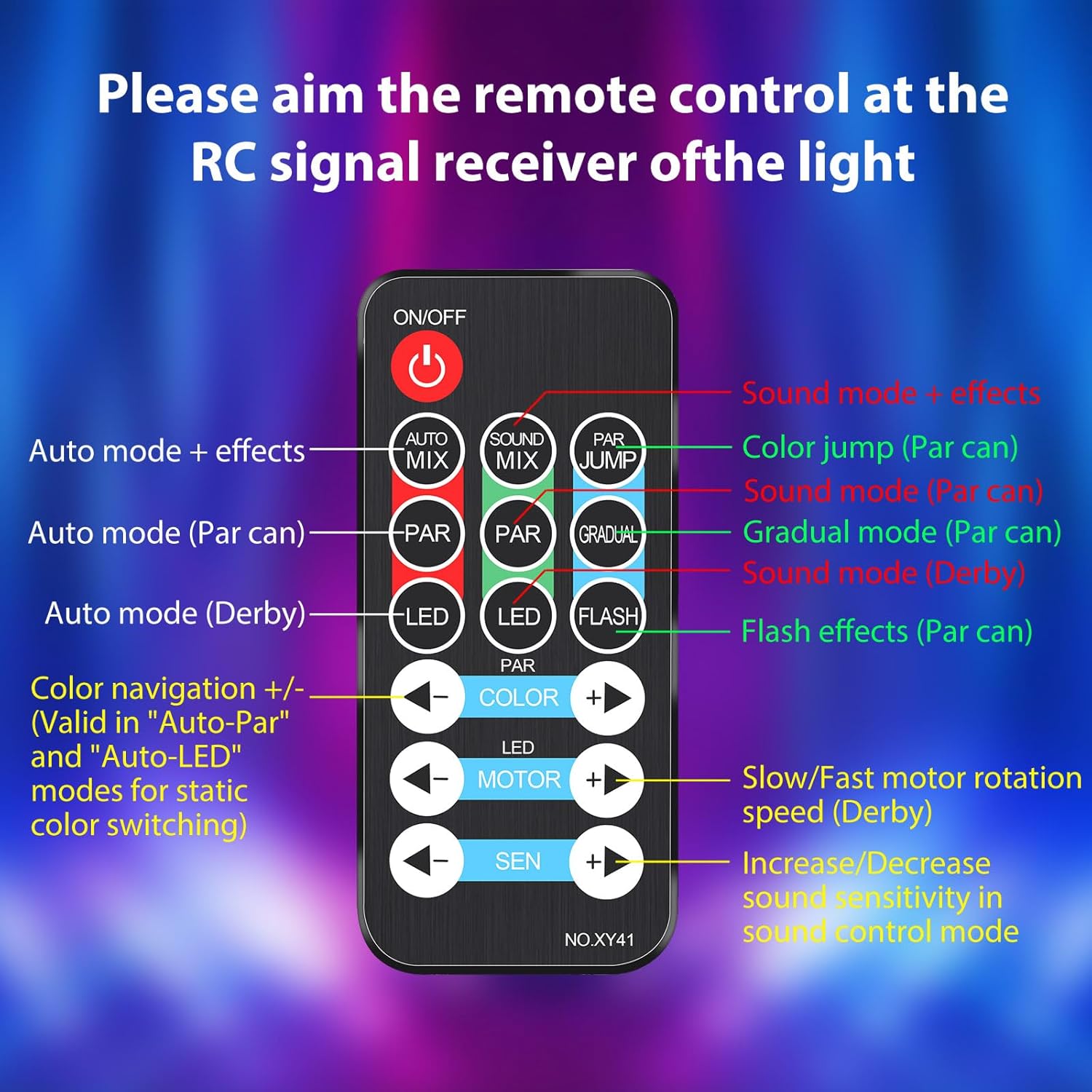
This image provides a detailed view of the remote control, indicating the function of each button for easy operation.
- ON/OFF: Powers the unit on or off.
- AUTO MIX: Activates Auto-Play mode with mixed effects.
- SOUND MIX: Activates Sound-Activated mode with mixed effects.
- PAR JUMP: Initiates a color jump effect for the Par lights.
- PAR: Cycles through Auto mode for Par lights.
- SOUND (PAR): Activates Sound mode for Par lights.
- GRADUAL (PAR): Activates Gradual mode for Par lights.
- LED: Cycles through Auto mode for Derby lights.
- SOUND (DERBY): Activates Sound mode for Derby lights.
- FLASH: Activates flash effects for Par lights (strobe).
- COLOR +/-: Navigates through colors in Auto-Par and Auto-LED modes for static color switching.
- MOTOR +/-: Adjusts the rotation speed of the Derby light motor (slow/fast).
- SEN +/-: Increases or decreases sound sensitivity in sound control mode.
5.2 Operating Modes
The light set offers various modes to suit different event needs:
- Auto-Play Mode: The lights cycle through pre-programmed patterns and color changes automatically.
- Sound-Activated Mode: The lights react to music and sounds, changing patterns and colors in sync with the rhythm. The built-in microphone detects audio.
- Derby Light Effects: Projects criss-cross multi-color beams.
- Par Light Effects: Creates exciting color washes.
- Strobe Light Effects: The 21 white LEDs provide a super bright strobe effect. Note: The strobe effect in the built-in automated programs cannot be turned off independently.

This image illustrates various colorful light patterns created by the Telbum DJ lights, showcasing the dynamic visual effects possible. Optimal effects are achieved in a smoke environment.

This image demonstrates the integrated automated and sound-activated programs, showing a red light effect, a white light effect, and a multi-color effect. It also notes that the strobe effect is integrated into these programs.
6. Maintenance
Proper maintenance ensures the longevity and optimal performance of your Telbum DJ Light Set.
6.1 Cleaning
- Always disconnect the power supply before cleaning.
- Use a soft, lint-free cloth to wipe the exterior of the light bar and stand.
- For stubborn dirt, slightly dampen the cloth with water. Avoid using abrasive cleaners, solvents, or harsh chemicals, as these can damage the finish.
- Gently clean the light lenses to ensure clear light projection.
6.2 Storage
- When not in use, store the light set in a cool, dry place, away from direct sunlight and extreme temperatures.
- If possible, use the original packaging or a protective case to prevent dust accumulation and physical damage.
- Ensure the tripod stand is folded and secured to prevent accidental unfolding or damage.
7. Troubleshooting
If you encounter issues with your Telbum DJ Light Set, refer to the following common problems and solutions:
| Problem | Possible Cause | Solution |
|---|---|---|
| Light does not turn on. | No power supply. Faulty power cable/outlet. | Ensure the power cable is securely plugged into both the light bar and a working electrical outlet. Test the outlet with another device. |
| Remote control is unresponsive. | Remote battery depleted. Obstruction between remote and light. Remote not aimed correctly. | Replace the remote control battery. Ensure there are no obstructions. Aim the remote directly at the IR receiver on the light bar. |
| Sound-activated mode not working. | Microphone blocked. Sound level too low. Sensitivity setting too low. | Ensure the microphone on the light bar is not covered. Increase the volume of the music. Adjust the 'SEN +' button on the remote to increase sensitivity. |
| Light effects are dim or unclear. | Dirty lenses. Ambient light too bright. | Clean the light lenses as described in the Maintenance section. Operate the lights in a darker environment for best results. |
| Tripod stand is unstable. | Legs not fully extended/locked. Uneven surface. | Ensure all tripod legs are fully extended and the locking mechanisms are tightened. Place the stand on a flat, level surface. |
If the problem persists after trying these solutions, please contact customer support.
8. Specifications
| Feature | Detail |
|---|---|
| Model Number | PL-29Z |
| Brand | Telbum |
| Color | RGBW |
| Material | Plastic |
| Finish Type | Painted |
| Light Source Type | Light Emitting Diode (LED) |
| Power Source | Corded Electric |
| Wattage | 50 watts |
| Number of Light Sources | 29 (2 Derby, 6 Par, 21 Strobe) |
| Product Dimensions (Light Bar) | 21"L x 10"W x 4.7"H |
| Item Weight | 5.34 pounds |
| Mounting Type | Floor Mount (with tripod) |
| Bulb Features | Sound Activated, Automated Lighting Effects, Color Changing |
| Included Components | 1*Derby Par Light Set, 1*Remote Control, 1*Tripod Lighting Stand, 1*User Manual |
9. Warranty & Support
Telbum products are manufactured to high-quality standards. For information regarding warranty coverage, please refer to the warranty card included with your purchase or visit the official Telbum brand store.
For technical support, troubleshooting assistance beyond this manual, or inquiries about replacement parts, please contact Telbum customer service through their official channels. You can find more information and contact options on the Telbum Brand Store on Amazon.
