1. Product Overview
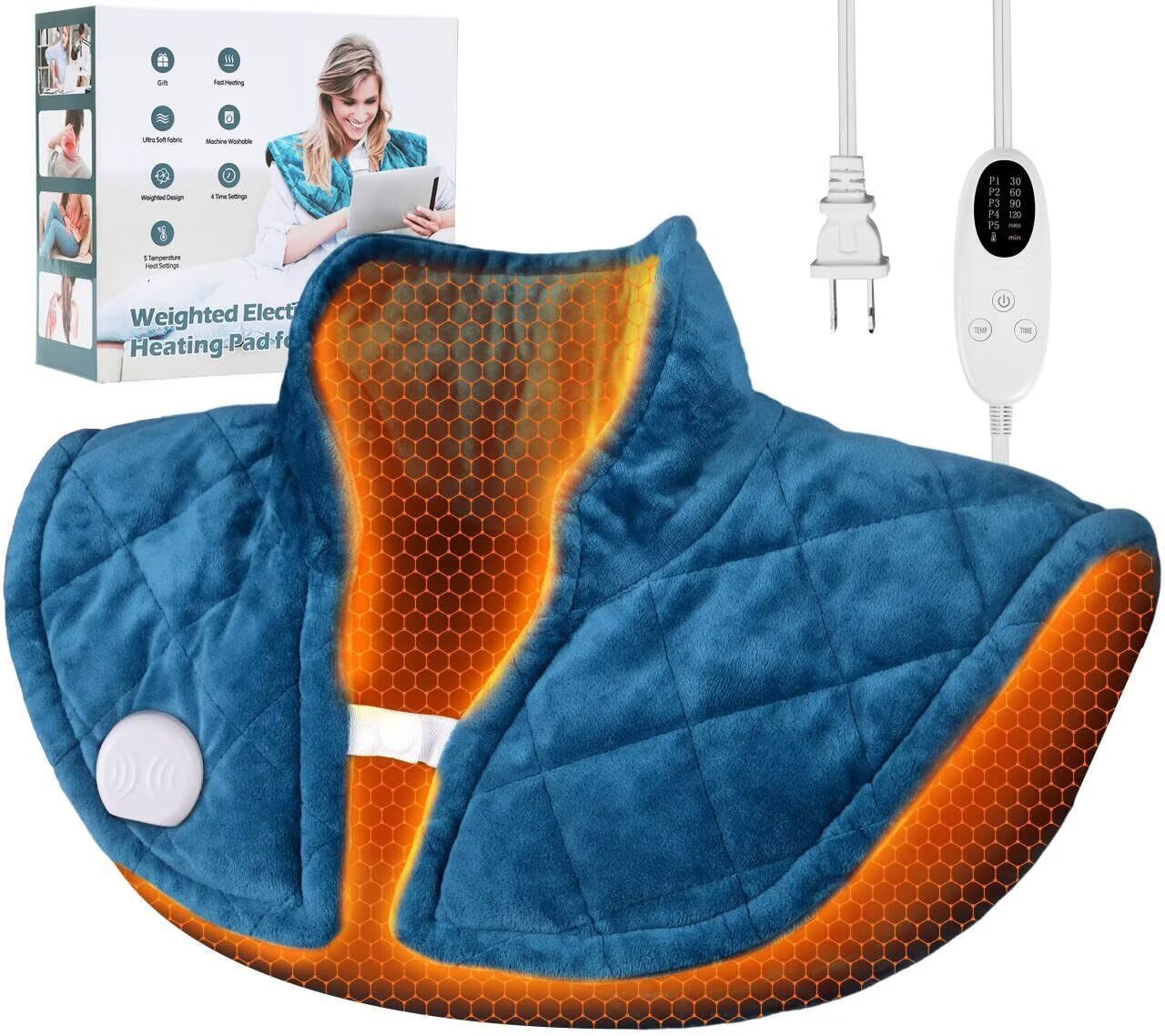
The Chapjoy Weighted Heating Pad is designed to provide targeted heat therapy for the neck and shoulders. Its weighted design helps it conform to the body, delivering consistent warmth. This electric heating pad features multiple heat settings and an auto-off timer for safe and customizable use. The soft flannel material ensures comfort, and the pad is machine-washable for easy maintenance.
Key Features:
- Weighted Design: Contains approximately 1.2 lbs of micro glass beads for optimal contouring and placement.
- Targeted Heat Therapy: Specifically shaped for the neck and shoulders, also suitable for abdomen and waist.
- Adjustable Heat: 5 heat settings ranging from 104°F to 140°F.
- Auto-Off Timer: 4 timer options (0.5H, 1H, 1.5H, 2H) for energy saving and safety.
- Soft Flannel Material: Provides a comfortable touch and even heat distribution.
- Machine-Washable: Pad is washable after controller removal.
- User-Friendly Controller: Features an LED display and easy-to-use buttons.
- Extended Power Cord: 7-foot cord for flexible positioning.
2. Important Safety Information
Read all instructions and warnings before using this heating pad. Failure to follow these instructions may result in electric shock, fire, or injury.
- Do Not Use While Sleeping: Never use the heating pad while asleep or for prolonged periods without supervision.
- Avoid Bunching or Crushing: Do not bunch, sit on, or crush the heating pad during use. This can cause overheating and damage.
- Controller Removal for Washing: Always remove the controller before washing the pad.
- No Tumble Drying: Do not tumble dry the heating pad. Air dry only.
- Flammable Materials: Keep the heating pad away from flammable materials.
- Temperature Check: Allow up to 20 minutes for the pad to reach its maximum temperature. Always test the temperature against your skin before prolonged use to prevent burns.
- Supervision: Do not use on infants, invalids, or persons insensitive to heat. Use with caution on elderly individuals.
- Medical Conditions: Consult a physician before use if you have any medical conditions, including diabetes, circulatory problems, or nerve damage.
- Damage Inspection: Inspect the heating pad and power cord regularly for any signs of wear or damage. Do not use if damaged.


3. Setup Guide
Follow these steps to prepare your Chapjoy Weighted Heating Pad for first use:
- Unpack: Carefully remove the heating pad and controller from its packaging.
- Inspect: Check the pad and power cord for any visible damage. Do not use if damaged.
- Connect Controller: Ensure the controller is securely plugged into the heating pad.
- Plug In: Insert the power plug into a standard electrical outlet.
- Position: Place the heating pad on the desired area of your body, such as your neck and shoulders. The weighted design will help keep it in place.

4. Operating Instructions
The Chapjoy Weighted Heating Pad features an intuitive controller for adjusting heat and timer settings.
Power On/Off:
- Press the Power button (usually indicated by a circle with a vertical line) to turn the heating pad on or off.
Heat Settings:
The pad offers 5 heat levels to suit your comfort needs. The LED display will show the current heat setting (P1-P5).
- Press the TEMP button to cycle through the 5 heat settings:
- P1: Approximately 104°F (40°C)
- P2: Approximately 113°F (45°C)
- P3: Approximately 122°F (50°C)
- P4: Approximately 131°F (55°C)
- P5: Approximately 140°F (60°C) - Maximum temperature.
Auto-Off Timer:
The auto-off timer helps conserve energy and prevents overheating. The LED display will show the selected timer duration.
- Press the TIME button to select one of the 4 auto-off timer options:
- 0.5H: 30 minutes
- 1H: 60 minutes
- 1.5H: 90 minutes
- 2H: 120 minutes
The heating pad will automatically shut off once the selected time has elapsed.

5. Recommended Usage Areas
The Chapjoy Weighted Heating Pad is versatile and can be applied to various body parts for heat therapy.
- Neck and Shoulders: The primary design targets these areas, providing relief for tension and discomfort.
- Back: Can be positioned to provide warmth to the upper or lower back.
- Abdomen/Waist: Effective for relieving menstrual cramps or general abdominal discomfort.


6. Care and Maintenance
Proper care and maintenance will extend the life of your Chapjoy Weighted Heating Pad.
Cleaning Instructions:
- Disconnect Power: Always unplug the heating pad from the electrical outlet before cleaning.
- Remove Controller: Detach the controller from the heating pad. The pad is machine-washable, but the controller is not.
- Machine Wash: Machine wash the heating pad on a gentle cycle with cold water.
- Mild Detergent: Use a mild detergent. Do not use bleach.
- Air Dry: Hang to air dry completely. Do not tumble dry, iron, or dry clean.
- Storage: Store the heating pad in a cool, dry place when not in use. Ensure it is completely dry before storing.

7. Troubleshooting
If you encounter issues with your heating pad, refer to the following common problems and solutions:
| Problem | Possible Cause | Solution |
|---|---|---|
| Heating pad does not turn on. | Not plugged in correctly; Power outlet issue; Controller not connected; Internal fault. | Ensure power cord is fully plugged into outlet and pad. Test outlet with another device. Reconnect controller securely. If problem persists, contact customer support. |
| Pad is not heating sufficiently. | Low heat setting selected; Pad not given enough time to heat up; Overheat protection activated. | Increase heat setting. Allow up to 20 minutes for full heat. Ensure pad is not bunched or crushed. If overheat protection activated, unplug and allow to cool before restarting. |
| Pad shuts off unexpectedly. | Auto-off timer expired; Overheat protection activated; Loose connection. | Check timer setting. If timer expired, restart the pad. If overheat protection, unplug and cool. Check all connections. |
| Controller display is not working. | Loose connection; Controller fault. | Ensure controller is firmly connected to the pad. If problem persists, contact customer support. |
8. Product Specifications
| Feature | Specification |
|---|---|
| Model Number | B0DGL6D9XY |
| Brand | Chapjoy |
| Product Dimensions | 18 x 0.5 x 22 inches |
| Item Weight | 1.6 Pounds (approx. 2.5 lbs total weighted) |
| Material | Cotton (Flannel) |
| Color | Blue |
| Heat Settings | 5 (104°F to 140°F) |
| Auto-Off Timers | 4 (0.5H, 1H, 1.5H, 2H) |
| Special Features | Automatic Shut Off, Overheat Protection, Timer |
| Power Cord Length | 7 feet |
| Neck Circumference | 19 inches (with 2-inch extension piece) |
9. Warranty and Customer Support
For warranty information or customer support inquiries regarding your Chapjoy Weighted Heating Pad, please contact the manufacturer directly. Refer to the product packaging or the official Chapjoy website for contact details.
Please have your model number (B0DGL6D9XY) and purchase date available when contacting support.