
Introduction
Thank you for choosing the TOZO NC3 Hybrid Active Noise Cancelling Wireless Earbuds. These earbuds are designed to provide a superior audio experience with advanced noise cancellation, crystal-clear calls, and extended playtime. This manual will guide you through the setup, operation, and maintenance of your new earbuds to ensure optimal performance.
What's in the Box
- TOZO NC3 Active Noise Cancelling Wireless Earbuds
- Charging Case
- 6 Pairs of Earcaps (XS/S/M/L/XL/XXL)
- USB A to USB C Charging Cable
- Quick Guide & User Manual

Image: TOZO NC3 Earbuds and Charging Case.
Product Overview
Components
The TOZO NC3 earbuds consist of two main components: the earbuds themselves and the charging case. The charging case features a smart digital display to show battery status.

Image: Smart Digital Display on Charging Case.
Controls and Features
The earbuds feature touch controls for various functions and can be managed via the TOZO App. Key features include:
- Hybrid Active Noise Cancellation (ANC): Reduces ambient noise by up to 45dB.
- 6 Microphones with ENC: Ensures clear calls by reducing environmental noise.
- Transparency Mode: Allows you to hear your surroundings without removing the earbuds.
- Extended Playtime: Up to 13 hours on a single charge, 55 hours with the charging case (ANC off).
- TOZO App Integration: Access 32 preset EQs and personalized sound profiles.
- IPX8 Waterproof: Resistant to water and sweat.
- Bluetooth 5.3: Provides stable and low-latency connectivity.
- Powerful Dynamic Drivers: 12mm drivers for deep bass and clear highs.

Image: Advanced Noise Cancellation Technology.

Image: Powerful Dynamic Drivers.
Setup
1. Charging the Earbuds and Case
Before first use, fully charge the earbuds and the charging case. Connect the USB A to USB C charging cable to the charging case and a power source. The LED display on the case will indicate the charging status.
- Charging time for earbuds: Approximately 1.5 hours.
- A 10-minute charge provides 1 hour of playtime.

Image: Charging the TOZO NC3 Earbuds and Case.
2. Selecting the Right Eartips
For optimal sound quality and noise cancellation, choose the eartips that provide the best seal and comfort. The TOZO NC3 comes with 6 pairs of earcaps (XS/S/M/L/XL/XXL).
- Try different sizes to find the most secure and comfortable fit.
- A good seal is crucial for effective noise cancellation and bass response.
3. Pairing with Your Device
- Open the charging case. The earbuds will automatically enter pairing mode.
- On your device (smartphone, tablet, laptop), go to Bluetooth settings.
- Select "TOZO NC3" from the list of available devices.
- Once connected, you will hear a confirmation tone.
The earbuds support Bluetooth 5.3 technology for a stable and fast connection.
Operating Instructions
Touch Controls
The TOZO NC3 earbuds feature intuitive touch controls. Specific functions can be customized via the TOZO App.
| Action | Function |
|---|---|
| Single Tap (L/R) | Play/Pause, Answer/End Call |
| Double Tap (L) | Previous Track |
| Double Tap (R) | Next Track |
| Triple Tap (L/R) | Activate Voice Assistant |
| Long Press (L/R) | Switch ANC/Transparency Mode |
| Long Press (L/R) during call | Reject Call |
Noise Control Modes
The TOZO NC3 offers Hybrid Active Noise Cancellation and Transparency Mode:
- Active Noise Cancellation (ANC): Blocks out external noise for an immersive listening experience.
- Transparency Mode: Allows ambient sounds to pass through, keeping you aware of your surroundings.
Switch between modes by long-pressing the touch area on either earbud.

Image: Enhanced Noise Cancellation in use.
TOZO App Features
Download the TOZO App from your device's app store to unlock full customization options:
- 32 Preset EQ Modes: Choose from various sound profiles to match your music style.
- Personalized EQs: Create and share your own custom equalizer settings.
- Noise Control Adjustment: Fine-tune ANC and Transparency levels.
- Firmware Updates: Keep your earbuds updated with the latest features and improvements.
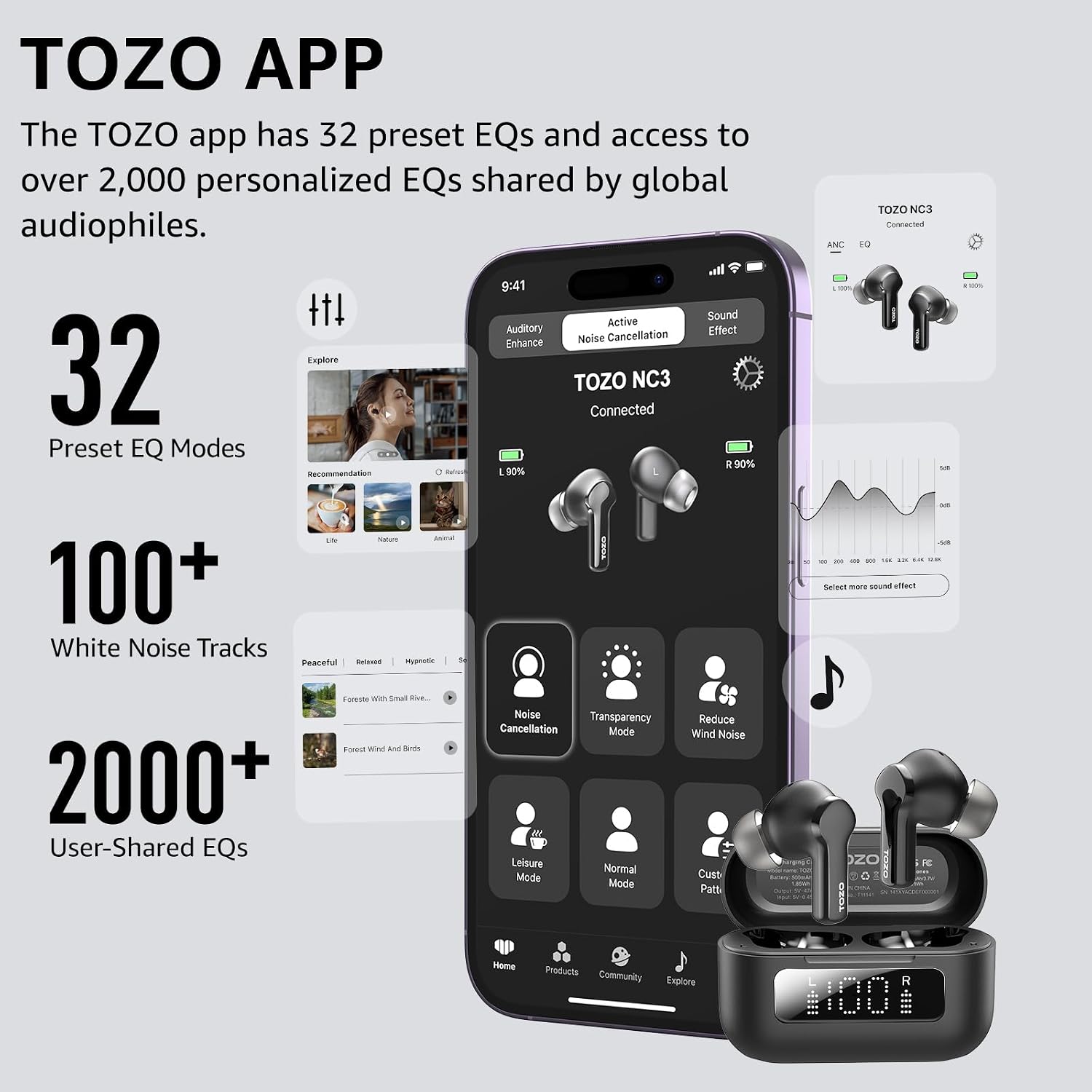
Image: TOZO App Interface.
Low-Latency Mode
The earbuds support a low-latency mode, ensuring audio and visuals are perfectly synchronized, ideal for gaming and watching videos.

Image: Low-Latency Mode for synchronized audio and visuals.
Maintenance
Cleaning
- Regularly clean the earbuds and charging case with a soft, dry, lint-free cloth.
- Remove eartips and clean any earwax or debris from the earbud nozzles using a small brush or cotton swab.
- Ensure charging contacts on both earbuds and case are clean and dry.
Water Resistance (IPX8)
The TOZO NC3 earbuds are IPX8 waterproof, meaning they are protected against immersion in water up to 1 meter for up to 30 minutes. While they are resistant to sweat and splashes, avoid prolonged exposure to water or using them during swimming.
- Always dry the earbuds completely before placing them back in the charging case to prevent damage.
Troubleshooting
Common Issues and Solutions
| Problem | Possible Solution |
|---|---|
| Earbuds not pairing | Ensure earbuds are charged. Place them back in the case, close, then reopen to re-enter pairing mode. Forget "TOZO NC3" on your device's Bluetooth list and try pairing again. |
| Only one earbud playing sound | Place both earbuds back in the charging case, close the lid for 5 seconds, then open again. This often re-syncs them. Check battery levels for both earbuds. |
| Poor sound quality / Weak bass | Ensure you have selected the correct size eartips for a proper seal. Clean earbud nozzles. Adjust EQ settings in the TOZO App. |
| Noise Cancellation not effective | Ensure earbuds are properly seated in your ears with a good seal. Adjust ANC levels via the TOZO App. |
| Charging issues | Check the USB-C cable and power adapter. Ensure charging contacts on earbuds and case are clean and free of debris. |
For further assistance, refer to the TOZO App or the official TOZO support channels.
Specifications
| Feature | Detail |
|---|---|
| Model Name | NC3 |
| Item Model Number | T11141 |
| Noise Control | Hybrid Active Noise Cancellation (up to 45dB) |
| Connectivity Technology | Wireless (Bluetooth 5.3) |
| Bluetooth Range | 20 Meters |
| Microphones | 6 Mics with ENC Ambient Noise Reduction |
| Playtime (ANC Off) | 13 hours (earbuds), 55 hours (with charging case) |
| Playtime (ANC On) | 9.5 hours (earbuds), 40 hours (with charging case) |
| Charging Time | 1.5 Hours (earbuds) |
| Water Resistance | IPX8 Waterproof |
| Audio Driver Type | Dynamic Driver |
| Audio Driver Size | 12 Millimeters |
| Frequency Response | 20 Hz - 20,000 Hz |
| Sensitivity | 100 dB |
| Impedance | 32 Ohm |
| Control Type | Touch Control, App, Voice |
| Material | Plastic, Acrylonitrile Butadiene Styrene (ABS) |
| Item Weight | 40.6 Grams (total) / 1.43 ounces |
| Charging Case Battery Capacity | 500 Milliamp Hours |
| Product Dimensions | 1.08 x 0.95 x 1.28 inches (earbud) |
| UPC | 810102981424 |
Warranty and Support
TOZO products typically come with a manufacturer's warranty. Please refer to the warranty card included in your product packaging or visit the official TOZO website for detailed warranty information and terms.
For technical support, troubleshooting not covered in this manual, or warranty claims, please contact TOZO customer service through their official website or the contact information provided in your product packaging.
Official TOZO Website: www.tozostore.com