
JOOAN L2-U
JOOAN 2K Wireless Video Doorbell Camera (Model L2-U) User Manual
Your comprehensive guide to setup, operation, and maintenance.
1. Introduction
Thank you for choosing the JOOAN 2K Wireless Video Doorbell Camera. This device is designed to enhance your home security with advanced features such as 2K Full HD video, two-way audio, PIR human detection, and anti-theft alarm. This manual provides detailed instructions to help you set up, operate, and maintain your doorbell camera effectively.
2. Package Contents
Before you begin, please verify that all items are included in your package:
- JOOAN 2K Wireless Video Doorbell Camera
- Wireless Chime
- Mounting Bracket
- USB Charging Cable
- Mounting Screws and Anchors
- User Manual (this document)
- "Please Ring The Bell" Sticker
- Doorbell Removal Tool
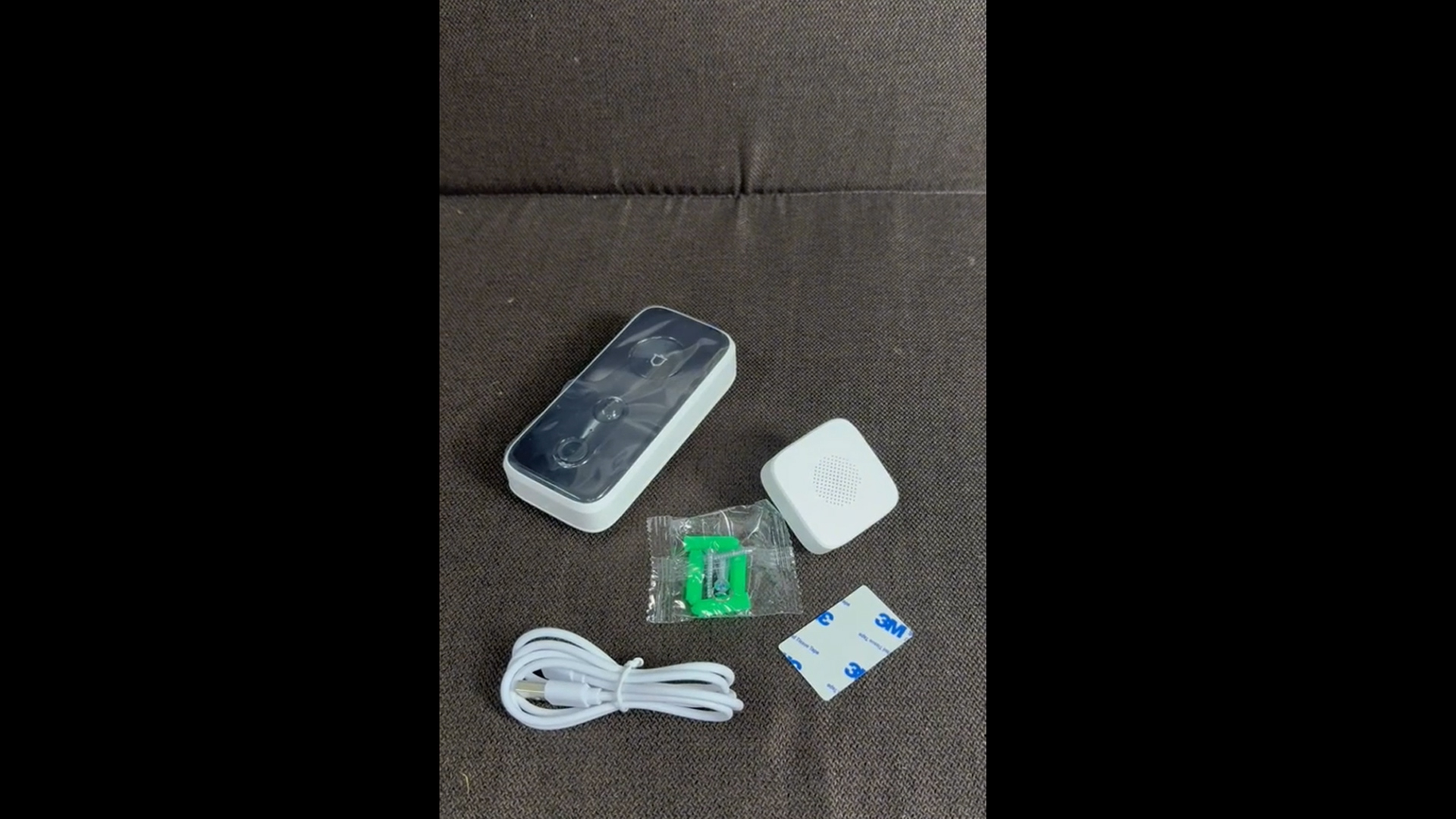
Image: Contents of the JOOAN 2K Wireless Video Doorbell Camera package, including the doorbell unit, chime, and various accessories.
Video: An unboxing video demonstrating the contents of the JOOAN 2K Wireless Video Doorbell Camera and chime package.
3. Setup Guide
3.1 Charging the Doorbell
The doorbell camera is equipped with a rechargeable battery. Before initial use, fully charge the device using the provided USB cable and power adapter. The charging port is located on the bottom of the doorbell unit.

Image: Close-up view of the JOOAN 2K Wireless Video Doorbell Camera showing the USB charging port at the bottom.
Video: A short demonstration of the doorbell's lifetime free cloud storage and human detection capabilities.
3.2 App Installation and Pairing
Download the "cam720" application from your smartphone's app store (iOS or Android). Follow the in-app instructions to create an account and pair your doorbell camera. Ensure your phone is connected to a 2.4G WiFi network during the pairing process.
- Download and install the "cam720" app.
- Open the app and register a new account or log in.
- Follow the prompts to add a new device.
- Power on the doorbell camera.
- Connect the doorbell to your 2.4G WiFi network via the app.

Image: Illustration showing the doorbell connecting to a 2.4G WiFi network for app pairing.
3.3 Mounting the Doorbell
The doorbell can be installed using either the included double-sided tape for a non-permanent solution or screws for a more secure mounting. The mounting bracket should be installed first, ensuring the arrow on the bracket points upwards.
- Tape Installation: Clean the desired surface, apply the double-sided tape to the back of the mounting bracket, and firmly press the bracket onto the wall.
- Screw Installation: Mark the drill points using the mounting bracket. Drill pilot holes, insert the anchors, and secure the mounting bracket with the provided screws.
- Once the bracket is secure, slide the doorbell camera onto the bracket until it clicks into place.

Image: Diagram illustrating the tape or screw installation methods for the JOOAN 2K Wireless Video Doorbell Camera.
Video: Troubleshooting guide on how to wake up the doorbell and address connectivity issues.
3.4 Chime Setup
Plug the wireless chime into any standard electrical outlet inside your home. You can select from 32 different chime tunes and adjust the volume to your preference using the buttons on the chime unit.

Image: The JOOAN Wireless Chime plugged into an outlet, with musical notes indicating sound output.
4. Operating Instructions
4.1 Live View and Two-Way Audio
When someone presses the doorbell, your smartphone will receive a call notification. You can answer the call to view live video and engage in two-way audio communication with the visitor. This feature allows you to speak to delivery personnel or deter potential intruders.

Image: A person using a smartphone to communicate via two-way audio with a visitor at the doorbell.
4.2 Motion Detection and Alerts
The doorbell camera features PIR (Passive Infrared) human detection. It will automatically detect human motion and send instant alerts to your smartphone. You can adjust the motion detection sensitivity within the app (near, middle, far) to minimize false alarms.

Image: Illustration of the AI human detection feature, distinguishing between human and animal motion.
4.3 Night Vision
The doorbell camera is equipped with built-in IR lights that automatically switch to night vision mode in low-light conditions, providing clear visibility up to 33 feet. This ensures continuous monitoring day and night.

Image: Comparison of day vision and IR night vision from the doorbell camera, showing clear visibility in both conditions.
4.4 Cloud Storage and Shared Access
JOOAN provides lifetime free cloud storage for your video recordings, eliminating the need for monthly subscriptions. You can also share camera access with family members through the app, allowing multiple users to monitor the doorbell simultaneously.

Image: The JOOAN 2K Wireless Video Doorbell Camera with cloud icons, representing the free cloud storage feature.
5. Maintenance
5.1 Battery Recharging
To recharge the doorbell, gently remove it from the mounting bracket using the doorbell removal tool (a small pin). Plug the USB cable into the doorbell and a power source. The doorbell will indicate when it is fully charged.

Image: Steps to remove the doorbell from its mounting for charging.
5.2 Cleaning
Wipe the doorbell camera's lens and body with a soft, damp cloth as needed to ensure clear video quality. Avoid using harsh chemicals or abrasive materials that could damage the device.
5.3 Weather Resistance
The JOOAN 2K Wireless Video Doorbell Camera is IP65 weather-resistant, designed to withstand various outdoor conditions including rain, sun, heat, and cold. However, extreme weather conditions may affect performance or battery life.

Image: The doorbell camera shown in a rainy environment, highlighting its IP65 weather resistance.
6. Troubleshooting
| Problem | Possible Cause | Solution |
|---|---|---|
| Doorbell not connecting to Wi-Fi | Incorrect Wi-Fi password, 5G Wi-Fi network, weak signal. | Ensure 2.4G Wi-Fi is used. Verify password. Move doorbell closer to router. |
| Frequent false motion alerts | High motion sensitivity, objects like trees or cars triggering alerts. | Adjust motion detection sensitivity in the app (e.g., to "middle" or "near"). |
| Poor video quality at night | Obstruction of IR lights, excessive ambient light. | Ensure IR lights are clear. Reduce strong light sources near the doorbell if possible. |
| Doorbell battery drains quickly | Frequent motion detection, cold weather, constant live view. | Reduce motion sensitivity. Limit live view usage. Battery life may be shorter in cold climates. |
| Anti-theft alarm triggers unexpectedly | Doorbell not securely mounted, physical tampering. | Ensure the doorbell is firmly attached to the mounting bracket. The alarm is designed to activate if the doorbell is removed from its base. |

Image: Illustration of the anti-theft alarm feature, showing an intruder triggering the alarm.
7. Specifications
| Feature | Detail |
|---|---|
| Video Resolution | 2K Full HD |
| Field of View | 140° Wide Angle |
| Connectivity | 2.4G Wi-Fi |
| Audio | Two-Way Audio |
| Night Vision Range | Up to 33 feet (10 meters) |
| Motion Detection | PIR Human Detection |
| Storage | Lifetime Free Cloud Storage (No SD card support) |
| Power Source | Rechargeable Battery |
| Weather Resistance | IP65 |
| Chime | Wireless Chime with 32 selectable tunes |
| Anti-theft Feature | Alarm upon removal from mount |
| Dimensions | 10.67 x 5.51 x 2.52 inches (Package) |
| Weight | 11.3 ounces (Item) |
8. Warranty and Support
For warranty information and technical support, please refer to the official JOOAN website or contact their customer service directly. Keep your purchase receipt as proof of purchase for any warranty claims.
JOOAN Customer Service: Visit JOOAN Store on Amazon
Related documentsL2-U


Ask a question about this manual
Ask about setup, troubleshooting, compatibility, parts, safety, or missing instructions. Manuals+ will review the question and use this page’s manual context to help answer it.