
Introduction
The ELITE Avanti Smart Trainer is a direct drive indoor cycling trainer designed for professional-level performance. It features an integrated Optical Torque Sensor (OTS) for exceptional power accuracy of ±1%, simulating gradients up to 18% with automatic resistance control. Advanced connectivity options including WiFi, ANT+ FE-C, and Bluetooth ensure a stable and responsive training experience. The trainer is designed for ease of use with automatic calibration and compatibility with various cycling platforms.
Safety Information
- Always ensure the trainer is placed on a stable, level surface.
- Keep children and pets away from the trainer during operation.
- Do not touch moving parts while the trainer is in use.
- Ensure proper ventilation during use to prevent overheating.
- Use only the original power adapter supplied with the trainer.
- Regularly inspect the trainer for any signs of wear or damage. Discontinue use if any issues are found.
Package Contents
Before assembly, verify that all components are present:
- ELITE Avanti Smart Trainer Main Unit
- Power Adapter and Cable
- Riser Block
- Quick Release Skewer
- Quick Release Adapters (130-135x5mm)
- Thru-Axle Adapters (142x12mm)
- User Manual
- 12 months free My E-Training app/software access
Setup & Assembly
1. Unboxing and Initial Inspection
Carefully remove the ELITE Avanti Smart Trainer and all accessories from its packaging. Inspect all components for any visible damage. Place the main unit on a flat, stable surface.
2. Stabilizer Leg Deployment
The ELITE Avanti features integrated foldable stabilizer legs. Unfold the legs until they click securely into place. Ensure the trainer is stable and does not wobble.
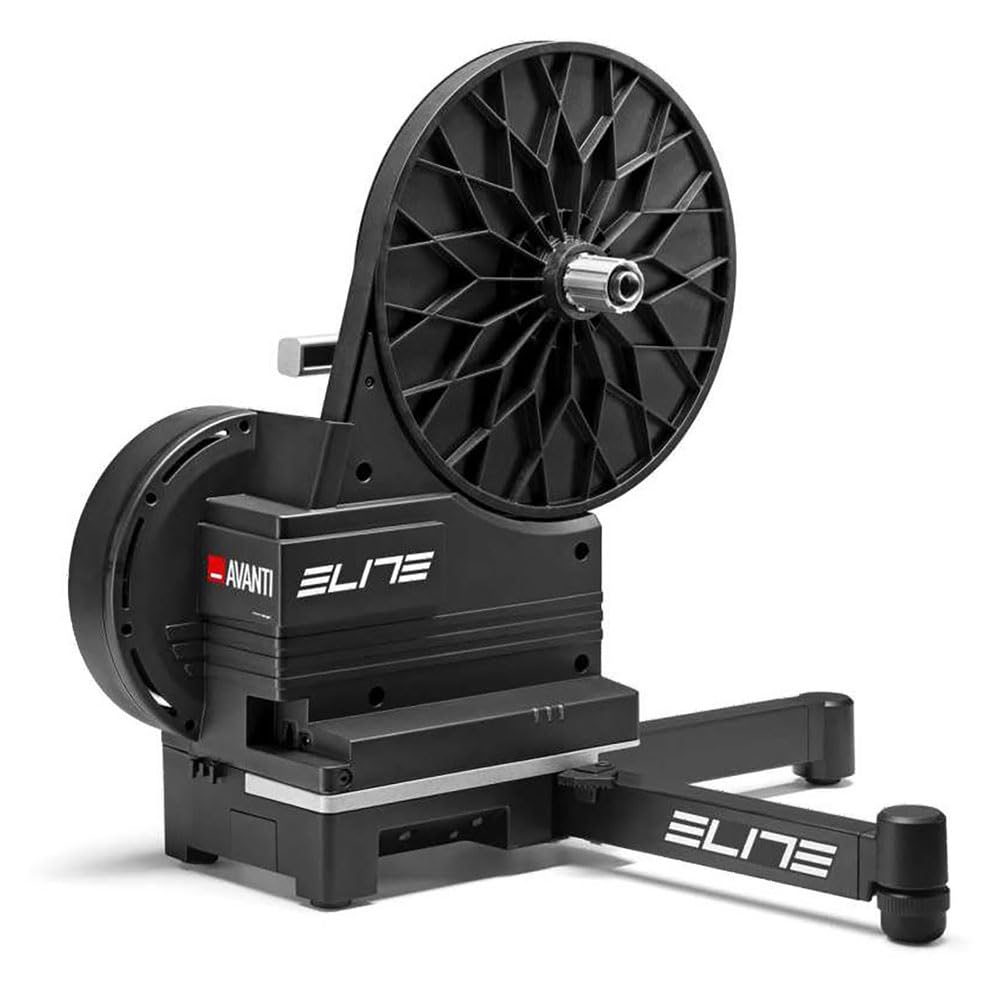
Image: ELITE Avanti Smart Trainer with its stabilizer legs deployed, ready for use.
3. Cassette Installation
The ELITE Avanti is supplied without a cassette. You will need to install a compatible cassette (not included). The trainer is compatible with Shimano/SRAM 12-speed cassettes directly. For 8/9/10-speed cassettes, a spacer (often included with the cassette or available separately) may be required. Follow your cassette manufacturer's instructions for proper installation. Cassette installation tools (chain whip, lockring tool) are not included.
4. Bicycle Mounting
The trainer supports both quick release (130-135x5mm) and thru-axle (142x12mm) systems. Select the appropriate adapters for your bicycle and install them onto the trainer's axle. Shift your bicycle's rear derailleur to position the chain on the smallest chainring (front) and smallest cassette sprocket (rear). Carefully mount your bicycle onto the trainer, aligning the chain with the smallest sprocket on the trainer's cassette. Secure the bike using your original quick-release skewer or thru-axle. Ensure the bicycle is firmly seated and stable on the trainer.

Image: Side view of the ELITE Avanti Smart Trainer, showing the cassette area where the bicycle is mounted.
5. Power Connection
Connect the power adapter cable to the trainer's power port, then plug the adapter into a standard electrical outlet. The trainer requires a continuous power supply for all functions, including downhill simulation and interactive resistance control.
Operation
1. Connectivity
The ELITE Avanti Smart Trainer offers versatile connectivity:
- WiFi: Integrated WiFi provides a stable connection for firmware updates and data transmission.
- ANT+ FE-C: Connects to compatible cycling computers and software for interactive training.
- Bluetooth: Dual-channel Bluetooth allows connection to smartphones, tablets, and other Bluetooth-enabled devices.
The trainer transmits data at a high frequency of 10Hz (Fast Track/Race Mode) for instant response, ideal for structured workouts and virtual races.
2. Automatic Calibration
The ELITE Avanti features automatic calibration, which periodically adjusts the power measurement without requiring manual intervention. This ensures consistent and accurate power readings over time.
3. Training Modes and App Compatibility
The trainer automatically controls resistance to simulate gradients up to 18%. It is fully compatible with popular indoor cycling applications such as Zwift, TrainerRoad, and ROUVY. These platforms allow you to experience virtual rides, structured workouts, and races. The trainer also supports 'Easy Start' and 'Supertuck' functions for Zwift.
4. Flex Feet Technology
The included black Flex Feet provide a micro-lateral oscillation of 4.5°, simulating the natural movement of a bike on the road. This enhances pedaling realism and engages the correct muscle groups. Optional red Flex Feet with 7° oscillation are available separately for a more pronounced movement.
Maintenance
1. Cleaning
Regularly clean the exterior of the trainer with a soft, dry cloth. Avoid using abrasive cleaners, solvents, or harsh chemicals, as these can damage the finish or internal components. Keep the cassette and chain area clean to ensure smooth operation and prevent premature wear.
2. Firmware Updates
Ensure your ELITE Avanti Smart Trainer's firmware is always up-to-date. Firmware updates are automatically managed via the integrated WiFi connection, providing access to the latest features, improvements, and bug fixes. Check the ELITE My E-Training app or website for information on available updates.
3. Storage
When not in use, the compact design and integrated handle allow for easy storage. Store the trainer in a dry environment, away from extreme temperatures and direct sunlight.
Troubleshooting
- No Power: Ensure the power adapter is securely connected to both the trainer and a working electrical outlet. Check if the outlet is functional.
- Connectivity Issues: Verify that Bluetooth/ANT+ is enabled on your device. Ensure the trainer is not simultaneously paired with too many devices. Check for potential interference from other electronic devices. For WiFi, ensure a strong signal.
- Inaccurate Power Readings: The trainer features auto-calibration. If you suspect inaccuracies, ensure the trainer is powered on and connected to the app for a few minutes to allow it to perform its automatic calibration cycle.
- Unusual Noise: Inspect the cassette and chain for proper alignment, cleanliness, and lubrication. Ensure your bicycle is securely mounted to the trainer. Check for any loose parts on the trainer itself.
- Resistance Problems: Verify that the trainer is powered on. Check the settings within your cycling application (e.g., Zwift, TrainerRoad) to ensure the desired resistance or ERG mode is active.
- Bike Not Fitting: Ensure you are using the correct quick release or thru-axle adapters for your specific bicycle frame. Refer to the 'Setup & Assembly' section for compatibility details.
If you encounter persistent issues not covered here, please contact ELITE customer support.
Specifications
| Feature | Specification |
|---|---|
| Brand | ELITE |
| Model Name | Avanti |
| Model Number | 1080690001 |
| Color | Black |
| Material | Carbon Steel, Aluminum |
| Resistance Mechanism | Electronic |
| Power Accuracy | ±1% (OTS - Optical Torque Sensor) |
| Max Simulated Gradient | 18% |
| Max Power Output | 2100W |
| Connectivity | WiFi, ANT+ FE-C, Bluetooth (10Hz data transmission) |
| Bike Compatibility | Road, Gravel, MTB |
| Axle Compatibility | 130-135x5mm Quick Release, 142x12mm Thru-Axle |
| Cassette Compatibility | Shimano/SRAM 12-speed (cassette not included) |
| Dimensions (L x W x H) | 83L x 65l x 52H cm |
| Item Weight | 13.5 kg |
| Max Load Capacity | 95 kg |
| Included Components | Riser block, 12 months free My E-Training app/software |
Warranty & Support
The ELITE Avanti Smart Trainer is covered by a manufacturer's warranty. For detailed information regarding warranty terms, conditions, and registration, please refer to the specific warranty documentation included with your product or visit the official ELITE website. For technical assistance, troubleshooting, or any product-related inquiries, please contact ELITE customer service through their official channels.


