
LOKMAT APPLLP 4
LOKMAT 4G SIM Smart Watch User Manual
Model: APPLLP 4
Introduction
This user manual provides comprehensive instructions for the LOKMAT 4G SIM Smart Watch (Model: APPLLP 4). It covers essential information regarding product setup, operation, maintenance, and troubleshooting to ensure you get the most out of your device. The LOKMAT Smart Watch is a versatile wearable device featuring Android 8.1 OS, 4G network support, a 1.508-inch AMOLED display, a unique rotating camera, and various health and fitness tracking capabilities.
What's in the Box
- LOKMAT 4G SIM Smart Watch (APPLLP 4)
- Magnetic Charging Cable
- User Manual
Product Overview
Familiarize yourself with the components of your LOKMAT Smart Watch.
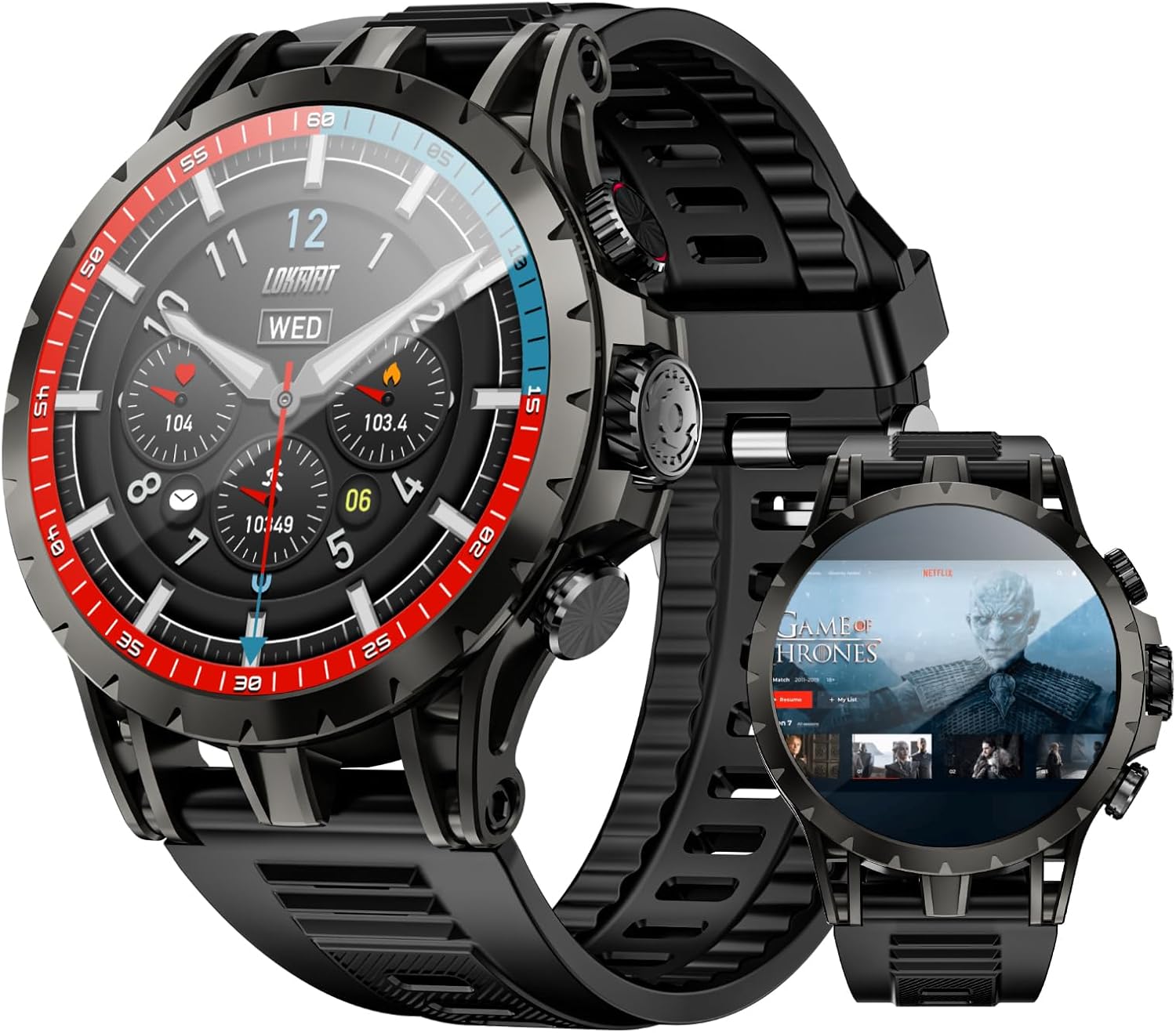
Figure 1: Front and side view of the LOKMAT 4G SIM Smart Watch, showcasing its round display and robust design.

Figure 2: Close-up of the LOKMAT Smart Watch's 1.508-inch AMOLED display, highlighting its high resolution and vibrant colors.
Key Components:
- AMOLED Display: High-resolution touch screen for interactive use.
- Rotating Camera: Integrated camera capable of 190° rotation for flexible photo and video capture.
- Side Buttons: For power, navigation, and quick access functions.
- SIM Card Slot: Supports 4G SIM cards for standalone cellular connectivity.
- Heart Rate/SpO2 Sensor: Located on the back for health monitoring.
- Magnetic Charging Ports: For connecting the charging cable.
Setup
1. Charging the Device
Before first use, fully charge your LOKMAT Smart Watch. A full charge typically takes approximately 2 hours.
- Connect the magnetic charging cable to the charging ports on the back of the watch. Ensure the pins align correctly.
- Plug the USB end of the cable into a standard USB power adapter (5V/1A recommended) or a computer's USB port.
- The watch display will show a charging indicator.

Figure 3: The LOKMAT Smart Watch connected to its magnetic charging cable, displaying the charging status on screen.
2. Inserting a SIM Card (Optional)
The LOKMAT Smart Watch supports 4G standalone calling. To use cellular features, insert a nano-SIM card.
- Locate the SIM card slot on the side of the watch.
- Carefully open the SIM card tray using the provided SIM ejector tool or a small pin.
- Place the nano-SIM card into the tray with the gold contacts facing down, ensuring correct orientation.
- Gently push the tray back into the slot until it clicks into place.

Figure 4: The LOKMAT Smart Watch displaying a call interface, with an illustration of SIM cards and network frequency bands supported.
3. Initial Power On
Press and hold the power button (usually the top right button) for a few seconds until the LOKMAT logo appears. Follow the on-screen prompts to complete the initial setup, including language selection and time zone.
4. Connecting to Wi-Fi
To access online features and app downloads, connect your watch to a Wi-Fi network.
- From the watch face, swipe down to access the quick settings panel.
- Tap the Wi-Fi icon to enable it.
- Go to Settings > Network & Internet > Wi-Fi.
- Select your desired network from the list and enter the password if prompted.
Operating Instructions
1. Navigating the Interface
- Swipe Up: Access the app drawer.
- Swipe Down: Access quick settings and notifications.
- Swipe Left/Right: Access widgets or different watch faces.
- Tap: Select an item or open an application.
- Long Press: Customize watch face (from watch face screen).
2. Making Calls (4G)
With a SIM card inserted and network access, you can make and receive calls directly from your watch.
- Open the Phone app from the app drawer.
- Dial the number using the on-screen keypad or select a contact from your address book.
- Tap the call icon to initiate the call.
3. Using the Rotating Camera
The LOKMAT Smart Watch features a unique 190° pull-out rotating camera for versatile photography.
- Open the Camera app.
- Gently pull out and rotate the camera module to your desired angle (up to 190 degrees).
- Tap the shutter button on the screen to take a photo or start/stop video recording.

Figure 5: The LOKMAT Smart Watch showcasing its high-definition telescopic camera, capable of 190° full angle rotation for various shooting perspectives.
4. Health Data Tracking
The watch monitors various health metrics and supports multiple sports modes.
- Heart Rate Monitoring: Open the Heart Rate app to measure your current heart rate.
- SpO2 Monitoring: Open the Blood Oxygen app to measure your blood oxygen saturation.
- Sports Modes: Access the Workout app to select from various sports modes (e.g., running, walking, cycling) to track your activity data.
- Breathing Training: Utilize the dedicated app for guided breathing exercises.

Figure 6: Illustration of the LOKMAT Smart Watch's 24-hour comprehensive health protection, including heart rate monitoring, blood oxygen detection, breathing training, and multiple sports modes.
5. App Installation and Usage
As an Android 8.1 device, the watch supports installing various applications.
- Connect to Wi-Fi.
- Access the pre-installed app market or browser to download and install compatible applications.

Figure 7: The LOKMAT Smart Watch screen showing a grid of popular applications available for online download and installation.
6. Media Playback
The watch can store and play music and videos, and connect to Bluetooth headphones.
- Music: Use the pre-installed music player or download a third-party app. Connect Bluetooth headphones for private listening.
- Video: Play videos directly on the AMOLED screen.

Figure 8: The LOKMAT Smart Watch displaying video content, illustrating its capability to function as a portable media player.

Figure 9: The LOKMAT Smart Watch displaying a music player interface, with a Bluetooth speaker and earbuds nearby, indicating support for external audio devices.
7. NFC Access Control
The watch supports NFC for access control emulation. Refer to the NFC settings within the watch to configure this feature with compatible systems.
8. GPS Functionality
The built-in GPS allows for real-time location tracking and navigation. This is particularly useful during outdoor activities tracked via sports modes.
Maintenance
1. Cleaning
- Wipe the screen and body with a soft, lint-free cloth.
- For stubborn smudges, slightly dampen the cloth with water. Avoid harsh chemicals or abrasive materials.
- Ensure the charging ports are clean and dry before charging.
2. Battery Care
- Avoid extreme temperatures, which can degrade battery life.
- Charge the watch regularly, but avoid leaving it fully discharged for extended periods.
- Use only the provided magnetic charging cable.
3. Software Updates
Periodically check for software updates to ensure optimal performance and access to new features.
- Connect your watch to Wi-Fi.
- Go to Settings > About Watch > System Update.
- Follow the on-screen instructions to download and install any available updates.
Troubleshooting
| Problem | Possible Solution |
|---|---|
| Watch does not power on. | Ensure the watch is fully charged. Press and hold the power button for at least 10 seconds. |
| Cannot connect to Wi-Fi. | Check Wi-Fi password. Ensure the watch is within range of the Wi-Fi router. Restart the watch and router. |
| SIM card not detected. | Ensure the SIM card is correctly inserted and is a nano-SIM. Restart the watch. Check if the SIM card is active with your carrier. |
| Health tracking data seems inaccurate. | Ensure the watch is worn snugly on your wrist. Clean the sensor on the back of the watch. Avoid excessive movement during measurements. |
| Apps are slow or crashing. | Close background applications. Clear app cache. Restart the watch. Consider a factory reset if issues persist (backup data first). |
Specifications
| Feature | Detail |
|---|---|
| Model Name | APPLLP 4 |
| Display | 1.508-inch AMOLED, 466x466 resolution |
| Operating System | Android 8.1 |
| RAM | 3GB |
| Internal Storage | 32GB |
| Connectivity | 4G LTE (SIM support), Wi-Fi (2.4GHz), Bluetooth, NFC |
| Camera | 190° Rotatable Camera |
| GPS | Built-in GPS |
| Battery | 750mAh Lithium Polymer |
| Health Monitoring | Heart Rate, SpO2, Multiple Sports Modes |
| Dimensions | 4.13 x 4.13 x 3.11 inches (Package) |
| Weight | 7.2 ounces |
Warranty and Support
LOKMAT products are covered by a manufacturer's warranty. Please refer to the warranty card included in your product packaging for specific terms and conditions. For technical support, troubleshooting assistance, or warranty claims, please contact LOKMAT customer service through the official website or the contact information provided with your purchase.
Manufacturer: LOKMAT
Date First Available: September 9, 2024
Related documentsAPPLLP 4


Ask a question about this manual
Ask about setup, troubleshooting, compatibility, parts, safety, or missing instructions. Manuals+ will review the question and use this page’s manual context to help answer it.