
1. Introduction
The Dabbsson DBS2100B is a 2150Wh expansion battery designed to significantly extend the capacity of your Dabbsson Pro Series Portable Power Station (DBS1000Pro, DBS1400Pro, DBS2100Pro). This unit provides additional power for various applications, including outdoor activities and home power backup. It features multiple USB ports for charging devices and supports standalone solar recharging.

Figure 1: Dabbsson DBS2100B Expansion Battery. This image shows the main unit of the Dabbsson DBS2100B expansion battery, highlighting its compact design and robust casing.
2. Safety Information
Please read all safety instructions carefully before using the Dabbsson DBS2100B expansion battery. Failure to follow these instructions may result in electric shock, fire, or serious injury.
- Do not disassemble, repair, or modify the unit.
- Keep the unit away from fire, water, and extreme temperatures.
- Ensure proper ventilation during use and charging.
- This product is built with safety in mind, featuring FCC/CE EMC Class B certification for home use and UL94 V0 Rating for protection against flame and fall.
- Use only approved accessories and cables.

Figure 2: Safety Features of DBS2100B. This image illustrates the robust construction of the Dabbsson DBS2100B, emphasizing its FCC/CE EMC Class B certification and UL94 V0 rating for enhanced safety and durability.
3. Package Contents
Upon unpacking, please verify that all the following items are included:
- DBS2100B Extra Battery
- User Manual (this document)
- Warning Card
- Extra Battery Cable
- Solar Charging Cable
4. Setup
4.1 Connecting to a Pro Series Power Station
The DBS2100B expansion battery is designed to connect with Dabbsson DBS1000Pro, DBS1400Pro, or DBS2100Pro power stations to increase their total energy capacity.
- Ensure both the DBS2100B and your Pro Series power station are powered off before connecting.
- Locate the expansion battery port on both the DBS2100B and your Dabbsson Pro Series power station.
- Use the provided Extra Battery Cable to securely connect the two units.
- Once connected, power on your Pro Series power station. The DBS2100B will be recognized, and the combined capacity will be displayed.
Note: A maximum of two DBS2100B units can be connected to one DBS1000Pro, DBS1400Pro, or DBS2100Pro power station, providing a significant increase in total capacity.
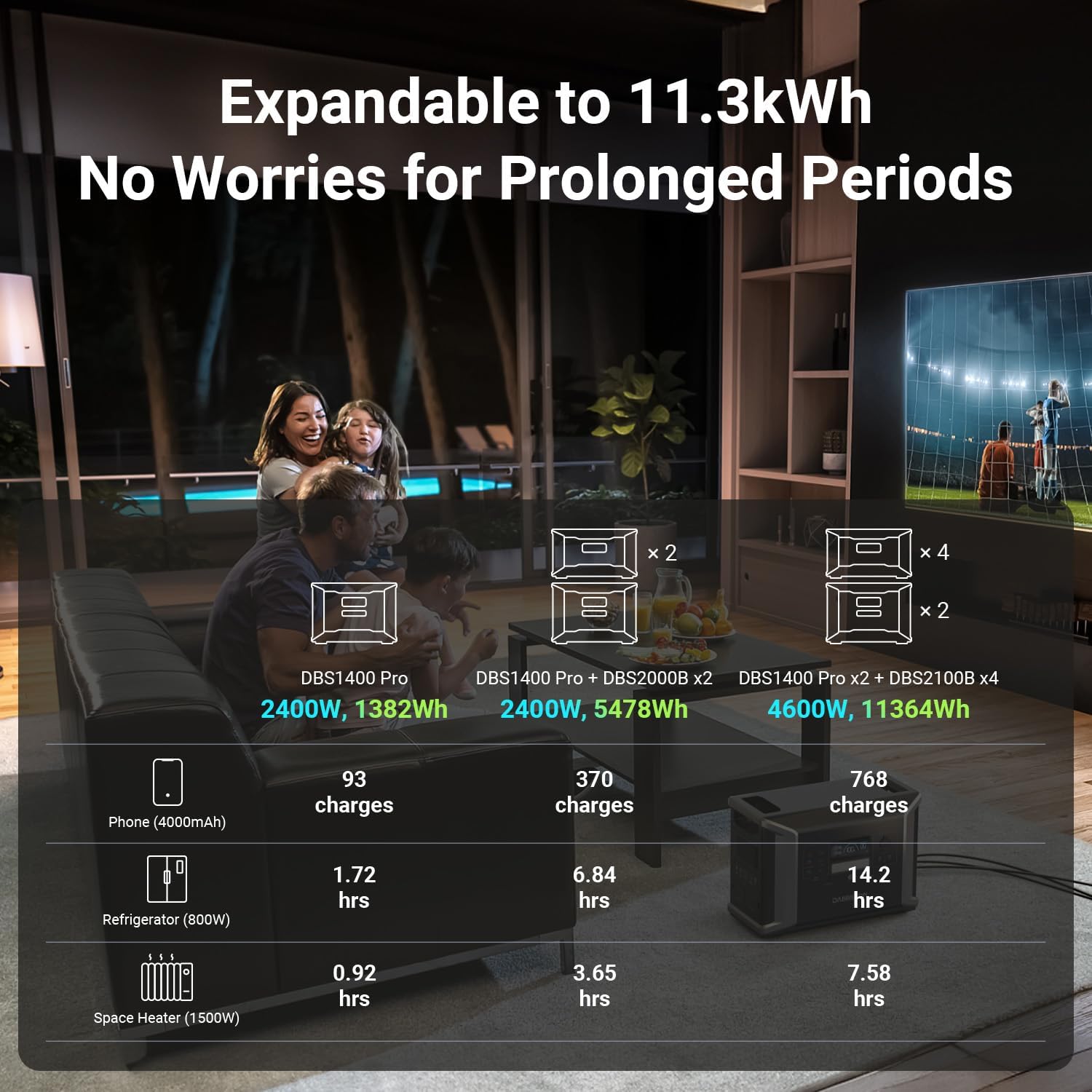
Figure 3: Expanding Power Station Capacity. This image demonstrates how the DBS2100B expands the capacity of a Dabbsson Pro Series power station, showing configurations for increased power output and duration for various appliances.
4.2 Boosting AC Recharge
When the DBS2100B battery is connected to a DBS1000Pro, DBS1400Pro, or DBS2100Pro, the maximum AC input for charging can be boosted up to 1800W. This allows for faster recharging of the combined battery capacity.
- Connect the AC charging cable to your Pro Series power station.
- Plug the AC charging cable into a wall outlet.
- The system will automatically detect the connected DBS2100B and adjust the charging input to the boosted rate.
5. Operating Instructions
5.1 Standalone USB Charging
The DBS2100B can function as a standalone power supply for smaller devices. It is equipped with:
- Two (2) 100W USB-C ports
- Two (2) 18W USB-A ports
To use these ports:
- Ensure the DBS2100B is powered on.
- Connect your device (e.g., phone, laptop, camera) to the appropriate USB-C or USB-A port using a compatible cable.
- The device will begin charging automatically.
5.2 Standalone Solar Recharging
The DBS2100B features an integrated MPPT (Maximum Power Point Tracking) and solar charging controller, allowing it to be recharged directly by solar panels without needing to be connected to a main power station. It supports up to 1200W of solar input.
- Position your solar panels in direct sunlight.
- Connect the solar panels to the DBS2100B using the provided Solar Charging Cable.
- The unit's display will indicate the charging status and input power.

Figure 4: Standalone Solar Charging. This image shows the Dabbsson DBS2100B connected to solar panels, demonstrating its capability for independent solar recharging with up to 1200W input.
5.3 Smart App Control
Monitor and control your DBS2100B expansion battery using the Dabbsson Smart App. The app allows you to view battery status, input/output power, and manage settings remotely.
- Download the "Dabbsson" app from the Apple App Store or Google Play Store.
- Follow the in-app instructions to pair your DBS2100B with your mobile device.
- Once connected, you can monitor and control the battery's functions from your smartphone.

Figure 5: Dabbsson Smart App Control. This image displays a smartphone screen showing the Dabbsson app interface, which allows users to monitor and control the expansion battery's status and settings.
6. Maintenance
Proper maintenance ensures the longevity and optimal performance of your DBS2100B expansion battery.
- Storage: If storing for extended periods, charge the battery to approximately 50-80% every 3-6 months to prevent deep discharge. Store in a cool, dry place away from direct sunlight.
- Cleaning: Use a dry, soft cloth to clean the exterior of the unit. Do not use harsh chemicals or abrasive materials.
- Temperature: Avoid operating or storing the unit in extreme temperatures (below 0°C or above 40°C).
- Ventilation: Ensure ventilation openings are not blocked during operation to prevent overheating.
7. Troubleshooting
If you encounter issues with your DBS2100B, refer to the following common troubleshooting steps:
- Unit Not Powering On:
- Ensure the power button is pressed firmly.
- Check if the battery has sufficient charge.
- Not Charging:
- Verify all charging cables are securely connected.
- If using solar, ensure panels are in direct sunlight and clean.
- Check the power source (wall outlet or solar panel) is functional.
- USB Ports Not Working:
- Ensure the DBS2100B is powered on.
- Try a different USB cable or device to rule out device/cable issues.
- Error Message on Display:
- Refer to the Dabbsson Smart App or the main power station's manual for specific error code interpretations.
- Try restarting the unit.
If the problem persists, please contact Dabbsson customer support.
8. Specifications
| Feature | Specification |
|---|---|
| Model Number | DBS2100B |
| Capacity | 2150Wh |
| Item Weight | 44 pounds |
| Product Dimensions | 1 x 1 x 1 inches (L x W x H) |
| Power Source | Battery Powered |
| Voltage | 120V |
| USB-A Output | 2 x 18W |
| USB-C Output | 2 x 100W |
| Max. Solar Input | 1200W |
| Boosted AC Input (when connected) | Up to 1800W |
| Certifications | FCC/CE EMC Class B, UL94 V0 Rating |
9. Warranty and Support
9.1 Warranty Information
The Dabbsson DBS2100B comes with a comprehensive warranty. The product includes a 3-Year Warranty with an additional 2-Year Extended Warranty, totaling 5 years of coverage. Please retain your proof of purchase for warranty claims.
9.2 Customer Support
For technical assistance, warranty claims, or any other inquiries, please contact Dabbsson customer support. You can find contact details on the official Dabbsson website or through the contact information provided on your warning card.
Online Support: Visit the Dabbsson Store on Amazon for more information and support resources.


