
1. Introduction
Thank you for choosing the PELLOR Mini Digital Scoreboard. This portable electronic scoreboard is designed for various indoor and outdoor games, offering clear score tracking with an easy-to-read LED display and simple controls. Please read this manual carefully to ensure proper use and maintenance of your device.

Image 1.1: The PELLOR Mini Digital Scoreboard displaying scores.
Video 1.1: An overview of the PELLOR Mini Digital Scoreboard, demonstrating its features and design.
2. Product Features
- Portable Design: Compact and lightweight for easy transport.
- Magnetic Back: Built-in magnets allow attachment to metal surfaces.
- High-Brightness LED Display: Visible in various lighting conditions, including sunlight and dark environments.
- Rechargeable Battery: Integrated 900 mAh lithium battery for cordless operation.
- Simple Controls: Intuitive buttons for score and period adjustments.
- Versatile Use: Suitable for table tennis, cornhole, pickleball, badminton, basketball, volleyball, baseball, chess, and card games.

Image 2.1: The scoreboard being placed into a bag, highlighting its portable design.

Image 2.2: A diagram illustrating the magnetic function on the back of the scoreboard.
3. Package Contents
Upon opening your PELLOR Mini Digital Scoreboard package, you should find the following items:
- 1 x PELLOR Mini Digital Scoreboard
- 1 x USB-C Charging Cable
- 1 x Storage Pouch
- 1 x User Manual (this document)

Image 3.1: The scoreboard, storage pouch, and USB-C charging cable included in the package.
4. Setup
Before using your scoreboard for the first time, ensure it is fully charged. Refer to the Charging section for detailed instructions.
- Power On: Hold the GUEST +1 / PWR button for 2 seconds to turn the scoreboard on.
- Placement: Place the scoreboard on a flat, stable surface. If a metal surface is available, the built-in magnets can secure the scoreboard in place.
5. Operating Instructions
The PELLOR Mini Digital Scoreboard features intuitive buttons for easy score and period management.

Image 5.1: Layout of the control buttons on the PELLOR Mini Digital Scoreboard.
- HOME Score Adjustment:
- Press HOME +1 to increase the Home team's score by one.
- Press HOME -1 to decrease the Home team's score by one.
- GUEST Score Adjustment:
- Press GUEST +1 to increase the Guest team's score by one.
- Press GUEST -1 to decrease the Guest team's score by one.
- Period Adjustment:
- Press PERIOD +1 to advance the period count by one.
- Press PERIOD -1 to decrease the period count by one. If the value is less than 1, the period display will turn off.
- Power On/Off: Hold the GUEST +1 / PWR button for 2 seconds to turn the scoreboard on or off.
- Reset Scores: Hold the GUEST -1 / RST button for 2 seconds to reset all scores (Home, Guest, and Period) to zero.
- Toggle Button Sound: Press the GUEST +1 / PWR and GUEST -1 / RST buttons simultaneously to enable or disable the button beep sound.
Video 5.1: A demonstration of key pressing operations, including score adjustment, reset, and sound toggle.
6. Charging Instructions
The scoreboard is equipped with a built-in 900 mAh lithium battery, providing approximately 4 hours of continuous use on a full charge.
- Charging Method: Use the provided USB-C cable to connect the scoreboard to a standard 5V USB power source (e.g., wall adapter, power bank, computer USB port).
- Charging Time: A full charge takes approximately 1.5 hours when the device is turned off.
- Important Note: This device supports standard 5V USB-C charging only. Fast charging adapters/cables are NOT supported and may damage the device.

Image 6.1: Illustrations of charging the scoreboard using a wall adapter and a power bank.

Image 6.2: The scoreboard being charged via its USB-C port.
Video 6.1: A demonstration of connecting the scoreboard to a standard 5V USB-C charger.
7. Care and Maintenance
- Cleaning: Wipe the scoreboard with a soft, dry cloth. Do not use abrasive cleaners or solvents.
- Storage: Store the scoreboard in a cool, dry place away from direct sunlight and extreme temperatures. Use the provided storage pouch to protect it from scratches when not in use.
- Water Exposure: The scoreboard is not waterproof. Avoid exposure to water or high humidity.
8. Troubleshooting
| Problem | Possible Cause | Solution |
|---|---|---|
| Scoreboard does not turn on. | Battery is depleted. | Charge the scoreboard for at least 1.5 hours using a standard 5V USB-C charger. |
| Short battery life. | Battery not fully charged or aging battery. | Ensure the scoreboard is fully charged before use. If the issue persists, contact customer support. |
| Buttons are unresponsive or stuck. | Debris under buttons or mechanical issue. | Gently clean around the buttons. Avoid pressing buttons with excessive force. If buttons remain stuck, contact customer support. |
| Display is dim or flickering. | Low battery or environmental factors. | Charge the scoreboard. Ensure it is not exposed to extreme temperatures. |
9. Specifications
- Model Name: VCTR06-A
- Dimensions (LxWxH): 7.09 x 0.87 x 1.85 inches (18 x 2.2 x 4.7 cm)
- Weight: 8 ounces (0.23 kg)
- Material: Plastic
- Battery: Built-in 900 mAh Lithium Battery
- Charging: Standard 5V USB-C (Fast charging not supported)
- Display: High-brightness LED
- Color: Red Black
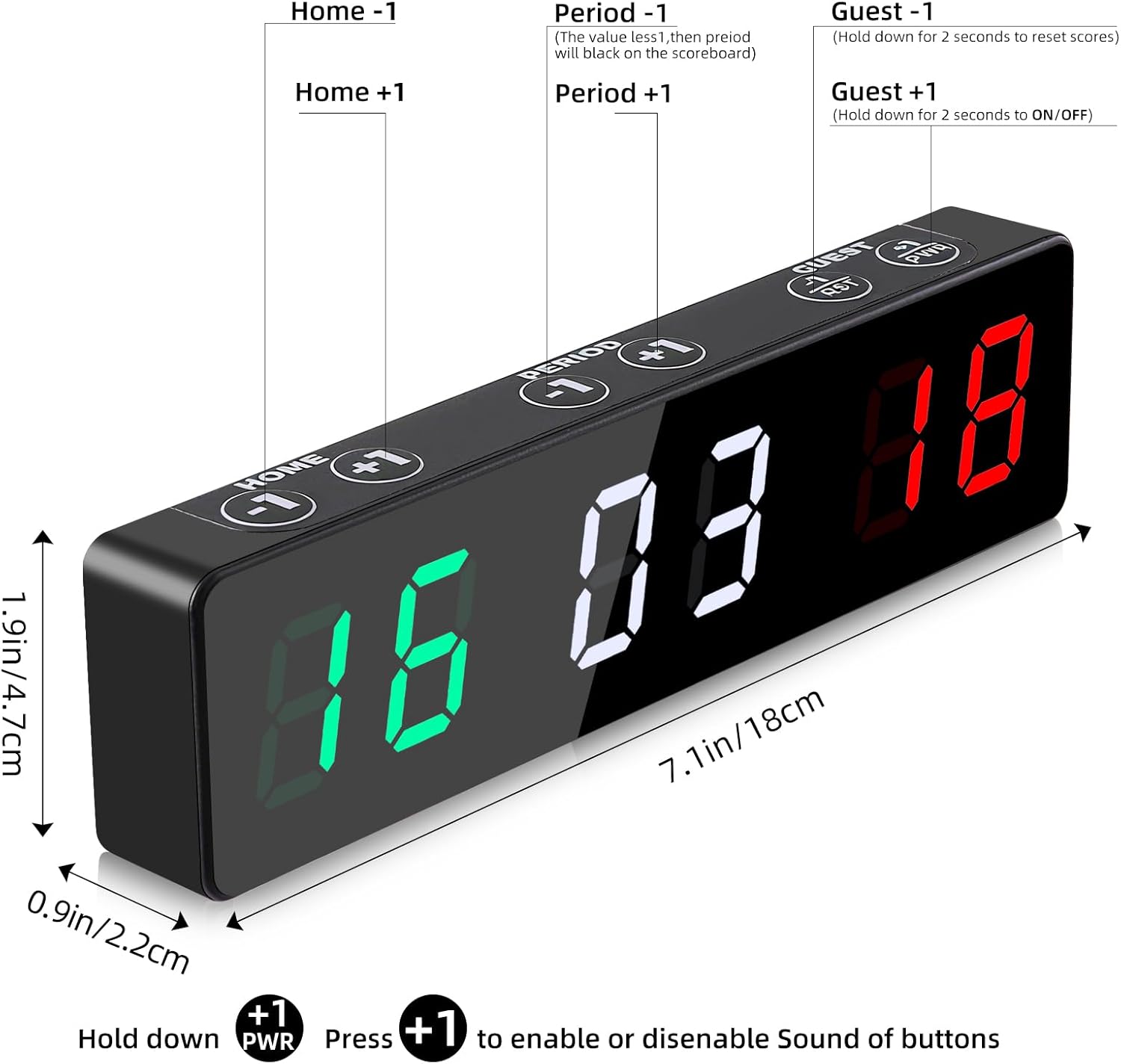
Image 9.1: The scoreboard with its physical dimensions indicated.
10. Warranty Information
The PELLOR Mini Digital Scoreboard comes with a 1-Year Limited Warranty from the date of purchase. This warranty covers manufacturing defects and workmanship under normal use. It does not cover damage caused by misuse, accidents, unauthorized modifications, or improper charging.
Please retain your proof of purchase for warranty claims.
11. Customer Support
If you encounter any issues or have questions regarding your PELLOR Mini Digital Scoreboard that are not addressed in this manual, please contact our customer support team. For the most up-to-date contact information, please refer to the product packaging or the official PELLOR website.