
1. Introduction and Overview
The AZZA CSAZ-570B Cove is an ATX mid-tower computer case designed for gaming and high-performance PC builds. It features a back-connect supported design, optimizing cable management and internal aesthetics. This manual provides essential information for setting up, operating, and maintaining your computer case.
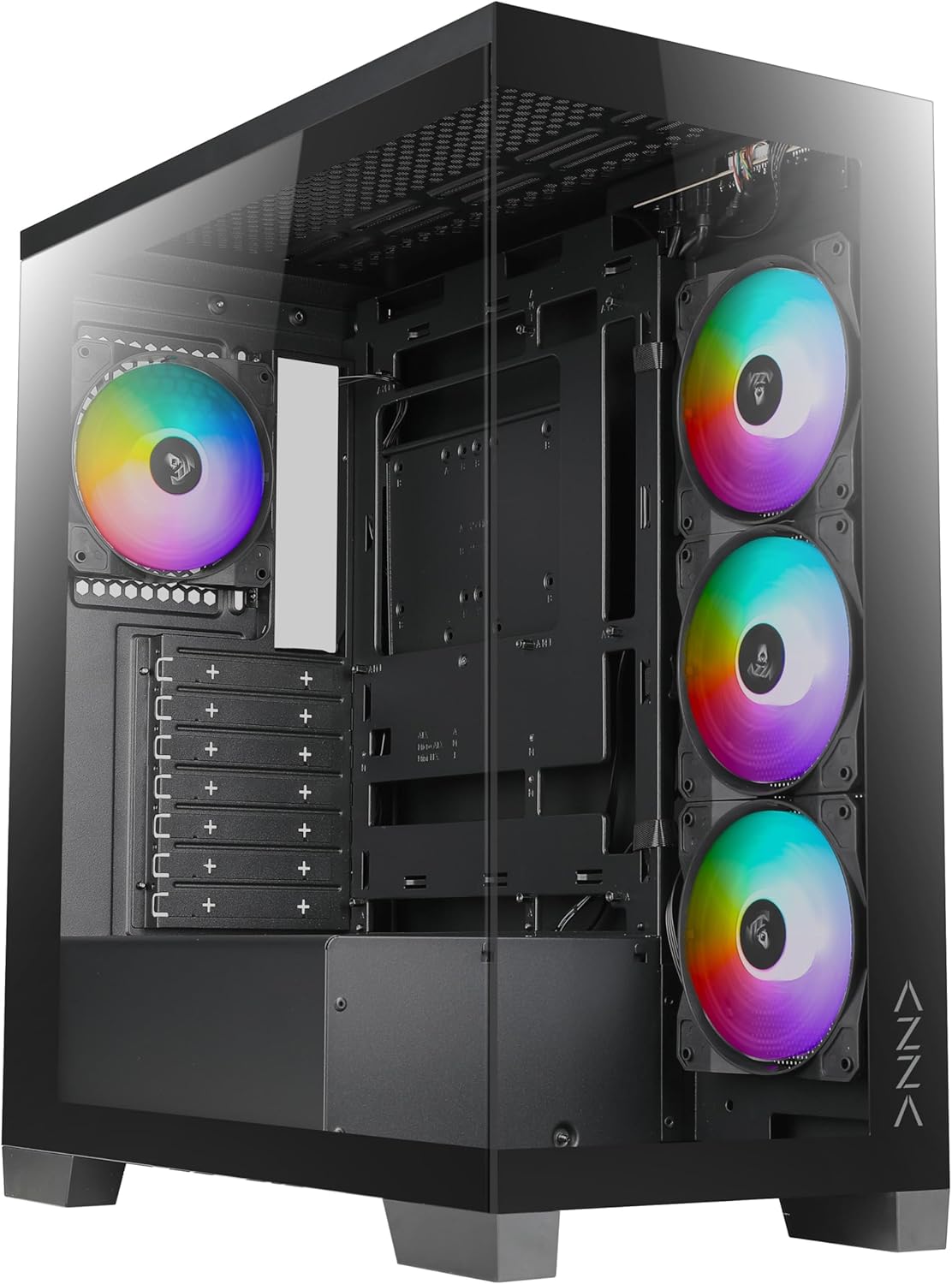
Figure 1: Front view of the AZZA CSAZ-570B Cove computer case with RGB fans visible.
Key Features:
- Performance Optimized: Full mesh front panel with 4 x 120 mm pre-installed addressable RGB fans for excellent airflow.
- Multifaceted Airflow Support: Supports up to 10 x 120 mm fans, including direct GPU airflow with 2 x 120 mm fans above the PSU shroud.
- Customizable Lighting: Controllable fan lighting via the top panel LED button, with motherboard RGB software synchronization support.
- Intuitive I/O: Top panel includes Power button, LED button, Combo HD Audio, 1 x USB 2.0, 1 x USB 3.0, and 1 x Type-C port.
- Back-Connect Supported: Designed to accommodate motherboards with back-mounted connectors for cleaner internal routing.
2. Setup and Installation
This section outlines the steps for installing components into your AZZA CSAZ-570B Cove computer case.
2.1 Motherboard Installation
The case supports ATX (including back-connect supported), Micro ATX, and ITX motherboards. Ensure standoffs are correctly aligned for your motherboard form factor before installation.

Figure 2: Internal layout indicating motherboard support area (A), maximum CPU cooler height (B), and maximum GPU length (C).
- Align your motherboard with the pre-installed standoffs.
- Secure the motherboard using appropriate screws.
- Connect all necessary power cables (24-pin ATX, CPU 8-pin) and data cables.
- For back-connect motherboards, route cables through the designated rear channels.
2.2 Cooling System Configuration
The CSAZ-570B offers extensive cooling options for optimal thermal performance.

Figure 3: Diagram illustrating fan mounting locations and sizes within the case.
Fan Support:
- Front: 4 x 120mm (pre-installed ARGB fans)
- Top: 3 x 120mm or 2 x 140mm
- Rear: 1 x 120mm
- Side (Motherboard Tray): 3 x 120mm
- Above PSU Shroud: 2 x 120mm (for direct GPU airflow)

Figure 4: Diagram showing radiator compatibility for the AZZA CSAZ-570B case.
Radiator Support:
- Motherboard Side: Up to 360mm
- Top: Up to 280mm or 360mm
2.3 Storage Device Installation
The case provides flexible options for installing 2.5" SSDs and 3.5" HDDs.

Figure 5: Internal view highlighting locations for SSD and HDD installation.
- Right Side Panel: Supports 2 x 2.5" SSDs or 1 x 3.5" HDD.
- Metal Tray: Supports 1 x 2.5" SSD.
2.4 Power Supply Installation
The power supply mounts at the bottom of the case.
- Slide the power supply into the designated compartment at the bottom rear of the case.
- Secure the power supply with screws from the rear of the case.
3. Operating Instructions
This section details the functionality of the front I/O panel and lighting controls.
3.1 Front I/O Panel
The top panel provides convenient access to essential ports and controls.

Figure 6: Close-up view of the top I/O panel with labeled ports and buttons.
- Power Button: Press to power on or off the system.
- LED Button: Cycles through various pre-programmed ARGB lighting modes for the installed fans.
- Combo HD Audio: For connecting headphones and microphones.
- USB 2.0 x 1: Standard USB port for peripherals.
- USB 3.0 x 1: High-speed USB port for data transfer.
- Type-C x 1: Reversible USB-C port for modern devices.
3.2 ARGB Lighting Control
The pre-installed ARGB fans can be controlled in two ways:
- LED Button: Use the dedicated LED button on the top panel to cycle through different lighting effects and colors.
- Motherboard RGB Software: If your motherboard supports Addressable RGB (ARGB) synchronization, connect the case's ARGB cable to the motherboard's ARGB header. This allows you to control the fan lighting directly through your motherboard's software (e.g., ASUS Aura Sync, MSI Mystic Light Sync, Gigabyte RGB Fusion, ASRock Polychrome Sync). Ensure the LED button is not actively overriding the motherboard control.
4. Maintenance
Regular maintenance helps ensure optimal performance and longevity of your computer case and its components.
- Dust Cleaning: Periodically clean dust filters (if present) and internal components using compressed air. Dust accumulation can impede airflow and lead to overheating.
- Fan Cleaning: Gently clean fan blades to remove dust buildup, which can affect fan performance and noise levels.
- Cable Management: Ensure cables are neatly routed and secured to prevent interference with airflow and moving parts.
- Exterior Cleaning: Wipe the exterior surfaces with a soft, damp cloth. Avoid abrasive cleaners.
5. Troubleshooting
This section provides general troubleshooting tips for common issues.
- System Not Powering On:
- Check if the power supply is properly connected to the wall outlet and the motherboard.
- Ensure the power button cable from the case is correctly connected to the motherboard's front panel header.
- Verify the power supply switch is in the 'ON' position.
- Fans Not Spinning/RGB Not Working:
- Confirm fan power cables are securely connected to the motherboard or fan controller.
- Check ARGB cables for proper connection to the motherboard's ARGB header or the case's ARGB controller.
- If using motherboard software, ensure the software is running and configured correctly.
- Try cycling the LED button on the top panel to see if the lights respond.
- USB Ports Not Functioning:
- Ensure the USB 2.0, USB 3.0, and Type-C headers from the case are correctly plugged into the corresponding headers on your motherboard.
- Check device drivers for your motherboard's USB controllers.
6. Specifications
Detailed technical specifications for the AZZA CSAZ-570B Cove computer case.
| Feature | Specification |
|---|---|
| Model Name | CSAZ-570B |
| Case Type | Mid Tower |
| Color | Black |
| Material | Plastic, Tempered Glass |
| Product Dimensions (LxWxH) | 17.1"D x 9.1"W x 19.3"H (435mm x 230mm x 490mm) |
| Item Weight | 21.8 pounds |
| Motherboard Compatibility | ATX (Back-connect supported), Micro ATX, ITX |
| Max CPU Cooler Height | 170mm |
| Max GPU Length | 400mm |
| Power Supply Mounting Type | Bottom Mount |
| Pre-installed Fans | 4 x 120mm ARGB (Front) |
| Front I/O Ports | Power Button, LED Button, Combo HD Audio, 1x USB 2.0, 1x USB 3.0, 1x Type-C |
| Drive Bays | 2 x 2.5" SSD or 1 x 3.5" HDD (Right Side Panel), 1 x 2.5" SSD (Metal Tray) |
Figure 7: Product dimensions of the AZZA CSAZ-570B case.
7. Warranty and Support
For warranty information and technical support, please contact AZZA directly.
- Manufacturer: AZZA
- Seller: AZZA USA (via Amazon)
- Product Protection Plans: Additional protection plans are available for purchase separately. These plans offer extended coverage beyond the standard manufacturer's warranty.
- 3-Year Protection Plan
- 4-Year Protection Plan
- Complete Protect (monthly subscription)
- Return Policy: This product is eligible for a 30-day return policy (refund/replacement) from the date of purchase.
- Official AZZA Store: For further information and product updates, visit the AZZA Store on Amazon.


