
1. Product Overview
This manual provides comprehensive instructions for the installation, operation, and maintenance of your ASURE Wireless CarPlay Android Auto Car Stereo. This 9-inch touchscreen head unit is designed for specific VW models, offering advanced connectivity and navigation features.

Image: The ASURE 9-inch touchscreen car stereo, showing its main interface with navigation, radio, and media controls.
2. What's in the Box
Verify that all components are present before beginning installation:
- 1x Wiring Harness Kit
- 1x Car Stereo Radio
- 1x Screen
- 1x Radio Cable
- 1x ISO Power Harness
- 1x GPS Cable
- Audio Video Ports (various cables)
- Wifi/BT Antenna
- Reversing Camera Input
- 2x USB Cable
- 1x Microphone
- 1x Quadlock Power Harness
- 1x Can Bus Box
- 1x Screwdriver and User Manual
- 1x Reversing Camera (if included with your package)

Image: A visual representation of all accessories and cables included with the ASURE car stereo unit.
3. Specifications
| Feature | Detail |
|---|---|
| Item Weight | 2.78 pounds |
| Package Dimensions | 12.09 x 7.32 x 4.17 inches |
| Item Model Number | af985dbf-2742-46fd-bb50-4e8dcef1785b |
| Display Size | 9 Inches |
| Operating System | Android 14 |
| Processor | Quad-core |
| RAM | 2GB |
| ROM | 64GB |
| Connectivity Technology | Bluetooth, USB, Wi-Fi (2.4GHz + 5.0GHz) |
| Special Features | Android Auto, Apple CarPlay, Built-In Bluetooth, Built-In Wi-Fi, GPS Navigation |
| Compatible Devices | Smartphone |
| Audio Output Mode | Stereo |
| Surround Sound Channel Configuration | 5.1 |
| Product Dimensions | 7.5"D x 12"W x 4.3"H |
4. Setup and Installation
4.1 Vehicle Compatibility
This car stereo is designed for a precise fit in various VW models from 2005-2010. Please refer to the compatibility chart below to ensure your vehicle is supported.

Image: A detailed chart indicating compatible VW, Skoda, and Seat vehicle models and their respective manufacturing years.
4.2 Wiring and Connections
The unit comes with a Plug and Play Wired Harness for ease of installation. For some vehicles, steering wheel control (SWC) cables may require manual wiring. If SWC does not function, contact support for assistance.
To enable steering wheel controls, ensure the 8-Pin plug (integrated into the power harness) is connected to the radio's rear 8-Pin socket. If your car has an upgraded sound amplifier, select 'H.AMP' in the settings (Settings -> Factory -> Password 3368 -> Car Model -> RZC -> Volk-swagen -> PQ -> LOW).

Image: Rear view of the car stereo unit with labeled ports for GPS antenna, camera, USB, and audio connections.
4.3 Initial Settings and Calibration
After installation, you may need to adjust certain settings for optimal performance. This includes screen brightness, CAN-BUS settings, and touch screen calibration.
Video: This video demonstrates how to access and adjust various settings on the ASURE 4Core car stereo, including speed unit display, Bluetooth pairing, screen brightness adjustment for night driving, CAN-BUS box setup for steering wheel controls, and touch screen recalibration.
5. Operating Instructions
5.1 Wireless CarPlay & Android Auto
The unit supports built-in Wireless CarPlay and Android Auto for seamless smartphone integration. Connect your phone wirelessly to access maps, stream music, make calls, and send texts using voice commands or the touchscreen.

Image: Demonstrates the wireless CarPlay and Android Auto interfaces, highlighting the ease of connection and use.
5.2 GPS Navigation & Wi-Fi Connectivity
Utilize the built-in GPS for navigation, even without a cell signal. The unit supports dual-band Wi-Fi (2.4GHz + 5.0GHz) for stable internet access, allowing you to stream, download, and browse online content.

Image: Visual representation of the GPS navigation and Wi-Fi capabilities, showing map applications and online content access.
5.3 Bluetooth & FM/RDS Radio
Connect your smartphone via Bluetooth for hands-free calling and audio streaming. The integrated FM/RDS radio provides access to local radio stations with enhanced data display.
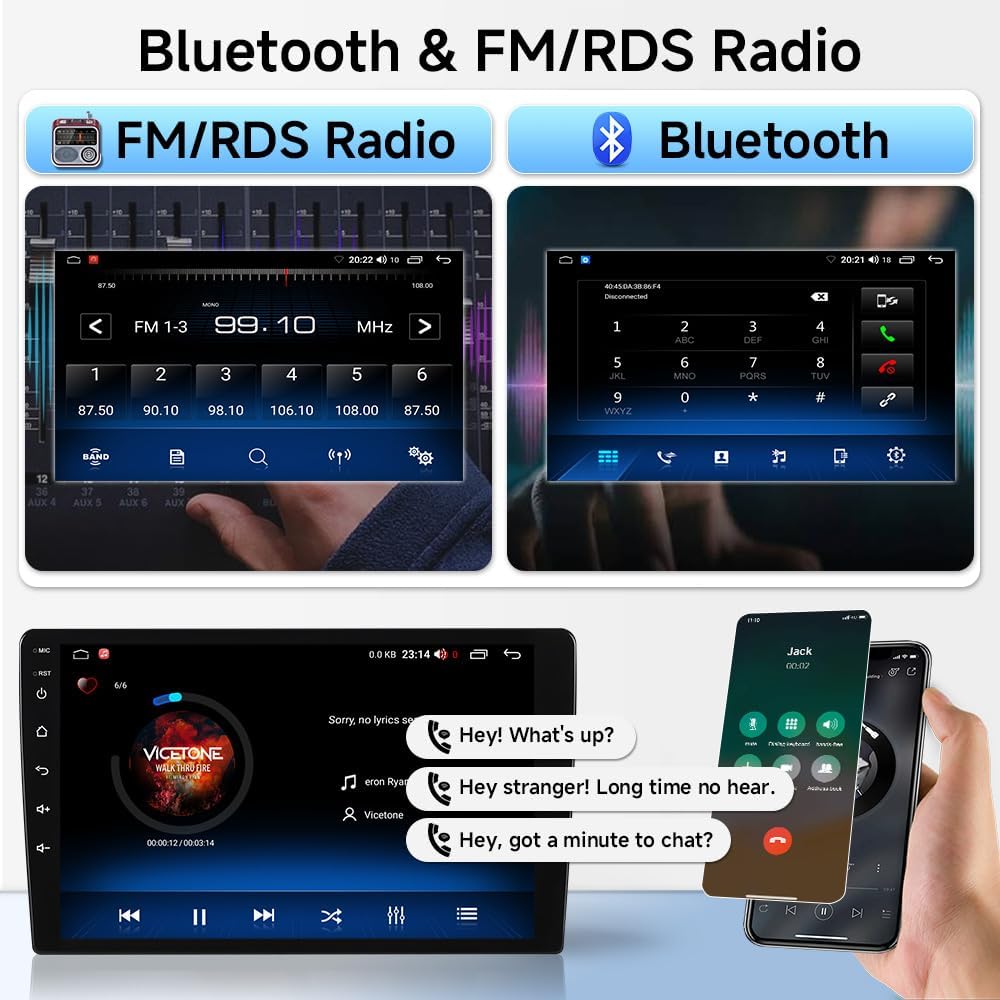
Image: Displays the radio tuning interface and a Bluetooth call screen, demonstrating audio and communication functions.
5.4 AHD Reversing Camera Support
The system supports an AHD reversing camera, providing clear day and night vision with a 170° wide-angle view. Features include F1.4 aperture and distance level warnings for confident backing up.

Image: Illustrates the benefits of the AHD reversing camera, including clear visibility and safety features.
5.5 User Interface Customization
The Android operating system allows for extensive customization of the user interface, including installing third-party launchers and personalizing icons and themes.
Video: This video demonstrates how to install and customize a third-party launcher (AGAMA Car Launcher) on the Android radio, including changing themes, icons, and screen layouts.
6. Maintenance
To ensure the longevity and optimal performance of your ASURE car stereo, follow these general maintenance guidelines:
- Screen Cleaning: Use a soft, lint-free cloth to gently wipe the touchscreen. Avoid abrasive cleaners or harsh chemicals that could damage the display.
- Software Updates: Periodically check for available software updates through the system settings or the manufacturer's website. Updates can improve performance, add features, and enhance security.
- Environmental Conditions: Avoid exposing the unit to extreme temperatures, direct sunlight for prolonged periods, or excessive moisture.
- Cable Connections: Ensure all cables are securely connected. Loose connections can lead to intermittent functionality.
7. Troubleshooting
If you encounter issues with your ASURE car stereo, consider the following basic troubleshooting steps:
- No Power: Check all power connections and fuses. Ensure the vehicle's ignition is on.
- No Sound: Verify volume levels on both the stereo and your connected device. Check speaker connections. Ensure the correct audio source is selected.
- Bluetooth Connection Issues: Ensure Bluetooth is enabled on both the stereo and your phone. Delete previous pairings and attempt to re-pair.
- GPS Signal Loss: Ensure the GPS antenna is properly installed and has a clear view of the sky.
- Touchscreen Unresponsive: Try restarting the unit. If the issue persists, perform a touchscreen calibration as shown in the setup video.
- Steering Wheel Controls Not Working: Verify CAN-BUS box settings and wiring as detailed in the setup section and video.
For persistent issues, consult the detailed troubleshooting section of the full user manual or contact ASURE customer support.
8. Warranty and Support
8.1 Warranty Information
Your ASURE car stereo comes with a 30-day free return and replacement policy, and a 1-year repair warranty. Please retain your proof of purchase for warranty claims.
8.2 Customer Support
For further assistance, technical support, or warranty inquiries, please visit the official ASURE Store or contact their customer service department.