
2.0 x Red
Sherum Intellireaders User Manual
Intelligent Progressive Far and Near Dual-Use Reading Glasses
1. Introduction
Thank you for choosing Sherum Intellireaders. These intelligent progressive reading glasses are designed to provide a seamless visual experience for various activities, from reading up close to viewing distant objects. Featuring advanced lens technology, they offer clarity, comfort, and protection against harmful blue light and UV rays.

Image: Sherum Intellireaders glasses with a protective case.
2. Product Features
- Progressive Multifocal Lenses: Seamless transition between far, intermediate, and near vision zones, eliminating the need to switch glasses.
- Anti-Blue Light & UV Protection: Filters harmful blue light from digital screens and provides UV protection, reducing eye strain and fatigue.
- High-Definition & Scratch-Resistant: Ensures clear vision and durability for long-lasting use.
- Lightweight Titanium Frame: Constructed from titanium for exceptional strength-to-weight ratio, ensuring all-day comfort (weighs approximately 17.05 grams).
- Dual-Use Design: Suitable for various activities including reading, computer work, driving, and outdoor use.

Image: Illustration of how progressive multifocal lenses work for different viewing distances.

Image: Visual representation of blue light filtering by the lenses.
3. Setup and Initial Use
Upon receiving your Sherum Intellireaders, carefully remove them from their packaging. It is normal to experience a brief adjustment period when first using progressive lenses.
3.1 Understanding Progressive Lenses
Progressive lenses have three main vision zones:
- Top Zone (Distance Vision): Used for looking at objects far away, such as driving or viewing landscapes.
- Middle Zone (Intermediate Vision): Used for objects at arm's length, like computer screens or dashboards.
- Bottom Zone (Near Vision): Used for close-up tasks such as reading books, newspapers, or using a smartphone.

Image: Detailed diagram illustrating the far, near, and progressive zones within the lens.
3.2 Initial Adjustment Tips
- Head Movement: Instead of moving your eyes side to side, learn to move your head to find the clearest vision zone for your task.
- Practice: Wear your new glasses consistently to allow your eyes and brain to adapt. Start with familiar environments.
- Reading: Hold reading material at a comfortable distance and adjust your head position slightly up or down to find the clearest focus.
4. Operating Instructions
Using your Sherum Intellireaders effectively involves understanding how to utilize the different focal areas for various daily activities.
4.1 For Distance Vision (Far Place)
When viewing objects far away, such as driving or watching television, slightly raise your head and look through the upper portion of the lenses. This area is optimized for clear distance vision.
4.2 For Near Vision (Near Place)
For reading, using a smartphone, or other close-up tasks, slightly lower your head and look through the bottom portion of the lenses. This area provides the necessary magnification for clear near vision.
4.3 For Intermediate Vision (Progressive Area)
The middle section of the lens offers a smooth transition for intermediate distances, ideal for computer work or interacting with objects at arm's length. This alternating area between far and near is softer, making it convenient for tasks like watching a computer screen.

Image: Demonstrates how to use the far and near vision zones of the progressive lenses.
4.4 Benefits of Anti-Blue Light Lenses
These glasses are equipped with anti-blue light lenses that filter harmful blue light emitted from digital screens (monitors, tablets, cell phones), helping to alleviate eyestrain and protect your vision.
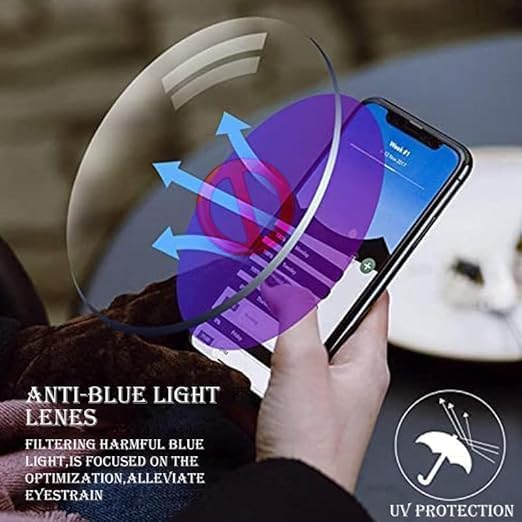
Image: Visual explanation of anti-blue light lens technology.

Image: Diagram illustrating how blue light protection lenses work with various devices.
5. Maintenance and Care
Proper care will extend the life and maintain the clarity of your Sherum Intellireaders.
- Cleaning Lenses: Use a soft, clean microfiber cloth specifically designed for eyewear. For stubborn smudges, use a lens cleaning spray or mild soap and water, then gently wipe dry. Avoid using paper towels, clothing, or harsh chemicals, as these can scratch the lenses.
- Storing Glasses: Always store your glasses in the provided protective case when not in use. This prevents scratches and damage from accidental drops or pressure.
- Handling: Always hold your glasses by the frame, not the lenses, to avoid smudges and potential damage.
- Avoid Extreme Temperatures: Do not leave your glasses in direct sunlight (e.g., on a car dashboard) or in extremely cold environments, as this can damage the lens coatings and frame material.
6. Troubleshooting
If you encounter any issues with your Sherum Intellireaders, please refer to the following common solutions:
| Problem | Possible Cause | Solution |
|---|---|---|
| Initial Dizziness/Discomfort | Common adjustment period for progressive lenses. | Wear glasses consistently for 1-2 weeks to allow your eyes and brain to adapt. Start in familiar, safe environments. |
| Blurred Vision | Dirty lenses, incorrect head position, or not looking through the correct lens zone. | Clean lenses thoroughly. Adjust head position to find the clearest focus for the task. Ensure you are looking through the appropriate part of the lens (top for far, bottom for near). |
| Eye Strain/Fatigue | Prolonged use of digital screens, or not fully adapted to progressive lenses. | Take regular breaks from screens (20-20-20 rule). Ensure proper lighting. Continue wearing glasses to adapt. |
| Glasses feel loose or tight | Minor frame adjustment needed. | Gently adjust the temples for a comfortable fit. Avoid excessive force to prevent damage. If significant adjustment is needed, consult an optician. |

Image: Common vision problems that Sherum Intellireaders aim to alleviate.
7. Specifications
| Feature | Detail |
|---|---|
| Product Name | Sherum Intellireaders |
| Model | Progressive Far and Near Dual-Use Reading Glasses |
| Lens Type | Progressive Multifocal, Anti-Blue Light, UV Protection, Scratch-Resistant, Waterproof |
| Frame Material | Titanium |
| Weight | Approx. 17.05 grams |
| Department | Unisex Adult |
| Available Magnifications | 1.0x, 1.5x, 2.0x, 2.5x, 3.0x, 3.5x, 4.0x |
7.1 Dimensions
| Measurement | Value |
|---|---|
| Frame Width | 145mm (5.70 inch) |
| Nose Bridge Width | 20mm (0.78 inch) |
| Lens Width | 53mm (2.08 inch) |
| Lens Height | 33mm (1.29 inch) |
| Temples Length | 140mm (5.51 inch) |
Note: There may be a 2-3% difference due to manual measurement.

Image: Table showing recommended magnification based on age, and detailed product dimensions.
8. Official Product Video
Video: An official product video demonstrating the features and benefits of Sherum Intellireaders for men. This video highlights the progressive multifocal design and blue light protection.
9. Warranty and Support
For any questions, concerns, or support regarding your Sherum Intellireaders, please refer to the seller's contact information on the platform where you purchased the product. Please note that statements regarding dietary supplements have not been evaluated by the FDA and are not intended to diagnose, treat, cure, or prevent any disease or health condition.
Related documents2.0 x Red


Ask a question about this manual
Ask about setup, troubleshooting, compatibility, parts, safety, or missing instructions. Manuals+ will review the question and use this page’s manual context to help answer it.