
AdTech 4100
AdTech Freedom Cordless Hot Glue Gun Model 4100 User Manual
Brand: AdTech | Model: 4100
Introduction
This manual provides comprehensive instructions for the AdTech Freedom Cordless Hot Glue Gun, Model 4100. Please read this manual thoroughly before initial use to ensure safe and efficient operation. This cordless glue gun is designed for various crafting, DIY, and repair applications, offering portability and precision with its rechargeable battery and integrated LED light.
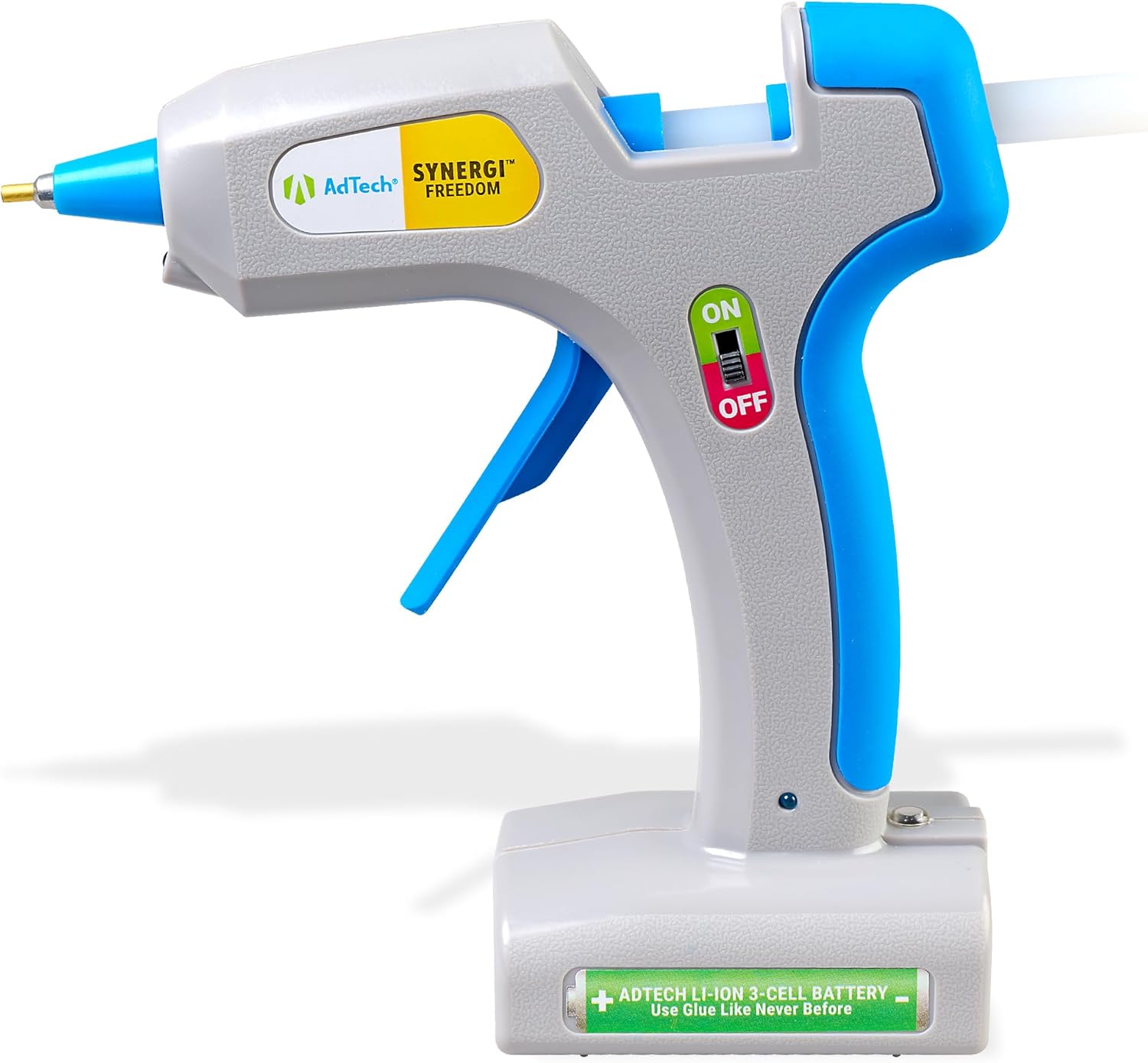
Image: The AdTech Freedom Cordless Hot Glue Gun, a gray and blue device with an 'ON/OFF' switch and a battery indicator.
Important Safety Instructions
Failure to follow these safety instructions may result in fire, electric shock, or personal injury. Retain these instructions for future reference.
- The nozzle and molten glue become very hot. Avoid direct contact with skin to prevent burns.
- Keep the glue gun out of reach of children and pets.
- Use the glue gun in a well-ventilated area.
- Do not immerse the glue gun in water or other liquids.
- Only use glue sticks recommended by the manufacturer.
- Do not leave the hot glue gun unattended. Always turn it off and allow it to cool before storing.
- Do not attempt to modify or repair the glue gun. Refer all servicing to qualified personnel.
- Ensure the charging cable and port are dry before connecting for charging.
Package Contents
Verify that all items are present in the package:
- AdTech Freedom Cordless Hot Glue Gun (Model 4100)
- USB-C Charging Cable
- 5 Artistick Stringless Hot Glue Sticks
Setup
Initial Charging
Before using your AdTech Freedom Cordless Hot Glue Gun for the first time, it is essential to fully charge the battery.
- Locate the USB-C charging port on the glue gun.
- Connect the provided USB-C charging cable to the glue gun's port.
- Plug the other end of the USB-C cable into a compatible USB power adapter (not included) or a powered USB port.
- The charging indicator light on the glue gun will illuminate to show it is charging.
- Allow the glue gun to charge until the indicator light changes or turns off, signifying a full charge. A full charge provides up to 100 minutes of continuous use.

Image: The AdTech Freedom Cordless Hot Glue Gun resting on its base, connected to a USB-C charging cable.
Inserting Glue Sticks
Ensure the glue gun is off and cool before inserting glue sticks.
- Take a standard full-size (0.43 inch / 11mm diameter) hot glue stick.
- Insert the glue stick into the circular opening at the rear of the glue gun.
- Push the glue stick firmly until it is seated and stops. Do not force it.

Image: The rear of the AdTech Freedom Cordless Hot Glue Gun, illustrating where a glue stick is inserted into the opening.
Operating Instructions
Powering On and Preheating
- Slide the ON/OFF switch, located on the side of the glue gun, to the "ON" position.
- The LED indicator light will illuminate, and the glue gun will begin to heat up.
- Allow the glue gun to preheat for approximately 3-5 minutes until it reaches its operating temperature. The nozzle will become hot.
Applying Glue
- Once heated, gently squeeze the trigger to dispense molten glue from the precision nozzle.
- The built-in LED light will illuminate your work area, aiding in precise glue placement, especially in low-light conditions.
- Apply glue to one surface and quickly press the surfaces together. Hot glue sets rapidly, typically within 15-30 seconds, for optimal bonding.

Image: A close-up view of the AdTech Freedom Cordless Hot Glue Gun's nozzle applying a thin bead of hot glue to a surface, demonstrating precision.

Image: A person's hands holding the AdTech Freedom Cordless Hot Glue Gun, applying glue to a craft item with colorful pom-poms in the background.
Powering Off
- When you have finished using the glue gun, slide the ON/OFF switch to the "OFF" position.
- Allow the glue gun to cool down completely on a heat-resistant surface before storing it.
Maintenance
Cleaning
- Always ensure the glue gun is turned off, disconnected from charging, and completely cool before cleaning.
- Wipe the exterior surfaces of the glue gun with a clean, slightly damp cloth. Do not use harsh chemicals, abrasive cleaners, or solvents, as these can damage the plastic.
- Do not attempt to clean the nozzle while it is hot. Any dried glue around the nozzle can be carefully removed once the gun has cooled down.
Storage
- Store the AdTech Freedom Cordless Hot Glue Gun in a dry, cool place, away from direct sunlight and extreme temperatures.
- Ensure the glue gun is completely cool before storing.
- It is advisable to remove any partially used glue sticks if the gun will be stored for an extended period, to prevent potential blockages or leakage.
Troubleshooting
If you encounter issues with your glue gun, refer to the table below for common problems and solutions.
| Problem | Possible Cause | Solution |
|---|---|---|
| Glue gun does not heat up. | Battery not charged or power switch is OFF. | Ensure the battery is fully charged and the ON/OFF switch is in the "ON" position. |
| Glue does not dispense. | Glue stick not fully inserted or gun not heated sufficiently. | Push the glue stick firmly into the chamber. Allow adequate preheating time (3-5 minutes). |
| Glue leaks from nozzle when idle. | This can be normal for some hot glue guns, especially if left on for extended periods. | Turn off the glue gun when not actively applying glue. Place it on a heat-resistant mat or surface. |
| Short battery life. | Incomplete charge cycle or battery degradation over time. | Ensure the glue gun is fully charged before use. Battery performance may naturally decrease with prolonged use. |
Product Specifications
- Model: 4100
- Brand: AdTech
- Power Source: Battery Powered (Lithium Ion)
- Wattage: 25W
- Voltage: 32 Volts
- Battery Life: Up to 100 minutes (continuous use)
- Charging: USB-C
- Compatible Glue Stick Diameter: Full-size (0.43 inch / 11mm)
- Key Features: Integrated LED Light, Precision Detail Nozzle, Ergonomic Easy Grip Handle
- Item Weight: 1.2 Pounds
- Package Dimensions: 11.22 x 8.19 x 2.52 inches
- UPC: 026438548990
Warranty Information
For detailed warranty information regarding your AdTech Freedom Cordless Hot Glue Gun, please refer to the official AdTech website or the documentation included with your purchase. Warranty terms and conditions may vary.
Customer Support
If you have any questions, require technical assistance, or need to report an issue with your AdTech Freedom Cordless Hot Glue Gun, please visit the official AdTech website for their customer service contact information. You can typically find support resources, FAQs, and contact details on their website.
Related documents4100

Ask a question about this manual
Ask about setup, troubleshooting, compatibility, parts, safety, or missing instructions. Manuals+ will review the question and use this page’s manual context to help answer it.