
1. Introduction
Thank you for choosing the Tiakia U6-9901 Aluminum Bicycle Motorcycle Phone Holder. This manual provides detailed instructions for the safe and proper installation, operation, and maintenance of your new phone holder. Please read this manual thoroughly before use to ensure optimal performance and longevity of the product.
2. Package Contents
Please verify that all components are present in your package:
- 1 x Tiakia Aluminum Bicycle Motorcycle Phone Holder
- 1 x Handlebar Clamp Base
- 4 x Rubber Pads for Handlebar (various sizes)
- 1 x Hex Key (for installation)
- 1 x User Manual

Image 2.1: All components included in the package.
3. Specifications
| Feature | Specification |
|---|---|
| Model Name | U6-9901 |
| Material | 6063-T6 Aluminum Alloy |
| Compatible Phone Size | 4.5 to 7.0 inches |
| Compatible Phone Width | 62 to 90 mm |
| Compatible Phone Thickness | < 14 mm |
| Compatible Handlebar Diameter | 22.2 mm, 25.4 mm, 28.6 mm, 31.8 mm, 35 mm |
| Rotation | 360-degree adjustable |
| Mounting Type | Handlebar |
| Water Resistance Level | Not waterproof |

Image 3.1: Product compatibility with various phone sizes and adjustable bottom claws.

Image 3.2: Handlebar diameter compatibility with included rubber pads.
4. Safety Information
- Ensure the phone holder is securely mounted to the handlebar before placing your device.
- Always double-check that your phone is firmly secured in the holder before riding.
- Do not operate your phone while riding. Pull over to a safe location if you need to use your device.
- Avoid over-tightening screws, which may damage the product or your handlebar.
- This product is not waterproof. Protect your phone from rain or moisture.
- Regularly inspect the holder for any signs of wear or damage. Replace if necessary.
5. Installation
Follow these steps to install your Tiakia phone holder:
- Attach the Handlebar Clamp Base: Choose the appropriate rubber pad size for your handlebar diameter (22.2mm, 25.4mm, 28.6mm, 31.8mm, or 35mm). Place the rubber pad inside the handlebar clamp base. Position the clamp on your handlebar and tighten the two screws using the provided hex key until it is secure. Ensure the base is firmly attached and does not rotate freely.
- Connect the Phone Holder to the Base: Align the spherical joint of the phone holder with the ball head on the handlebar clamp base. Push the phone holder onto the ball head until it clicks into place. Tighten the Phillips security nut clockwise to secure the phone holder at your desired angle.
- Adjust Bottom Claws (Optional): The bottom claws are adjustable in three positions to avoid blocking side buttons or ports on your phone. Adjust them as needed to fit your specific phone model.

Image 5.1: Diagram showing key components and stability features, including the thickened non-slip silicone mat, 2-in-1 design grip, three-stage adjustable bottom bracket, and double-screwed aluminum alloy base.

Image 5.2: Proper connection of the phone holder to the ball joint for secure 360-degree rotation.
6. Operating Instructions
6.1 Inserting Your Phone
- Press the quick-release button located on the right side of the holder to open the clamps.
- Carefully place your smartphone into the holder, ensuring it sits securely against the silicone pads.
- Release the quick-release button. The clamps will automatically adjust and lock your phone in place. Verify that your phone is held firmly.
6.2 Removing Your Phone
To remove your phone, simply press the quick-release button on the right side of the holder. The clamps will release, allowing you to safely retrieve your device.
6.3 Adjusting Viewing Angle
Loosen the Phillips security nut on the ball joint slightly. Adjust the phone holder to your desired horizontal or vertical viewing angle. Once the desired angle is achieved, tighten the security nut firmly to lock the position.
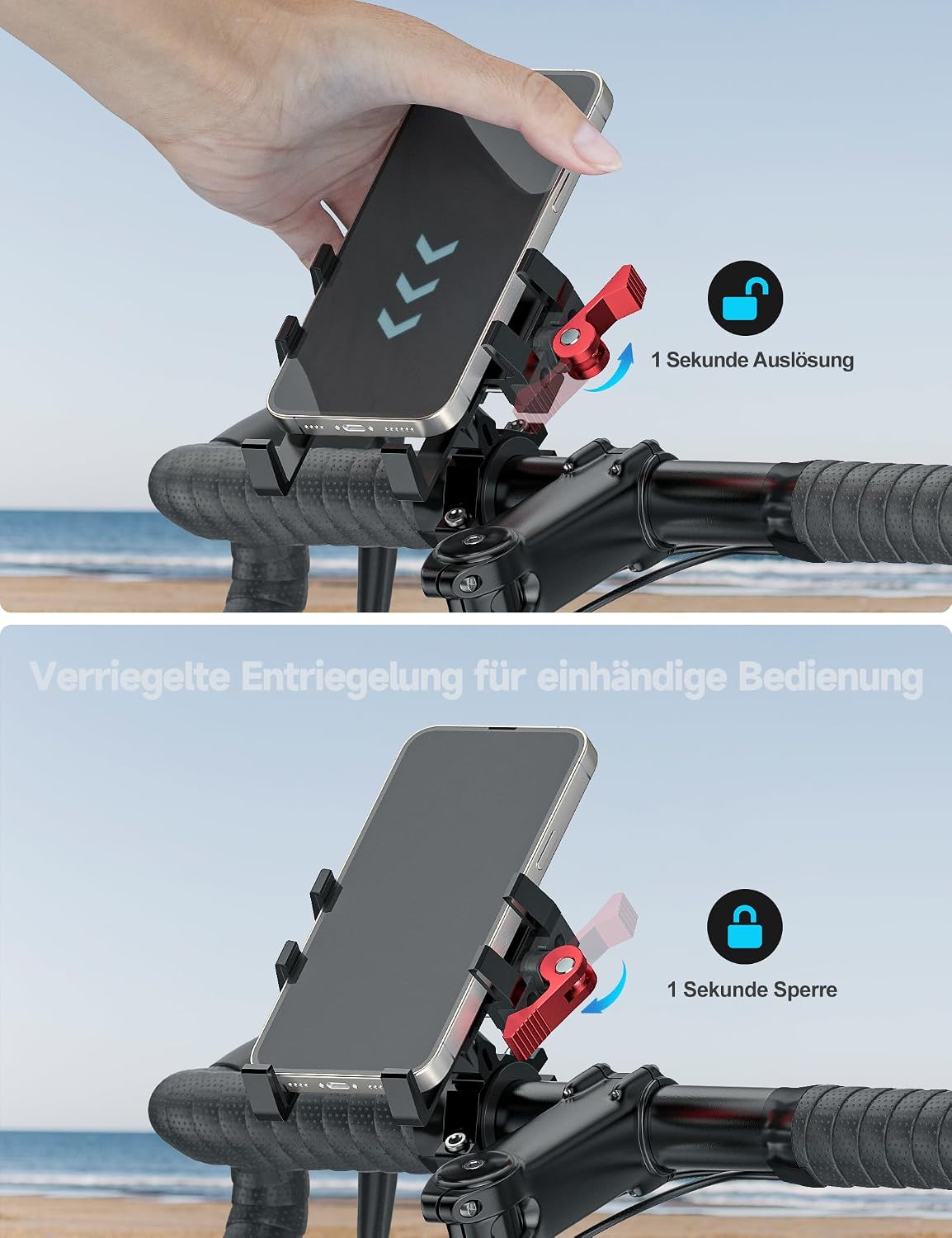
Image 6.1: Demonstrates the 1-second quick release and lock mechanism for one-handed operation.

Image 6.2: The holder's design ensures the phone's camera remains unobstructed for use while mounted.
7. Maintenance
- Cleaning: Wipe the holder with a soft, damp cloth. Do not use abrasive cleaners or solvents.
- Inspection: Periodically check all screws and connections to ensure they are tight. Re-tighten if necessary.
- Storage: When not in use for extended periods, store the phone holder in a dry place away from direct sunlight.
8. Troubleshooting
- Phone feels loose: Ensure the quick-release button is fully engaged and the clamps are securely holding the phone. Check if the phone's width and thickness are within the compatible range (62-90mm width, <14mm thickness).
- Holder rotates on handlebar: Ensure the handlebar clamp screws are tightened sufficiently. Verify that the correct size rubber pads are used for your handlebar diameter.
- Phone holder angle shifts: Tighten the Phillips security nut on the ball joint firmly to prevent unwanted rotation.
- Difficulty inserting/removing phone: Ensure the quick-release button is fully pressed to allow the clamps to open completely.
9. Warranty and Support
Tiakia products come with a standard manufacturer's warranty. For specific warranty details, please refer to the product packaging or contact Tiakia customer support. If you encounter any issues or have questions regarding your product, please contact our customer service team through the retailer where you purchased the item or visit the official Tiakia brand store on Amazon.
Tiakia Brand Store: Visit Tiakia Store