1. Introduction
This manual provides detailed instructions for the setup, operation, and maintenance of your EYTSE TK30 Portable Karaoke Machine. Please read this manual thoroughly before using the product to ensure proper function and to maximize your enjoyment.
2. Package Contents
Verify that all items listed below are included in your package. If any items are missing or damaged, please contact customer support.
- EYTSE TK30 Portable Karaoke Machine
- 2 x Wireless UHF Microphones
- Remote Control
- Auxiliary Cable
- Power Cable (USB-C charging cable)
- User Manual

Image 2.1: EYTSE TK30 Karaoke Machine with included accessories: main unit, two wireless microphones, remote control, and cables.
3. Product Overview
Familiarize yourself with the main components and control panel of your karaoke machine.
3.1 Main Unit Features
- 5.25-inch Full-Range Speaker: Delivers clear audio with rich bass and crisp treble.
- LED Display: Shows current mode, time, or track information.
- Phone Holder: Integrated slot for securely holding a smartphone or tablet.
- Control Panel: Buttons for power, mode, volume, effects, and playback.
- Input Ports: USB, TF Card, AUX, Wired Microphone (MLC IN), DC 5V charging.

Image 3.1: Diagram illustrating the control panel and various input/output ports on the top of the EYTSE TK30 karaoke machine.
3.2 Wireless Microphones
- UHF Technology: Provides stable and clear wireless connection.
- LCD Display: Shows microphone status and frequency.
- Battery Powered: Each microphone requires 2x AA batteries (not included).

Image 3.2: Close-up view of the two wireless microphones, highlighting the rugged metal mesh head and crystal-clear LCD display.
4. Setup Instructions
4.1 Charging the Main Unit
- Connect the provided power cable to the DC 5V input port on the karaoke machine.
- Plug the other end of the power cable into a standard 110V AC power outlet.
- The LED display will indicate charging status. A full charge takes approximately 3-4 hours.
- The internal 6000mAh battery provides up to 24 hours of playtime on a single charge, depending on usage and volume levels.

Image 4.1: Visual representation of the 6000mAh battery, showing 3-4 hours for a full charge and up to 24 hours of playing time.
4.2 Microphone Battery Installation
- Unscrew the bottom cap of each wireless microphone.
- Insert two AA batteries into each microphone, ensuring correct polarity (+/-).
- Screw the bottom cap back on securely.
4.3 Power On/Off
- To power on the karaoke machine, press and hold the POWER button on the control panel.
- To power off, press and hold the POWER button again.
- To power on the microphones, slide the power switch on each microphone to the 'ON' position. They will automatically connect to the main unit.
4.4 Bluetooth Connection
- Power on the karaoke machine. It will automatically enter Bluetooth pairing mode, indicated by a flashing 'BLUE' on the LED display.
- On your smartphone, tablet, or other Bluetooth-enabled device, open the Bluetooth settings.
- Search for available devices and select "EYTSE TK30" to pair.
- Once connected, the 'BLUE' indicator will stop flashing, and you can play audio from your device through the karaoke machine. The Bluetooth range is up to 15 meters.
4.5 True Wireless Stereo (TWS) Pairing
The TWS function allows you to connect two EYTSE TK30 units for a stereo sound experience.
- Ensure both EYTSE TK30 units are powered on and in Bluetooth mode, but not yet connected to any external device.
- On one of the units (this will be the primary unit), press and hold the MODE/TWS button until you hear a pairing tone.
- The two units will automatically search and pair with each other. Once paired, you will hear a confirmation tone.
- Now, connect your Bluetooth device to the primary unit as described in Section 4.4. Audio will play in stereo through both units.

Image 4.2: Two EYTSE TK30 units set up for True Wireless Stereo (TWS) pairing, providing an immersive stereo sound experience.
4.6 Other Audio Inputs
- USB: Insert a USB flash drive into the USB port. The machine will automatically switch to USB mode and play audio files.
- TF Card: Insert a TF (MicroSD) card into the TF card slot. The machine will automatically switch to TF card mode and play audio files.
- AUX: Connect an external audio device (e.g., MP3 player, laptop) using the provided auxiliary cable to the AUX IN port. Press the MODE/TWS button to switch to AUX mode.
- Wired Microphone (MLC IN): Connect a wired microphone (not included) to the MLC IN port.

Image 4.3: Illustration of the EYTSE TK30 supporting various connectivity options including Bluetooth, USB, TF card, and AUX input.
5. Operating Instructions
5.1 Basic Playback Controls
- Play/Pause: Press the PLAY/PAUSE button to start or pause playback.
- Next Track/Volume Up: Press the NEXT/VOL+ button to skip to the next track. Press and hold to increase the main unit's volume.
- Previous Track/Volume Down: Press the PREV/VOL- button to go to the previous track. Press and hold to decrease the main unit's volume.
5.2 Microphone Usage
- Microphone Volume: Use the MIC.VOL+ and MIC.VOL- buttons on the main unit to adjust the microphone volume.
- Echo Effects: Press the ECHO/EQ button repeatedly to cycle through different echo effects.
- Equalizer (EQ): Press and hold the ECHO/EQ button to cycle through different equalizer presets for the music.
5.3 LED Light Modes
The EYTSE TK30 features dynamic LED lights that sync with your music.
- Press the LED/REC button to cycle through 7 different flame light colors and 7 additional color ring light combinations.
- Press and hold the LED/REC button to turn the LED lights off or on.

Image 5.1: Examples of the unique colorful flame light effects and light rings that can be displayed by the EYTSE TK30.
5.4 Recording Function
You can record your singing performances directly to a USB flash drive or TF card.
- Ensure a USB flash drive or TF card is inserted into the corresponding port.
- While playing music and singing into the microphone, press and hold the LED/REC button to start recording.
- Press the LED/REC button again to stop recording. The recorded file will be saved to the inserted storage device.
5.5 Phone Holder
The integrated phone holder on top of the unit allows you to conveniently place your smartphone or tablet for viewing lyrics or controlling music.
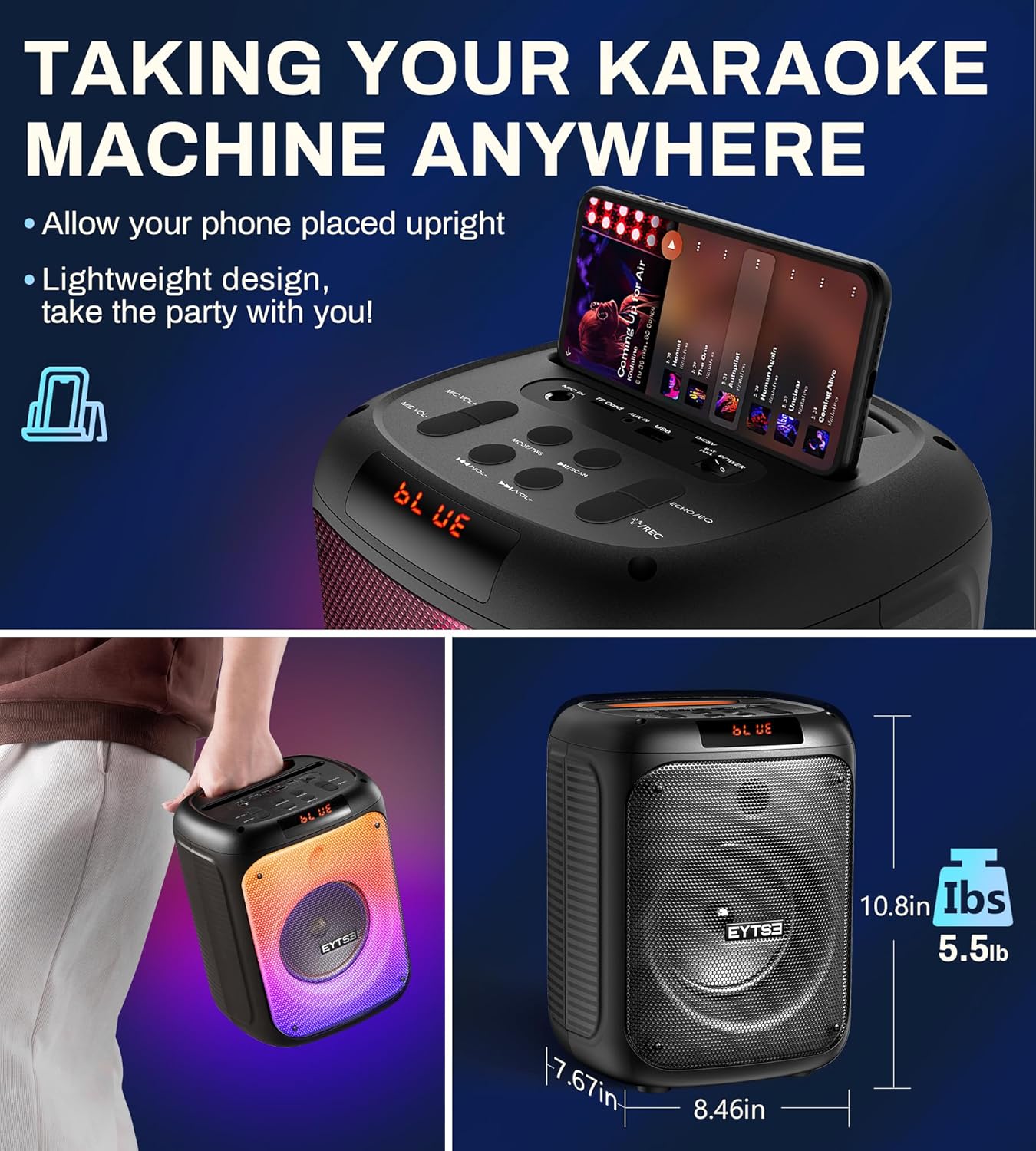
Image 5.2: The EYTSE TK30 with a smartphone placed in its integrated holder, demonstrating its portability and compact dimensions.
6. Maintenance
6.1 Cleaning
- Wipe the exterior of the karaoke machine and microphones with a soft, dry cloth.
- Do not use abrasive cleaners, waxes, or solvents as they may damage the finish.
- Avoid getting moisture into any openings.
6.2 Storage
- When not in use for extended periods, store the unit in a cool, dry place away from direct sunlight and extreme temperatures.
- Remove batteries from the microphones if storing for a long time to prevent leakage.
7. Troubleshooting
| Problem | Possible Cause | Solution |
|---|---|---|
| No power | Battery depleted; Power cable not connected | Charge the unit fully; Ensure power cable is securely connected. |
| No sound from speaker | Volume too low; Incorrect input mode; Device not connected | Increase main unit volume; Press MODE/TWS to select correct input; Reconnect Bluetooth device or cable. |
| Microphone not working | Microphone off; Batteries depleted/incorrectly inserted; Microphone volume too low | Turn on microphone; Replace AA batteries, check polarity; Increase MIC.VOL+ on main unit. |
| Bluetooth connection unstable | Device too far; Interference | Move device closer to the karaoke machine (within 15m); Avoid obstacles or other wireless devices. |
| TWS pairing failed | Units already connected to other devices; Incorrect pairing procedure | Ensure both units are disconnected from other devices; Follow TWS pairing steps carefully (Section 4.5). |
| Battery drains fast | High volume usage; LED lights constantly on | Reduce volume; Turn off LED lights when not needed; Ensure unit is fully charged before use. |
8. Specifications
| Feature | Detail |
|---|---|
| Model Number | TK30 |
| Peak Power Output | 120W |
| Speaker Size | 5.25-inch Full-Range |
| Connectivity | Bluetooth 5.0, USB, TF Card, AUX, Wired Microphone (3.5mm Jack) |
| Bluetooth Range | Up to 15 meters (49 feet) |
| Microphone Type | UHF Wireless Dynamic Microphones (2 included) |
| Microphone Range | Up to 20 meters (65 feet) |
| Main Unit Battery | 6000mAh Lithium Battery |
| Charging Time | 3-4 hours |
| Playtime | Up to 24 hours (varies with volume and LED usage) |
| Microphone Batteries | 2x AA batteries per microphone (not included) |
| Product Dimensions | 8.46 x 7.67 x 10.8 inches |
| Item Weight | 7.24 pounds |
| Power Source | Corded Electric (for charging) |
| Voltage | 110 Volts (AC) |
| Special Features | Echo Effect, Light Up Speaker, PA System, Portable, Rechargeable, TWS Stereo Sound, USB Recording |
9. Warranty and Support
The EYTSE TK30 Portable Karaoke Machine is designed for reliability and performance. For any questions, technical assistance, or warranty claims, please refer to the contact information provided with your purchase or visit the official EYTSE website. Please retain your proof of purchase for warranty service.


