
EUQQ Q92
EUQQ Q92 Open Ear Clip-on Headphones Instruction Manual
Model: Q92
Brand: EUQQ
Product Overview
The EUQQ Q92 Open Ear Clip-on Headphones offer a revolutionary ergonomic design for a unique listening experience, allowing audio to flow naturally without covering your ears. This design ensures environmental awareness, ideal for outdoor activities. Equipped with advanced Bluetooth 5.3 technology and dual built-in microphones, these earbuds provide crystal clear hands-free calls and stable connections with ultra-low latency audio streaming. They are crafted from soft silicone for a lightweight and secure clip-on fit, weighing just 0.18 oz per earbud. The headphones offer 6 hours of playtime on a single charge, with an additional 30 hours from the magnetic charging case, totaling 36 hours of playback. The case features an LED digital display to monitor battery levels and fully recharges in just 1 hour via a Type-C cable. The waterproof design makes them suitable for running and fitness.
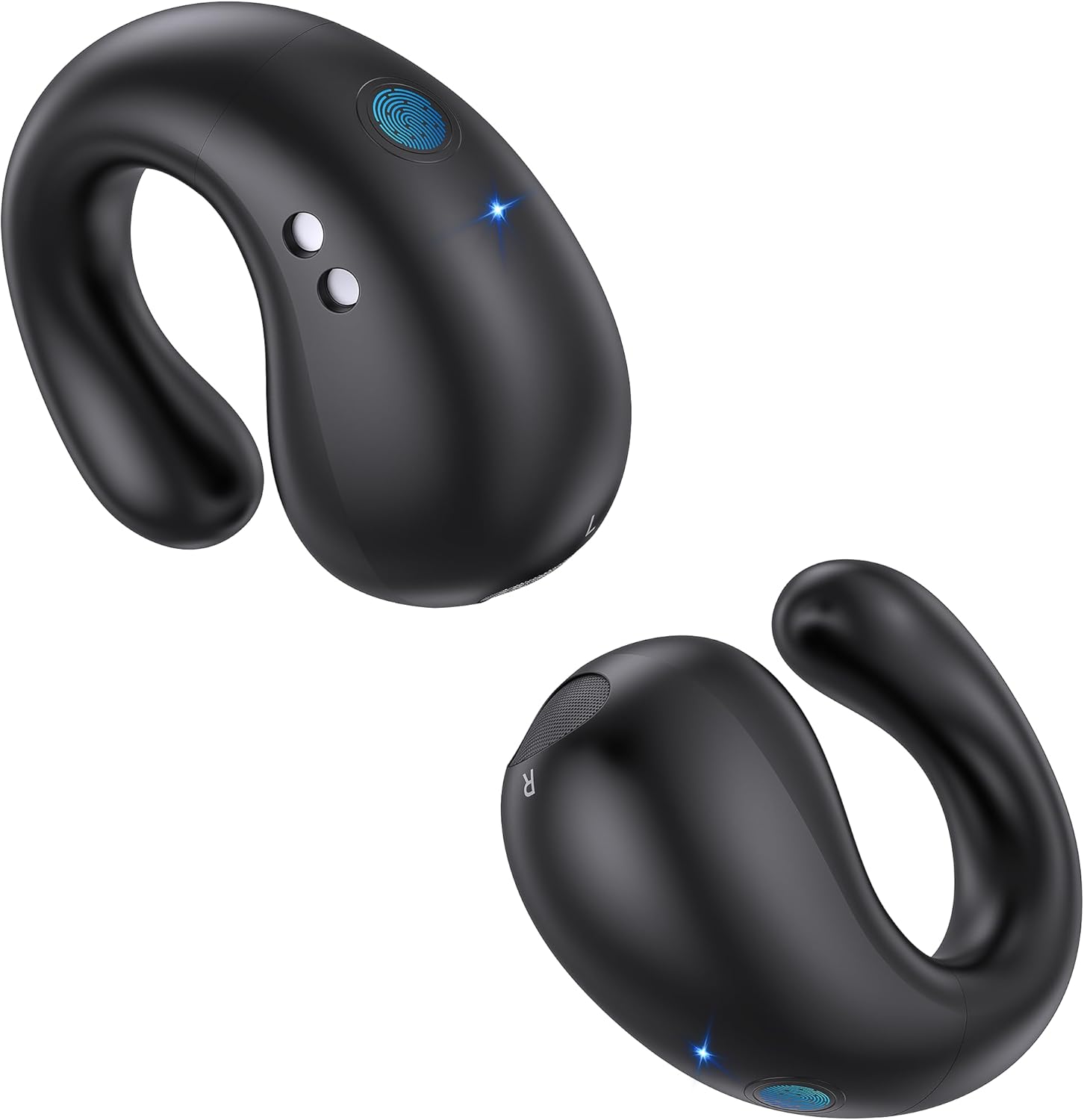
Figure 1: EUQQ Q92 Open Ear Clip-on Headphones and Charging Case.
What's in the Box
- 2 x Wireless Earbuds
- 1 x User Manual
- 1 x Type-C Charging Cable
- 1 x Product Box
- 1 x Charging Case

Figure 2: Included components in the EUQQ Q92 package.
Setup Guide
Initial Charging
Before first use, ensure the charging case and earbuds are fully charged. The charging case features an LED digital display that clearly shows the battery level of both the case and individual earbuds. The case fully recharges in approximately 1 hour via the provided Type-C cable.

Figure 3: LED digital display showing battery levels.
Pairing with Your Device
- Open the charging case and remove both earbuds. They will automatically enter pairing mode.
- On your smartphone, tablet, or other Bluetooth-enabled device, navigate to the Bluetooth settings.
- Look for 'YYK-Q92' in the list of available devices and select it to connect.
- Once connected, the earbuds are ready for use. There are no additional apps required for connection.

Figure 4: Seamless Bluetooth 5.3 connectivity.
Wearing the Earbuds
The earbuds feature an open-ear clip-on design, resting gently on your cochlea without being inserted into the ear canal. This provides a comfortable and secure fit, ideal for extended wear and active use. Simply clip them onto your ear for a stable fit that won't easily fall off.

Figure 5: Proper placement of the open-ear earbuds for comfort and environmental awareness.

Figure 6: The lightweight and secure fit of the earbuds.
Operating Instructions
Touch Controls
The earbuds feature intuitive touch controls for easy operation. Refer to the diagram below for specific functions:

Figure 7: Earbud touch control functions.
- Play/Pause: Click 1 time (L/R earbud)
- Switch Song: Click 2 times (L/R earbud)
- Adjust Volume: Long press 1 second (L/R earbud)
- Reset: Click 4 times (L/R earbud)
- Answer Call: Click 1 time (L/R earbud)
- Reject Call: Long press 1 second (L/R earbud)
- Voice Assistant (Siri): Click 3 times (L/R earbud) when not playing music
- Hang Up Call: Click 2 times (L/R earbud)
Making and Receiving Calls
The earbuds are equipped with dual built-in microphones for clear hands-free calls. Use the touch controls to answer, reject, or hang up calls as needed.
Maintenance
Battery Life and Charging
The earbuds provide 6 hours of continuous playtime on a single charge. The lightweight magnetic charging case offers an additional 30 hours, extending the total playback time to 36 hours. With an impressive 80 hours of standby time, your earbuds are ready when you are. The case fully recharges in just 1 hour via the Type-C cable.

Figure 8: Battery life and charging details.
Waterproof Design
The earbuds feature a waterproof design, making them suitable for various activities including running and fitness, without concern for sweat or light rain.
Troubleshooting
Factory Restore Setting
If you experience pairing issues or other connection-related problems, you can perform a factory reset:
- Delete 'YYK-Q92' from the Bluetooth menu on your device and deactivate the Bluetooth setting.
- Ensure the charging case has power or is plugged into a power supply.
- Insert both earbuds into the charging case to charge.
- Press and hold both earbuds for 8 seconds simultaneously to clear the pairing record with the last device. During this period, both earbud LEDs will flash red and blue light once, then turn to red light to indicate charging.
- Turn on the Bluetooth setting on your device and reconnect the earbuds. They should now work properly.
- If the issue persists, repeat these steps.
Specifications
| Feature | Detail |
|---|---|
| Model Name | Q92-B |
| Connectivity Technology | Wireless (Bluetooth 5.3) |
| Wireless Range | 10 Meters |
| Included Components | User Manual, 1*Box, 1*Type-c Charging Cable, 2*Wireless Earbuds, 1*Charging Case |
| Material | Plastic |
| Charging Time (Case) | 1 Hour |
| Battery Life (Earbuds) | 6 Hours (single charge) |
| Total Playtime (with Case) | 36 Hours |
| Standby Time | 80 Hours |
| Control Type | Touch Control |
| Water Resistance Level | Waterproof |
| Frequency Range | 20 Hz - 20,000 Hz |
| Item Weight | 0.317 ounces |
| Manufacturer | EUQQ |
Official Product Videos
Open Ear Clip on Headphones, Wireless Earbuds
This video provides a comprehensive overview of the EUQQ Q92 earbuds, demonstrating their comfortable open-ear design, easy pairing process, and impressive sound quality. It also highlights the functionality of the built-in microphone for calls.
Open Ear Clip on Headphones
Explore the unique design and features of the Open Ear Clip on Headphones in this video. It showcases the secure fit and how the earbuds rest comfortably without entering the ear canal, ensuring awareness of your surroundings.
EUQQ Q92-B Open Ear Clip Earbuds
This official Amazon video provides a concise overview of the EUQQ Q92-B earbuds, highlighting their key selling points and design benefits for users seeking comfortable and aware listening experiences.
Warranty and Support
Specific warranty and support information for the EUQQ Q92 Open Ear Clip-on Headphones is not provided in this manual. Please refer to the product packaging or the manufacturer's official website for detailed warranty terms and customer support contact information.
Related documentsQ92


Ask a question about this manual
Ask about setup, troubleshooting, compatibility, parts, safety, or missing instructions. Manuals+ will review the question and use this page’s manual context to help answer it.