
Taylor 5294756
Taylor Digital Bathroom Talking Scale User Manual
Model: 5294756
Product Overview
The Taylor Electronic Glass Talking Scale is designed to help you monitor your weight with ease and accuracy. This functional and stylish scale provides weight readings both visually on its LCD display and audibly in multiple languages, making it ideal for users with visual impairments.

Figure 1: Front view of the Taylor Digital Bathroom Talking Scale.
Key Features:
- Talking Function: Announces weight in pounds (lb) in English, or kilograms (kg) in Spanish, Greek, German, or Croatian.
- High Accuracy: Equipped with four precision sensors for consistent and reliable measurements, reflecting weight in 0.2 lb increments.
- High Capacity: Supports weights up to 440 lb (200 kg).
- Stylish Design: Features a durable tempered glass platform with stainless steel accents, measuring 12.2" x 12.2".
- Easy-to-Read Display: A 2.8" x 1.2" LCD provides clear digital readouts.
- Convenient Functions: Includes instant-on, auto-off, and a low battery indicator.

Figure 2: Key features of the scale including platform size, display size, and multi-language voice announcement.

Figure 3: The scale's talking feature, announcing weight measurements in five languages.
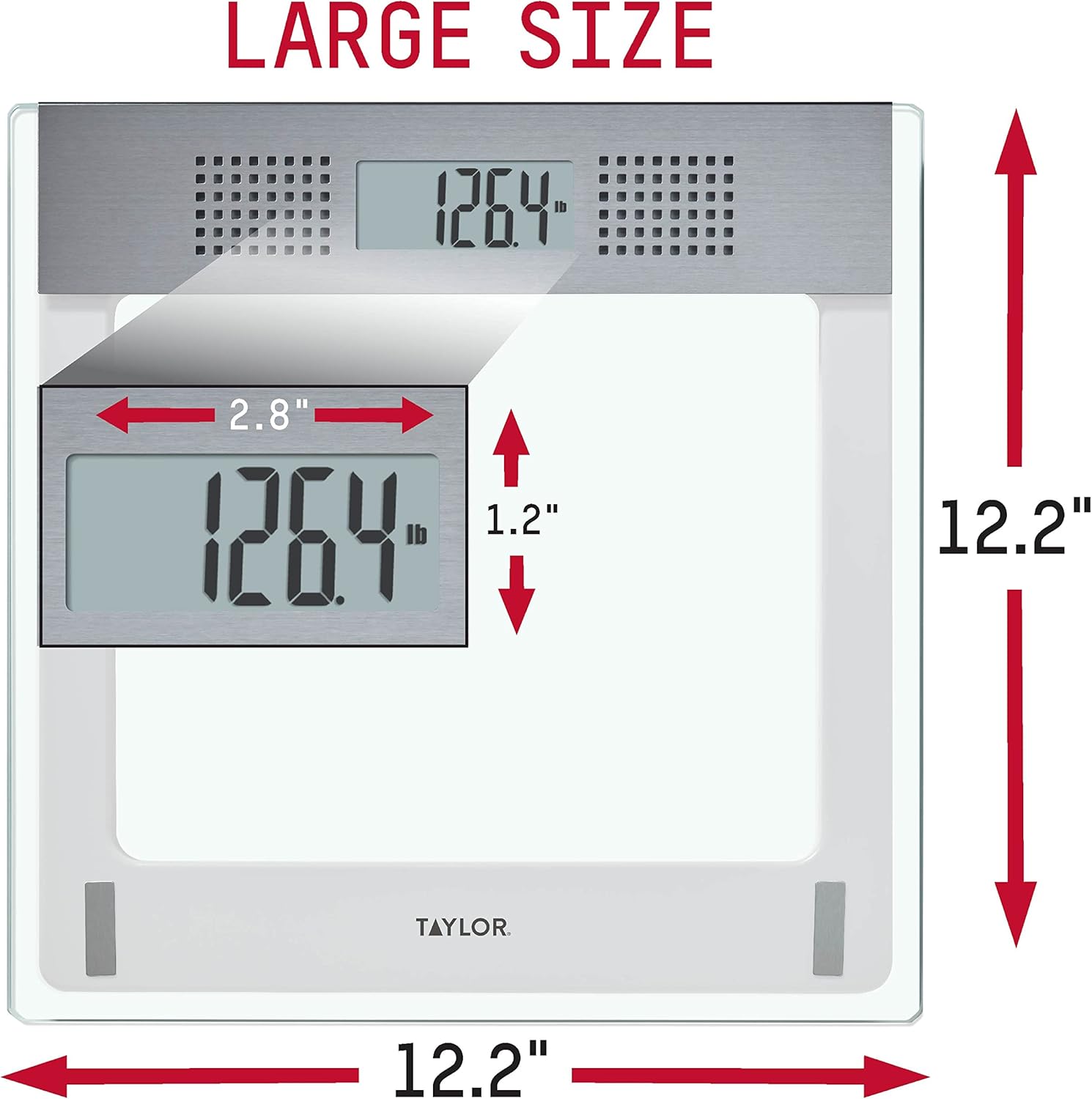
Figure 4: Dimensions of the scale, highlighting its compact and spacious design.
Setup
Battery Installation:
The scale requires 3 AAA batteries (included). Locate the battery compartment on the underside of the scale.

Figure 5: Underside of the scale with battery compartment visible.
- Open the battery compartment cover.
- Insert the 3 AAA batteries, ensuring correct polarity (+/-).
- Close the battery compartment cover securely.
Initial Setup and Placement:
For best performance and accurate readings, follow these steps when initially setting up your scale:
- Place your scale on a hard, flat surface. Do not use on uneven tile, flooring, or carpeting, as this can affect accuracy.
- Step on the scale with one foot, applying enough pressure to turn the scale on.
- Then, remove your foot. The digital readout should show dashes or zeros.
- The scale will automatically turn off.
- Now your scale is ready to take a weight reading. Step on the scale evenly with both feet.

Figure 6: Original instruction sheet with setup guidelines.

Figure 7: The scale positioned on a hard, flat surface.
Operating Instructions
Taking a Weight Reading:
- Ensure the scale is on a hard, flat surface.
- Gently step onto the scale with both feet, centering your weight. The scale will automatically turn on.
- Stand still until your weight is displayed on the LCD and announced audibly.
- The scale will automatically turn off after a few seconds of inactivity.

Figure 8: Proper stance for taking a weight reading.
Language Selection:
The scale can announce weight in English, Spanish, Greek, German, or Croatian. Refer to the underside of the scale for a button or switch to cycle through language options. Press the button to select your desired language.
Maintenance
Cleaning:
To clean your scale, wipe it with a damp cloth and mild detergent. Do not use abrasive cleaners or immerse the scale in water.
Battery Replacement:
When the low battery indicator appears on the display, it's time to replace the batteries. Follow the battery installation steps in the "Setup" section.
Troubleshooting
Inconsistent Readings or Errors:
If you encounter any error or inconsistent readings, please follow these steps:
- Ensure the scale is placed on a hard, flat, and level surface. Avoid carpets or uneven tiles.
- Try to keep your scale in the same location or position as much as possible.
- If you move the scale for any reason, please reset the scale as indicated in the "Initial Setup and Placement" section (step 2 and 3).
- Remember that your weight readings may vary throughout the day. For most consistent readings, we recommend that you use the same scale, weigh-in at the same time of day, and wear similar clothing.
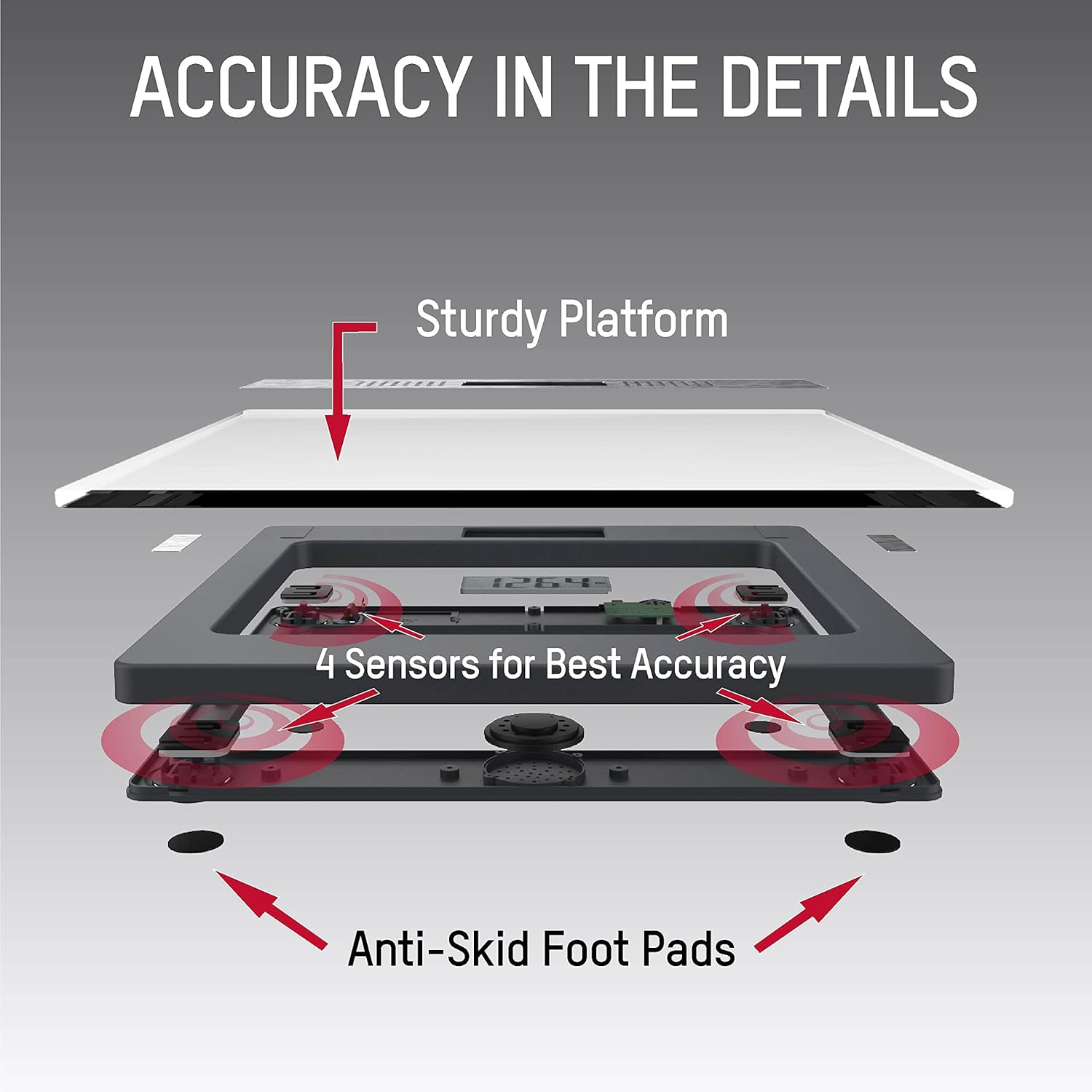
Figure 9: The scale's four precision sensors and anti-skid foot pads contribute to accurate measurements.
Specifications
| Feature | Detail |
|---|---|
| Product Dimensions | 14.13 x 14.72 x 2.05 inches |
| Item Model Number | 5294756 |
| Weight Capacity | 440 lb (200 kg) |
| Weight Increments | 0.2 lb |
| Display Type | LCD (2.8" x 1.2") |
| Special Feature | Talking (5 Languages: English, Spanish, Greek, German, Croatian) |
| Power Source | 3 AAA Batteries (included) |
| Manufacturer | Lifetime Brands Inc. |

Figure 10: Side profile of the scale, illustrating its slim form factor.
Warranty and Support
Taylor, established in 1851, is committed to providing high-quality, accurate, and durable products. We value your thoughts on our products and services.
Contact Information:
- Phone: 1-866-843-3905 (8am - 5pm Mountain Standard Time, Monday - Friday)
- Email: taylorusa@lifetimebrands.com
Please post an online review to help us continue to meet your needs and expectations.
Important Information
Statements regarding dietary supplements have not been evaluated by the FDA and are not intended to diagnose, treat, cure, or prevent any disease or health condition.
Related documents5294756


Ask a question about this manual
Ask about setup, troubleshooting, compatibility, parts, safety, or missing instructions. Manuals+ will review the question and use this page’s manual context to help answer it.