
Introduction
This manual provides comprehensive instructions for the installation, operation, and maintenance of your OREI BK-401C 8K 4x1 USB-C/HDMI 2.1 Switch. Please read this manual thoroughly before using the device to ensure proper functionality and to prevent damage.
The OREI BK-401C is designed to allow seamless switching between multiple video sources (three HDMI and one USB-C) to a single HDMI display, supporting high-resolution video and advanced audio formats.
Package Contents
Verify that all items are present in the package:
- 1x OREI BK-401C USB-C / HDMI Switcher
- 1x 5V/1A Power Supply
- 1x IR Remote Control (with 1 Lithium Ion battery included)
- 1x User Manual

Image: Icons representing the contents of the OREI BK-401C package, including the switch unit, power adapter, IR remote control, and user manual.
Features
The OREI BK-401C switch offers advanced capabilities for high-definition audio and video distribution:
- High Resolution Support: Supports video resolutions up to 8K@60Hz, 4K@120Hz, and 1080p@240Hz.
- HDMI 2.1 Compliance: Fully compliant with HDMI 2.1, HDCP 2.3/2.2/1.4 standards.
- Advanced HDR Formats: Compatible with HDR10+, HDR10, Dolby Vision, and HLG.
- High Bandwidth: Features 48Gbps video bandwidth for optimal performance.
- Gaming Enhancements: Supports Variable Refresh Rate (VRR), Auto Low-Latency Mode (ALLM), and Fast VActive (FVA) functions.
- Multiple Inputs: Provides three HDMI inputs and one USB-C input for versatile connectivity.
- Flexible Switching: Allows switching between sources via the included IR remote control or the button on the front panel. Supports automatic switching.
- Audio Support: Compatible with LPCM 7.1, Dolby TrueHD, Dolby Atmos, DTS-HD Master Audio, and DTS:X Audio.
- CEC Functionality: Consumer Electronics Control (CEC) is supported for HDMI ports.

Image: Key features of the OREI BK-401C switch, including supported resolutions, HDR formats, and audio technologies.
Setup
Follow these steps to connect your OREI BK-401C switch:
- Power Off Devices: Ensure all source devices (e.g., gaming consoles, PCs, Blu-ray players) and your display (TV, monitor, projector) are powered off before making connections.
- Connect Source Devices:
- Connect up to three HDMI source devices to the HDMI IN 1, IN 2, and IN 3 ports on the switch using high-quality HDMI 2.1 cables.
- Connect one USB-C source device (e.g., laptop) to the USB-C IN 4 port on the switch using a compatible USB-C to HDMI cable or adapter if necessary.
- Connect Display: Connect your HDMI display (TV, monitor, projector) to the HDMI OUT port on the switch using a high-quality HDMI 2.1 cable.
- Connect Power: Connect the included 5V/1A power supply to the DC 5V port on the switch, then plug the power adapter into a wall outlet.
- Power On: Power on your display and then your source devices.
Note: For optimal performance, it is recommended to use high-quality HDMI cables under 25 feet (7.6 meters) in length. For longer distances, OREI Fiber Optic HDMI cables are recommended.

Image: Illustrates how to connect various source devices and a display to the OREI BK-401C switch.
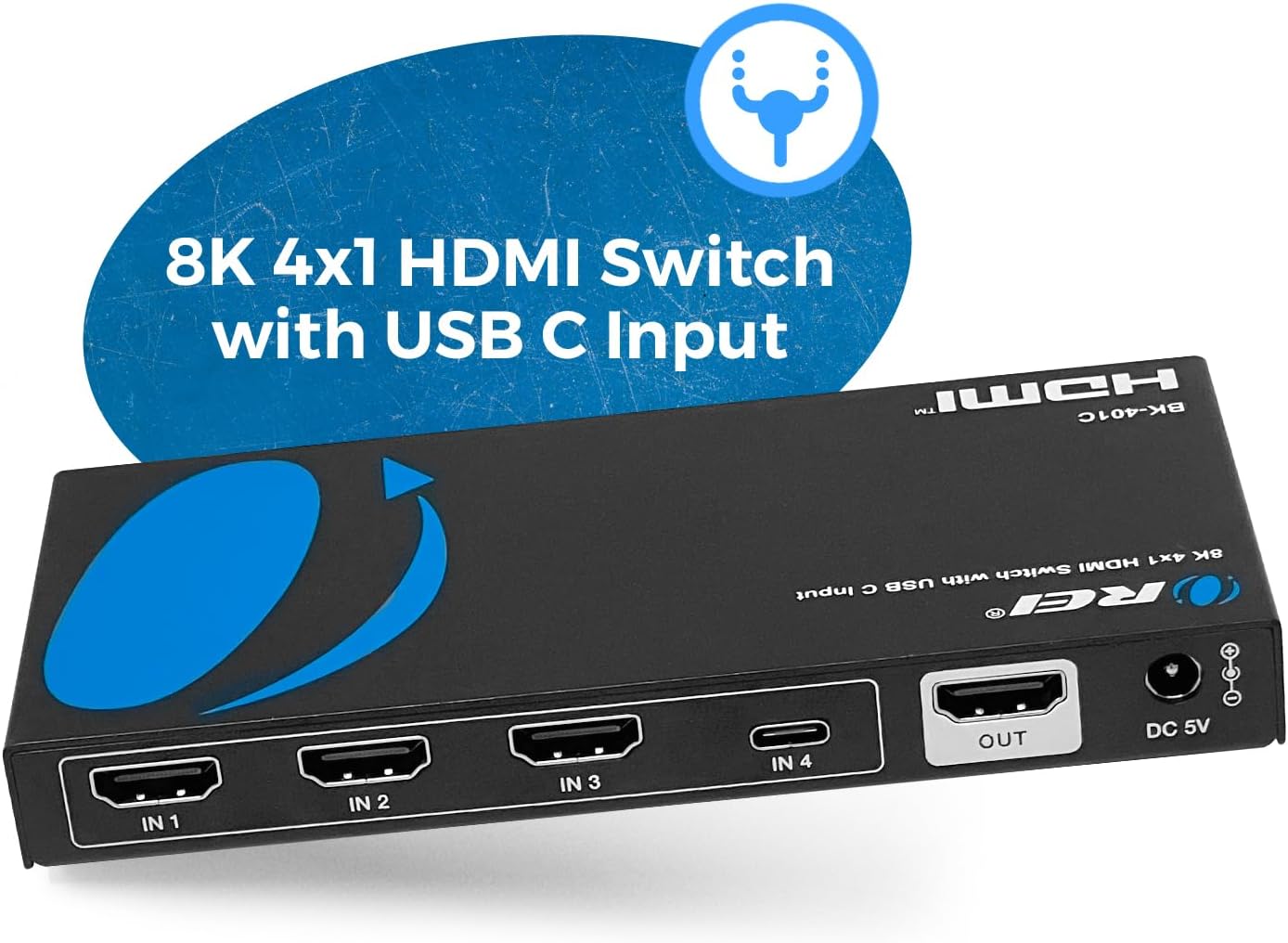
Image: Detailed view of the input and output ports on the OREI BK-401C switch.
Operating Instructions
The OREI BK-401C switch offers both manual and automatic input switching options.
Manual Switching
- Using the Front Panel Button: Press the "SWITCH" button on the front panel of the device to cycle through the available inputs (IN 1, IN 2, IN 3, IN 4).
- Using the IR Remote Control: Point the IR remote control towards the switch and press the corresponding input button (1, 2, 3, or C for USB-C) to select your desired source.
Automatic Switching
The switch supports automatic input detection. When a new active source is connected or an active source is powered on, the switch can automatically switch to that input. This feature can be enabled or disabled using the "AUTO" button on the remote control or the switch itself.

Image: Demonstrates the manual switching methods using the front panel button and the IR remote control.

Image: The OREI BK-401C switch with its remote, illustrating the control options for selecting inputs.
Specifications
| Feature | Detail |
|---|---|
| Model Number | BK-401C |
| HDMI Version | HDMI 2.1 |
| HDCP Compliance | HDCP 2.3/2.2/1.4 |
| Video Resolution | Up to 8K@60Hz, 4K@120Hz, 1080p@240Hz |
| HDR Support | HDR10+, HDR10, Dolby Vision, HLG |
| Video Bandwidth | 48Gbps |
| Gaming Features | VRR, ALLM, FVA |
| Inputs | 3x HDMI, 1x USB-C |
| Output | 1x HDMI |
| Audio Formats | LPCM 7.1, Dolby TrueHD, Dolby Atmos, DTS-HD Master Audio, DTS:X |
| Control | Front panel button, IR remote, Auto-switching |
| Dimensions (L x W x H) | 5.7 x 2.67 x 0.7 inches (approx. 14.5 x 6.8 x 1.8 cm) |
| Weight | 9.1 ounces (approx. 258g) |
| Power Supply | DC 5V/1A |
| Color | Black |

Image: Physical dimensions and weight of the OREI BK-401C switch.
Troubleshooting
If you encounter issues with your OREI BK-401C switch, refer to the following common troubleshooting steps:
- No Video Output:
- Ensure all cables (HDMI, USB-C, power) are securely connected.
- Verify that the correct input source is selected on the switch.
- Check that your display is set to the correct HDMI input.
- Try connecting the source device directly to the display to rule out cable or source issues.
- Restart all connected devices, including the switch, source, and display.
- Ensure HDMI cables are high-quality and within recommended length (under 25 feet).
- Intermittent Video/Audio:
- Check for loose cable connections.
- Test with different HDMI cables.
- Ensure the power adapter is providing stable power to the switch.
- Remote Control Not Working:
- Ensure there are no obstructions between the remote and the switch's IR receiver.
- Check the battery in the remote control and replace if necessary.
- Ensure the remote is pointed directly at the switch.
- Resolution/Refresh Rate Issues:
- Verify that your source device and display both support the desired resolution and refresh rate.
- Ensure you are using HDMI 2.1 compliant cables for 8K@60Hz or 4K@120Hz.
If problems persist after following these steps, please contact OREI customer support.
Maintenance
To ensure the longevity and optimal performance of your OREI BK-401C switch, follow these maintenance guidelines:
- Cleaning: Use a soft, dry cloth to clean the exterior of the device. Do not use liquid cleaners or aerosols.
- Ventilation: Ensure the device is placed in a well-ventilated area to prevent overheating. Do not block any ventilation openings.
- Environment: Avoid exposing the device to extreme temperatures, humidity, dust, or direct sunlight.
- Power: Always use the provided 5V/1A power adapter. Disconnect power during electrical storms or when unused for long periods.
Warranty and Support
The OREI BK-401C switch comes with a 1-Year Full Warranty from the manufacturer. This warranty covers defects in materials and workmanship under normal use.
OREI also provides Lifetime Technical Support for this product. If you require assistance with setup, troubleshooting, or have any questions, please contact OREI customer support through their official channels.
For warranty claims or technical support, please visit the OREI website or refer to the contact information provided in your product packaging.


