
1. Introduction
Welcome to the AYA NEO Pocket DMG user manual. This document provides essential information for setting up, operating, maintaining, and troubleshooting your AYA NEO Pocket DMG handheld gaming console. The Pocket DMG is a high-performance portable device designed for gaming enthusiasts, featuring a vibrant OLED display, powerful Snapdragon G3x Gen 2 processor, and an Android 13 operating system.

Image 1.1: The AYA NEO Pocket DMG handheld gaming console.
2. Product Overview and Features
The AYA NEO Pocket DMG combines classic handheld design with modern technology to deliver a robust gaming experience. Key features include:
- Powerful Performance: Equipped with the Snapdragon G3x Gen 2 Gaming Platform, featuring a 3.36 GHz Kryo Prime Ultra Octa-Core CPU and Adreno A32 GPU, ensuring smooth performance for a wide range of games.
- Vibrant OLED Display: A 3.92-inch OLED screen with a resolution of 1240x1080 pixels and 419 PPI, offering deep blacks and vivid colors.
- Ample Memory and Storage: 16GB LPDDR5X RAM and 512GB UFS 4.0 internal storage, expandable via microSD card.
- Innovative Controls: Features a left joystick with Hall Effect technology, a dual-mode touchpad, D-pad, ABXY buttons, and coastline shoulder buttons for precise and versatile control.
- Long Battery Life: A 6000mAh battery supports extended gaming sessions, with 25W PD fast charging capability.
- Advanced Connectivity: Supports Wi-Fi 6 (802.11ax) and Bluetooth 5.3 for stable wireless connections, along with a full-featured USB 3.2 Gen 2 Type-C interface.
- Android 13 Operating System: Provides access to a vast library of Android games and applications.

Image 2.1: Overview of the AYA NEO Pocket DMG's design and core features.
3. Setup Guide
3.1 Initial Charging
Before first use, fully charge your AYA NEO Pocket DMG. Connect the included USB Type-C cable to the device's charging port and the other end to a compatible 25W PD fast charger. The charging indicator will show the charging status.
3.2 Powering On/Off
- To Power On: Press and hold the Power button located on the device until the screen illuminates.
- To Power Off: Press and hold the Power button until the power options appear on the screen. Select 'Power Off' to shut down the device. A short press will put the device into sleep mode.
3.3 Initial Android Setup
Upon first power-on, you will be guided through the standard Android 13 setup process. This includes selecting your language, connecting to a Wi-Fi network, and logging into your Google account. A stable internet connection is recommended for this process.
3.4 Connecting to Networks and Devices
- Wi-Fi: Navigate to Settings > Network & internet > Wi-Fi to connect to available wireless networks.
- Bluetooth: Navigate to Settings > Connected devices > Connection preferences > Bluetooth to pair with Bluetooth accessories such as headphones or external controllers.
4. Operating Instructions
4.1 Navigation and Controls
The Pocket DMG features a comprehensive control layout:
- Left Joystick: Hall Effect technology for precise analog input.
- D-Pad: For directional input in games and menu navigation.
- ABXY Buttons: Standard action buttons.
- Shoulder Buttons: Located on the top edge for additional in-game actions.
- Dual-Mode Touchpad: Offers versatile control options.
- MagicSwitch Wheel Key: Provides personalized function definition.

Image 4.1: Advanced controller functions of the AYA NEO Pocket DMG.
4.2 Gaming and Software
The Pocket DMG runs on Android 13, allowing access to the Google Play Store for downloading games and applications. The device also integrates with AYASpace and AYAHome for enhanced features and management.
- AYASpace/AYAHome: Utilize these applications for managing your games, system settings, and accessing exclusive features.
- Game Database: The device includes a game database for quick management of locally downloaded or imported games. Note that AYA NEO does not provide game resource downloads.
- Button Mapping: The device supports flexible button mapping, allowing you to adjust controls for different games.
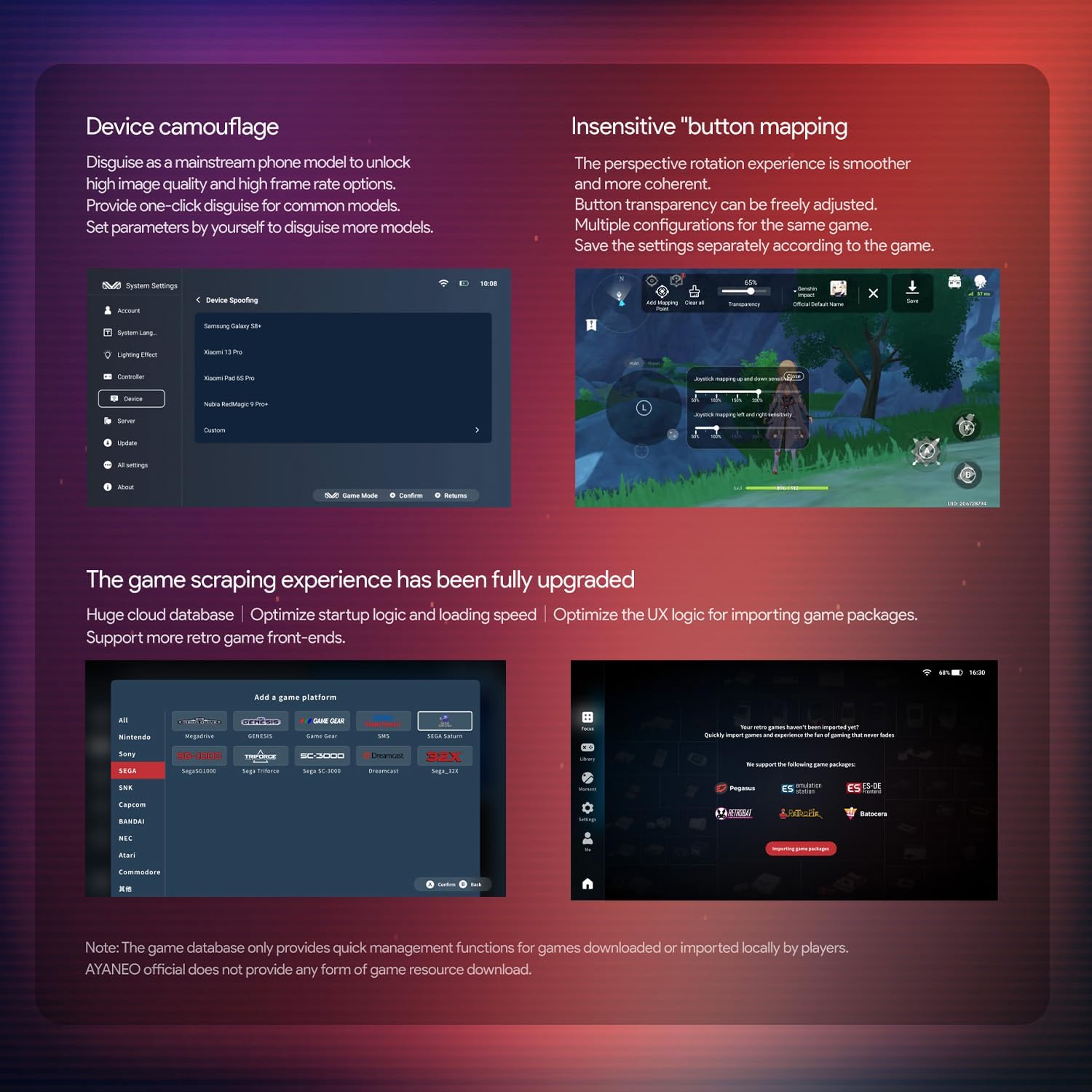
Image 4.2: Software features for device management and game optimization.
5. Maintenance
5.1 Cleaning the Device
To maintain the appearance and functionality of your Pocket DMG:
- Use a soft, dry, lint-free cloth to wipe the screen and body.
- For stubborn smudges, slightly dampen the cloth with water or a screen cleaner. Avoid harsh chemicals.
- Do not spray cleaners directly onto the device.
5.2 Battery Care
To prolong battery life:
- Avoid extreme temperatures.
- Do not fully discharge the battery frequently.
- If storing the device for an extended period, charge it to about 50% and power it off.
5.3 Software Updates
Regularly check for system updates to ensure optimal performance and access to the latest features. Updates can typically be found in the device's Settings menu under 'System' or through the AYAHome application.
6. Troubleshooting
If you encounter issues with your AYA NEO Pocket DMG, refer to the following common solutions:
- Device Not Powering On: Ensure the device is sufficiently charged. Connect it to a charger for at least 30 minutes before attempting to power on again.
- Unresponsive Screen: If the screen is unresponsive, try restarting the device by holding the Power button for approximately 10-15 seconds until it powers off, then power it on normally.
- Connectivity Issues (Wi-Fi/Bluetooth): Check that Wi-Fi or Bluetooth is enabled in settings. Try toggling them off and on. For Wi-Fi, ensure you are within range of a known network and have entered the correct password.
- Performance Lag: Close unnecessary background applications. Ensure the device has sufficient free storage space. Consider reducing in-game graphics settings if applicable.
- Application Crashes: Try clearing the cache of the problematic application (Settings > Apps > [App Name] > Storage & cache > Clear cache). If the issue persists, reinstall the application.
For persistent issues not resolved by these steps, please refer to the official AYA NEO support resources.
7. Specifications
Detailed technical specifications for the AYA NEO Pocket DMG (Model: B0DG63Q7TN):
| Feature | Specification |
|---|---|
| Processor | Snapdragon G3x Gen 2 (3.36 GHz) |
| Operating System | Android 13 |
| Display | 3.92-inch OLED, 1240x1080 pixels, 419 PPI |
| RAM | 16GB LPDDR5X |
| Internal Storage | 512GB UFS 4.0 (expandable via microSD) |
| Battery | 6000mAh, 25W PD Fast Charging |
| Connectivity | Wi-Fi 6 (802.11ax), Bluetooth 5.3, USB 3.2 Gen 2 Type-C |
| Controls | Hall Effect Joystick, D-Pad, ABXY Buttons, Shoulder Buttons, Dual-Mode Touchpad, MagicSwitch Wheel Key |
| Dimensions | 3.6 x 5.94 x 0.88 inches |
| Weight | 278 Grams (9.8 ounces) |
| Material | Plastic |
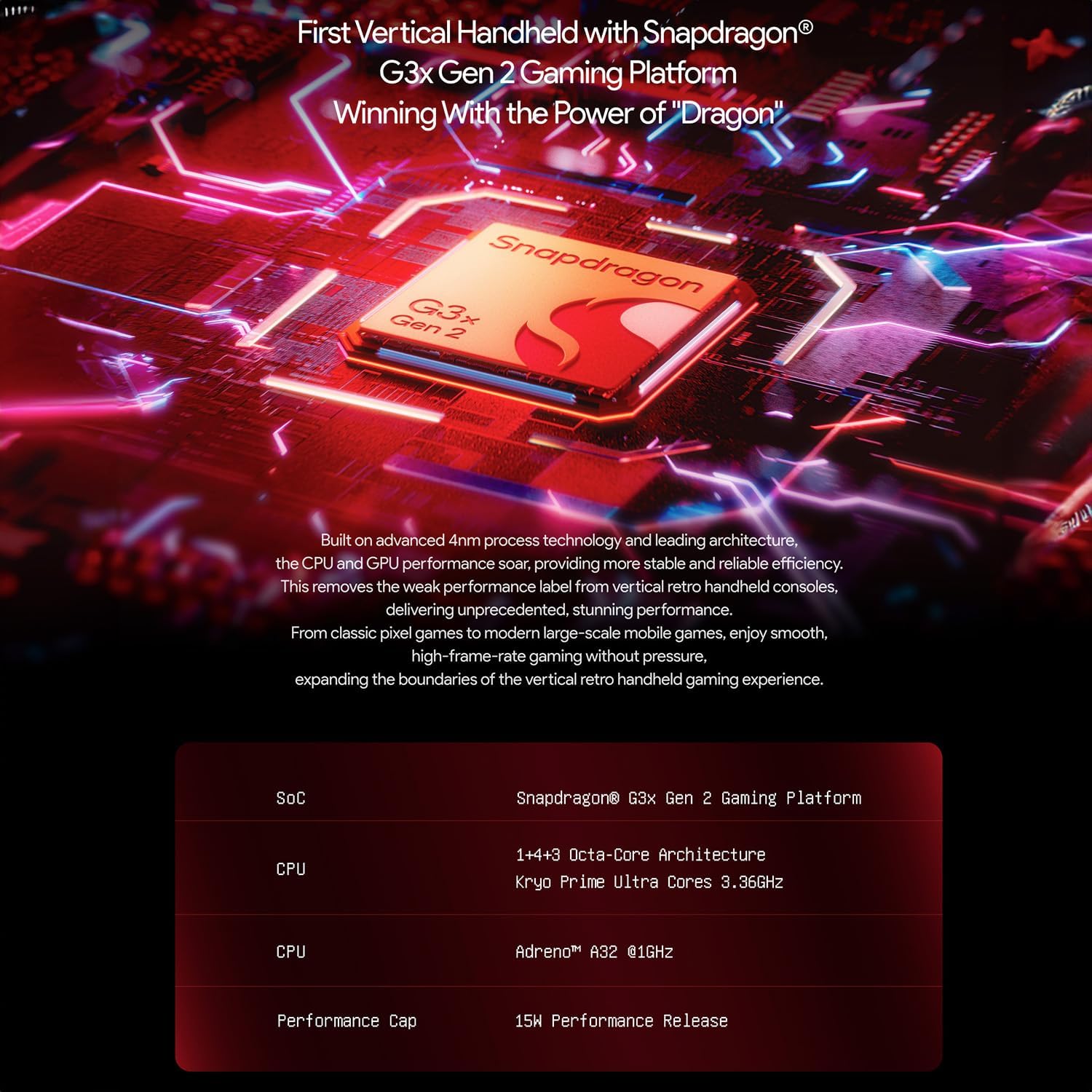
Image 7.1: Snapdragon G3x Gen 2 Gaming Platform details.

Image 7.2: OLED Dazzling Screen specifications.

Image 7.3: Memory and Storage specifications.

Image 7.4: 6000mAh battery capacity.
8. Warranty and Support
For information regarding product warranty, returns, and technical support, please refer to the official AYA NEO website or contact your retailer. Keep your proof of purchase for warranty claims.
Online resources and FAQs may also be available on the AYA NEO support pages to assist with common inquiries.