
1. Introduction
Thank you for choosing the Gochanmi NX800 Audio Mixer. This professional 8-channel mixer features 99 DSP effects, a preamplifier, USB and Bluetooth connectivity, independent 48V phantom power, and a 7-segment equalizer. This manual provides essential information for setting up, operating, and maintaining your device to ensure optimal performance and longevity.
2. Safety Information
- Read all instructions carefully before operating the device.
- Keep this manual for future reference.
- Do not expose the device to rain or moisture.
- Do not block any ventilation openings.
- Use only attachments/accessories specified by the manufacturer.
- Disconnect the power cord during lightning storms or when unused for long periods.
- Refer all servicing to qualified service personnel.
3. Package Contents
Carefully unpack your Gochanmi NX800 Audio Mixer and check that all items are present and in good condition. If any items are missing or damaged, contact your retailer immediately.
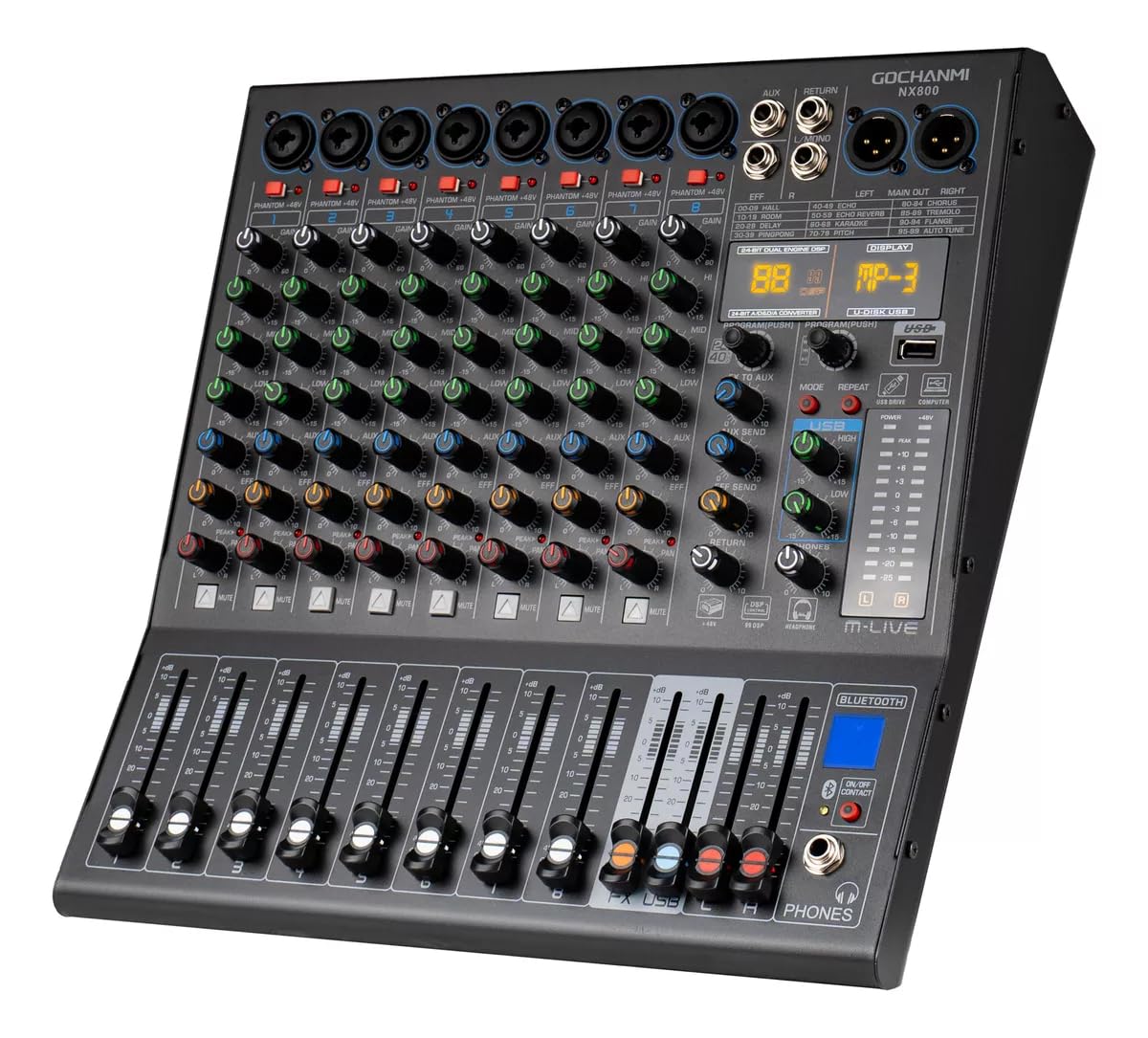
Image: Gochanmi NX800 Audio Mixer packaging and contents. The image shows the mixer unit, power cable, protective foam, instruction manual, and the packaging box. An additional cardboard box is used for protection, and a post-sales service card is included.
- Power Cable
- NX800 Unit
- Protective Foam
- Instruction Manual
- Packaging Box
4. Product Overview and Features
The Gochanmi NX800 is a versatile 8-channel audio mixer designed for professional use, offering a comprehensive set of features for various audio applications.
- Professional Bluetooth mixer with ultra-low noise discrete microphone preamplifier and +48V phantom power.
- 8-way microphone input interface compatible with 8-way line input interface.
- Each microphone input interface has an independent 48V phantom power supply.
- Each mono input channel is equipped with a 3-segment equalizer and a peak indicator light.
- Provides 2 groups of auxiliary outputs and 1 headphone monitoring output channel.
- 99 types of built-in DSP effects.
- Bluetooth, MP3, large screen player, USB with sound card function, USB computer recording, and direct U-disk recording capabilities.
5. Controls and Functions
5.1 Channel Controls (Left Side)

Image: Detailed view of the left side controls of the Gochanmi NX800 Audio Mixer, showing individual channel inputs and controls.
- Multifunction Input Port: Universal interface compatible with XLR and 6.35mm connectors.
- +48V Phantom Power Switch: Each channel has its own +48V switch. Control whether to provide +48V Phantom power based on connected devices.
- Gain Controller: Turn right to increase channel gain, and left to decrease channel gain.
- Treble Adjustment: Adjust the treble portion of this input channel. Turning left decreases treble, turning right increases treble.
- Mids Control: Adjust the mid-range portion of this input channel. Turning left decreases mids, turning right increases mids.
- Bass Control: Adjust the bass portion of this input channel. Turning left decreases bass, turning right increases bass.
- AUX Output Control: If using the AUX output as an auxiliary output, adjust this control left or right to control the output level for signals sent to AUX.
- Sound Effects Control: Use this control to adjust the intensity of sound effects. Turning left decreases effects, turning right increases effects.
- Sound Field Positioning Control (PAN): Adjusts the spatial distribution of the sound source in this channel. Turning left positions the sound source to the left, turning right positions it to the right.
- Mute Button: Pressing this button mutes all sounds from this channel.
- Slider Volume: Sliding up increases input volume, sliding down decreases volume.
5.2 Master and USB/Bluetooth Controls (Right Side)

Image: Detailed view of the right side controls of the Gochanmi NX800 Audio Mixer, including master outputs, USB/Bluetooth section, and effects controls.
- Auxiliary Output: An additional output port for sending signals to other devices.
- Effects Return to Input: Used to mix audio signals processed by external effects devices with the main output signal.
- Main Output: The main left and right channel outputs. The output signal is the final result after all adjustments.
- Effects Processor Output Connector: Send the audio signal to an external effects processor via this connection.
- DSP Effect Change Rotary Knob: Press to make the screen flash, then turn left or right to change DSP effects. Press again to confirm.
- DSP Control Button: Control the start and pause of the DSP effect.
- USB Interface: Connect devices such as mobile phones, computers, USB flash drives, and other devices.
- USB Treble Control: Controls the USB treble level.
- USB Bass Control: Controls the USB bass level.
- FX Effects Output Control via AUX: Adjusts the intensity of FX effects sent to AUX.
- AUX Send Control: Controls the AUX send level.
- Effects Send Control: Controls the effects send level.
- Effects Return Mix Control: Controls the intensity of the effects return.
- Monitor Volume Control: Controls the volume of the monitoring headphones.
- Bluetooth Connection Switch: Enable or disable the Bluetooth connection function.
- Monitor Headphone Port: Connect your monitoring headphones here.
5.3 DSP Effects and Equalization

Image: Display showing the 99 built-in DSP reverberation effects and how to select them.
The NX800 features 99 built-in DSP reverberation effects. Use the DSP Effect Change Rotary Knob (Control 5.2.5) to select the desired effect type. Turn the knob to browse through the effects, and press it to confirm your selection. The effect will take effect automatically.
- 00-09: HALL
- 10-19: ROOM
- 20-29: DELAY
- 30-39: PI-PONG
- 40-49: ECHO
- 50-59: REVERB
- 60-69: KARAOKE
- 70-79: PITCH
- 80-84: CHORUS
- 85-89: TREMOLO
- 90-94: FLANGE
- 95-99: AUTO TUNE

Image: Illustration of the 48dB high gain preamplifier, and the HI (treble), MID (mids), LOW (bass) equalization controls, and EFF (reverberation effect) control.
The NX800 features a 48dB high gain, ultra-low noise discrete microphone preamplifier, compatible with 6.35mm and XLR connectors. Each mono channel includes a 3-segment equalizer:
- HI (Treble Adjustment): Adjusts high frequencies from -15dB to +15dB.
- MID (Mids Control): Adjusts mid-range frequencies from -15dB to +15dB.
- LOW (Bass Control): Adjusts low frequencies from -15dB to +15dB.
The EFF (Reverberation Effect Control) allows you to add and adjust reverberation to your music, from 0 to +10.

Image: Close-up of the independent +48V Phantom Power buttons and Mute buttons for each channel on the Gochanmi NX800 Audio Mixer.
Each channel features an Independent +48V Phantom Power Button, allowing you to supply phantom power to condenser microphones as needed. Additionally, each channel has an Independent Mute Button to silence the channel when required.
6. Setup
Follow these steps to set up your Gochanmi NX800 Audio Mixer for operation.

Image: Connection diagram for the Gochanmi NX800 Audio Mixer, showing various input and output devices.
- Power Connection: Connect the provided power cable to the mixer and a suitable power outlet (110 Volts).
- Input Devices:
- Connect microphones (wireless, condenser, dynamic) using XLR cables or 6.35mm interfaces to the multifunction input ports.
- Connect instruments like guitars using 6.35mm interfaces to the input ports.
- Output Devices:
- Connect amplifiers or powered speakers to the main output ports (6.35mm).
- Connect headphones to the monitor headphone port for monitoring.
- Connect a monitoring system to the auxiliary outputs.
- USB Connection: Connect the mixer to a computer (Windows, MacBook) or mobile device (Android, iPhone, iPad) via the USB interface for recording or playback.
- Bluetooth Connection: Enable the Bluetooth connection switch to pair with Bluetooth-enabled devices for audio playback.
7. Operating Instructions
7.1 Basic Operation
- Power On: Ensure all connections are secure, then turn on the mixer.
- Adjust Gain: For each input channel, use the Gain Controller (Control 5.1.3) to set the input level. Adjust until the peak indicator light flashes only occasionally, avoiding constant illumination.
- Equalization: Use the Treble (Control 5.1.4), Mids (Control 5.1.5), and Bass (Control 5.1.6) controls to shape the tone of each channel.
- Pan Control: Use the Sound Field Positioning Control (PAN) (Control 5.1.9) to position the sound source in the stereo field.
- Channel Volume: Use the Slider Volume (Control 5.1.11) to adjust the individual channel volume.
- Master Volume: Adjust the main output volume using the master faders (Control 5.1.11, if applicable to master, or dedicated master volume control).
7.2 Using DSP Effects
The NX800 offers 99 built-in DSP effects. To apply and adjust effects:
- Select Effect: Press the DSP Effect Change Rotary Knob (Control 5.2.5) to activate effect selection. Turn the knob to scroll through the 99 effects. Press again to confirm your choice.
- Apply to Channel: Use the Sound Effects Control (Control 5.1.8) on each channel to send a portion of that channel's signal to the selected DSP effect.
- Effect Send/Return: Use the Effects Send Control (Control 5.2.12) to adjust the overall level of effects sent. Use the Effects Return Mix Control (Control 5.2.13) to adjust the intensity of the returned effects in the main mix.
- DSP On/Off: Use the DSP Control Button (Control 5.2.6) to start or pause the DSP effect.
7.3 Bluetooth and USB Functions
- Bluetooth: Activate the Bluetooth Connection Switch (Control 5.2.15). Search for the mixer on your Bluetooth device and pair. You can then play audio from your device through the mixer.
- USB Playback/Recording: Connect a USB flash drive to the USB Interface (Control 5.2.7) for direct playback or recording. Connect to a computer via USB to use the mixer as a sound card for recording or playback.
- USB EQ: Adjust the USB Treble Control (Control 5.2.8) and USB Bass Control (Control 5.2.9) to fine-tune the tone of audio played via USB.
8. Maintenance
- Cleaning: Use a soft, dry cloth to clean the exterior of the mixer. Do not use liquid cleaners or aerosols.
- Storage: Store the mixer in a cool, dry place away from direct sunlight and extreme temperatures.
- Ventilation: Ensure proper ventilation around the unit to prevent overheating.
- Cable Care: Regularly check cables for damage. Avoid bending or twisting cables excessively.
9. Troubleshooting
If you encounter issues with your Gochanmi NX800, refer to the following common problems and solutions:
- No Sound Output:
- Check all cable connections (inputs, outputs, power).
- Ensure the mixer is powered on.
- Verify channel gain and volume faders are up.
- Check if any channels are muted.
- Ensure master volume is not at minimum.
- Distorted Sound:
- Reduce input gain to prevent clipping (peak indicator should not be constantly lit).
- Check cable integrity.
- Ensure connected speakers/amplifiers are not overdriven.
- Phantom Power Not Working:
- Ensure the +48V phantom power switch for the specific channel is engaged.
- Verify the microphone requires phantom power.
- Bluetooth Connection Issues:
- Ensure the Bluetooth connection switch is on.
- Make sure the mixer is in pairing mode (if applicable, refer to display).
- Ensure no other devices are currently paired with the mixer.
- Try restarting both the mixer and the Bluetooth device.
10. Specifications
| Feature | Specification |
|---|---|
| Brand | Gochanmi |
| Model | NX800 |
| Number of Channels | 8 |
| Connectivity Technology | Bluetooth, USB |
| Power Source | Electric Cord |
| Voltage | 110 Volts |
| Audio Input | XLR, 6.35mm Mono |
| Output Connector Type | 6.35mm |
| Phantom Power | Independent +48V per microphone input |
| DSP Effects | 99 built-in types |
| Frequency Response | 20Hz-20kHz, ±3dB |
| Distortion | <0.003 % (A-weighted) |
| Microphone Balanced Input Noise | -119dB (A-weighted) |
| Common Mode Rejection Ratio | 60dB |
| Single Channel Input Gain (MIC) | 0 to 48dB |
| Single Channel Input Gain (LINE) | -33 to +15dB |
| Stereo Channel Input Gain (LINE) | -8 to +6dB |
| Main Mix Crosstalk | -87dBu (A-weighted) |
| Channel Crosstalk | -85dBu (A-weighted) |
| Maximum Output Level | +20dBu |
| MIC Input High-Pass Filter | 75Hz, 18dB/oct |
| Single Channel Equalization (High) | ±15dB@12KHz |
| Single Channel Equalization (Mid) | ±12dB@2.5KHz |
| Single Channel Equalization (Low) | ±15dB@80Hz |
11. Warranty and Support
The Gochanmi NX800 Audio Mixer comes with a 1-month seller's warranty. For any product inquiries, technical support, or warranty claims, please contact your retailer or the manufacturer directly. Please retain your proof of purchase for warranty validation.