
Introduction
Welcome to the user manual for your new MEDION LIFE H20 Cordless Hard Floor Cleaner. This manual provides essential information for the safe and efficient operation, maintenance, and troubleshooting of your device. Please read it thoroughly before first use and keep it for future reference.
Safety Instructions
To ensure safe operation, please observe the following safety guidelines:
- Read all instructions before using the appliance.
- Use only as described in this manual.
- Do not immerse the appliance in water.
- Keep hair, loose clothing, fingers, and all parts of the body away from openings and moving parts.
- Use only MEDION recommended attachments.
- Do not use with damaged cord or plug.
- Do not handle plug or appliance with wet hands.
- Unplug from outlet when not in use and before cleaning.
- This appliance is for household use only.
Package Contents
Please check the package contents to ensure all items are present and undamaged:
- MEDION LIFE H20 Hard Floor Cleaner (MD11934)
- Cleaning Brush
- Charging Station
- Power Adapter
- User Manual
Product Overview
Familiarize yourself with the components of your MEDION LIFE H20.

Figure 1: MEDION LIFE H20 Hard Floor Cleaner with its charging station.
The MEDION LIFE H20 features a sleek design with an integrated handle, water tanks, and a motorized brush head. The charging station provides convenient storage and charging.
Setup
Assembly
- Carefully remove all components from the packaging.
- Insert the handle into the main body of the cleaner until it clicks securely into place.
- Place the charging station on a flat, stable surface near a power outlet.
- Connect the power adapter to the charging station and plug it into a wall outlet.
Initial Charging
Before first use, fully charge the device.
- Place the assembled cleaner onto the charging station.
- The LED display on the cleaner will indicate the charging status. A full charge typically takes approximately 3 hours.
- Ensure the device is fully charged for optimal performance and battery life.

Figure 2: The MEDION LIFE H20 placed on its charging station for convenient storage and charging.
Filling the Clean Water Tank

Figure 3: The MEDION LIFE H20 features separate tanks for clean water (blue cap) and dirty water (darker tank).
- Locate the clean water tank, usually marked with a blue cap or clear indication.
- Remove the clean water tank from the main unit.
- Open the tank cap and fill it with clean tap water. You may add a suitable, low-foaming hard floor cleaning solution as per the solution's instructions. Do not exceed the MAX fill line.
- Close the cap securely and reinsert the clean water tank into the cleaner until it clicks into place.
Operating the Cleaner
Powering On and Mode Selection

Figure 4: The LED display provides real-time information on battery status and selected cleaning mode (e.g., ECO).
- Press the Power button on the handle to turn on the cleaner. The LED display will illuminate.
- Use the Mode button (often indicated by three lines) to switch between cleaning modes:
- Eco Mode: For light cleaning and extended battery life.
- Max Mode: For stubborn dirt and enhanced suction power.
- Suction Mode: For picking up liquids only.
Cleaning Hard Floors

Figure 5: The MEDION LIFE H20 is designed for efficient cleaning of various hard floor surfaces.
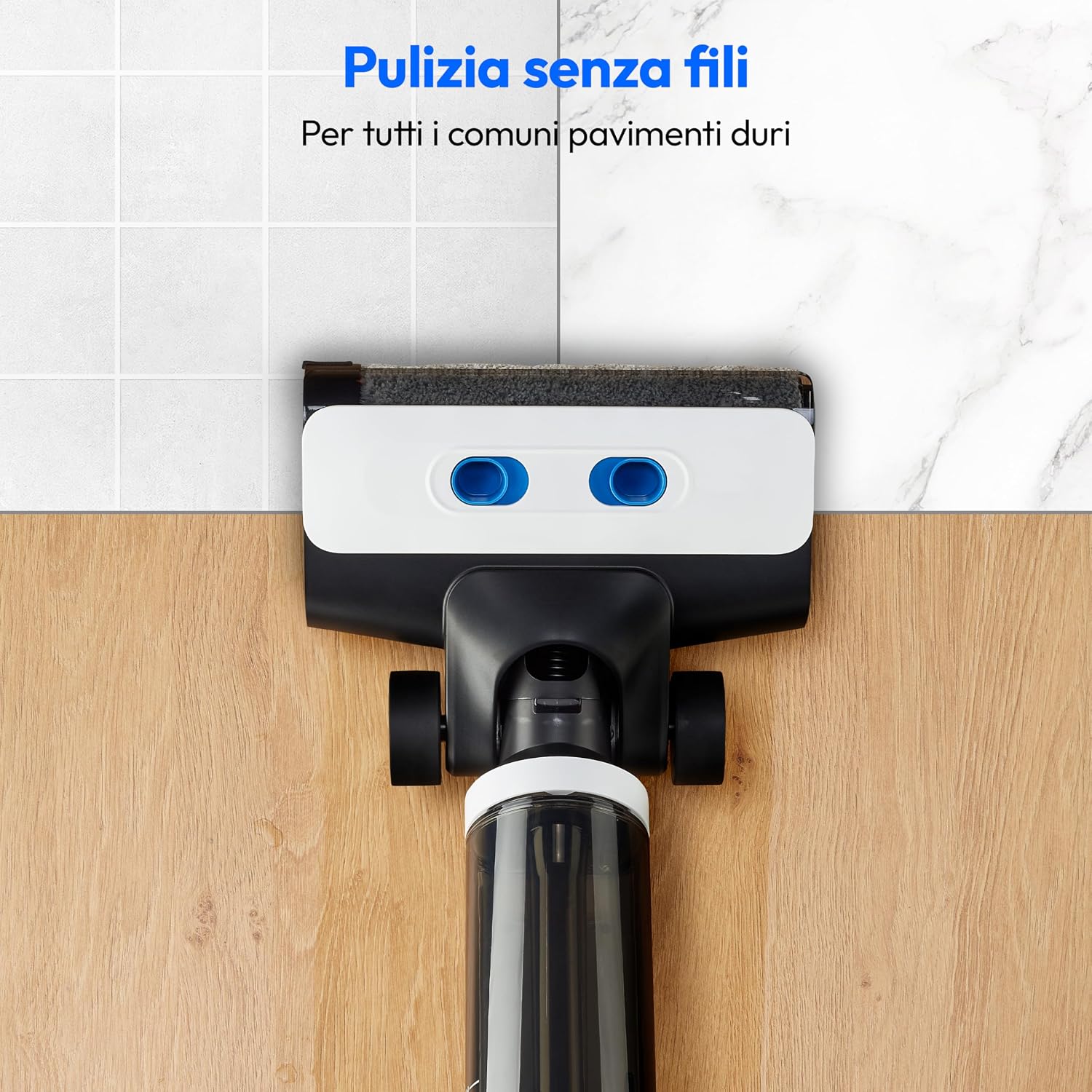
Figure 6: The cleaner effectively works on various hard floor types such as wood, tile, and laminate.
- Tilt the cleaner back to engage the brush roller and start the cleaning process.
- Move the cleaner slowly forward and backward over the floor surface. The motorized brush roller will scrub the floor while the suction system collects dirty water.
- The device is self-propelled, requiring minimal effort to maneuver.
- The battery provides up to 30 minutes of cordless cleaning on a single charge.
Maintenance
Regular maintenance ensures optimal performance and longevity of your MEDION LIFE H20.
Emptying the Dirty Water Tank
- After each use, or when the dirty water tank is full (indicated by the MAX line), remove it from the cleaner.
- Open the tank and carefully pour out the dirty water.
- Rinse the tank thoroughly with clean water.
- Allow the tank to air dry before reinserting it into the cleaner.
Self-Cleaning Function

Figure 7: The self-cleaning function automatically cleans the brush roller and internal pathways.
- Ensure the clean water tank has sufficient water and the dirty water tank is empty.
- Place the cleaner on its charging station.
- Press the Self-Cleaning button (often indicated by a drop symbol).
- The cleaner will perform a self-cleaning cycle for approximately two minutes, cleaning the brush roller and internal pathways.
- After the cycle, empty and clean the dirty water tank again.
Cleaning the Brush Roller
For thorough cleaning, the brush roller can be removed.
- Turn off the cleaner and remove the dirty water tank.
- Open the brush roller cover.
- Remove the brush roller and rinse it under running water. Use the provided cleaning brush to remove any hair or debris.
- Allow the brush roller to air dry completely before reinserting it.
Troubleshooting
| Problem | Possible Cause | Solution |
|---|---|---|
| Cleaner does not turn on. | Battery is low or depleted. | Charge the cleaner fully. |
| Poor cleaning performance. | Clean water tank is empty; Dirty water tank is full; Brush roller is dirty or tangled. | Refill clean water tank; Empty dirty water tank; Clean the brush roller. |
| Water leakage. | Water tanks not properly installed or caps not sealed. | Ensure tanks are securely in place and caps are tightly closed. |
| Self-cleaning function not working. | Insufficient water in clean tank; Dirty water tank is full. | Ensure clean water tank is sufficiently filled and dirty water tank is empty. |
Specifications

Figure 8: Key dimensions of the MEDION LIFE H20 cleaner and its charging station.
| Feature | Detail |
|---|---|
| Model | MD11934 |
| Brand | MEDION |
| Color | White |
| Product Dimensions | 110.3 x 26 x 25.5 cm |
| Item Weight | 3.9 kg |
| Clean Water Tank Capacity | Approx. 500 ml |
| Dirty Water Tank Capacity | Approx. 500 ml |
| Battery Life | Up to 30 minutes |
| Charging Time | Approx. 3 hours |
| Special Features | Cordless, Rechargeable Battery, Self-Cleaning Function, LED Display, Motorized Brush Roller, Separate Water Tanks |
Warranty and Support
For warranty information, technical support, or service inquiries, please contact MEDION customer service. You can find contact details on the official MEDION website or through your purchase documentation.
Keep your proof of purchase for warranty claims.
