
Introduction
This manual provides detailed instructions for the Cillso H97 Wireless Earbuds. Please read this manual carefully before using the product to ensure proper operation and to maximize your user experience. Keep this manual for future reference.

Image: The Cillso H97 Wireless Earbuds in their charging case, displaying the digital battery indicator.
Package Contents
- Cillso H97 Wireless Earbuds (Left and Right)
- Charging Case
- USB-C Charging Cable
- User Manual
Setup
1. Charging the Earbuds and Case
Before first use, fully charge the earbuds and the charging case. Connect the provided USB-C cable to the charging port on the case and to a 5V/1A or 5V/2A power adapter. The digital display on the case will indicate the charging status.
- Charging Time: Approximately 1.5 hours for a full charge.
- Battery Life: Up to 8 hours of playback per charge, and up to 40 hours total with the charging case.
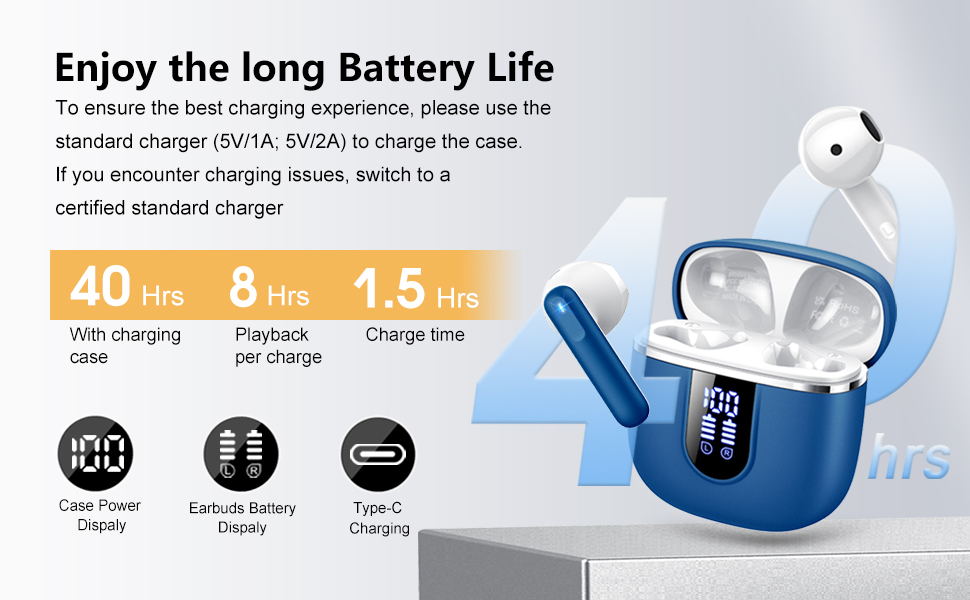
Image: Diagram illustrating the 40-hour total battery life, 8-hour single playback, and 1.5-hour charge time, along with the USB-C charging port and digital display.
The charging case is equipped with Over Current Protection (OCP) technology to prevent damage from prolonged high current. If the current exceeds the power limit, the power source will be cut off to protect the circuitry and device.

Image: Illustration explaining Over Current Protection (OCP) technology in the charging case.
2. Pairing with a Bluetooth Device
- Open the charging case. The earbuds will automatically enter pairing mode.
- On your device (smartphone, tablet, laptop), enable Bluetooth.
- Search for "H97" in the list of available Bluetooth devices and select it to connect.
- Once connected, you will hear an audible confirmation, and the earbuds will be ready for use.
The H97 earbuds feature Bluetooth 5.4 for a more stable connection, longer transmission range, lower power consumption, and reduced latency.

Image: Visual representation of Bluetooth 5.4 technology, highlighting benefits like stable connection, longer range, lower power consumption, and lower latency.
3. Wearing the Earbuds
Gently insert the earbuds into your ears, ensuring a comfortable and secure fit. The rounded tips are designed for in-ear comfort. Adjust them until the sound quality is optimal and they feel stable.

Image: Diagram showing the recommended angle for inserting the earbud into the ear for a secure fit.
Operating Instructions
Touch Controls
The H97 earbuds feature sensitive touch sensors for easy control of various functions:
| Action | Function |
|---|---|
| Double tap the left/right MFB button | Play/Pause music |
| One tap the left/right MFB button | Answer/End call |
| Long press the right/left MFB button for 2s | Next/Previous track |
| One tap the left/right MFB button (during call) | Volume Up/Down (specific mapping not detailed, typical for single tap) |
| Triple tap MFB button | Activate Voice Assistant (common function) |

Image: Visual guide to the smart touch controls on the earbuds for playback and call management.
Audio Features
The H97 earbuds deliver a high-quality audio experience:
- Hi-Fi Stereo Sound: Featuring 13mm diameter speakers with crystal clear treble, vibrant mid-range, and powerful bass.
- 3D Bass Stereo: Enhanced bass for an immersive listening experience.
- Crystal-Clear Calls: Equipped with 4 ENC (Environmental Noise Cancelling) microphones to filter out background noise and suppress wind noise, ensuring clear communication.

Image: Diagram illustrating the 13mm speaker driver and triple-layer composite diaphragm for enhanced bass and sound quality.

Image: Illustration detailing the 4-microphone design for crystal-clear calls, including feedback and talk mics, and anti-wind noise features.
Compatibility
The Cillso H97 Wireless Earbuds are compatible with a wide range of Bluetooth-enabled devices, including:
- Smartphones (Android, iOS)
- Tablets
- Laptops
- Desktop Computers (with Bluetooth adapter)

Image: Icons representing compatibility with phones, tablets, laptops, and desktops, shown alongside the earbuds and a smartphone playing music.
Maintenance
Cleaning and Care
The H97 earbuds are IP7 waterproof, offering protection against water, sweat, and rain. However, proper care is still recommended:
- Wipe the earbuds and charging case with a soft, dry cloth after each use, especially after workouts.
- Avoid using abrasive cleaners or solvents.
- Ensure the charging port is dry before connecting the charging cable.
- Store the earbuds in their charging case when not in use to protect them and keep them charged.

Image: A person wearing the earbuds with water splashing, illustrating the IPX7 waterproof feature, along with icons for dust prevention, sweatproof, and nano material.
Charging Best Practices
- Always use the provided USB-C cable or a certified standard charger (5V/1A or 5V/2A) to charge the case.
- If you encounter charging issues, try switching to a different certified standard charger.
- Do not expose the charging case or earbuds to extreme temperatures.
Troubleshooting
Common Issues and Solutions
| Problem | Possible Solution |
|---|---|
| Earbuds not pairing or connecting |
|
| Only one earbud working |
|
| Low volume or poor sound quality |
|
| Charging case not charging |
|
Specifications
| Feature | Detail |
|---|---|
| Model Number | H97 |
| Brand | Cillso |
| Bluetooth Version | 5.4 |
| Audio Technology | 3D Bass Stereo, Hi-Fi Stereo Sound |
| Speaker Size | 13mm diameter |
| Microphones | 4 ENC Noise Cancelling Mics |
| Battery Life (Earbuds) | Up to 8 hours (single charge) |
| Total Playtime | Up to 40 hours (with charging case) |
| Charging Port | USB-C |
| Charging Input | 5V/1A or 5V/2A recommended |
| Waterproof Rating | IP7 |
| Compatible Devices | Smartphones, Tablets, Laptops, Bluetooth Devices |
| Frequency Range | 20 Hz - 20,000 Hz |
| Earpiece Shape | Rounded tips |
| Product Dimensions | 0.79 x 0.79 x 0.79 inches (earbud dimensions, case dimensions are 48.9mm x 53.4mm) |
| Item Weight | 0.352 ounces |

Image: Visual representation of the earbuds and charging case dimensions, emphasizing their lightweight and pocket-sized design.
Warranty and Support
Information regarding product warranty and customer support was not available in the provided data. Please refer to the product packaging or the manufacturer's official website for details on warranty coverage and how to contact customer support.
Safety Information
- Do not disassemble or modify the earbuds or charging case.
- Keep the product away from extreme temperatures, direct sunlight, and moisture.
- Avoid dropping or subjecting the product to strong impacts.
- Keep out of reach of children and pets.
- Dispose of the product responsibly according to local regulations.