
Introduction
This manual provides comprehensive instructions for the Redragon K683 Rapid Trigger HE Gaming Keyboard. It covers setup, operational features, maintenance, troubleshooting, and product specifications to ensure optimal use of your device.

Image: The Redragon K683 Rapid Trigger HE Gaming Keyboard, showcasing its 60% layout and RGB backlighting.
Setup
1. Package Contents
- Redragon K683 Rapid Trigger HE Gaming Keyboard
- Detachable USB-A to USB-C Cable
- User Manual (this document)
2. Connecting the Keyboard
- Connect the USB-C end of the provided cable to the port on the Redragon K683 keyboard.
- Connect the USB-A end of the cable to an available USB port on your computer.
- The keyboard will be automatically recognized by your operating system.
3. Driver and Software Installation
To unlock the full potential of the Hall Effect magnetic switches and customize features such as actuation points and key assignments, it is recommended to install the dedicated Redragon software. This software is compatible with Windows operating systems.
- Visit the official Redragon website to download the latest software for the K683 model.
- Follow the on-screen instructions to complete the installation.
- Note: The magnetic switch features are not fully compatible with Mac, PlayStation 5, or Nintendo Switch platforms without the dedicated Windows driver.

Image: Screenshot of the Redragon K683 software interface, showing customization options for key functions and lighting.
Operating Instructions
1. Key Features
- Hall Effect Magnetic Switches: These switches utilize magnetic fields for actuation, eliminating physical contact points. This design contributes to a faster response time and extended lifespan compared to traditional mechanical switches.
- Rapid Trigger Technology: Through the Redragon software, the actuation point can be precisely adjusted from 0.3mm to 4.0mm. This allows for dynamic activation and deactivation, enabling keys to register presses and releases based on movement rather than a fixed point. The actual effect of 0.1-0.2mm actuation points may vary due to component tolerances.
- 8K Hz Hyper-Polling: The keyboard features an 8,000Hz polling rate, transmitting inputs to your computer up to 8 times faster than standard keyboards, resulting in a response time as low as 0.125ms.
- 2 Actions in 1 Tap: The professional software allows users to assign two distinct actions to a single key based on the key's actuation depth. This feature can simplify complex command sequences.
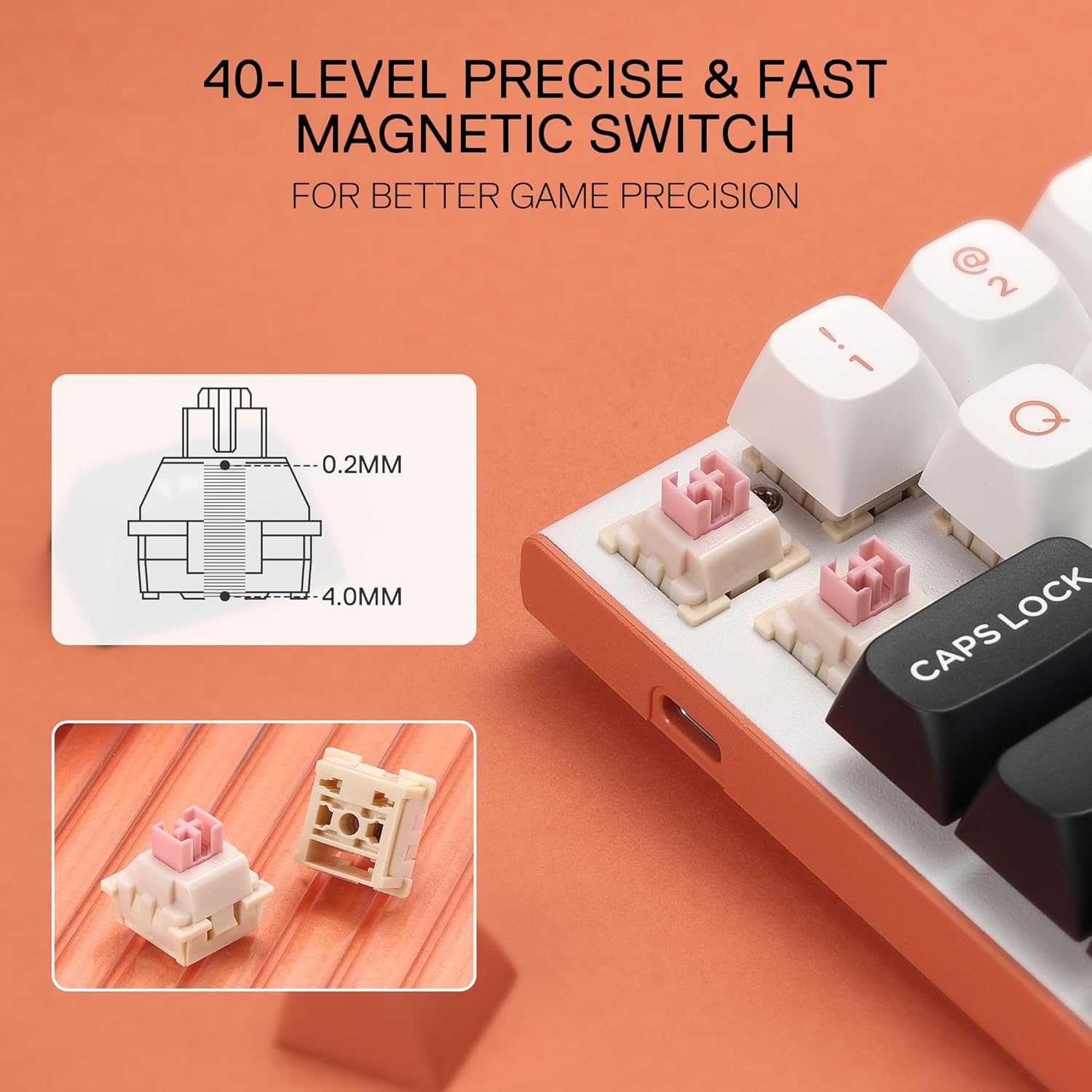
Image: Diagram illustrating the adjustable actuation range of the magnetic switches, from 0.2mm to 4.0mm.

Image: Visual representation of Rapid Trigger functionality in various gaming contexts, showing dynamic reset and activation.
2. Keyboard Layout and Keycaps
- The K683 features a 60% layout with 61 keys, designed for a compact form factor.
- It is equipped with innovated round PBT keycaps, which are known for their durability and resistance to shine over time.

Image: Comparison of the 60% keyboard layout with a full-size keyboard, highlighting the compact design.
3. Backlight Control
The keyboard features customizable RGB backlighting. Use the following key combinations with the FN key to adjust lighting effects:
- FN + M: Adjust Backlight Brightness
- <;b style="font-weight:bold;">FN + <, >: Adjust Backlight Speed
- FN + ALT + R: Switch Backlight Modes
- FN + Backspace: Enter Self-define Backlight Mode

Image: Visual guide to keyboard shortcuts for controlling backlight brightness, speed, and modes.
4. Performance Modes
The Redragon K683 can be configured for different usage scenarios:
- Performance Gaming Mode: Actuation distance can be set between 0.2mm and 1.4mm for rapid response and precise timing.
- Efficient Working Mode: Actuation distance can be set between 1.6mm and 4.0mm for a more deliberate and less sensitive typing experience.

Image: Comparison of Performance Gaming Mode and Efficient Working Mode, showing different actuation distance ranges.
Maintenance
1. Cleaning the Keyboard
- Disconnect the keyboard from your computer before cleaning.
- Use a soft, lint-free cloth slightly dampened with water or a mild cleaning solution to wipe the keycaps and surface.
- For dust and debris between keys, use compressed air.
- Avoid using harsh chemicals or abrasive materials, as these can damage the keyboard's finish or keycap legends.
2. Storage
When not in use, store the keyboard in a dry, cool environment away from direct sunlight and extreme temperatures.
Troubleshooting
1. Keyboard Not Responding
- Ensure the USB-C cable is securely connected to both the keyboard and the computer.
- Try connecting the keyboard to a different USB port on your computer.
- Test the keyboard on another computer to rule out system-specific issues.
- Restart your computer.
2. Backlighting Not Working or Incorrect
- Check backlight brightness using FN + M.
- Cycle through backlight modes using FN + ALT + R.
- Ensure the Redragon software is installed and updated, as it controls advanced lighting settings.
3. Magnetic Switch Features Not Functioning (e.g., Rapid Trigger)
- Verify that the Redragon software is correctly installed and running on a Windows PC.
- Ensure the keyboard firmware is up to date through the software.
- Confirm that the specific features are enabled and configured within the software.
- Remember that full magnetic switch functionality is limited on non-Windows platforms.
Specifications
| Model Name | K683 |
| Brand | Redragon |
| Connectivity Technology | USB-C (Wired) |
| Keyboard Description | Mechanical (Hall Effect Magnetic Switches) |
| Special Features | 8K Hz Polling, Magnetic Switch, Rapid Trigger, Actuation Point Adjustable |
| Recommended Uses | Gaming |
| Compatible Devices | PC (Windows for full features) |
| Keyboard Backlighting | RGB |
| Item Weight | 15.9 ounces |
| Package Dimensions | 12.64 x 6.81 x 2.44 inches |
| Included Components | Detachable USB-A to USB-C Cable |
Warranty and Support
1. Warranty Information
For detailed warranty information, please refer to the warranty card included with your product or visit the official Redragon website. Keep your proof of purchase for warranty claims.
2. Customer Support
If you encounter any issues not covered in this manual or require further assistance, please contact Redragon customer support through their official website or the contact information provided with your product packaging.
You can visit the Redragon Store for additional product information and support resources: Redragon Store on Amazon


