
AJAZZ AM3
AJAZZ AM3 MAX Wireless Gaming Mouse User Manual
Model: AM3
Introduction
Welcome to the user manual for your new AJAZZ AM3 MAX Wireless Gaming Mouse. This guide provides comprehensive instructions on setting up, operating, maintaining, and troubleshooting your device to ensure optimal performance. Please read this manual carefully before using the mouse.

The AJAZZ AM3 MAX Wireless Gaming Mouse in orange-red, showcasing its lightweight design and ergonomic shape.
Key Features
- Ultra-light Design: Weighing only 49g, crafted from low-density magnesium alloy with a hollow design for speed and precision.
- 8000Hz Wireless Polling Rate: Self-developed HYPERSPEED WIRELESS technology for faster data transmission and lower click latency (0.125ms response time).
- Tri-mode Connection: Supports ultra-fast 2.4G wireless, agile Bluetooth, and stable wired connections, easily switchable.
- PixArt PAW3950 Sensor: Provides best-in-class accuracy with up to 30,000 programmable DPI, 650 IPS speed, and 50g acceleration.
- 100% Pure Grade PTFE Feet: Ensures consistent glide with optimal braking force.
- Uni-Green Transparent White Dot Switches: Offers ultra-crisp clicks with over 80 million cycles durability.
- All-in-one Driver: Innovative software for DPI adjustment, polling rate, custom buttons, macro recording, and personalized key mapping.

The AM3 mouse features a full magnesium alloy body, contributing to its ultra-lightweight design.

The AM3 mouse offers versatile tri-mode connectivity: wired, 2.4GHz wireless, and Bluetooth.

Weighing only 49g, the AM3 mouse is designed for effortless movement and precision.
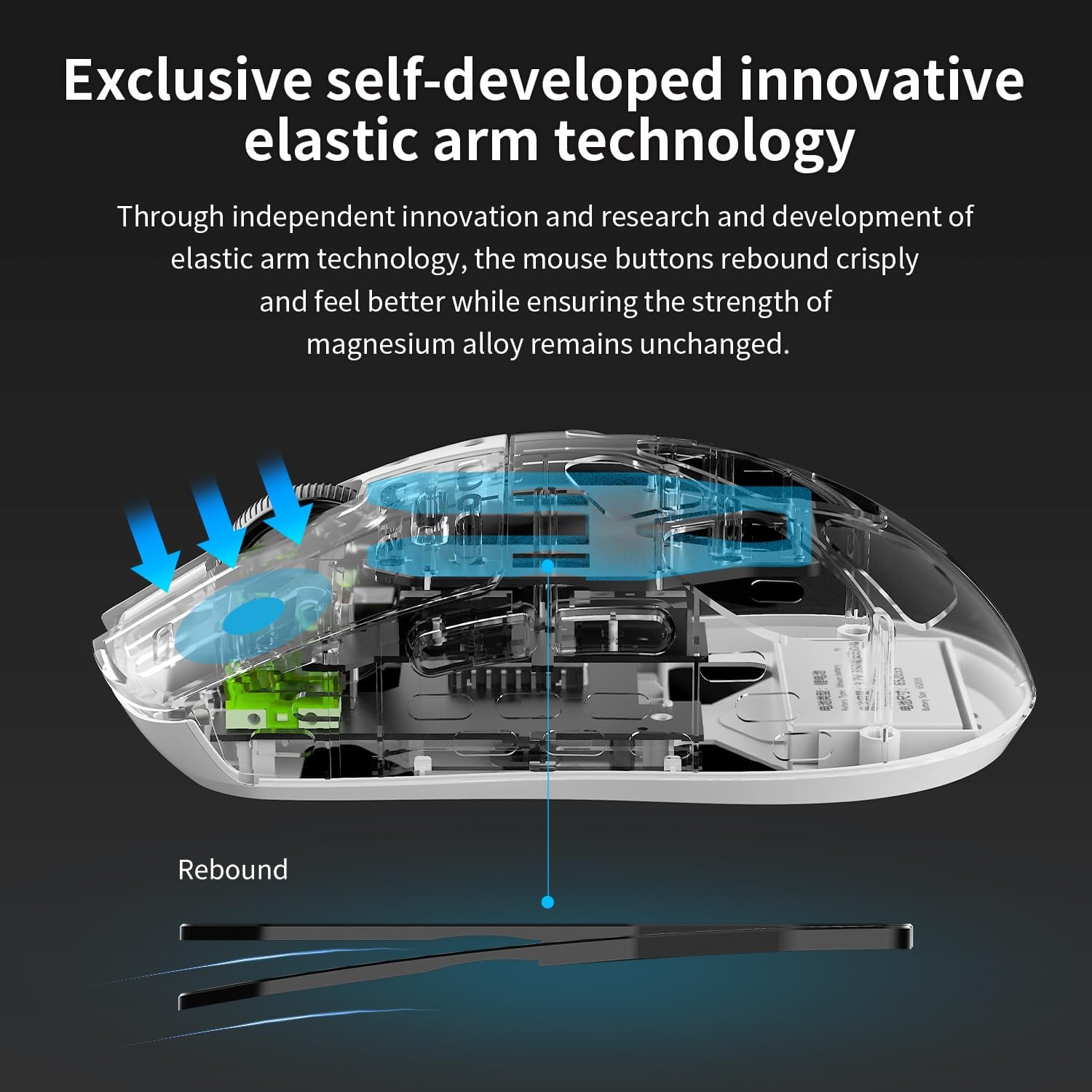
Exclusive self-developed elastic arm technology ensures crisp and responsive button clicks.
Package Contents
Please check the package contents upon unboxing to ensure all items are present:
- AJAZZ AM3 MAX Wireless Gaming Mouse
- USB-C to USB-A Charging/Data Cable
- 2.4GHz Wireless Receiver (Nano Receiver)
- User Manual (this document)
Setup Guide
1. Charging the Mouse
Before first use, it is recommended to fully charge the mouse. Connect the provided USB-C cable to the mouse's charging port and the USB-A end to a powered USB port on your computer or a USB wall adapter. The indicator light will show charging status and turn off when fully charged.
2. Connecting the Mouse
The AM3 MAX mouse supports three connection modes:
Wired Connection
- Connect the USB-C end of the cable to the mouse.
- Connect the USB-A end of the cable to an available USB port on your computer.
- The mouse will be automatically recognized and ready for use.
2.4GHz Wireless Connection
- Locate the 2.4GHz wireless receiver.
- Plug the receiver into an available USB port on your computer.
- Switch the mode selector switch on the bottom of the mouse to the '2.4G' position.
- The mouse will automatically connect to the receiver.
Bluetooth Connection
- Switch the mode selector switch on the bottom of the mouse to the 'BT' position.
- On your computer, open Bluetooth settings and enable Bluetooth.
- The mouse should appear as 'AJAZZ AM3 MAX' or similar in the list of discoverable devices. Select it to pair.
- Follow any on-screen prompts to complete the pairing process.
Operating Instructions
1. Button Functions
The AM3 MAX mouse features 5 programmable buttons. Default functions are as follows:
| Button | Default Function |
|---|---|
| Left Click | Primary Click |
| Right Click | Secondary Click |
| Scroll Wheel Click | Middle Click / Universal Scroll |
| Side Button 1 (Forward) | Browser Forward |
| Side Button 2 (Backward) | Browser Backward |
Note: Button functions can be customized using the all-in-one driver software.
2. DPI Adjustment
The mouse's DPI (Dots Per Inch) can be adjusted to change cursor sensitivity. Use the dedicated DPI button (if present, typically on the top or bottom of the mouse) or the all-in-one driver software to cycle through preset DPI levels or set a custom value up to 30,000 DPI.
3. Polling Rate Adjustment
The polling rate determines how often the mouse reports its position to the computer. The AM3 MAX supports up to 8000Hz wireless polling rate. This setting can be configured via the all-in-one driver software for optimal performance in competitive gaming.
4. All-in-one Driver Software
The AM3 MAX mouse utilizes an innovative all-in-one driver. This software automatically recognizes your computer system and provides advanced customization options without traditional installation. Access the driver to:
- Adjust DPI settings and stages.
- Configure polling rate.
- Customize button assignments.
- Create and manage macros.
- Set up personalized key mapping.
- Activate competition mode.
Refer to the software interface for detailed instructions on each function.
Maintenance and Care
To ensure the longevity and optimal performance of your AJAZZ AM3 MAX mouse, follow these maintenance guidelines:
- Cleaning: Use a soft, dry cloth to wipe the mouse surface. For stubborn dirt, slightly dampen the cloth with water or a mild cleaning solution. Avoid using harsh chemicals or abrasive materials.
- Sensor Care: Keep the optical sensor on the bottom of the mouse clean and free of dust or debris. Use a cotton swab or compressed air if necessary.
- Battery Care: Avoid fully discharging the battery frequently. For long-term storage, charge the mouse to about 50% and store it in a cool, dry place.
- Storage: When not in use, store the mouse in a clean, dry environment away from direct sunlight, extreme temperatures, and high humidity.
- Avoid Drops: Despite its durable magnesium alloy construction, avoid dropping the mouse, as internal components can be damaged.
Troubleshooting
If you encounter issues with your AJAZZ AM3 MAX mouse, please refer to the following common problems and solutions:
| Problem | Possible Solution |
|---|---|
| Mouse not responding (Wired) | Ensure the USB cable is securely connected to both the mouse and the computer. Try a different USB port. |
| Mouse not responding (2.4GHz Wireless) | Ensure the 2.4G receiver is plugged in and the mouse is switched to '2.4G' mode. Check battery level. Try plugging the receiver into a different USB port. |
| Mouse not responding (Bluetooth) | Ensure Bluetooth is enabled on your computer and the mouse is in 'BT' mode. Re-pair the mouse in your computer's Bluetooth settings. Check battery level. |
| Cursor movement is erratic or jumpy | Clean the optical sensor on the bottom of the mouse. Ensure you are using the mouse on a suitable surface (non-reflective, uniform color). |
| DPI setting not changing | Ensure the mouse is powered on. Use the dedicated DPI button or the all-in-one driver software to adjust. Restart the mouse or computer. |
| Battery drains quickly | Reduce polling rate if set very high (e.g., 8000Hz). Ensure the mouse is fully charged. Battery life can vary based on usage and settings. |
If the problem persists after trying these solutions, please contact AJAZZ customer support for further assistance.
Technical Specifications
| Feature | Specification |
|---|---|
| Model Number | AM3 |
| Connectivity Technology | Bluetooth, USB (Wired), 2.4GHz Radio Frequency |
| Movement Detection Technology | Optical (PixArt PAW3950 Sensor) |
| Max DPI | 30,000 DPI |
| Max IPS | 650 IPS |
| Max Acceleration | 50g |
| Polling Rate | Up to 8000Hz (Wireless) |
| Weight | Approximately 49g (1.08 pounds) |
| Product Dimensions | 4.2 x 1.5 x 0.1 inches |
| Battery Type | 1 Lithium Ion battery (included) |
| Switch Type | Uni-Green Transparent White Dot (80 million clicks) |
| Color | Orange Red (as per product variant) |
| Manufacturer | AJAZZ |
| Country of Origin | China |

Detailed specifications comparing the AM3 PRO and AM3 MAX models.
Warranty Information
AJAZZ products are manufactured to the highest quality standards. This product is covered by a limited warranty against defects in materials and workmanship. For specific warranty terms and conditions, please refer to the warranty card included with your product or visit the official AJAZZ website.
Customer Support
For technical support, troubleshooting assistance, or general inquiries, please contact AJAZZ customer support through the following channels:
- Online Support: Visit the official AJAZZ website or the AJAZZ Store on Amazon.
- Email Support: Refer to your product packaging or the official website for the customer service email address.
When contacting support, please have your product model (AM3 MAX) and ASIN (B0DG56B84R) ready.
Related documentsAM3


Ask a question about this manual
Ask about setup, troubleshooting, compatibility, parts, safety, or missing instructions. Manuals+ will review the question and use this page’s manual context to help answer it.