
1. Introduction
The SALA DJ Laser Light with App Control is a versatile and powerful laser projector designed for various events, including parties, stage performances, discos, KTVs, and bars. It features full RGB laser effects, app-controlled customization for 3D animations, text, and patterns, and multiple operation modes including Sound Control and DMX512. This manual provides essential information for the safe and effective use of your device.
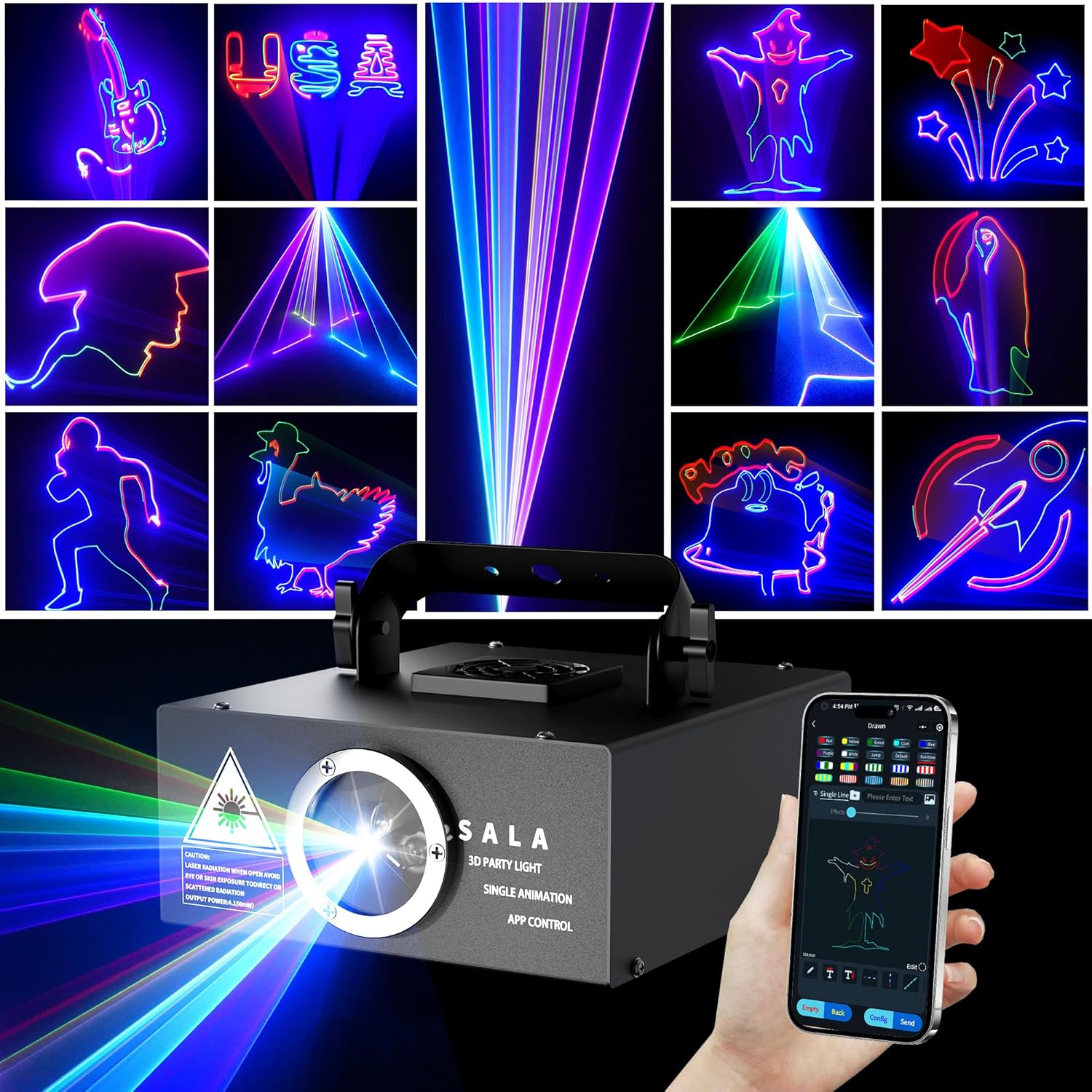
Image 1.1: The SALA DJ Laser Light showcasing its diverse projection capabilities, including various shapes and animations.
2. Package Contents
Please verify that all items are present and in good condition upon opening the package:
- SALA DJ Laser Light Unit
- Power Cord
- Bulb (included as part of the unit)
- User Manual (this document)
3. Features
The SALA DJ Laser Light offers a range of advanced features for dynamic lighting effects:
- Creative Control with Mobile App: Wirelessly connect to the mobile app (LightELF) to design custom 3D animations, draw patterns, enter text, and select from over 200 built-in effects within a 10-meter range.
- Mesmerizing Full RGB Laser Effects: Enjoy powerful, high-speed FULL RGB laser beams that create captivating 3D graphics, including visuals that dance, rotate, and zoom.
- Personalized Light Show: Create custom animations (note: custom patterns cannot be saved on the device for a long time) and add specific text (up to 4 groups for cyclic playback). Personalize built-in patterns and design up to 20 unique scenes, each lasting 25.5 seconds.
- Event-Ready Customization: Tailor lighting for various celebrations such as birthday parties, wedding receptions, Halloween, and Christmas parties. Sync visuals to music or add personalized text.
- Versatile Operation Modes: Six flexible operation modes are available: APP control, Sound Control, DMX512, Master/Slave, and manual control.
- Sound Activated Mode: Synchronize laser effects with music beats to create engaging patterns, vibrant colors, and dynamic beam effects. This mode requires an environment with high volume and rhythm.
- Fog Machine Recommendation: For optimal visual effects, especially to enhance beam visibility and create immersive light shows, the use of a fog machine in a small, enclosed indoor space is highly recommended.

Image 3.1: The laser light adapting to different event themes, showcasing its versatility for various celebrations.
4. Setup
4.1 Physical Setup
Place the laser light on a stable surface or mount it using appropriate hardware (not included) in a location where the laser beams can project freely without obstruction. Ensure proper ventilation around the unit.
4.2 App Installation and Connection
The SALA DJ Laser Light is controlled via the LightELF mobile application.
- Install the App: Download the "LightELF" app from your device's app store (available for Android and iOS).
- Open the App: Launch the LightELF app on your smartphone or tablet.
- Connect to Device: Ensure your laser light is powered on. In the app, tap "Click Me to Connect" or similar option to initiate Bluetooth pairing. Grant necessary location permissions if prompted.


Image 4.1: Steps for installing and connecting the LightELF app to the laser light.
4.3 DMX Setup (Optional)
For professional control, the unit supports DMX512. Connect your DMX controller to the DMX IN port on the laser light. Use the DMX OUT port to daisy-chain multiple units. Refer to your DMX controller's manual for specific channel assignments and programming.

Image 4.2: The laser light's control panel with DMX input/output, suitable for integration into a professional DJ setup.
5. Operation
5.1 App Control
The LightELF app provides comprehensive control over the laser light's functions:
- Graffiti/Drawing: Use the drawing interface to create custom patterns and animations.
- Text Playback: Input custom text messages for projection. You can configure up to 4 groups for cyclic playback.
- Built-in Effects: Access over 200 pre-programmed effects and animations.
- Scene Management: Design and save up to 20 unique scenes, each with a duration of 25.5 seconds.

Image 5.1: The LightELF app interface, demonstrating options for graffiti drawing, text input, and scene programming.

Image 5.2: The app's scene management feature, allowing users to create and edit multiple custom lighting sequences.
5.2 Sound Activated Mode
In Sound Activated mode, the laser light responds to ambient sound, synchronizing its patterns and effects with the music's beat. For best results, use this mode in an environment with clear, high-volume music and a strong rhythm.
5.3 DMX512 Mode
When connected to a DMX controller, the laser light can be integrated into a larger lighting setup, allowing for precise control over its various parameters. Consult the DMX channel chart (if provided separately or within the app) for detailed control options.
5.4 Master/Slave Mode
Connect multiple SALA DJ Laser Light units using DMX cables. Set one unit as the Master and the others as Slaves. The Slave units will then mimic the Master unit's patterns and effects, creating a synchronized light show.

Image 5.3: Visual representation of Sound Activation mode and DMX control in action.
6. Maintenance
To ensure the longevity and optimal performance of your SALA DJ Laser Light, follow these maintenance guidelines:
- Cleaning: Regularly wipe the exterior of the unit with a soft, dry cloth. Ensure the laser aperture is free from dust and debris. Do not use abrasive cleaners or solvents.
- Ventilation: Ensure the ventilation openings are clear and unobstructed to prevent overheating.
- Storage: When not in use, store the laser light in a cool, dry place, away from direct sunlight and extreme temperatures.
- Fog Machine Use: As mentioned in features, a fog machine significantly enhances the visual output. Regular cleaning of your fog machine is also recommended to maintain its performance.
7. Troubleshooting
If you encounter issues with your SALA DJ Laser Light, refer to the following common problems and solutions:
| Problem | Possible Cause | Solution |
|---|---|---|
| No laser output or dim output | Power issue; Laser aperture blocked; Overheating; No fog. | Check power connection. Ensure aperture is clean. Allow unit to cool down. Use a fog machine for better visibility. |
| App cannot connect to device | Bluetooth not enabled; Device out of range; App permissions missing; App malfunction. | Ensure Bluetooth is on. Move closer to the device (within 10m). Check app permissions (location). Restart the app or your phone. Restore location permission for the app. |
| Patterns are not clear or distorted | Dirty lens; Incorrect focus/zoom; Environmental factors. | Clean the laser lens carefully. Adjust settings in the app. Ensure the projection surface is flat and clear. |
| Sound Activated mode not working | Insufficient volume/rhythm; Microphone blocked. | Increase music volume and ensure clear beats. Check if the microphone on the unit is unobstructed. |
| Unit overheats and shuts down | Poor ventilation; Prolonged use. | Ensure adequate airflow around the unit. Do not block vents. Allow the unit to cool down before resuming use. |
8. Specifications
Detailed technical specifications for the SALA DJ Laser Light (Model LM-004):
| Attribute | Detail |
|---|---|
| Model Number | LM-004 |
| Brand | SALA |
| Color | Metallic |
| Shape | Rectangular |
| Material | Aluminum |
| Finish Type | Polished/Brushed Metal |
| Light Source Type | Light Emitting Diode |
| Power Source | Corded Electric |
| Mounting Type | Table Mount |
| Bulb Features | RGB 3D Animation, Sound Activated, DMX512 Compatibility |
| Number of Light Sources | 3 |
| Product Dimensions | 6.69"L x 5.9"W x 3.93"H |
| Item Weight | 3.23 pounds |

Image 8.1: Physical dimensions and control panel layout of the laser light.
9. Warranty and Support
For warranty information, please refer to the documentation provided with your purchase or contact SALA customer support directly. A digital version of the user manual is available for download at: User Manual (PDF).


