
MAXUS Digital Gram Scale 1000g x 0.1g
MAXUS Digital Gram Scale 1000g x 0.1g Instruction Manual
Model: Digital Gram Scale 1000g x 0.1g
1. Introduction
Thank you for purchasing the MAXUS Digital Gram Scale 1000g x 0.1g. This precision instrument is designed for accurate weighing of various items, offering a capacity of 1000 grams with a readability of 0.1 grams. This manual provides detailed instructions for setup, operation, and maintenance to ensure optimal performance and longevity of your scale.
2. Package Contents
- MAXUS Digital Gram Scale (1000g x 0.1g)
- 100g Calibration Weight
- User Manual
- Batteries (typically AAA, not explicitly stated but common for such devices)
3. Safety Information
- Do not overload the scale beyond its maximum capacity of 1000g.
- Avoid exposing the scale to extreme temperatures, humidity, or direct sunlight.
- Keep the scale away from strong electromagnetic fields.
- Handle the scale with care; avoid dropping or subjecting it to strong impacts.
- Clean the scale with a soft, damp cloth. Do not use abrasive cleaners or immerse it in water.
4. Setup
4.1 Battery Installation
- Open the battery compartment cover located on the underside of the scale.
- Insert the required batteries (e.g., 2 x AAA, not specified in product data, but common) according to the polarity indicators (+/-).
- Close the battery compartment cover securely.
4.2 Placement
Place the scale on a flat, stable, and vibration-free surface to ensure accurate readings.
5. Operating Instructions
The MAXUS Digital Gram Scale features three primary buttons: T (Tare), M (Mode/Unit), and Power (On/Off/Calibration).
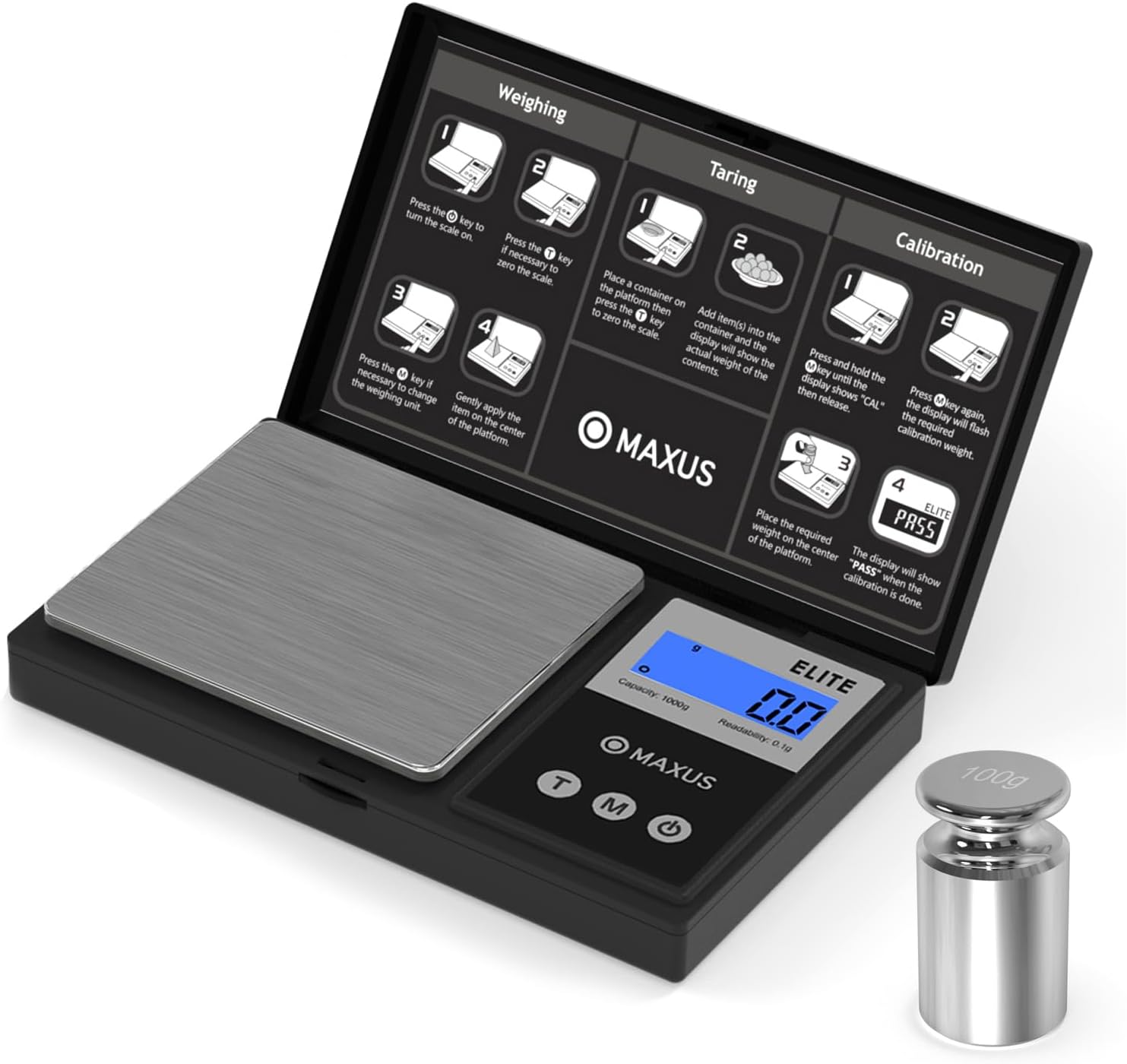
Image Description: A MAXUS Digital Gram Scale is shown with its lid open, revealing a diagram on the inside of the lid. The diagram illustrates three main functions: Weighing, Taring, and Calibration, each with numbered steps and small graphical representations. The scale itself has a silver weighing platform, a digital display showing "0.0g", "Capacity: 1000g", and "Readability: 0.1g", and three buttons labeled 'T', 'M', and a power symbol. A 100g cylindrical calibration weight is placed next to the scale.
5.1 Weighing
- Press the Power key to turn the scale on.
- If the display does not show "0.0", press the T (Tare) key to zero the scale.
- If necessary, press the M (Mode) key to change the weighing unit (e.g., grams, ounces, carats, grains, etc. - specific units not detailed in OCR, but implied by 'M' button).
- Gently place the item to be weighed on the center of the weighing platform. The display will show the weight.
5.2 Taring (Zeroing a Container)
- Place an empty container on the weighing platform.
- Press the T (Tare) key. The display will reset to "0.0", effectively subtracting the container's weight.
- Add item(s) into the container. The display will now show only the net weight of the contents.
5.3 Unit Conversion
With the scale on, press the M (Mode) key repeatedly to cycle through the available weighing units (e.g., g, oz, ct, gn). The current unit will be displayed on the screen.
6. Calibration
Calibration ensures the accuracy of your scale. It is recommended to calibrate your scale regularly or if you suspect inaccurate readings. Use the provided 100g calibration weight.
- Turn the scale on and ensure it is on a stable surface.
- Press and hold the M (Mode) key until the display shows "CAL", then release the button.
- Press the M (Mode) key again. The display will flash the required calibration weight (e.g., "100.0g").
- Gently place the required calibration weight (100g) on the center of the weighing platform.
- Wait for a few seconds. The display will show "PASS" when the calibration is successfully completed. Remove the weight.
7. Maintenance and Care
- Cleaning: Wipe the scale with a slightly damp cloth. Do not use harsh chemicals or abrasive materials. Ensure no liquid enters the scale's interior.
- Storage: Store the scale in a clean, dry environment at room temperature. Avoid placing heavy objects on the scale when not in use.
- Battery Replacement: Replace batteries when the low battery indicator appears on the display (often "Lo"). Remove batteries if the scale will not be used for an extended period.
8. Troubleshooting
| Problem | Possible Cause | Solution |
|---|---|---|
| Scale does not turn on | Dead or incorrectly installed batteries | Check battery polarity or replace batteries. |
| "Lo" displayed | Low battery power | Replace batteries. |
| "OUE2" or "EEEE" displayed | Overload beyond capacity | Remove excess weight immediately. Do not exceed 1000g. |
| Inaccurate readings | Unstable surface, need for calibration, or interference | Place on a stable surface. Perform calibration. Avoid strong electromagnetic fields. |
9. Specifications
- Brand: MAXUS
- Model: Digital Gram Scale 1000g x 0.1g
- Capacity: 1000 Grams
- Readability: 0.1 Grams
- Display Type: Digital
- Readout Accuracy: 0.01%
- Form Factor: Handheld
- Weigh Scale Type: Counter Scale
10. Warranty and Support
For warranty information or technical support, please refer to the contact details provided with your purchase documentation or visit the official MAXUS website. Keep your purchase receipt as proof of purchase for any warranty claims.
For additional support, you may visit the MAXUS Store on Amazon.
Ask a question about this manual
Ask about setup, troubleshooting, compatibility, parts, safety, or missing instructions. Manuals+ will review the question and use this page’s manual context to help answer it.