
1. Introduction
Thank you for choosing the KAISER KXB-3008 8-inch Studio Speaker. This manual provides essential information for the safe and efficient operation of your new portable speaker. Please read this manual thoroughly before use and retain it for future reference.
2. Product Overview
2.1 Key Features
- Bluetooth Connectivity: Seamlessly connect your devices wirelessly.
- LED Lights: Enhance your audio experience with dynamic LED lighting.
- Karaoke Function: Enjoy singing along with built-in karaoke features.
- Voice Effects: Experiment with various voice effects for entertainment.
- Rechargeable Battery: Portable design with a long-lasting rechargeable battery.
- KSR-Link Technology: Connect with another compatible KAISER speaker for enhanced stereo sound.
2.2 Included Components
- 1 x KAISER KXB-3008 Speaker
- 1 x Wired Microphone
- 1 x User Manual
- 1 x Power Cable

Figure 1: Front view of the KAISER KXB-3008 speaker, showcasing its grille and dynamic LED lighting.

Figure 2: The wired microphone provided with the speaker, featuring an on/off switch.
3. Setup
3.1 Initial Charging
Before first use, fully charge the speaker for at least 4 hours. Connect the power cable to the speaker's power input and a suitable power outlet. The charging indicator light will show the charging status.
3.2 Powering On/Off
- To turn on the speaker, locate the ON/OFF switch on the control panel and slide it to the "ON" position.
- To turn off the speaker, slide the ON/OFF switch to the "OFF" position.

Figure 3: Top control panel showing the power switch and other function buttons.
4. Operation
4.1 Bluetooth Connection
- Turn on the speaker.
- Press the "MODE" button until "BLUE" appears on the display, indicating Bluetooth mode.
- Enable Bluetooth on your device (smartphone, tablet, etc.).
- Search for "KXB-3008" in your device's Bluetooth list and select it to pair.
- A confirmation sound will indicate successful pairing.
4.2 KSR-Link Technology (True Wireless Stereo)
KSR-Link allows you to connect two KAISER KXB-3008 speakers wirelessly for a stereo sound experience.
- Ensure both KXB-3008 speakers are powered on and in Bluetooth mode.
- On one speaker (this will be the master speaker), press and hold the "MODE" button for a few seconds until you hear a pairing tone.
- The two speakers will automatically connect to each other.
- Once connected, pair your device to the master speaker via Bluetooth as described in section 4.1.
4.3 Using USB/Micro SD
Insert a USB flash drive or Micro SD card into the respective port on the control panel. The speaker will automatically switch to USB/SD mode and begin playing compatible audio files (e.g., MP3).
4.4 Radio FM
Press the "MODE" button to switch to FM radio mode. Use the playback control buttons (previous/next track) to scan for stations. The display will show the current frequency.
4.5 Karaoke Function
Connect the wired microphone to the "MIC" input. Adjust the microphone volume and echo effects using the dedicated knobs on the control panel. Play your music and sing along.
Video 1: Demonstration of a Kaiser 8-inch speaker, highlighting its features and controls. Note: This video features a similar 8-inch Kaiser speaker model.
5. Controls and Connections
5.1 Control Panel Overview
The top panel of the speaker features various buttons and knobs for controlling playback, volume, and other functions.
Figure 4: Detailed view of the top control panel, including volume, mode, playback, and bass controls.
- VOL (Volume Knob): Adjusts the master volume of the speaker.
- MIC VOL (Microphone Volume Knob): Adjusts the volume of the connected microphone.
- ECHO (Echo Knob): Adjusts the echo effect for the microphone.
- BASS (Bass Button): Activates or adjusts the bass boost.
- MODE Button: Switches between input modes (Bluetooth, FM Radio, USB, Micro SD, AUX).
- Light Button: Toggles or changes the LED light patterns.
- Playback Controls: Play/Pause, Previous Track, Next Track.
5.2 Input/Output Ports
The rear panel of the speaker provides various ports for connectivity.
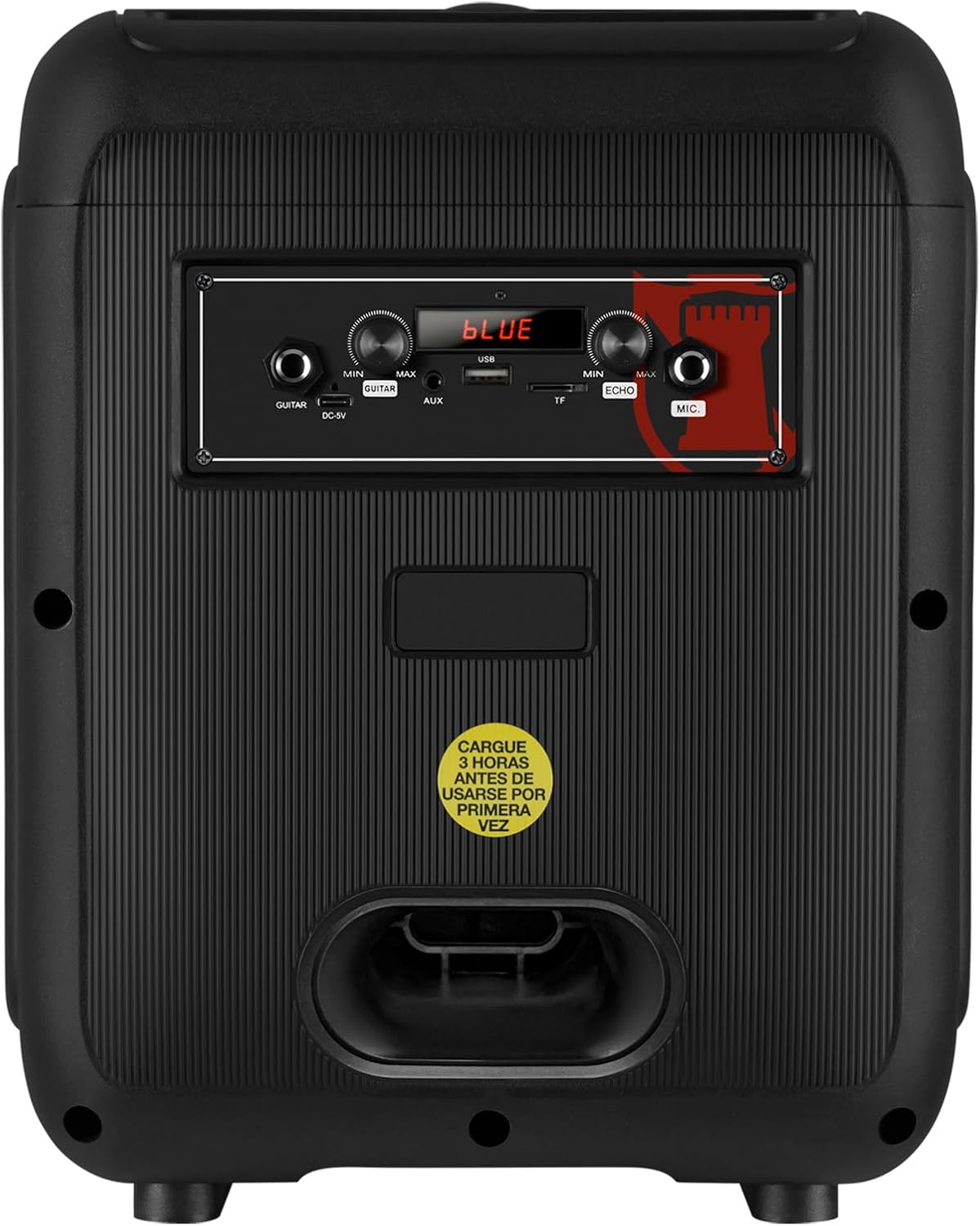
Figure 5: Rear panel showing the AUX, USB, Micro SD, and Microphone input ports, along with the power input.
- AUX Input: Connect external audio devices using a 3.5mm audio cable.
- USB Port: Insert a USB flash drive for MP3 playback.
- Micro SD Slot: Insert a Micro SD card for MP3 playback.
- MIC Input: Connect a wired microphone for karaoke or announcements.
- DC-9V Input: Power input for charging the speaker.
6. Specifications
| Feature | Description |
|---|---|
| Model Name | KXB-3008 |
| Speaker Type | Portable Speaker |
| Special Features | Lightweight, LED Light, Karaoke Function |
| Recommended Uses | Gaming Consoles, Laptops, Smartphones, Tablets |
| Compatible Devices | Smartphone, Tablet, Laptop, Gaming Console |
| Subwoofer Diameter | 8 Inches |
| Color | Black |
| Product Dimensions | 31cm (Depth) x 29cm (Width) x 42cm (Height) |
| Product Weight | 5 Kilograms |
| Waterproof | False |
| Control Method | Remote Control |
| Wireless Technology | Bluetooth |
| Power Source | Battery |
| Max Speaker Output | 30 Watts |
| Average Battery Life | 6 Hours |
| Audio Output Mode | Stereo, Surround |
| Mounting Type | Floor Mount, Table Mount |
7. Maintenance
- Cleaning: Use a soft, dry cloth to clean the speaker's exterior. Do not use abrasive cleaners or solvents.
- Storage: Store the speaker in a cool, dry place away from direct sunlight and extreme temperatures.
- Battery Care: To prolong battery life, avoid fully discharging the battery frequently. Charge the speaker regularly, even if not in use for extended periods.
- Avoid Water: This speaker is not waterproof. Keep it away from liquids to prevent damage.
8. Troubleshooting
| Problem | Possible Solution |
|---|---|
| Speaker does not turn on. | Ensure the battery is charged. Connect the power cable and try again. Check the power switch position. |
| No sound. | Check the volume level on both the speaker and your connected device. Ensure the correct input mode is selected (Bluetooth, AUX, USB/SD). |
| Bluetooth pairing fails. | Ensure the speaker is in Bluetooth mode. Make sure your device's Bluetooth is enabled and within range. Forget previous pairings on your device and try pairing again. |
| Microphone not working. | Ensure the microphone is properly connected to the MIC input. Check the microphone's ON/OFF switch and adjust the MIC VOL knob. |
| KSR-Link connection issues. | Ensure both speakers are KXB-3008 models and are in Bluetooth mode. Try re-initiating the KSR-Link pairing process. |
9. Warranty and Support
This product comes with a Limited Warranty. Please refer to the warranty card included in the packaging for detailed terms and conditions.
For technical support or customer service, please visit the official Kaiser website or contact your local dealer.


