
A9 Pro ANC/ENC
ANC/ENC A9 Pro Earbuds User Manual
Model: A9 Pro ANC/ENC | Brand: Generic
1. Introduction
Welcome to your new ANC/ENC A9 Pro Earbuds. These earbuds are designed to provide a superior audio experience with advanced features like Active Noise Cancellation (ANC), Environmental Noise Cancellation (ENC), and a built-in screen for intuitive control. Please read this manual carefully to ensure proper use and maintenance of your device.
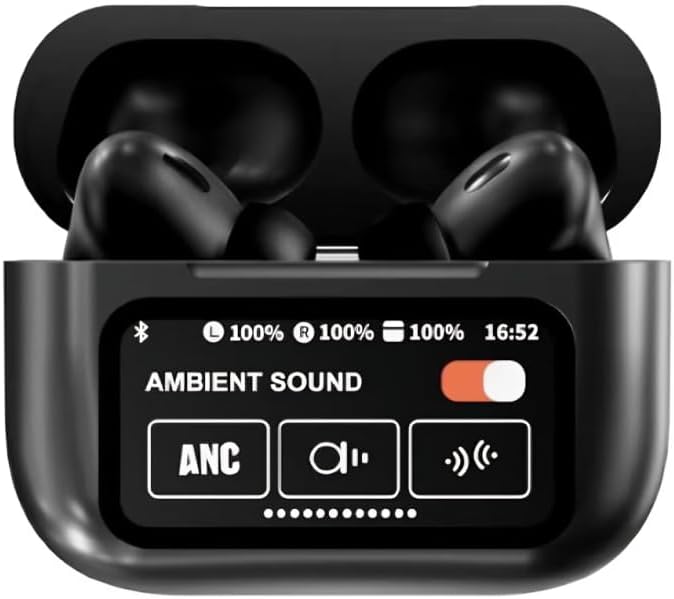
Figure 1: A9 Pro Earbuds in their charging case, showing the integrated display with sound mode options.
2. What's in the Box
Please check the contents of your package:
- A9 Pro Earbuds (Left and Right)
- Charging Case with Built-in Screen
- Eartips (Multiple Sizes)
- USB Charging Cable
3. Setup
3.1 Charging Your Earbuds and Case
Before first use, fully charge your A9 Pro Earbuds and charging case.
- Connect the USB charging cable to the charging port on the case and a power source.
- The screen on the charging case will indicate charging status.
- Place the earbuds into the charging case. They will begin charging automatically.
A full charge provides approximately 5 hours of single earbud listening time, with the charging case extending total battery life up to 36 hours.

Figure 2: Battery life information for the A9 Pro Earbuds and charging case.
3.2 Pairing with Your Device
To connect your earbuds to a smartphone or other Bluetooth-enabled device:
- Ensure the earbuds are in the charging case and the case has power.
- Open the charging case lid. The earbuds will automatically enter pairing mode.
- On your device, go to Bluetooth settings and turn Bluetooth on.
- Select "A9 Pro Earbuds" from the list of available devices.
- Once connected, the earbuds will indicate successful pairing (e.g., a voice prompt or LED indicator).
4. Operating Your Earbuds
4.1 Touch Controls
The A9 Pro Earbuds feature intuitive touch controls on each earbud. Specific functions may vary slightly depending on your device and app, but common controls include:
- Play/Pause: Single tap on either earbud.
- Next Track: Double tap on the right earbud.
- Previous Track: Double tap on the left earbud.
- Answer/End Call: Single tap on either earbud.
- Reject Call: Press and hold either earbud.
- Activate Voice Assistant: Triple tap on either earbud.
- Camera Control: Quick access to your phone's camera for remote photo capture. Refer to your phone's settings for specific setup.
4.2 Built-in Screen Functions
The charging case features a built-in screen for easy access to various functions without needing your phone:
- Timer Setup: Set custom timers directly from the screen.
- Flashlight Function: Control the built-in flashlight (if applicable) or a connected device's flashlight.
- Easy Song Navigation: Browse and select songs.
- Adjustable Audio Modes: Switch between Noise-Canceling, Transparency, and other sound modes.
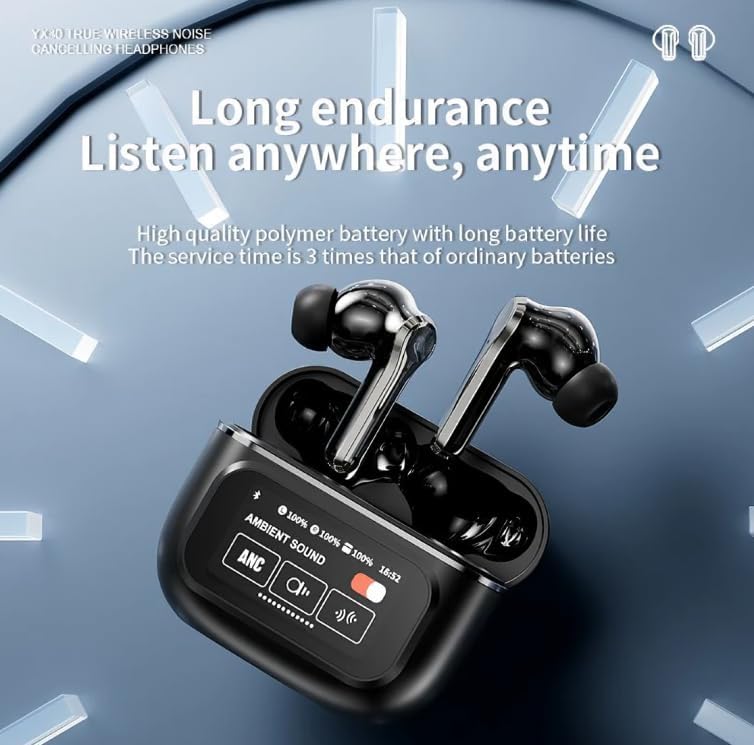
Figure 3: The A9 Pro Earbuds case display showing battery levels and sound mode options.
4.3 Audio Modes
The A9 Pro Earbuds offer advanced audio modes for an optimized listening experience:
- Active Noise Cancellation (ANC): Reduces external ambient noise, ideal for travel or noisy environments.
- Transparency Mode: Allows you to hear your surroundings while still enjoying your audio, useful for awareness in urban environments.
- Environmental Noise Cancellation (ENC): Focuses on reducing background noise during calls for clearer communication.
5. Maintenance
5.1 Cleaning
To maintain optimal performance and hygiene:
- Gently wipe the earbuds and charging case with a soft, dry, lint-free cloth.
- Remove eartips and clean them with mild soap and water, then dry thoroughly before reattaching.
- Do not use abrasive cleaners, alcohol, or chemical solvents.
- Avoid getting moisture in any openings.
5.2 Storage
When not in use, store your earbuds in their charging case to protect them from dust and damage.
6. Troubleshooting
If you encounter issues with your A9 Pro Earbuds, try the following solutions:
- Earbuds not pairing: Ensure both earbuds are in the case, fully charged, and the case lid is open. Turn off and on your device's Bluetooth, then try pairing again.
- No sound from one earbud: Place both earbuds back in the case, close the lid for a few seconds, then open it and try again. Check if the earbud is properly seated and charging.
- Charging issues: Ensure the charging cable is securely connected to both the case and the power source. Try a different USB port or cable.
- Poor sound quality: Ensure eartips are properly fitted and clean. Try different sized eartips for a better seal.
- Controls not responding: Ensure earbuds are charged. Try resetting the earbuds (refer to manufacturer's website for specific reset instructions if needed).
7. Specifications
| Feature | Description |
|---|---|
| Model Name | A9 Pro ANC/ENC |
| Connectivity Technology | Wireless (Bluetooth) |
| Wireless Communication Technology | Bluetooth |
| Ear Placement | In Ear |
| Form Factor | In Ear |
| Noise Control | Active Noise Cancellation, Passive Noise Cancellation |
| Control Method | Touch |
| Material | Plastic |
| Color | Black |
| Single Earbud Listening Time | Up to 5 hours |
| Total Battery Life (with case) | Up to 36 hours |
| Compatible Devices | Cellphones, Tablets |
8. Warranty and Support
For warranty information or technical support, please refer to the documentation provided with your purchase or contact the seller/manufacturer directly. Keep your proof of purchase for any warranty claims.
Related documentsA9 Pro ANC/ENC


Ask a question about this manual
Ask about setup, troubleshooting, compatibility, parts, safety, or missing instructions. Manuals+ will review the question and use this page’s manual context to help answer it.