
1. Introduction
Thank you for choosing the KUAIVO FG2015ULB 8-Electrode Smart Body Fat Scale. This device is designed to provide a comprehensive analysis of your body composition, offering detailed insights into your health and fitness. By utilizing 8 electrodes, it aims for more precise and extensive measurements across your body.

Image 1.1: KUAIVO FG2015ULB 8-Electrode Smart Body Fat Scale with its display and companion app interface.
2. Product Features
The KUAIVO FG2015ULB Smart Body Fat Scale offers advanced features for detailed body analysis:
- 8-Electrode Measurement: Utilizes 8 electrodes for more precise and comprehensive data by contacting both limbs and torso, providing a better understanding of muscle and fat distribution.
- 28 Body Composition Metrics: Measures weight, body fat rate, body water rate, muscle mass, bone mass, BMI, bioelectrical impedance, segmental fat and muscle distribution, and more.
- VA Digital Display: Features a 2.52 x 4.1 inch high-definition color VA display integrated with the measuring handle for intuitive data reading.
- Fitdays APP Integration: Seamlessly syncs measurement data to your mobile phone, offering extensive data analysis, printable health reports, and personalized health guidance.
- Multi-User Support: Stores data for up to 24 users, allowing families to share the scale while maintaining individual health records.
- Rechargeable Design: Convenient Type-C charging for sustained use.
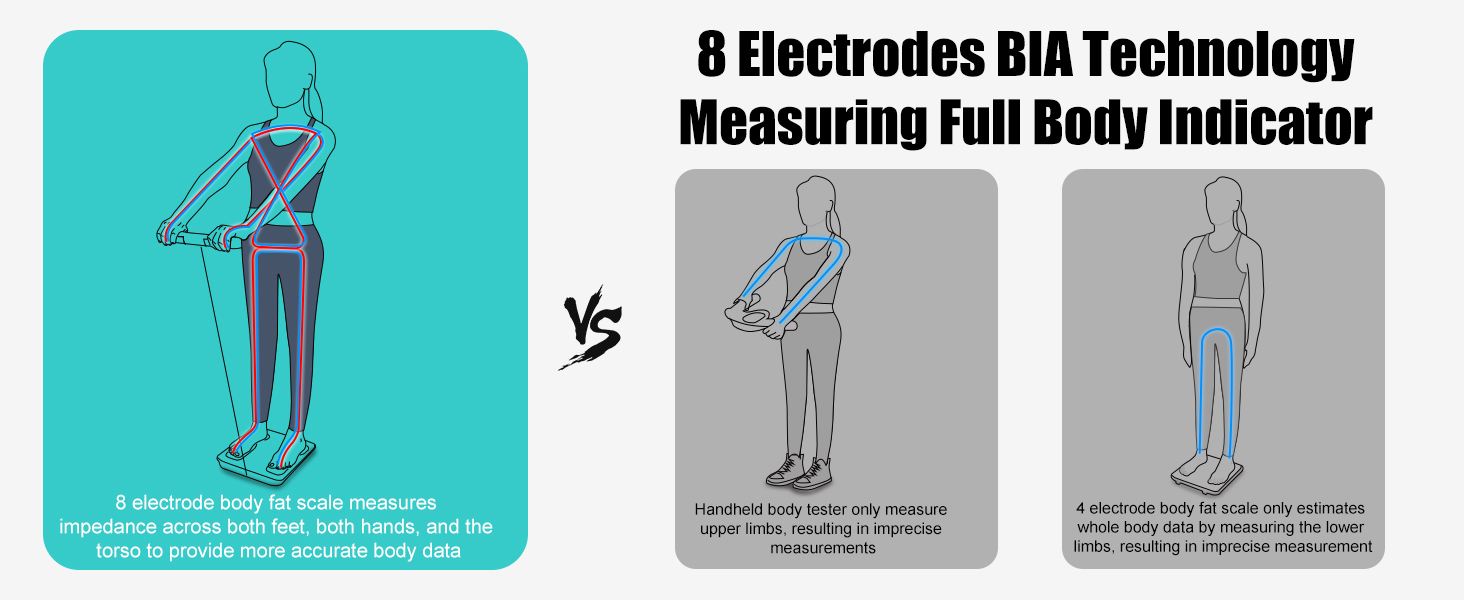
Image 2.1: Comparison of 8-electrode BIA technology for full body measurement accuracy.

Image 2.2: Visual representation of the 28 body health indicators provided by the scale.
3. Setup
- Placement: Place the body fat scale on a flat, hard, and sturdy surface. Avoid carpets, uneven surfaces, or areas near water to ensure accurate readings.
- App Download and Profile Creation: Turn on the scale. Download the 'Fitdays' APP from your device's app store. Open the app, register as a user, and create your personal profile by entering necessary data such as age, height, and gender. Ensure Bluetooth and GPS are enabled on your mobile device.
- Connect to App: Step gently onto the scale to turn it on. The app should automatically detect and connect to the scale via Bluetooth.
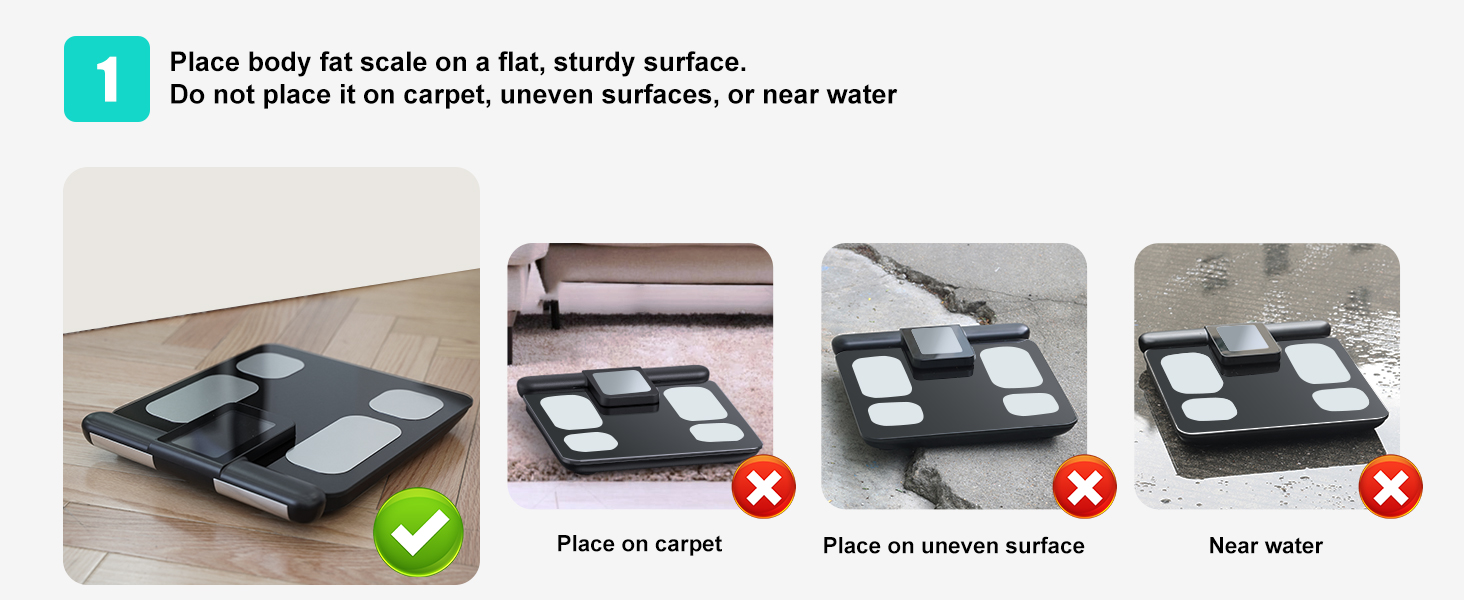
Image 3.1: Proper placement of the scale on a flat, hard surface.
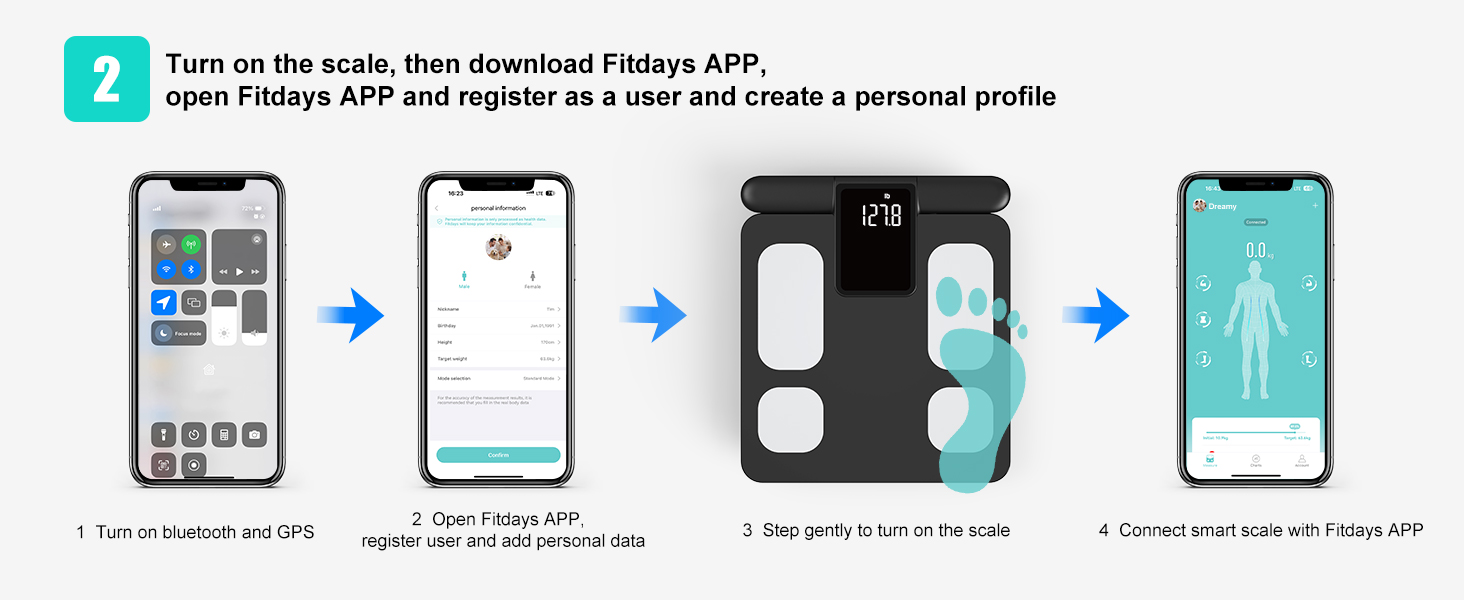
Image 3.2: Instructions for app download, registration, and initial connection.
4. Operating Instructions
- Taking a Measurement: Stand barefoot on the body fat scale, ensuring both feet fully contact the scale sensors. Hold the measuring handle with both hands, making sure all four electrode pads on the handle are simultaneously contacted by your fingers. Stretch your arms, keeping the connecting wires straight, and maintain your hands and body at a 30-45 degree angle.
- Reading Data: Wait approximately 12-18 seconds. During this time, the color icons on the handle's screen will flash. After the measurement is complete, the screen on the handle will display 8 key physical indicators. More detailed body indicators can be viewed on your phone via the Fitdays app.
- Retracting the Handle: To maintain stable measurements, the connecting line automatically locks during the measurement process. After measurement is complete, gently pull the connecting line upward to trigger its retraction.

Image 4.1: Step-by-step guide for proper scale usage, including foot and hand placement.
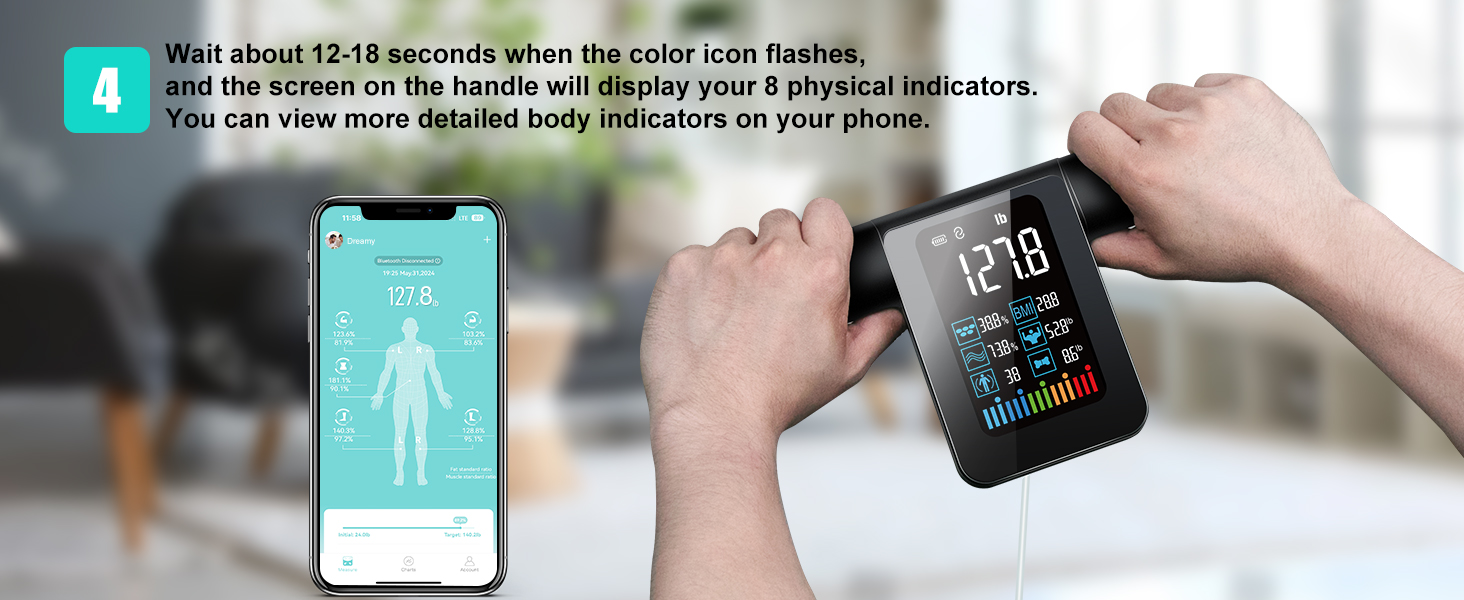
Image 4.2: The scale's VA display showing key metrics and the app interface with comprehensive data.
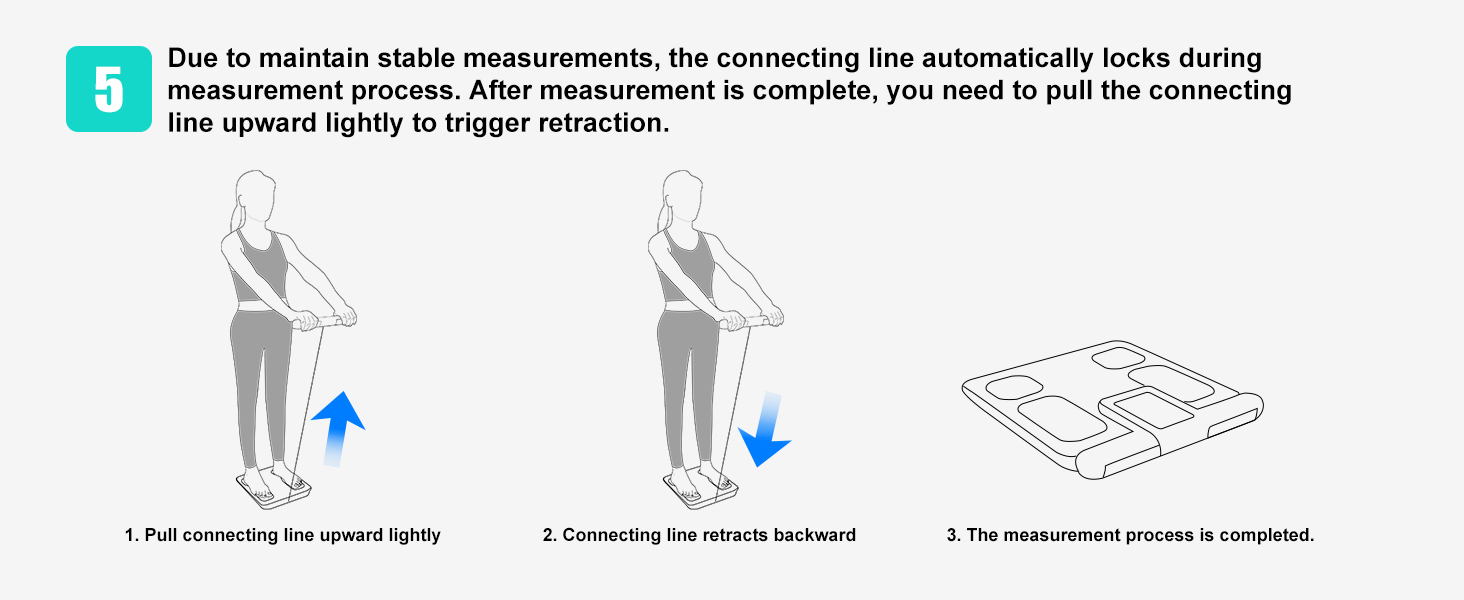
Image 4.3: Steps for retracting the measuring handle.
5. Understanding Your Data
The KUAIVO FG2015ULB scale provides 28 body composition metrics, offering a holistic view of your health. These metrics include:
- Weight, BMI, Body Fat Rate, Body Water Rate, Muscle Mass, Bone Mass, Visceral Fat, Subcutaneous Fat, Protein, Skeletal Muscle, Body Age, Ideal Body Weight, Obesity Level, BMR (Basal Metabolic Rate).
- Segmental analysis for Left Arm Muscle, Right Arm Muscle, Left Leg Muscle, Right Leg Muscle, Left Arm Fat, Right Arm Fat, Left Leg Fat, Right Leg Fat.
The VA Digital Display on the handle provides an immediate overview of key indicators. For in-depth analysis, historical data, and trend tracking, refer to the Fitdays app.
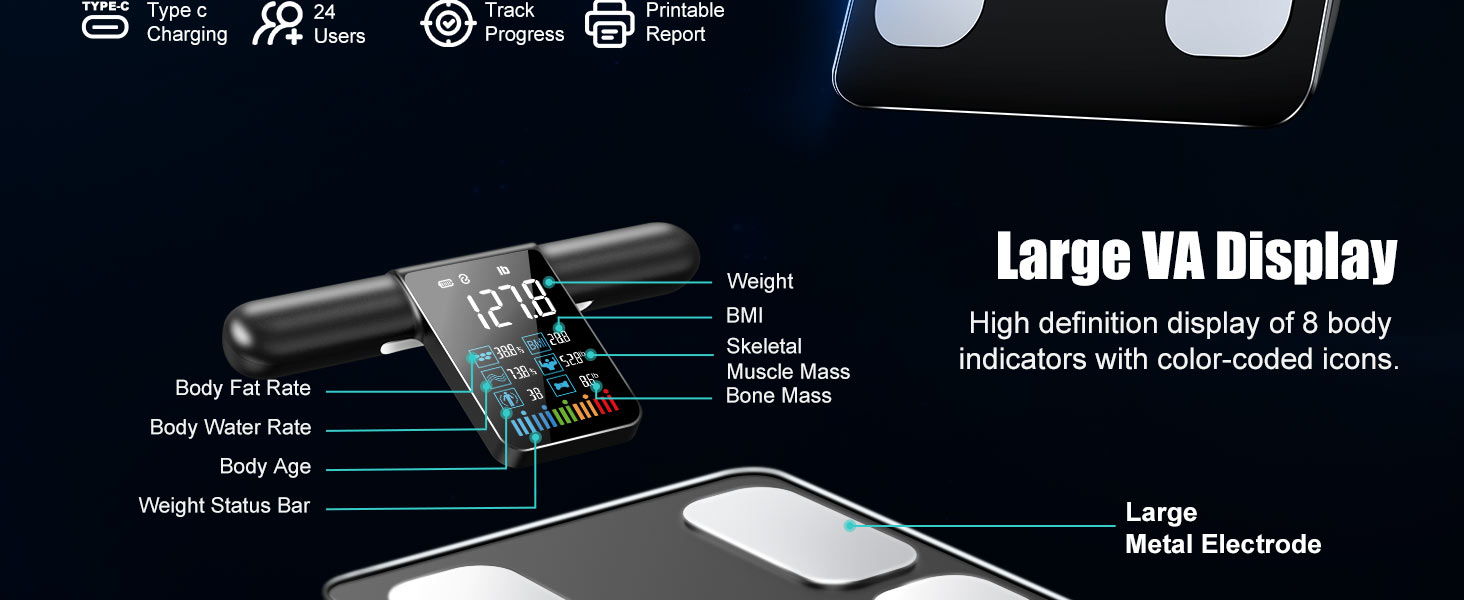
Image 5.1: Detailed view of the VA Digital Display and its indicators.
6. App Integration (Fitdays App)
The Fitdays app is central to managing your health data. It allows you to:
- Synchronize Data: Automatically syncs your measurement data from the scale to your mobile device.
- Generate Reports: Provides printable health reports for comprehensive body data management and progress tracking.
- Personalized Guidance: Offers insights and recommendations based on your data, aiding in fitness and nutrition planning.
- Multi-User Management: Supports up to 24 users, securely saving each individual's body composition information.
- Third-Party App Compatibility: Integrates with popular fitness applications such as Google Fit, Fitbit, Samsung Health, and Apple Health, allowing you to consolidate your health data.
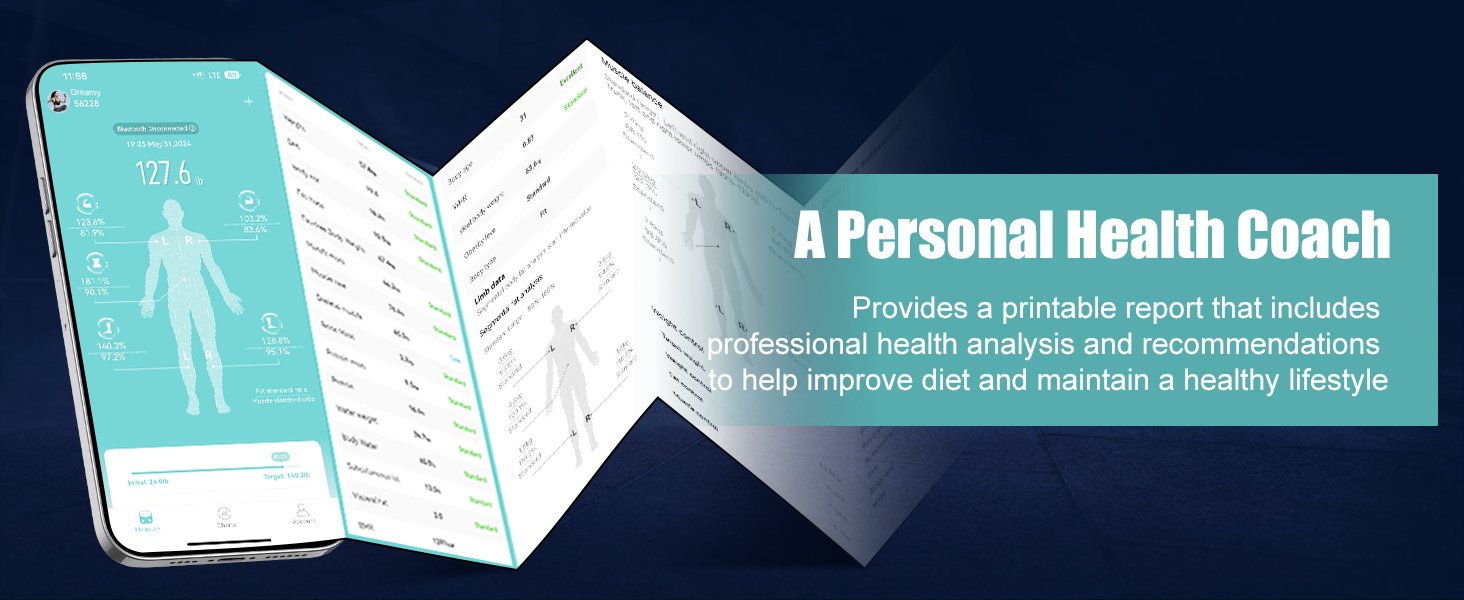
Image 6.1: Example of a printable health report from the Fitdays app.

Image 6.2: The Fitdays app supports syncing with multiple fitness apps and sharing data.
7. Maintenance
- Cleaning: Wipe the scale surface with a soft, damp cloth. Do not use abrasive cleaners or immerse the scale in water.
- Storage: Store the scale in a cool, dry place away from direct sunlight and extreme temperatures.
- Charging: The scale is rechargeable via a Type-C port. Ensure it is charged regularly to maintain optimal performance.
8. Troubleshooting
- Inaccurate Readings: Ensure the scale is on a flat, hard surface. Make sure your feet are bare and fully contact the electrodes. Ensure your hands fully contact the handle electrodes and you maintain the correct posture (30-45 degree arm angle).
- Difficulty Getting Readings on App: Verify that Bluetooth is enabled on your device and the Fitdays app is open and connected to the scale. Ensure your personal profile is correctly set up in the app.
- Scale Not Turning On: Check the battery level and recharge the scale if necessary using the Type-C port.
- App Not Syncing: Close and reopen the Fitdays app. Restart your phone's Bluetooth. Ensure the scale is on and within range of your phone.
9. Specifications
| Feature | Specification |
|---|---|
| Brand | KUAIVO |
| Model Number | FG2015ULB |
| Display Type | VA Digital Display (2.52 x 4.1 inch) |
| Electrodes | 8 |
| Body Composition Metrics | 28 |
| Connectivity | Bluetooth |
| Power Source | Rechargeable (Type-C) |
| Max Users | 24 |
| Recommended Use | Adults |
| Color | Black |
| Package Dimensions | 17 x 15 x 3 inches |
| Item Weight | 6.7 Pounds |
10. Warranty and Support
For warranty information and customer support, please refer to the documentation included with your product or contact KUAIVO customer service directly. Ensure you have your model number (FG2015ULB) and purchase details available when seeking support.