
Mooov 477371
Mooov 477371 Bluetooth Speaker User Manual
Model: 477371
1. Product Overview
The Mooov 477371 is a powerful 200W portable Bluetooth speaker designed for versatile audio playback and entertainment. It features integrated LED lighting effects, multiple audio input options, and a convenient trolley-style design for easy transport.

Figure 1.1: Front view of the Mooov 477371 Bluetooth Speaker with active LED lighting.
This image displays the Mooov 477371 speaker from a slight angle, showcasing its two large speaker grilles illuminated with purple LED lights. The speaker has a black casing with blue accents on the corners and a blue handle at the top.

Figure 1.2: The Mooov 477371 speaker being transported using its extendable trolley handle and wheels.
This image demonstrates the portability of the Mooov 477371 speaker, showing a person easily pulling it along using its integrated extendable handle and wheels, similar to a travel trolley.
2. Safety Information
- Do not expose the speaker to extreme temperatures or humidity.
- Avoid direct sunlight for extended periods.
- Do not disassemble or modify the device. This voids the warranty and may cause damage.
- Keep away from water. While the product is listed as "waterproof" in specifications, general electronic device care should be observed.
- Use only the provided power adapter for charging.
- Ensure proper ventilation when operating the speaker.
3. Package Contents
Verify that all items are present in the package:
- Mooov 477371 Bluetooth Speaker
- Power Cable
- Quick Start Guide (This manual serves as a comprehensive guide)
4. Device Layout and Controls
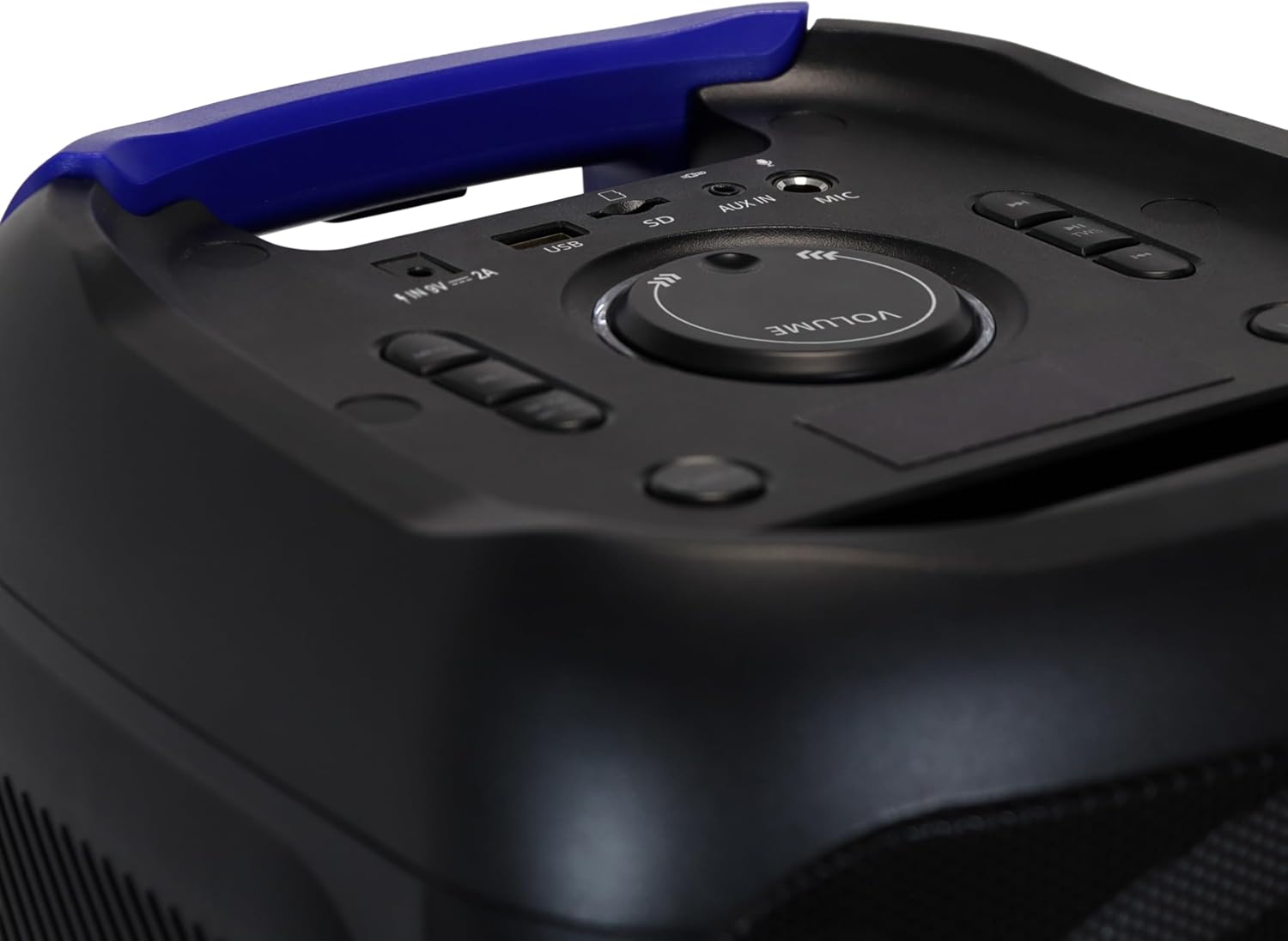
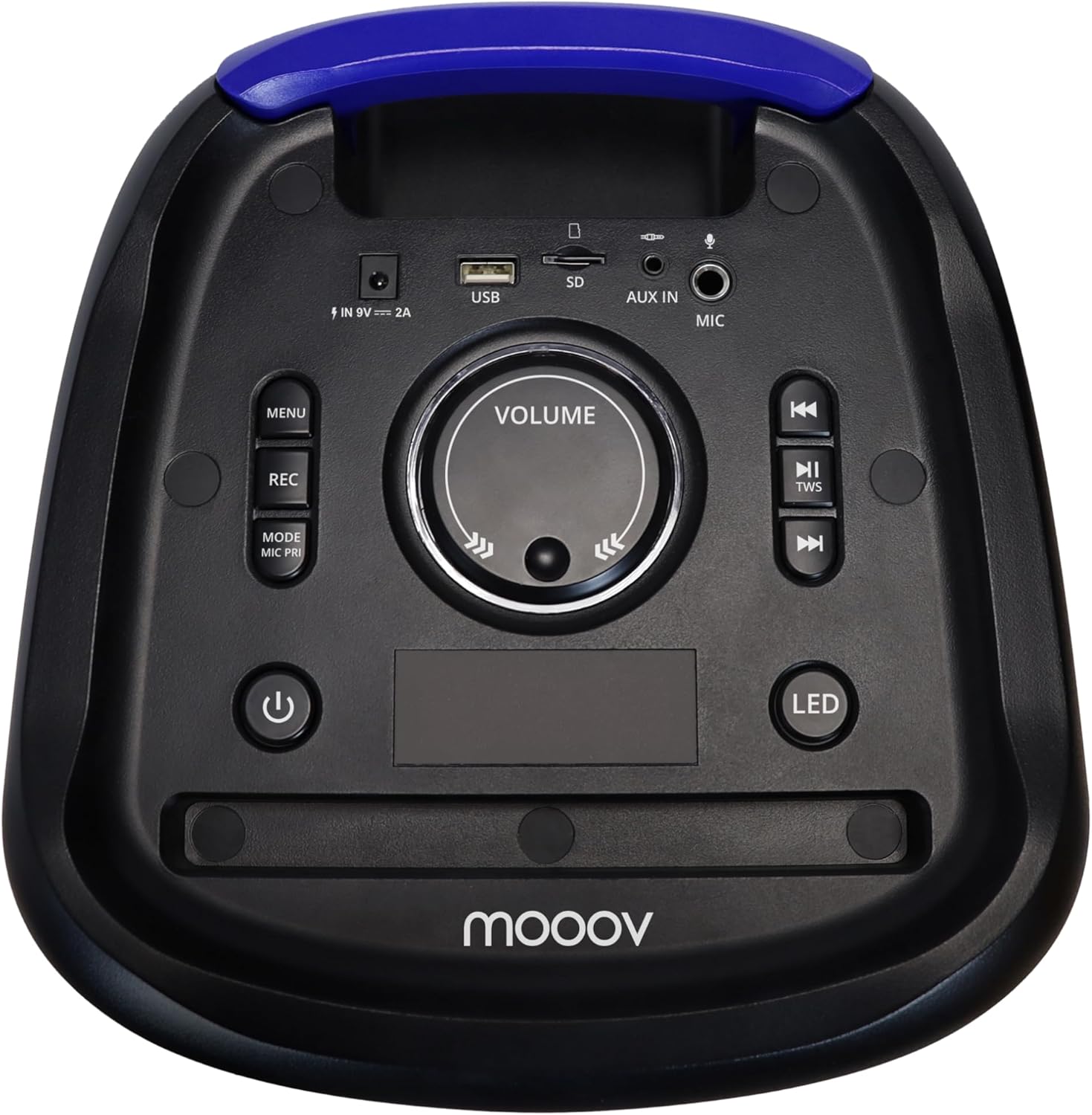
Figure 4.1: Top control panel of the Mooov 477371 speaker.
This image shows a top-down view of the speaker's control panel. Key features visible include the central volume knob, various buttons for playback control, mode selection, recording, and LED effects, as well as input ports for USB, SD card, AUX, and microphone.
Familiarize yourself with the control panel and ports:
- Volume Knob: Adjusts overall sound volume.
- MENU Button: Accesses menu options (if applicable).
- REC Button: Initiates voice recording to USB or microSD.
- MODE/MIC PRI Button: Switches input modes (Bluetooth, AUX, USB, SD) and activates microphone priority.
- Power Button: Turns the speaker on/off.
- LED Button: Cycles through LED lighting effects.
- Previous Track Button: Skips to the previous track.
- Play/Pause/TWS Button: Plays/pauses audio and initiates True Wireless Stereo pairing.
- Next Track Button: Skips to the next track.
- DC 9V IN 2A Port: Power input for charging.
- USB Port: For USB drive playback and recording.
- SD Card Slot: For microSD card playback and recording.
- AUX IN (3.5mm Jack): For connecting external audio devices.
- MIC Input: For connecting a microphone.
5. Setup and First Use
5.1 Charging the Speaker
Before first use, fully charge the speaker. Connect the provided power cable to the DC 9V IN 2A port on the top panel and plug the other end into a power outlet. The charging time is approximately 4 hours.
5.2 Powering On/Off
Press and hold the Power Button on the control panel to turn the speaker on or off.
6. Operating Instructions
6.1 Bluetooth Connectivity
- Turn on the Mooov 477371 speaker. It will automatically enter Bluetooth pairing mode.
- On your mobile device (smartphone, tablet, laptop), enable Bluetooth and search for available devices.
- Select "Mooov 477371" from the list of devices.
- Once connected, you will hear an audible confirmation, and the speaker's LED indicator will show a stable blue light.
6.2 AUX Input
Connect an external audio device (e.g., MP3 player, computer) to the AUX IN (3.5mm Jack) port using a 3.5mm audio cable (not included). The speaker will automatically switch to AUX mode, or you can press the MODE button to select AUX.
6.3 USB and SD Card Playback
Insert a USB drive into the USB Port or a microSD card into the SD Card Slot. The speaker will automatically detect and play compatible audio files. Use the Previous Track and Next Track buttons to navigate through files.
6.4 Microphone Use and Recording
Connect a microphone to the MIC Input. Adjust the microphone volume as needed. To record your voice to a connected USB drive or microSD card, press the REC button. Press it again to stop recording.
6.5 True Wireless Stereo (TWS) Functionality
The TWS feature allows you to pair two Mooov 477371 speakers for a stereo sound experience.
- Ensure both speakers are powered on and not connected to any Bluetooth device.
- On one speaker, press and hold the Play/Pause/TWS Button until you hear a pairing tone.
- The two speakers will automatically connect to each other. Once connected, you will hear a confirmation sound.
- Now, connect your mobile device to one of the paired speakers via Bluetooth. Audio will play in stereo through both speakers.
6.6 LED Light Effects
The speaker features 7 LED lighting effects. Press the LED Button to cycle through the different lighting modes or to turn the lights off.

Purple LED Effect

Red LED Effect
Green LED Effect
These images illustrate some of the dynamic LED lighting effects available on the Mooov 477371 speaker, showcasing purple, red, and green illuminations on the speaker grilles.
7. Maintenance
- Clean the speaker with a soft, dry cloth. Do not use abrasive cleaners or solvents.
- Keep the ports free of dust and debris.
- Store the speaker in a cool, dry place when not in use for extended periods.
8. Troubleshooting
| Problem | Possible Cause | Solution |
|---|---|---|
| Speaker does not turn on. | Low battery; Power cable not connected properly. | Charge the speaker fully; Ensure power cable is securely connected. |
| No sound from speaker. | Volume too low; Incorrect input mode; Device not connected. | Increase volume; Press MODE button to select correct input; Reconnect Bluetooth/AUX device. |
| Bluetooth pairing fails. | Speaker not in pairing mode; Device too far; Interference. | Ensure speaker is in pairing mode; Move device closer; Turn off other Bluetooth devices. |
| TWS pairing fails. | Speakers already connected to another device; Not in TWS pairing mode. | Disconnect both speakers from any Bluetooth devices; Ensure both are in TWS pairing mode. |
9. Specifications
| Feature | Detail |
|---|---|
| Model Number | 477371 |
| Brand | Mooov (METRONIC) |
| Output Power | 200 Watts |
| Connectivity | Bluetooth, AUX, USB, SD |
| LED Effects | 7 dynamic LED modes |
| Battery Life | Up to 3 hours (100% volume), 9 hours (50% volume) |
| Charging Time | Approx. 4 hours |
| Dimensions (H x W x D) | 580 (880 with extended handle) x 280 x 290 mm (29D x 28B x 58H cm) |
| Weight | 5.8 kg |
| Special Features | Portable, LED Light, Stereo Pairing (TWS), USB Port, Microphone Input, Trolley Handle and Wheels |
| Waterproof | Yes (as per specifications) |
10. Warranty and Support
10.1 Warranty Information
This product comes with a limited warranty. Please refer to the original purchase documentation or contact your retailer for specific warranty terms and conditions. Keep your proof of purchase for warranty claims.
10.2 Customer Support
For technical assistance, troubleshooting beyond this manual, or warranty inquiries, please contact Mooov customer support or your local retailer. Contact information can typically be found on the manufacturer's website or your purchase receipt.
Ask a question about this manual
Ask about setup, troubleshooting, compatibility, parts, safety, or missing instructions. Manuals+ will review the question and use this page’s manual context to help answer it.