
Introduction
This manual provides essential information for the assembly, operation, maintenance, and troubleshooting of your BORNOON Makeup Vanity with LED Light Strip Mirror and Chair. Please read these instructions carefully before assembly and use to ensure proper function and safety.

Image 1: The BORNOON Makeup Vanity, featuring an LED mirror, multiple drawers, RGB cabinets, and a cushioned stool.
Safety Information
- Assembly requires careful handling of tools and components.
- Always unplug the vanity from the power source before cleaning or performing maintenance on electrical components.
- Keep the vanity away from water and heat sources to prevent electrical hazards and material damage.
- Ensure all connections are secure before use.
- Do not overload drawers or shelves.
Package Contents
Verify that all components are present before beginning assembly. Refer to the included parts list in your physical manual for detailed identification.

Image 2: Dimensional diagram of the vanity and its components, including drawers, mirror, and stool.
Setup and Assembly
Assembly is required for this product. Please follow the step-by-step instructions provided in the separate assembly guide included with your package. Ensure you have adequate space and the necessary tools before starting.
- Unpack all components and verify against the parts list.
- Assemble the main vanity frame according to the diagrams.
- Install the drawers and ensure smooth operation.
- Attach the mirror and connect its LED light strip.
- Assemble the cushioned stool.
- Connect the power strip and RGB cabinet lighting.
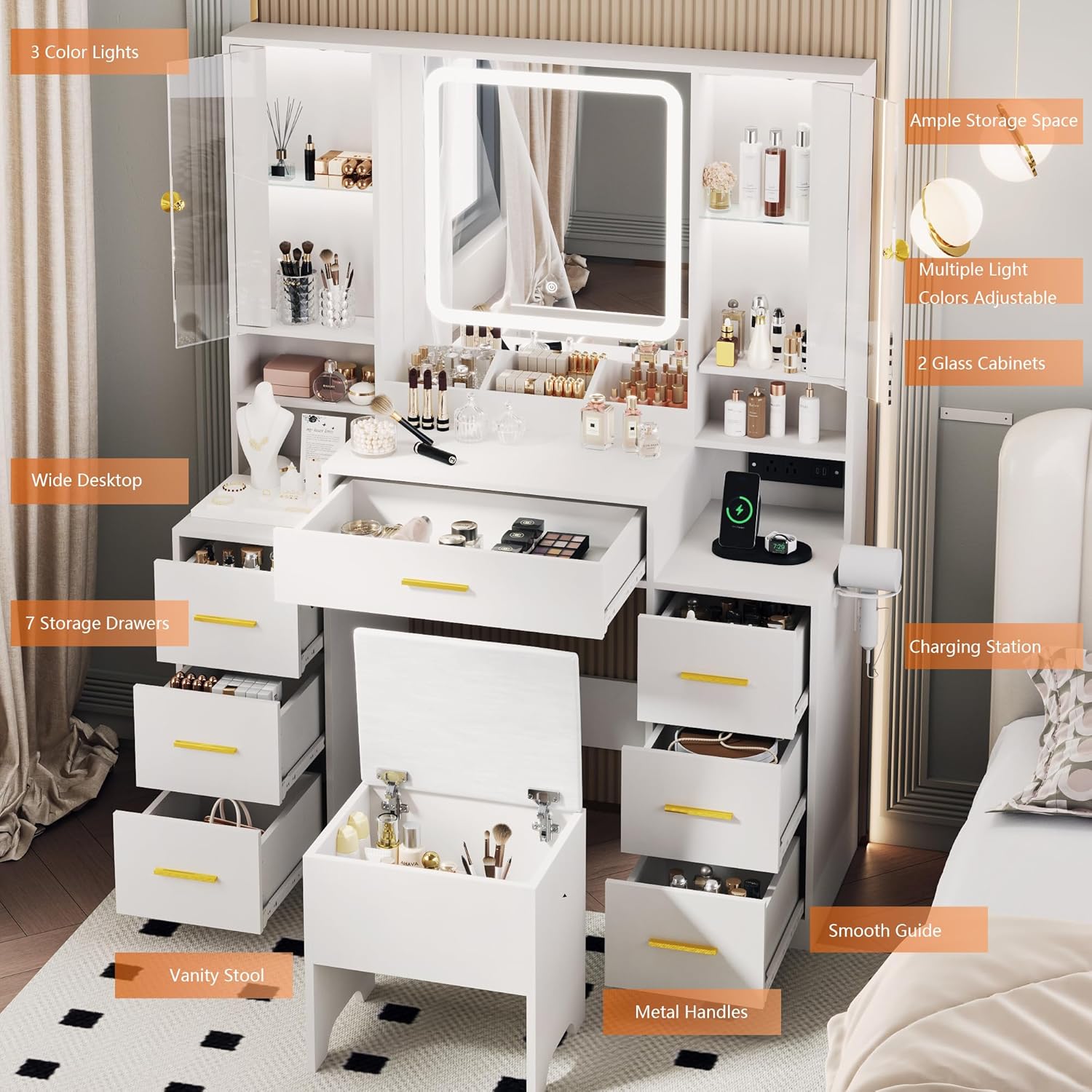
Image 3: Overview of the vanity's features, highlighting the wide desktop, 7 storage drawers, vanity stool, metal handles, charging station, and glass cabinets.
Operating Instructions
LED Light Strip Mirror
The mirror features an integrated LED light strip with adjustable brightness and color temperature settings.
- Power On/Off: Tap the touch sensor on the mirror to turn the light on or off.
- Adjust Brightness: Long press the touch sensor to cycle through brightness levels. Release when desired brightness is reached.
- Change Color Temperature: Tap the touch sensor repeatedly to switch between Warm Yellow, Warm White, and Cold White light modes.

Image 4: Illustration of the three adjustable lighting effects: Warm Yellow, Warm White, and Cold White, with instructions for brightness adjustment.
RGB Cabinets
The glass-door cabinets are equipped with RGB LED lights, offering various colors and modes.
- Control the RGB lights using the provided remote control or a compatible mobile application (if applicable, refer to specific instructions for app pairing).
- Select desired colors, brightness, and dynamic lighting modes.
Built-in Charging Station
The vanity includes a power strip for convenient charging of electronic devices.
- The charging station features 2 USB ports (5V 2.1A) and 2 AC outlets (110-120V).
- Plug the vanity's main power cord into a standard wall outlet.
- Connect your devices to the USB ports or AC outlets as needed.

Image 5: Detailed view of the built-in charging station, showing 5V 2.1A USB ports, 110-120V AC outlets, and a 5.08-foot power cord.
Drawers and Storage
The vanity is equipped with seven drawers and two cabinets for organizing cosmetics, jewelry, and other items.
- Utilize the various drawer sizes and cabinet shelves to categorize and store your belongings efficiently.
- The drawers feature smooth slides for easy opening and closing.

Image 6: Close-up of a drawer demonstrating the smooth slide mechanism.
Maintenance
- Cleaning: Wipe surfaces with a soft, damp cloth. Avoid abrasive cleaners or harsh chemicals that may damage the finish.
- Mirror Care: Use a glass cleaner specifically designed for mirrors. Do not spray cleaner directly onto the LED strip or electrical components.
- Electrical Components: Ensure all electrical connections are dry and free from dust. Do not attempt to repair electrical components yourself.
- Drawer Slides: Periodically check drawer slides for smooth operation. If needed, apply a small amount of silicone lubricant.
Troubleshooting
| Problem | Possible Cause | Solution |
|---|---|---|
| LED mirror light not turning on. | No power, loose connection, faulty sensor. | Check power cord connection. Ensure the wall outlet is functional. Gently tap the touch sensor. If issues persist, contact customer support. |
| RGB cabinet lights not working. | No power, remote control battery low, remote not paired. | Verify power connection. Replace remote control batteries. Refer to RGB light instructions for pairing. |
| Drawers are stiff or difficult to open/close. | Overloaded drawer, debris in slides, misaligned slides. | Reduce contents in the drawer. Clean drawer slides. Check for proper alignment during assembly. |
| Missing or damaged parts during assembly. | Shipping damage, packaging error. | Contact BORNOON customer support immediately for free replacement parts. |
Specifications
- Brand: BORNOON
- Model Number: BRN-22/23
- Frame Material: Engineered Wood
- Product Dimensions: 15.62"D x 43.15"W x 55.05"H
- Item Weight: 105.9 pounds
- Power Strip: 2 USB ports (5V 2.1A), 2 AC outlets (110-120V)
- Mirror Lighting: LED strip, adjustable brightness, 3 color temperatures (Warm Yellow, Warm White, Cold White)
- Cabinet Lighting: RGB LED
- Assembly Required: Yes
Warranty and Support
BORNOON offers a commitment to customer satisfaction. In the event of any damage during installation or use, BORNOON provides free replacement of any parts.
For further assistance, troubleshooting, or to request replacement parts, please contact BORNOON customer support through the retailer where the product was purchased or visit the official BORNOON store online.
Customer Support Link: BORNOON Seller Information