
1. Product Overview
This manual provides instructions for the VIKNAN 13.3-inch Car Radio Screen Upgrade, designed for Land Rover Defender models from 2020 to 2022. This unit replaces the original car screen, integrating various multimedia and navigation functionalities while retaining original vehicle features.
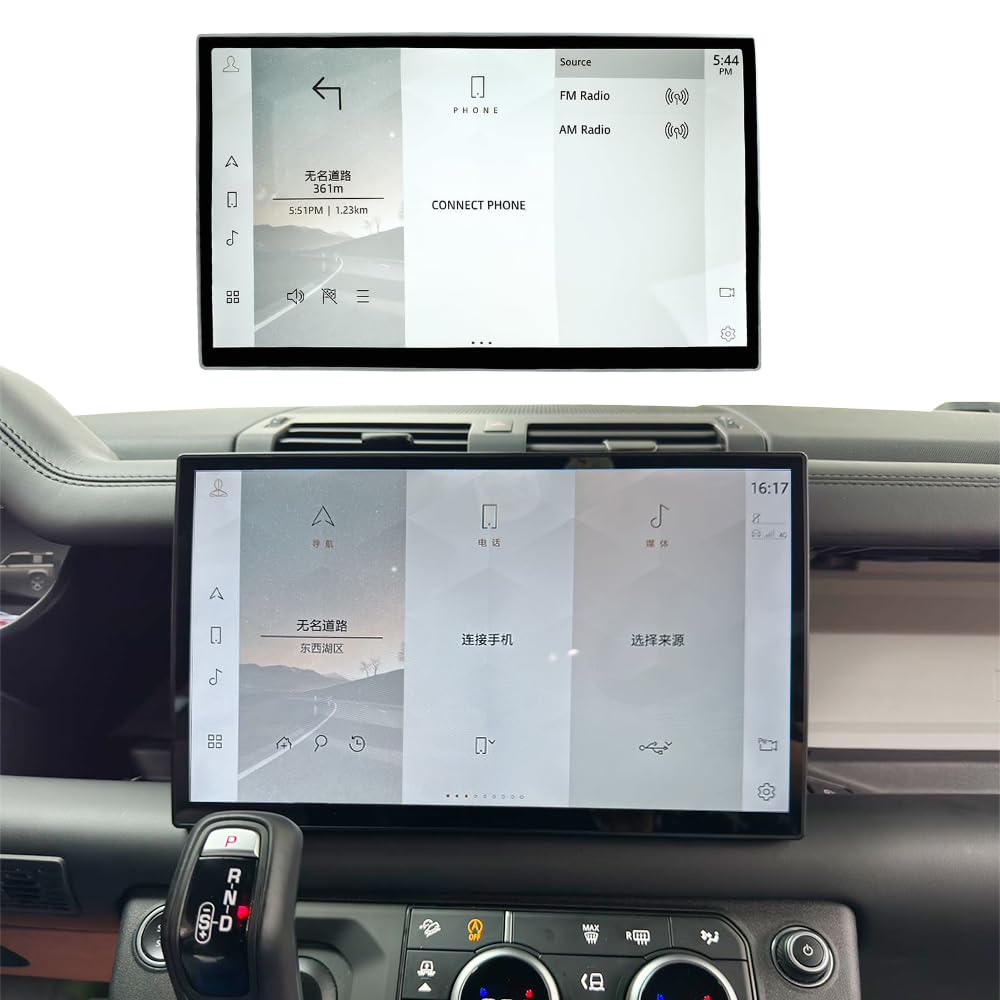
Image 1.1: VIKNAN 13.3-inch Car Radio Screen Upgrade unit.
2. Key Features
- Vehicle Compatibility: Suitable for Land Rover Defender 2020, 2021, 2022, 2023, and 2024 models. Supports original car amplifier and backup camera, retaining original car functions. Note: This is a screen upgrade, not an Android system.
- 13.3-inch IPS Touch Screen: Full touch IPS capacitive screen with high resolution (1920*720) supporting HD 1080P display. All original car functions will be displayed on this screen.
- Integrated Functions: Perfectly compatible with the original amplifier, air conditioning function display, seamless integration with your original climate control system, 4X4 function display, steering wheel controls, AHD camera support, CarPlay, GPS navigation, and mobile phone Bluetooth music.
- CarPlay & Android Auto: If your original car supports CarPlay and Android Auto, simply connect your smartphone.
- Plug and Play Installation: Only the screen needs replacement. Connects directly with original car wiring; no additional modifications are required.
3. What's in the Box
The package includes the following components:
- 13.3-inch Touch Screen Unit

Image 3.1: The 13.3-inch touch screen unit and its mounting frame.
4. Installation Guide
The installation process involves removing the original screen and dashboard trim, then connecting and mounting the new 13.3-inch screen. Professional online installation guidance and videos are available upon request from customer support.
4.1 Before and After Installation Comparison

Image 4.1: Visual comparison showing the original 10.2-inch/11.4-inch screen versus the upgraded 13.3-inch screen.
4.2 Installation Steps Video
Video 4.2: Detailed installation steps for the VIKNAN 13.3-inch Car Radio Screen Upgrade for Land Rover Defender. This video demonstrates the removal of existing components and the installation of the new screen.
5. Operating Instructions
The 13.3-inch screen operates as a full touch IPS capacitive display. All original car functions, including climate control, 4X4 display, and steering wheel controls, are integrated and accessible through the new screen interface.
5.1 4X4 Function Display
The screen supports displaying the vehicle's 4X4 functions, providing real-time information on the drivetrain status.

Image 5.1: The 4X4 function interface displayed on the upgraded screen.
5.2 GPS Navigation
The unit features built-in GPS navigation. It works perfectly with WiFi, online, or offline maps, ensuring you can navigate effectively.

Image 5.2: GPS navigation interface showing map data on the screen.
5.3 Original Camera Support
The system supports the original factory rear view camera or 360 camera. These cameras power on automatically when shifting into reverse gear, enhancing safety by eliminating blind spots.

Image 5.3: Rear view camera feed displayed on the screen, showing parking assistance.
6. Maintenance
To ensure the longevity and optimal performance of your VIKNAN 13.3-inch Car Radio Screen, follow these maintenance guidelines:
- Screen Cleaning: Use a soft, lint-free cloth specifically designed for electronic screens. Dampen the cloth slightly with water or a screen-safe cleaning solution. Avoid harsh chemicals, abrasive materials, or excessive moisture.
- Dust Removal: Regularly wipe down the screen and surrounding areas to prevent dust buildup, which can affect touch sensitivity and visibility.
- Avoid Direct Sunlight: Prolonged exposure to direct sunlight can cause overheating and potential damage to the screen. When parked, consider using a sunshade.
- Software Updates: Check with VIKNAN support for any available software updates to ensure the system runs efficiently and securely.
7. Troubleshooting
If you encounter any issues with your VIKNAN 13.3-inch Car Radio Screen, refer to the following common troubleshooting steps:
- Screen Not Turning On: Ensure all power connections are secure. Check the vehicle's fuse box for any blown fuses related to the infotainment system.
- No Sound: Verify that the volume is not muted or set too low. Check audio cable connections. Ensure the original car amplifier is functioning correctly.
- Touch Screen Unresponsive: Try restarting the vehicle. If the issue persists, ensure the screen is clean and free of debris.
- CarPlay/Android Auto Connection Issues: Ensure your smartphone is compatible and its operating system is up to date. Check the USB cable for damage and try a different cable.
- GPS Signal Loss: Ensure the GPS antenna is properly installed and has a clear line of sight to the sky. Move the vehicle to an open area if signal is weak.
For persistent issues or problems not listed here, please contact VIKNAN customer support.
8. Specifications
| Brand | VIKNAN |
| Model | B0DG2M73C1 |
| Screen Size | 13.3 Inches (Note: Product title states 13.3 inch, specifications state 12 inches. Following product title for consistency.) |
| Display Type | LCD |
| Native Resolution | 1920x720 (from feature bullets, specifications state 1920x1080, using feature bullets for consistency with screen size) |
| Connectivity Technology | USB |
| Compatible Devices | Audio Amplifier |
| Audio Output Mode | Stereo |
| Item Weight | 1.75 Kilograms |
| UPC | 767552704571 |
9. Warranty and Support
VIKNAN is committed to providing high-quality products and excellent customer service.
- Warranty: This product comes with a 1-year warranty.
- Return Policy: 30-day no-reason refund.
- Technical Support: Lifetime technical support is provided.
- Response Time: Expect a 24-hour quick response for inquiries.
- Installation Assistance: Installation manuals and videos are available upon request.
For any support needs, please contact us:
Email: viknav007@outlook.com

Image 9.1: VIKNAN After-sales Service contact information.