1. Introduction
This manual provides detailed instructions for the proper use and maintenance of your IPEROT Scientific Calculator IP-991ES Plus. This calculator is designed for a wide range of mathematical and scientific applications, featuring 417 functions and a 4-line display. Please read this manual thoroughly to ensure optimal performance and longevity of your device.
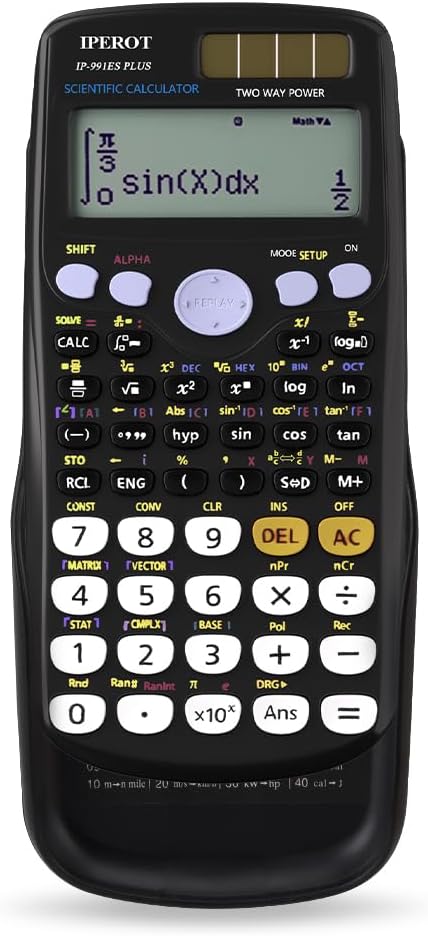
Image 1: Front view of the IPEROT Scientific Calculator IP-991ES Plus. The calculator is black with a clear 4-line display showing a sample integral calculation. The keys are arranged logically for scientific functions.
2. Setup and Power Supply
Your IPEROT Scientific Calculator IP-991ES Plus utilizes a dual power system, combining solar power with a battery backup. This ensures continuous operation in various lighting conditions.
2.1 Powering On/Off
- To power on the calculator, press the ON button located at the top right of the keypad.
- To power off the calculator, press SHIFT followed by the AC button (which also functions as OFF).
2.2 Dual Power System
The calculator is equipped with both solar cells and a single LR44 button cell battery (included). The solar cells provide power in well-lit environments, while the battery takes over in low light or when solar power is insufficient.

Image 2: Illustration of the calculator's dual power system. The image shows the solar panel on the calculator and a close-up of the battery compartment for the LR44 battery.
2.3 Battery Replacement
When the display becomes dim or calculations are erratic in sufficient light, the battery may need replacement. Use a small screwdriver to open the battery compartment on the back of the calculator and replace the LR44 battery, ensuring correct polarity.
3. Operating Instructions
This section details the various functions and modes of your IPEROT Scientific Calculator IP-991ES Plus.
3.1 Display and Basic Operations
The calculator features a 4-line display, allowing for clear viewing of expressions and results. Input is displayed on the upper lines, and results on the lower line.
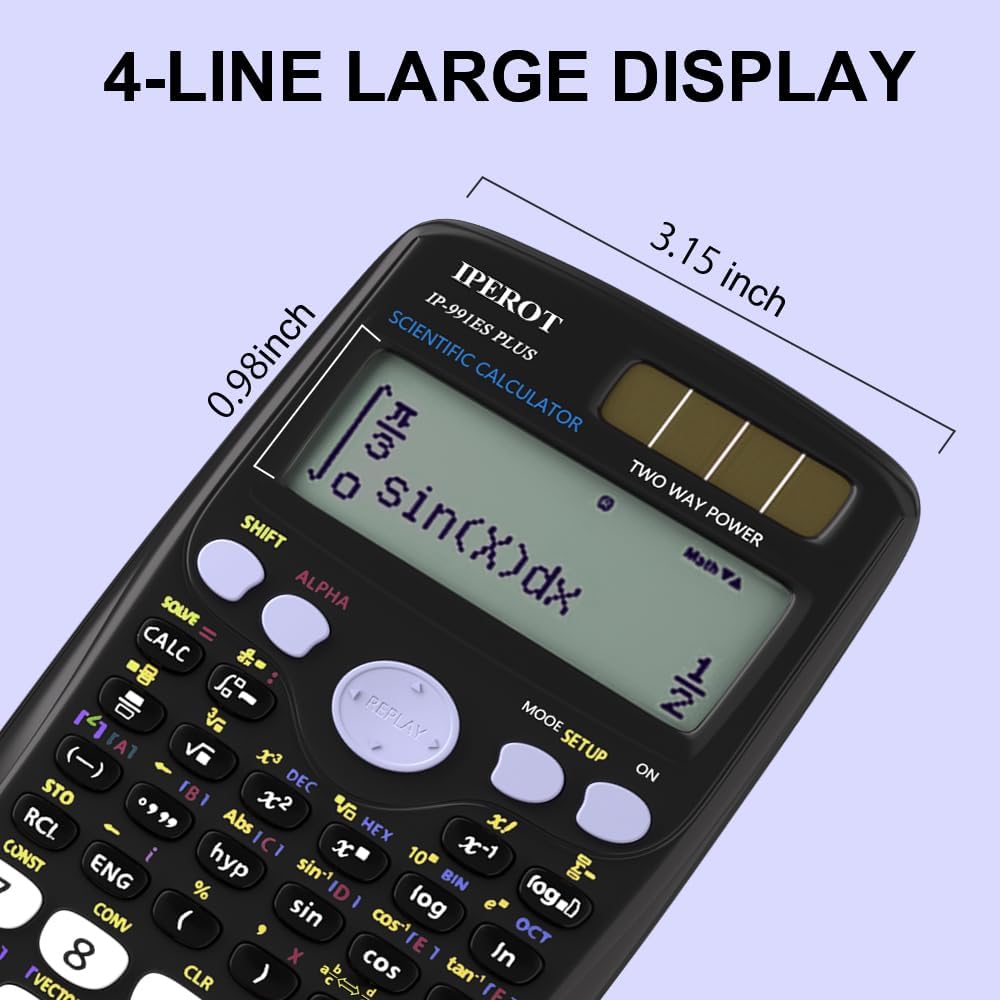
Image 3: Close-up of the calculator's 4-line display, highlighting its dimensions (0.98 inches by 3.15 inches) and showing a complex integral calculation.
- Inputting Numbers: Use the numeric keypad (0-9) and the decimal point (.).
- Arithmetic Operations: Use +, -, ×, ÷ for basic calculations.
- Equals: Press = to execute a calculation.
- Clear: Press AC to clear all entries and reset the calculator. Press DEL to delete the last entered character.
3.2 Function Modes (417 Functions)
The calculator supports 8 calculation modes, providing 417 functions for various mathematical and scientific tasks. To access different modes, press the MODE SETUP button.

Image 4: A visual representation of the 8 calculation modes available on the IPEROT Scientific Calculator, including General Calculations (COMP), Complex Numbers (CMPLX), Statistics (STAT), Base-N, Equation Solution, Matrix Calculations, Table, and Vector.
Common modes include:
- COMP (Compute): For general arithmetic and function calculations.
- CMPLX (Complex Numbers): For calculations involving complex numbers.
- STAT (Statistics): For statistical calculations like mean, standard deviation, and regression.
- BASE-N: For calculations in different number bases (binary, octal, decimal, hexadecimal).
- EQN (Equation): For solving linear and quadratic equations.
- MATRIX: For matrix operations.
- TABLE: For generating number tables from functions.
- VECTOR: For vector calculations.
3.3 Advanced Functions
The calculator supports a wide array of advanced functions, including:
- Trigonometric Functions: sin, cos, tan, and their inverses.
- Logarithmic Functions: log, ln, 10x, ex.
- Power and Root Functions: x2, x3, x-1, √, 3√, xy.
- Calculus: Derivative and integral calculations.
- Fractions: Input and calculate with fractions.
- Permutations and Combinations: nPr, nCr.
- Constants and Conversions: Access built-in scientific constants and unit conversions.
Many functions are accessed by pressing the SHIFT or ALPHA key before the desired function key. Refer to the key labels for secondary functions.

Image 5: Examples of the calculator's written display feature, showing how factorial (5+3)! and absolute value |12-7|x2 calculations appear on the screen with their respective results.
4. Maintenance and Care
Proper care will extend the life of your calculator.
- Cleaning: Wipe the calculator with a soft, dry cloth. Do not use abrasive cleaners or solvents.
- Storage: Store the calculator in a cool, dry place. Avoid extreme temperatures and direct sunlight.
- Protection: Use the included sliding cover to protect the display and keys from scratches and dust.

Image 6: The IPEROT Scientific Calculator shown with its protective sliding cover, illustrating how the cover can be used to shield the display and keys.
5. Troubleshooting
If you encounter issues with your calculator, refer to the following common problems and solutions:
| Problem | Solution |
|---|---|
| Display is dim or blank. | Ensure the calculator is in a well-lit area for solar power. If the issue persists, replace the LR44 battery. |
| Calculator does not turn on. | Press the ON button firmly. Check battery status and replace if necessary. Ensure sufficient light for solar operation. |
| Incorrect calculation results. | Verify the correct mode is selected (e.g., COMP for general calculations). Check input values and order of operations. Reset the calculator by pressing SHIFT then CLR (Clear) and select "All" to clear memory and settings. |
| Keys are unresponsive. | Ensure no debris is lodged under the keys. Clean the calculator surface. If the problem continues, contact customer support. |
6. Specifications
- Model: IP-991ES Plus (calculator-AB)
- Brand: IPEROT
- Functions: 417
- Display: 4-line LCD
- Power Source: Solar and Battery (1 x LR44, included)
- Dimensions: 6 x 2 x 0.1 inches (approximately)
- Item Weight: 4.6 ounces
- Color: Black
7. Warranty and Support
For warranty information or technical support, please refer to the contact details provided with your purchase or visit the official IPEROT website. Keep your proof of purchase for warranty claims.