
1. Product Overview
The ODK Desk (Model DBSC-1) is a versatile and space-saving computer desk designed for home offices, gaming setups, or study areas. It features a durable P2 particle board tabletop, a robust steel frame, and four fabric drawers for organized storage. The desk also includes a convenient headphone hook and adjustable foot pads for stability on uneven surfaces.

Image 1.1: ODK Desk (Brown, 120x48x75.7cm) in a typical setup.
2. Safety Warnings
Important: Please read and understand all safety warnings before assembly and use.
- This desk is designed to support a maximum load of 11.1 kg (24.5 lbs). Do not exceed this weight limit to prevent damage or injury.
- Ensure the desk is assembled and used on a flat and stable surface to prevent tipping.
- Avoid placing heavy objects or devices on the desk that could exceed the recommended weight capacity.
- Keep small parts and packaging materials away from children during assembly to prevent choking hazards.
- Periodically check all screws and connections to ensure they remain tight and secure.
3. Package Contents
Before beginning assembly, verify that all components listed below are present and undamaged. If any parts are missing or damaged, please contact customer support.
- Desk Top Panel (P2 particle board)
- Steel Frame Components
- 4 Fabric Drawers
- Headphone Hook
- Adjustable Foot Pads
- Assembly Hardware (screws, bolts, etc.)
- Assembly Tools (e.g., Allen wrench)
- Instruction Manual
4. Setup and Assembly
Assembly is designed to be straightforward and typically takes approximately 20 minutes with one person. All necessary tools are included.
- Unpack Components: Carefully remove all parts from the packaging and lay them out on a clean, soft surface (e.g., a blanket or carpet) to prevent scratches.
- Assemble Frame: Follow the detailed instructions provided in the separate assembly manual to connect the steel frame components. Ensure all screws are finger-tightened initially.
- Attach Desk Top: Secure the P2 particle board desk top to the assembled frame using the provided hardware. Once aligned, fully tighten all screws on the frame and desk top.
- Install Drawers: Insert the four fabric drawers into their designated compartments. The drawers are ready for use and easy to clean.
- Attach Headphone Hook: Mount the headphone hook to the desired location on the desk frame as indicated in the assembly manual.
- Adjust Foot Pads: Place the desk in its intended location. Adjust the foot pads at the bottom of the legs to ensure the desk is level and stable, preventing wobbling and protecting your floor from scratches.

Image 4.1: Details of the headphone hook, robust frame, and adjustable foot pads for stability.
5. Operating Instructions
The ODK Desk is designed for immediate use after assembly. Here are some tips for optimal operation:
- Utilizing Storage: The four fabric drawers provide ample space for organizing books, documents, stationery, and other personal items, helping to keep your workspace tidy.
- Headphone Hook: Use the integrated headphone hook to keep your headphones or headset conveniently stored and easily accessible, preventing clutter on the desk surface.
- Surface Protection: The P2 particle board tabletop is scratch, collision, and water-resistant, designed to withstand daily wear. However, using coasters for drinks and mouse pads for computer mice is recommended to prolong the desk's lifespan.
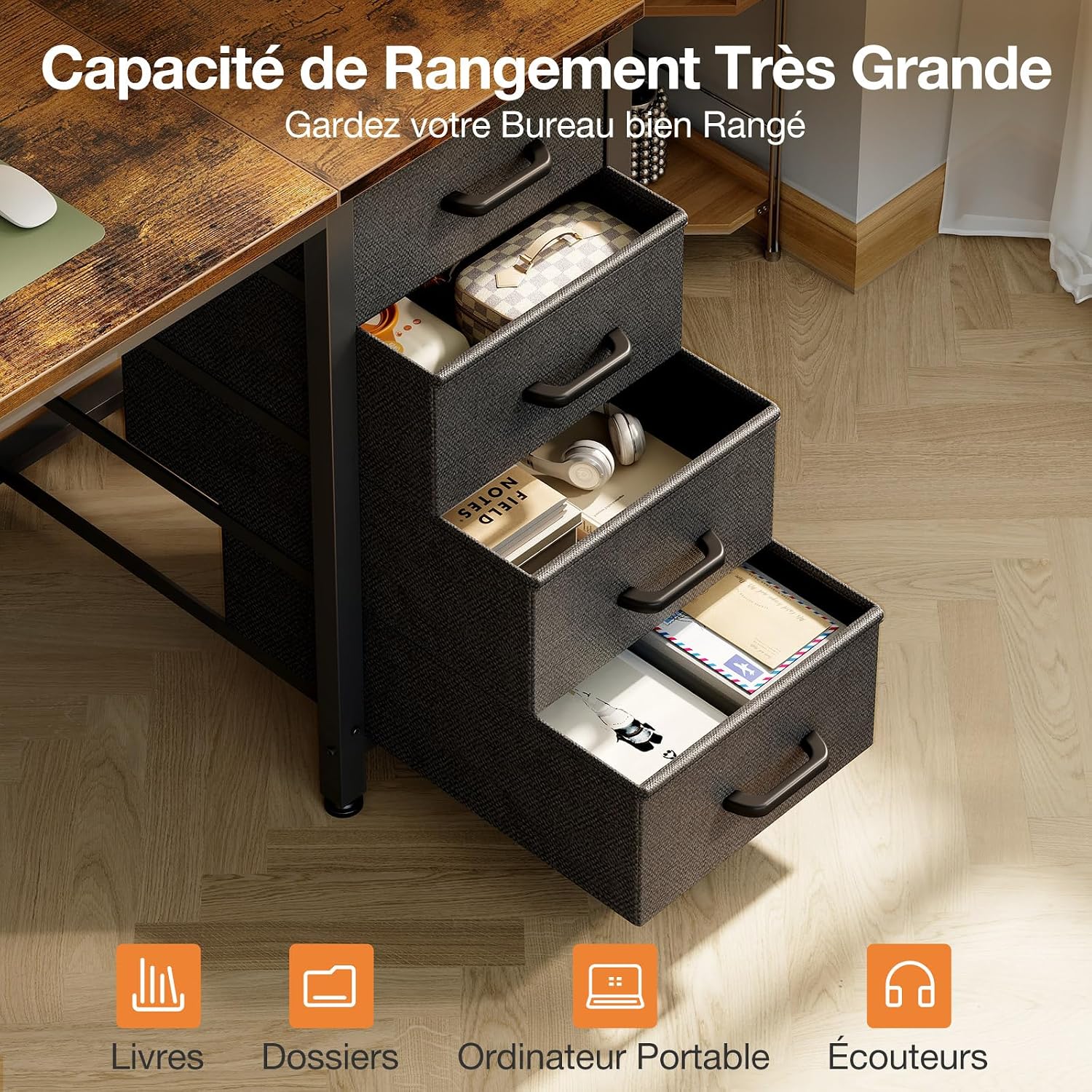
Image 5.1: The desk with its four fabric drawers open, illustrating storage capacity for various items.
6. Maintenance
Regular maintenance will help keep your ODK Desk in excellent condition.
- Cleaning the Desk Top: Wipe the desk surface with a soft, damp cloth. For stubborn marks, use a mild, non-abrasive cleaner. Avoid harsh chemicals that may damage the finish.
- Cleaning Fabric Drawers: The fabric drawers are easy to clean. Spot clean with a damp cloth and mild soap if necessary. Allow to air dry completely.
- Frame Maintenance: Wipe the steel frame with a dry or slightly damp cloth to remove dust.
- Hardware Check: Periodically (e.g., every 3-6 months) check all screws and bolts to ensure they are tight. Re-tighten if necessary to maintain stability.
- Avoid Direct Sunlight: Prolonged exposure to direct sunlight may cause fading or damage to the desk's finish.
7. Troubleshooting
If you encounter any issues with your ODK Desk, refer to the following common problems and solutions:
| Problem | Possible Cause | Solution |
|---|---|---|
| Desk is wobbly/unstable. | Uneven floor; loose screws. | Adjust the foot pads at the bottom of the legs until the desk is stable. Check and tighten all assembly screws. |
| Drawers do not slide smoothly. | Drawers are overloaded; obstruction in compartment. | Reduce the weight in the drawers. Check for any items obstructing the drawer's movement. Ensure drawers are inserted correctly. |
| Scratches on desk surface. | Sharp objects; abrasive cleaning. | Use a desk mat or coasters to protect the surface. Clean with soft cloths and non-abrasive cleaners. |
| Missing parts during assembly. | Packaging error. | Contact ODK customer support with your purchase details and the specific missing parts. |
8. Specifications

Image 8.1: Dimensional diagram of the ODK Desk.
| Feature | Detail |
|---|---|
| Model Number | DBSC-1 |
| Brand | ODK |
| Product Dimensions (L x W x H) | 120 x 48 x 75.7 cm (47.2 x 18.9 x 29.8 inches) |
| Item Weight | 11.1 Kilograms (24.5 lbs) |
| Recommended Maximum Load | 11 Kilograms (24.5 lbs) |
| Color | Brown |
| Style | Modern |
| Top Material Type | Engineered Wood (P2 Particle Board) |
| Frame Material | Steel |
| Number of Drawers | 4 (Fabric) |
| Special Features | Headphone Hook, Adjustable Foot Pads |
| Assembly Required | Yes (Approx. 20 minutes for 1 person) |
| Included Components | Headphone Hook, Assembly Tools |
| Recommended Uses | Gaming, Work, Writing, Home Office |
| Country of Origin | China |
| UPC | 850065069524 |
9. Warranty Information
The ODK Desk (Model DBSC-1) comes with a Limited Warranty. This warranty covers manufacturing defects under normal use. Please retain your proof of purchase for any warranty claims.
For specific details regarding the terms and conditions of your warranty, please refer to the documentation included with your purchase or contact ODK customer support.
10. Support
If you have any questions, require assistance with assembly, or need to report missing/damaged parts, please contact ODK customer support.
Please have your model number (DBSC-1) and proof of purchase ready when contacting support to ensure efficient service.
For the most up-to-date contact information, please visit the official ODK website or refer to the contact details provided in your product packaging.


