
Varstrom TSDZ2B
Varstrom TSDZ2B 48V 500W Mid Drive Kit User Manual
Model: TSDZ2B with DZ40 Display
1. Introduction
This manual provides essential information for the installation, operation, and maintenance of your Varstrom TSDZ2B 48V 500W Mid Drive Kit with DZ40 Display. Please read this manual thoroughly before installation and use to ensure proper function and safety.
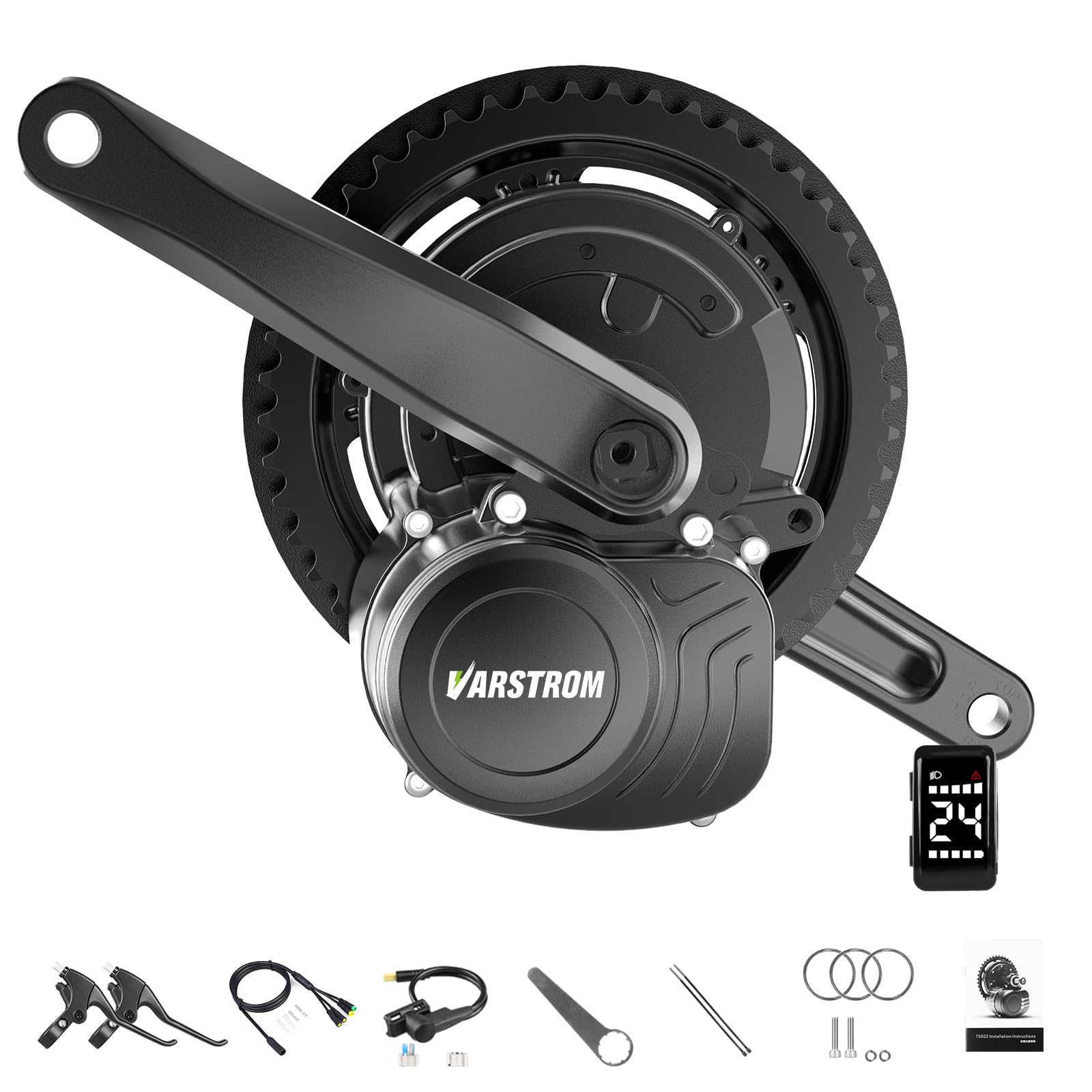
Figure 1: Varstrom TSDZ2B Mid Drive Kit with DZ40 Display. This image shows the complete kit including the motor, chainring, crank arms, and the DZ40 display unit.
2. Safety Information
Always prioritize safety when working with electrical components and bicycles. Failure to follow safety instructions may result in injury or damage to the product.
- Ensure the bicycle is stable and secured during installation.
- Disconnect the battery before performing any maintenance or installation.
- Wear appropriate safety gear, including gloves and eye protection.
- Do not modify the motor or electrical components.
- Keep children and pets away from the work area.
- Consult a professional bicycle mechanic if you are unsure about any installation steps.
3. Packing List
Verify that all components listed below are included in your package. If any items are missing or damaged, please contact Varstrom customer support.

Figure 2: Contents of the Varstrom TSDZ2B Mid Drive Kit package. This image displays the motor, DZ40 display, optional brake levers, 1T4 cable, speed sensor, thumb throttle, crank arms, washers, and a wrench.
- TSDZ2B 48V 500W Mid Mount Motor
- DZ40 Display
- Thumb Throttle
- Speed Sensor
- 1T4 Cable
- Screws & Washers
- Wrench
- Motor Extension Cable
- Brake Levers (optional, specific to brake type)
- Crank Arms
4. Specifications
Detailed technical specifications for the Varstrom TSDZ2B 48V 500W Mid Drive Motor and DZ40 Display.

Figure 3: Technical specifications and dimensions of the TSDZ2B motor. This image details rated voltage, power, torque, speed, pedal sensor type, shaft standard, dimensions, weight, RPM, efficiency, and noise level. It also shows compatibility with 68-73mm bottom brackets.
| Feature | Value |
|---|---|
| Rated Voltage | 48V |
| Rated Power | 500W |
| Max Torque | >80 N.m (up to 100 N.m) |
| Max Speed | 45 km/h |
| Pedal Sensor | Speed and Torque Integrated |
| Efficiency | >80% |
| Noise Grade | <55dB |
| Bottom Bracket Compatibility | 68-73mm length, 33.5-36mm inner diameter |
| Weight | 3.6 kg |
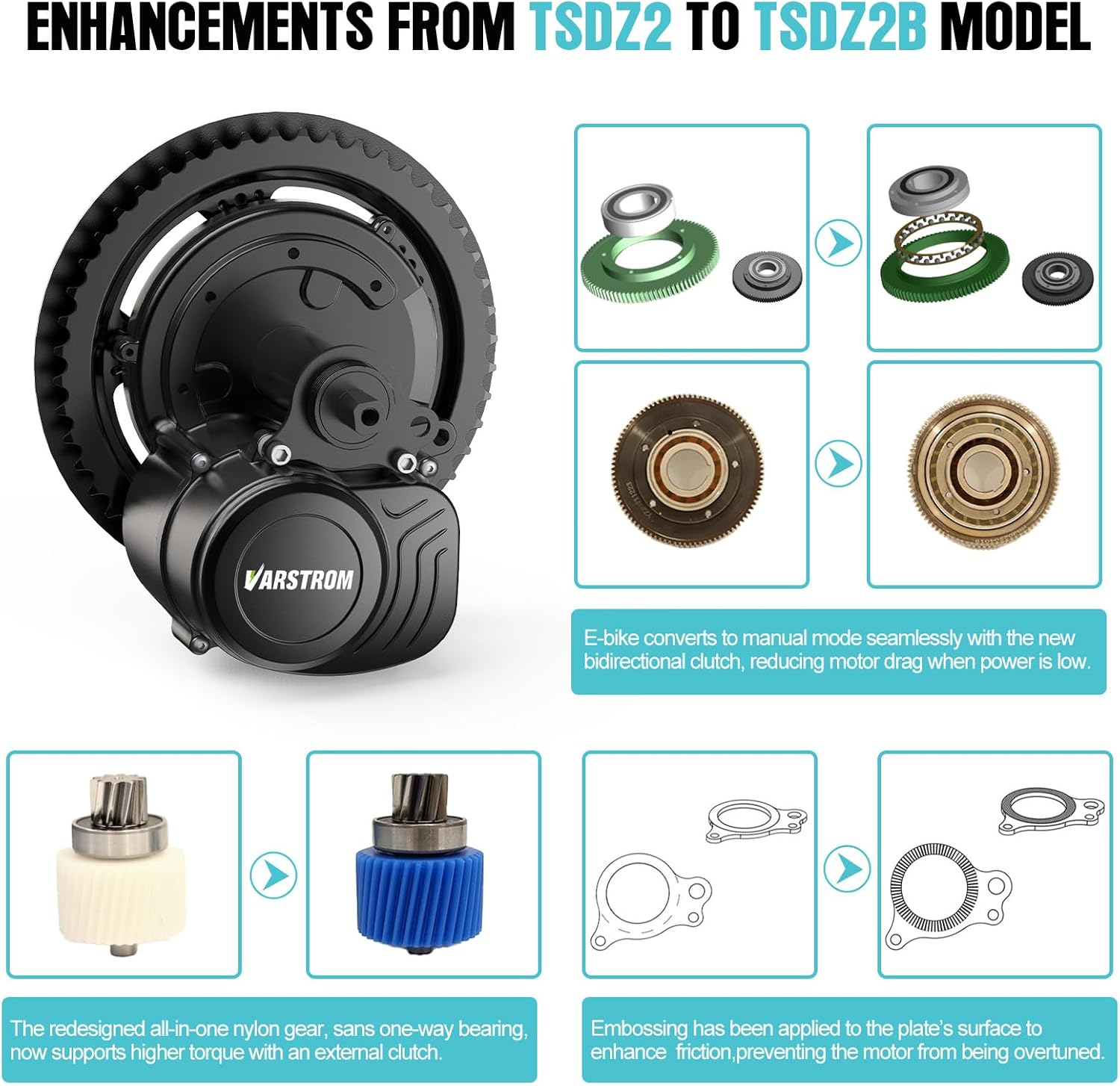
Figure 4: Specifications and dimensions of the DZ40 Display. This image shows the display unit, its mounting bracket, and details screen type, dimensions, unit of speed, operating voltages, speed limit setting, handlebar diameter, assist levels, and weight.
| Feature | Value |
|---|---|
| Screen Type | High-Brightness White Digital Tube |
| Dimensions (L*W*H) | 48mm x 27mm x 15mm |
| Unit of Speed | KM/H / MPH |
| Operating Voltages | 24V, 36V, 48V, 52V |
| Speed Limit Setting | 0 to 61 km/h |
| Handlebar Mounting Diameter | 22.2mm |
| Assist Levels | 5 |
| Weight | 0.052 kg |
5. Setup and Installation
This section outlines the general steps for installing the TSDZ2B mid-drive motor kit. Ensure your bicycle's bottom bracket is compatible (68-73mm length, 33.5-36mm inner diameter).
5.1 Pre-Installation Checks
- Confirm bottom bracket dimensions.
- Ensure your bike has a chain drive system.
- If using hydraulic brakes or integrated brake/shifter levers, ensure you have the correct brake sensors.
5.2 Motor Installation
- Remove existing crankset and bottom bracket from your bicycle.
- Insert the TSDZ2B motor into the bottom bracket shell.
- Secure the motor using the provided locking nuts and washers. Tighten to manufacturer specifications.
- Install the chainring onto the motor.
- Attach the crank arms to the motor spindle.
5.3 Component Wiring
The 1T4 cable simplifies the wiring process. Refer to the wiring schematic below for correct connections.

Figure 5: Wiring schematic for the TSDZ2B mid-drive kit. This diagram illustrates how the motor connects to the battery, speed sensor, 1T4 cable, and how the 1T4 cable branches out to the throttle, display, and brake levers.
- Mount the DZ40 display on your handlebar (22.2mm diameter).
- Install the thumb throttle on the handlebar.
- Replace your existing brake levers with the provided brake sensors, or install the separate brake sensors if applicable.
- Attach the speed sensor to the chainstay and secure the magnet to a spoke on the rear wheel. Ensure proper alignment and gap.
- Connect the motor to the battery (not included in the kit).
- Connect the speed sensor, throttle, display, and brake levers to the 1T4 cable.
- Connect the 1T4 cable to the motor.
- Secure all cables with zip ties, ensuring they do not interfere with moving parts.
6. Operating Instructions
Familiarize yourself with the operation of your new e-bike system.
6.1 DZ40 Display Functions
The DZ40 display provides essential ride information and control over the assist levels.
- Power On/Off: Press and hold the power button to turn the system on or off.
- Assist Level Adjustment: Use the '+' and '-' buttons to cycle through the 5 assist levels. Level 0 provides no assistance, while Level 5 provides maximum assistance.
- Information Display: The screen shows current speed, battery level, and assist level.
- Light Control: The display may have a button to control integrated lights if connected.
6.2 Torque Sensor Operation
The TSDZ2B motor features a torque sensor, providing a natural riding experience. The motor's assistance level is proportional to your pedaling effort.
- Pedal gently for less assistance, pedal harder for more assistance.
- This system provides a smooth and intuitive power delivery, mimicking the feel of a traditional bicycle.
6.3 Thumb Throttle
The thumb throttle provides on-demand power without pedaling. It can be used for quick starts or when extra boost is needed.
- Gently press the throttle to engage the motor.
- Release the throttle to disengage power.
- Always use the throttle responsibly and be aware of your surroundings.
7. Maintenance
Regular maintenance ensures the longevity and optimal performance of your mid-drive kit.
- Cleaning: Keep the motor and display clean. Use a damp cloth; avoid high-pressure washing directly on electrical components.
- Connections: Periodically check all electrical connections for tightness and corrosion.
- Cables: Inspect cables for any signs of wear, fraying, or damage. Replace if necessary.
- Fasteners: Ensure all mounting bolts for the motor, chainring, and crank arms are securely tightened.
- Chain: Maintain your bicycle chain regularly (clean, lubricate, check for wear).
- Software: Keep an eye out for any firmware updates from Varstrom, if applicable.
7.1 Component Upgrades (TSDZ2B Enhancements)
The TSDZ2B model features internal upgrades designed for improved durability and performance.

Figure 6: Visual representation of internal enhancements from TSDZ2 to TSDZ2B. This image highlights the new bidirectional clutch for reduced drag, the redesigned all-in-one nylon gear for higher torque, and embossing on the plate's surface to prevent over-tightening.
- Dual-Clutch System: Reduces resistance when cycling without electric assistance.
- Integrated Reduction Shaft: Replaces the previous design with one-way roller bearings, enhancing motor lifespan.
- These internal components are designed for long-term reliability and generally do not require user maintenance beyond regular checks.
8. Troubleshooting
This section addresses common issues you might encounter. For problems not listed here, please contact customer support.
| Problem | Possible Cause | Solution |
|---|---|---|
| Motor not powering on | Battery not connected or low charge; loose electrical connections; display not powered on. | Check battery connection and charge level; inspect all cable connections; ensure display is powered on. |
| No assist when pedaling | Assist level set to 0; speed sensor misaligned or damaged; torque sensor issue. | Increase assist level on display; check speed sensor alignment and magnet; contact support if torque sensor is suspected. |
| Throttle not working | Throttle cable loose or damaged; system error. | Check throttle cable connection; restart the system. |
| Display not showing speed | Speed sensor misaligned or damaged; magnet missing. | Check speed sensor and magnet alignment; ensure magnet is present on spoke. |
9. Warranty and Support
Varstrom products are designed for quality and reliability. For warranty information, please refer to the warranty card included with your product or visit the official Varstrom website.
For technical support, troubleshooting assistance, or to inquire about replacement parts, please contact Varstrom customer service through their official channels. When contacting support, please have your product model number (TSDZ2B) and purchase details ready.
Website: www.varstrom.com (Example link, verify actual website)
Related documentsTSDZ2B


Ask a question about this manual
Ask about setup, troubleshooting, compatibility, parts, safety, or missing instructions. Manuals+ will review the question and use this page’s manual context to help answer it.