Product Overview
The Fanttik Slim V10 Mix is a versatile 4-in-1 cordless device designed for both vacuuming and air dusting. Its compact and lightweight design makes it ideal for detailed cleaning in various environments, including car interiors, office desks, and computer keyboards. It features a powerful brushless motor, smart LED display, and easy-to-clean components.

Figure 1: Fanttik Slim V10 Mix Cordless Car Vacuum and included accessories.
Key Features:
- 4-in-1 Multifunctionality: Combines vacuuming and air dusting capabilities for comprehensive cleaning.
- Smart LED Display: Provides real-time battery level and mode indication.
- Powerful Suction: Advanced brushless motor delivers up to 16000Pa/40AW suction power with two modes.
- Lightweight & Portable: Weighs just 515g (1.13 lbs) for comfortable handling and easy storage.
- Easy Maintenance: One-click dust emptying and washable HEPA filter for convenient cleaning.
- Universal Type-C Charging: Allows for convenient charging anywhere.
What's in the Box
Please check the package contents to ensure all items are present:
- Vacuum Cleaner Body
- Crevice Tool
- Push-in Brush
- Multi-surface Brush
- Short Blow Nozzle
- Long Blow Nozzle
- Multi-function Air Blower
- Blow Nozzle Brush
- Type C Cable
- Cleaning Brush
- Storage Bag
- User Manual
Setup
Initial Charging:
Before first use, fully charge the Fanttik Slim V10 Mix. Connect the provided Type-C cable to the charging port on the device and plug the other end into a compatible USB power adapter (not included). The LED display will indicate charging status.

Figure 2: Charging the device using the universal Type-C port.
Attaching Accessories:
Select the appropriate nozzle or brush for your cleaning task. Align the accessory with the device's opening and push firmly until it clicks into place. Ensure a secure connection before operation.
Operating Instructions
Power On/Off and Mode Selection:
Press and hold the power button for 1 second to turn the device on or off. Once on, the device will start in low-speed mode. Press the power button again to switch to high-speed mode for increased suction or blowing power.
Smart LED Display:
The integrated LED display provides real-time information. It shows the current battery level and indicates whether the device is operating in low (L) or high (H) speed mode.

Figure 3: Smart LED Display indicating battery and speed mode.
Vacuuming Function:
Use the vacuum function for cleaning dust, crumbs, and small debris. Attach the crevice tool for tight spaces like car seats and crevices, or the multi-surface brush for larger areas like floor mats.

Figure 4: Effective vacuuming of car interiors.

Figure 5: Versatile vacuuming for various car areas.
Air Duster Function:
Transform your vacuum into a powerful air duster by attaching the appropriate blow nozzle. This function is perfect for removing dust from delicate surfaces, computer keyboards, and hard-to-reach areas.

Figure 6: Using the air duster for car detailing and electronics.
Inflating Function:
The multi-function air blower and short/long blow nozzles can be used to inflate small items such as swim rings, yoga balls, and air mattresses. Refer to the accessory functions image for estimated inflation times.

Figure 7: Inflating various items with the air blower function.

Figure 8: Overview of accessory functions and their applications.
Maintenance
Dust Emptying:
The transparent dust container allows you to see when it needs to be emptied. To empty, simply press the one-click dust emptying button to release the contents without getting your hands dirty.
Filter Cleaning:
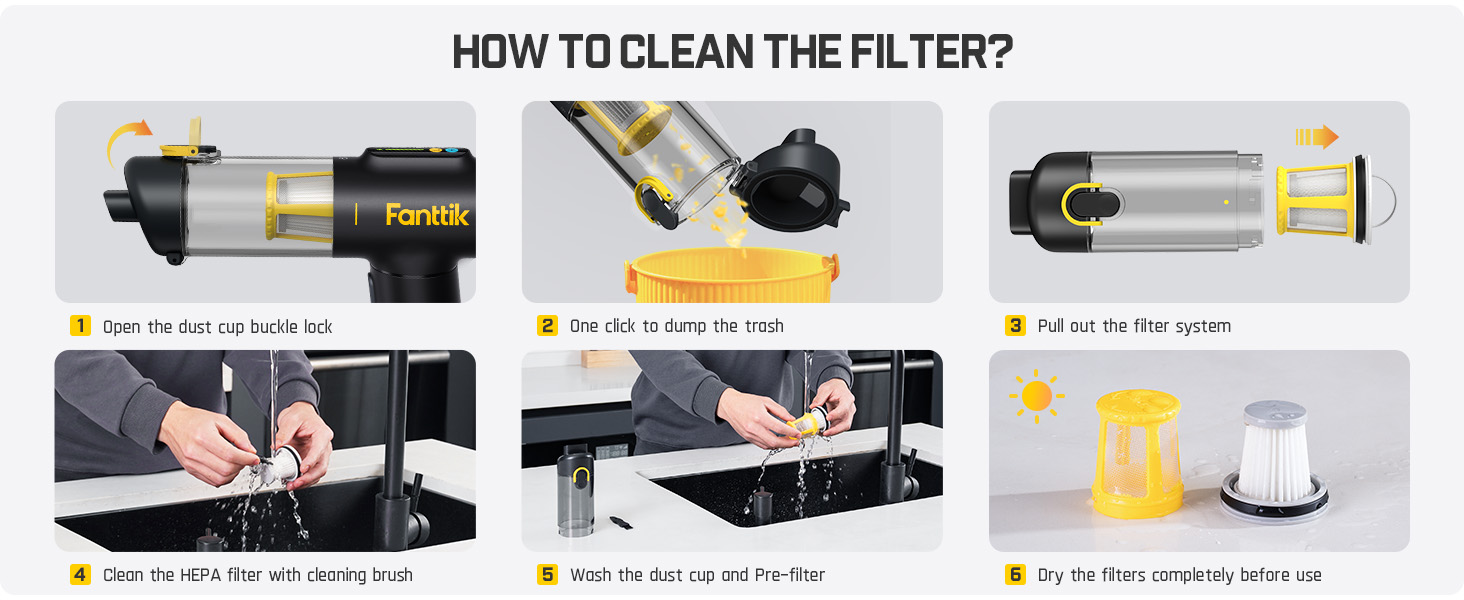
The HEPA filter and pre-filter are washable for extended use. Regular cleaning ensures optimal suction performance.

Figure 9: Step-by-step guide on how to clean the filter.
- Open the dust cup buckle lock.
- One click to dump the trash.
- Pull out the filter system.
- Clean the HEPA filter with the cleaning brush.
- Wash the dust cup and Pre-filter.
- Dry the filters completely before use.
Troubleshooting
- Device not turning on: Ensure the device is fully charged. Press and hold the power button for at least 1 second.
- Low suction power: Check if the dust cup is full and empty it if necessary. Inspect the HEPA filter and pre-filter for clogs and clean them as per the maintenance instructions. Ensure all attachments are securely connected.
- Device not charging: Verify that the Type-C cable is properly connected to both the device and the power adapter. Try using a different power adapter or USB port.
- Unusual noise: Turn off the device immediately. Check for any foreign objects lodged in the nozzle or inside the dust cup. If the issue persists, contact customer support.
Specifications
| Feature | Detail |
|---|---|
| Brand | Fanttik |
| Model Name | Slim V10 Mix |
| Special Feature | Cordless, Portable |
| Filter Type | HEPA Filter |
| Is Cordless? | Yes |
| Capacity | 120 Milliliters |
| Wattage | 100 watts |
| Runtime | 13 minutes (High), 35 minutes (Low) |
| Charging Time | 2.5 Hours |
| Maximum Suction | 16000Pa / 40AW |
| Form Factor | Handheld |
| Color | Black |
| Product Dimensions | 8.85"L x 6.6"W x 2.16"H |
| Battery Type | Lithium-Ion (12V, included) |
| Noise Level | 70 dB |
| Item Weight | 1.13 pounds |
| Number of Speeds | 2 |
| Control Method | Touch / Push Button |
| Indoor/Outdoor Usage | Indoor |
Warranty and Support
For detailed warranty information and customer support, please refer to the official Fanttik website or the included User Manual PDF. You can download the PDF version of this manual for future reference:
Fanttik offers various protection plans for extended coverage. Please check the product listing or contact Fanttik customer service for more details on available plans.


