
TrailBlaze TB-S3TH
User Manual: TrailBlaze 8000 BTU Portable Air Conditioner
Model: TB-S3TH | Brand: TrailBlaze
Introduction
Thank you for choosing the TrailBlaze 8000 BTU Portable Air Conditioner. This versatile 3-in-1 unit provides efficient cooling, fan circulation, and dehumidification for spaces up to 350 sq.ft. Designed for ease of use and portability, it features an intuitive LED display, remote control, and a 24-hour timer. This manual provides comprehensive instructions for safe operation, installation, maintenance, and troubleshooting to ensure optimal performance and longevity of your unit.
Important Safety Instructions
Please read all instructions carefully before operating the appliance and retain for future reference.
- Always connect the unit to a grounded power outlet of the correct voltage (110V).
- Do not operate the unit with a damaged cord or plug.
- Do not block air inlets or outlets. Ensure at least 20 inches of clearance around the unit.
- Do not insert fingers or foreign objects into the air vents.
- Keep the unit away from flammable materials and direct sunlight.
- Always unplug the unit before cleaning or performing any maintenance.
- Do not use the unit in wet or damp environments, such as bathrooms or laundry rooms.
- This appliance is not intended for use by persons (including children) with reduced physical, sensory or mental capabilities, or lack of experience and knowledge, unless they have been given supervision or instruction concerning use of the appliance by a person responsible for their safety.
Package Contents
Verify that all items listed below are included in your package:
- Portable Air Conditioner Unit
- Remote Control
- Exhaust Hose
- Window Venting Kit (Adjustable window slider, exhaust hose adapter, window kit adapter)
- Drain Hose (for continuous drainage in Dehumidify mode)
- User Manual

Figure 1: Included accessories with the portable air conditioner.
Product Overview
Familiarize yourself with the main components of your portable air conditioner:

Figure 2: Front view of the portable AC unit and remote control.
- Control Panel: Located on the top of the unit, with touch-sensitive buttons and an LED display for settings and status.
- Air Outlet: Front grille where conditioned air is expelled.
- Air Intake: Rear grilles for drawing in room air.
- Exhaust Air Outlet: Connection point for the exhaust hose.
- Drain Port: For manual or continuous water drainage.
- Caster Wheels: Four integrated wheels for easy mobility.
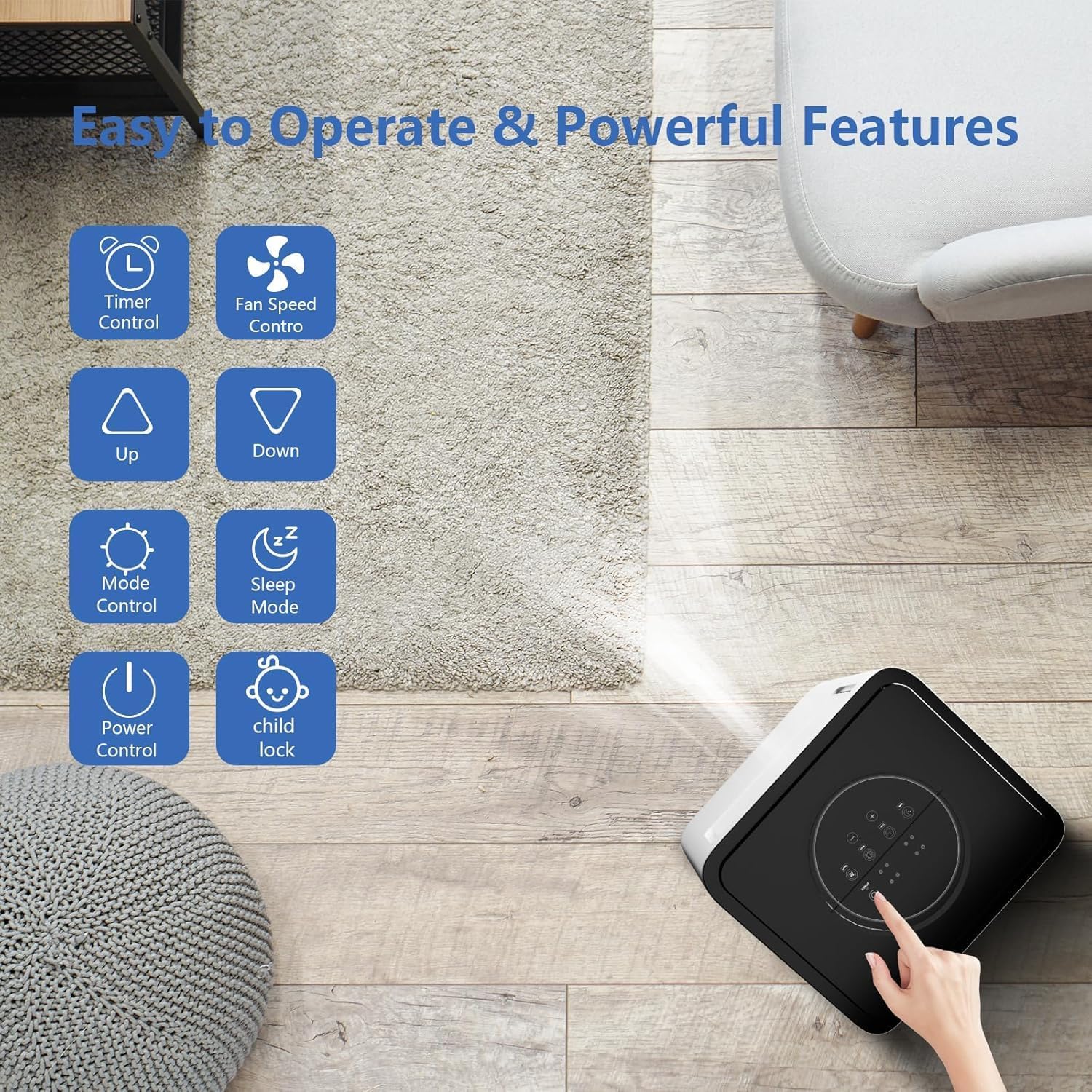
Figure 3: Detailed view of the control panel functions.

Figure 4: Remote control and touch screen interface for unit operation.
Setup and Installation
Choosing a Location
Place the unit on a flat, stable surface. Ensure there is at least 20 inches (50 cm) of space around the unit for proper airflow. Avoid placing it near heat sources or in direct sunlight. The unit is designed for portability and can be easily moved between rooms.
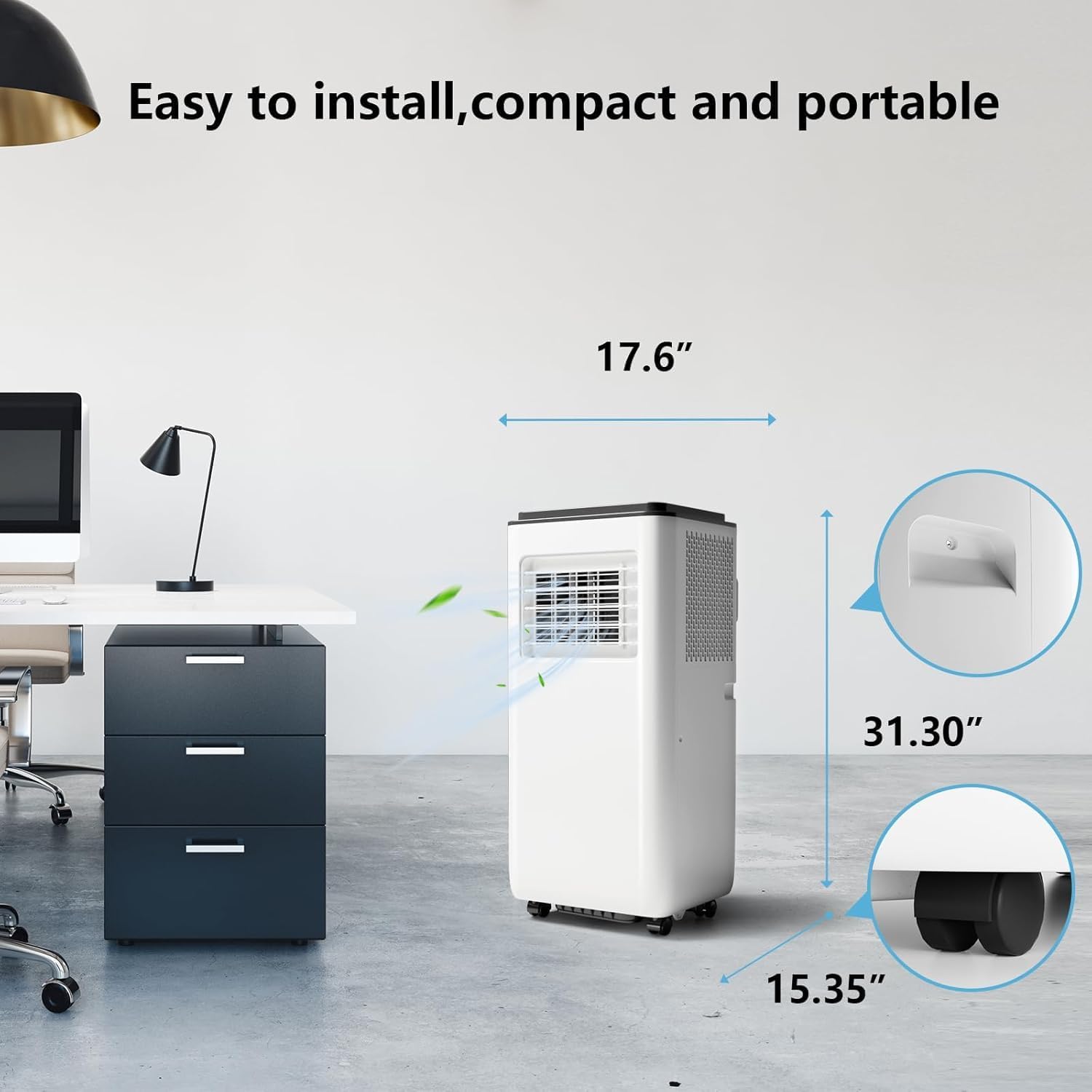
Figure 5: Unit dimensions and portability.
Window Kit Installation
The window venting kit is essential for exhausting hot air outside. It is compatible with both double/single-hung windows and sliding windows.
- Assemble the window slider kit by connecting the adjustable panels to fit your window opening (26-50 inches).
- Place the assembled window kit into the window opening and extend it to fit securely. Lock the window to prevent unauthorized entry.
- Attach the exhaust hose adapter to one end of the exhaust hose.
- Connect the other end of the exhaust hose to the exhaust air outlet on the back of the portable AC unit.
- Insert the exhaust hose adapter into the opening of the window kit. Ensure a tight seal to prevent hot air from re-entering the room.

Figure 6: Window kit installation for various window types.
Operating Instructions
Control Panel and Remote Control
The unit can be operated using the touch control panel on top of the unit or the included remote control. Ensure the remote control has working batteries.
- Power Button: Press to turn the unit ON or OFF.
- Mode Button: Cycle through Cool, Fan, and Dehumidify modes.
- Fan Speed Button: Adjust fan speed (Low, Medium, High).
- Up/Down Buttons: Adjust temperature settings in Cool mode or set timer duration.
- Timer Button: Set the auto-on or auto-off timer (1-24 hours).
- Sleep Mode Button: Activates quiet operation and gradual temperature adjustment for comfortable sleep.
- Child Lock Button: (On control panel only) Press and hold to lock/unlock the control panel to prevent accidental changes.
Modes of Operation

Figure 7: The three operational modes of the unit.
- Cool Mode: Provides powerful cooling. Set desired temperature between 61°F and 89°F using the Up/Down buttons. The unit will cool the room to the set temperature.
- Fan Mode: Circulates air without cooling. Choose from Low, Medium, or High fan speeds.
- Dehumidify Mode: Removes excess moisture from the air. The unit will operate at a low fan speed. In this mode, continuous drainage is recommended using the provided drain hose.

Figure 8: Dehumidification capacity of the unit.
Timer Function
The 24-hour timer allows you to program the unit to turn on or off automatically. Press the Timer button, then use the Up/Down buttons to set the desired hours (1-24). The timer indicator will light up on the display.

Figure 9: Timer and Sleep Mode for enhanced comfort.
Sleep Mode
Activate Sleep Mode for quiet operation and energy saving during nighttime. In Cool mode, pressing the Sleep button will gradually increase the set temperature by 1°F after 30 minutes, and another 1°F after another 30 minutes. The fan speed will automatically switch to low. This mode helps maintain a comfortable sleeping environment while reducing noise and energy consumption.

Figure 10: Benefits of Sleep Mode, including low noise operation.
Maintenance
Regular maintenance ensures the efficient and long-lasting operation of your portable air conditioner.
Cleaning the Air Filter
The air filter should be cleaned every two weeks or more frequently depending on usage and air quality. A dirty filter can reduce efficiency and airflow.
- Unplug the unit from the power outlet.
- Locate the air filter panel (usually at the back or side of the unit).
- Remove the filter.
- Clean the filter with a vacuum cleaner or wash it gently with warm water and mild detergent.
- Allow the filter to air dry completely before reinserting it into the unit. Do not expose to direct sunlight.

Figure 11: Air filter removal and cleaning for improved air quality.
Draining Water
This unit features a self-evaporation system, which means most condensed water will evaporate automatically through the exhaust hose. However, in high humidity conditions or during prolonged dehumidification, the internal water tank may fill up. The unit will stop operating and display an error code (e.g., "FL" or "E4") when the tank is full.
- Manual Drainage: Place a shallow pan or tray under the drain port at the bottom rear of the unit. Remove the drain plug to allow water to flow out. Replace the plug once drained.
- Continuous Drainage: For continuous dehumidification, attach the provided drain hose to the continuous drain port and route it to a floor drain or a larger container.
Storage
If the unit will not be used for an extended period:
- Unplug the unit and drain all accumulated water.
- Clean the air filter.
- Store the power cord and accessories neatly.
- Cover the unit with a plastic bag or cloth to protect it from dust.
- Store the unit in a cool, dry place.
Troubleshooting
Before contacting customer support, please refer to the following table for common issues and their solutions:
| Problem | Possible Cause | Solution |
|---|---|---|
| Unit does not turn on. | No power, power cord unplugged, circuit breaker tripped. | Check power connection, reset circuit breaker. |
| Unit blows warm air. | Exhaust hose not properly installed, window kit not sealed, air filter dirty, room too large. | Ensure exhaust hose is connected and vented outside. Seal window kit. Clean air filter. Ensure room size is within 350 sq.ft. |
| Unit is noisy. | Unit not on a level surface, air filter dirty, foreign object in fan. | Place unit on a level surface. Clean air filter. Check for obstructions. |
| Water leakage. | Drain plug loose, continuous drain hose not connected properly. | Ensure drain plug is secure. Check continuous drain hose connection. |
| "FL" or "E4" error code. | Water tank is full. | Drain the water from the unit. |
Product Specifications
| Feature | Specification |
|---|---|
| Brand | TrailBlaze |
| Model Number | TB-S3TH |
| Cooling Capacity | 8000 BTU |
| Coverage Area | Up to 350 sq.ft. |
| Modes | Cool, Fan, Dehumidify |
| Temperature Range | 61°F - 89°F (Cool Mode) |
| Noise Level | ≤52 dB |
| Voltage | 110V |
| Wattage | 1000W |
| Item Weight | 50.6 pounds |
| Product Dimensions (D x W x H) | 14.96 x 13.39 x 35.24 inches |
| Refrigerant | R 410A |
| Control Type | LED Display, Remote Control |
| Special Features | Fast Cooling, 24-Hour Timer, Sleep Mode, Self-Evaporation System |
Warranty and Customer Support
This TrailBlaze product is backed by a manufacturer's warranty. For specific warranty details, including duration and coverage, please refer to the warranty card included in your product packaging or contact our customer support.
If you encounter any issues not covered in the troubleshooting section or require further assistance, please contact our customer support team:
- Website: www.trailblaze.com (Example link, replace if actual link is known)
- Email: support@trailblaze.com (Example email, replace if actual email is known)
- Phone: 1-800-XXX-XXXX (Example number, replace if actual number is known)
Please have your model number (TB-S3TH) and purchase date ready when contacting support.
Ask a question about this manual
Ask about setup, troubleshooting, compatibility, parts, safety, or missing instructions. Manuals+ will review the question and use this page’s manual context to help answer it.