
AOSHIDA XQ-50 Pro 3
xDuoo XQ-50 Pro3 DAC Headphone Amplifier User Manual
Model: XQ-50 Pro 3 | Brand: AOSHIDA
1. Introduction
The xDuoo XQ-50 Pro3 is a versatile Bluetooth audio converter and DAC headphone amplifier designed to enhance your audio experience. It allows you to upgrade existing DACs or amplifiers with 24-bit lossless Bluetooth streaming, making it suitable for both vintage and modern audio setups. Featuring advanced chips like the Qualcomm QCC5125 for high-definition Bluetooth, CS8406 for digital conversion, and CS43131 for digital-to-analog conversion, the XQ-50 Pro3 delivers superior sound quality with multiple output options.
2. Package Contents
Please verify that all items listed below are included in your package:
- 1 x Type-C cable
- 1 x Bluetooth antenna
- 1 x User Manual
- 1 x 6.35mm to 3.5mm converter
3. Product Overview
Front Panel

The front panel features a 1.3-inch color display, a 3.5mm headphone output jack, and a multi-function knob for volume control and menu navigation. A power/input selection button is also present.
Rear Panel

The rear panel provides various input and output options, including RCA analog output, coaxial digital output, optical digital output, a USB-C input for PC DAC functionality, and a DC 5V power input. The Bluetooth antenna connector is also located here.
Key Features
- Wireless Connectivity: Upgrade your existing DAC or amplifier with 24-bit lossless Bluetooth streaming.
- High-Definition Bluetooth Streaming: Features Qualcomm's QCC5125 chip, supporting SBC, AAC, aptX, aptX_LL, aptX_HD, and LDAC formats.
- Superior Signal Quality: CS8406 digital conversion chip ensures high-quality optical or coaxial outputs.
- CS43131 DAC Chip: Independent DAC chip for exceptional sound with high signal-to-noise ratio (SNR) and low distortion.
- Easy Navigation: 1.3-inch color screen displays Bluetooth status, encoding format, and sampling rate.
- Rich Output Interfaces: Headphone output with 360mW power, RCA, Coaxial, and Optical outputs.
4. Setup Guide
4.1 Power Connection
- Connect the provided Type-C cable to the DC 5V input port on the rear panel of the XQ-50 Pro3.
- Connect the other end of the Type-C cable to a compatible 5V/1A USB power adapter (not included) or a USB port on a computer.
4.2 Bluetooth Antenna Installation
- Gently screw the Bluetooth antenna into the designated connector on the rear panel of the XQ-50 Pro3.
- Ensure the antenna is securely fastened for optimal Bluetooth signal reception.
4.3 Audio Connections
Choose one of the following connection methods based on your audio system:
- To an Amplifier/Active Speakers (RCA): Connect RCA cables from the XQ-50 Pro3's RCA OUT ports to the analog input of your amplifier or active speakers.
- To a DAC (Optical/Coaxial): Connect an optical or coaxial cable from the XQ-50 Pro3's OPTICAL OUT or COAXIAL OUT port to the corresponding digital input on your external DAC.
- To Headphones: Plug your headphones into the 3.5mm headphone jack on the front panel. Use the included 6.35mm to 3.5mm converter if your headphones have a 6.35mm plug.
- PC USB DAC Mode: Connect a USB-C cable from the XQ-50 Pro3's USB input to your computer. The device will function as an external sound card.
5. Operating Instructions
5.1 Power On/Off
Press and hold the power button on the front panel to turn the device on or off.
5.2 Input Selection
Short press the power button to cycle through available input modes (Bluetooth, USB).
5.3 Bluetooth Pairing
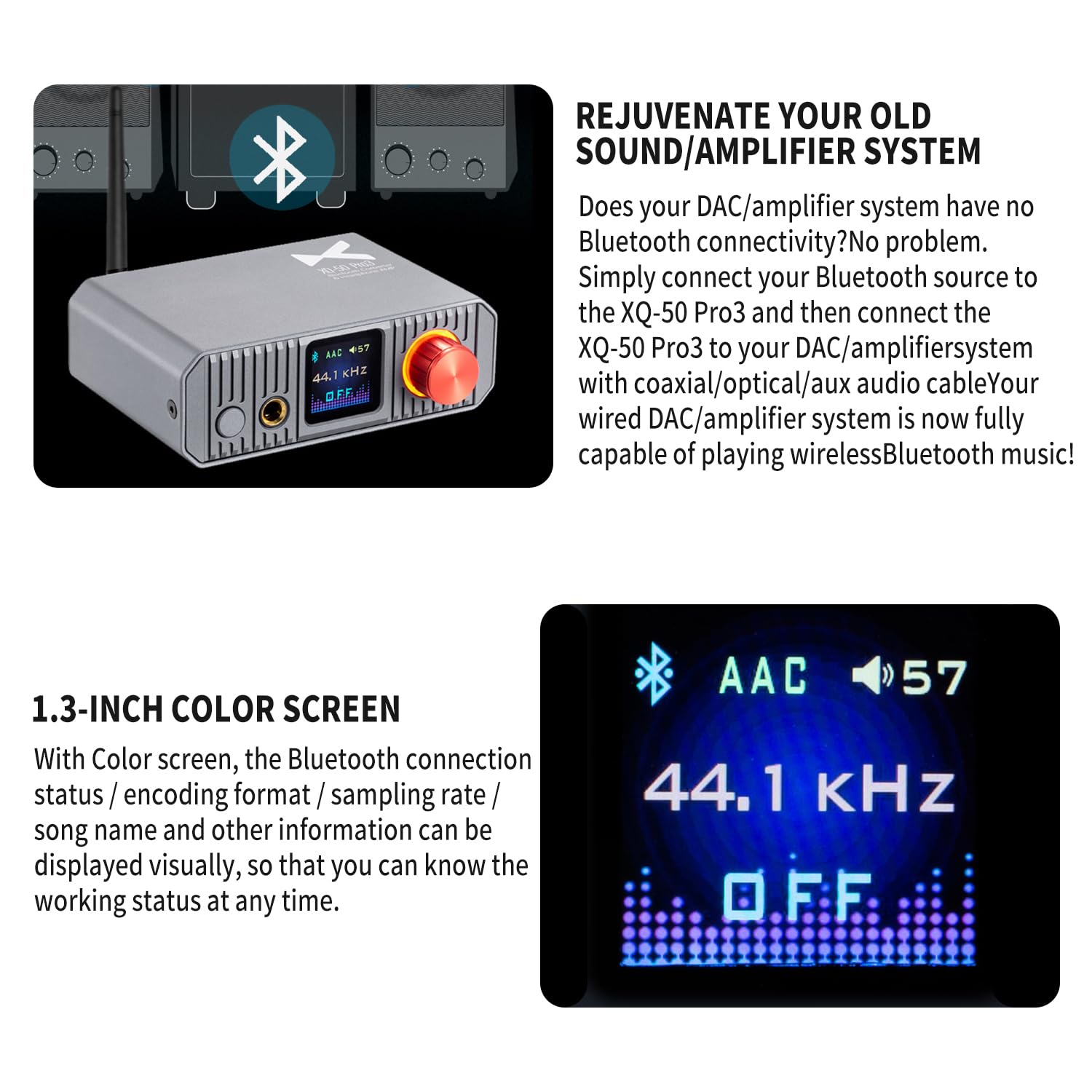
When the XQ-50 Pro3 is in Bluetooth mode, the 1.3-inch color screen will display the Bluetooth connection status. If not connected, it will automatically enter pairing mode. On your source device (phone, tablet, computer), search for "xDuoo XQ-50 Pro3" in the Bluetooth settings and select it to pair. The screen will confirm the connection and display the active codec (e.g., AAC, LDAC) and sampling rate.
5.4 Volume Control
Rotate the multi-function knob on the front panel clockwise to increase volume and counter-clockwise to decrease volume. This controls the headphone output and the analog RCA output level.
5.5 EQ Adjustment

The XQ-50 Pro3 supports EQ adjustment. Refer to the on-screen menu (accessed via the multi-function knob) to select and customize various EQ modes to tailor the sound to your preference.
6. Specifications
| Parameter | Value |
|---|---|
| Power Supply | DC 5V/1A |
| Bluetooth Version | 5.1 |
| Supported Audio Formats | SBC, AAC, aptX, aptX_LL, aptX_HD, LDAC |
| Communication Range | Approximately 10 meters (33 feet) |
| Headphone Output Power | 360mW (32 ohms @ 1kHz) |
| Headphone THD+N | 0.008% |
| Headphone SNR | 115dB |
| Headphone Crosstalk | 85dB |
| Optical Output THD+N | 0.00087% |
| Coaxial Output THD+N | 0.00087% |
| AUX Output THD+N | 0.002% |
| Optical Output Level | 0.5V P-P |
| Coaxial Output Level | 0.5V P-P |
| AUX Output Level | 2V |
| Dimensions (L x W x H) | 10.0 x 12.0 x 4.2 cm (3.94 x 4.72 x 1.65 inches) |
| Weight | 0.34 kg (0.75 lbs) |
| DAC Chip | CS43131 |
| Digital Conversion Chip | CS8406 |
| Bluetooth Chip | Qualcomm QCC5125 |
7. Maintenance
- Cleaning: Use a soft, dry cloth to clean the exterior of the device. Avoid using liquid cleaners or solvents.
- Storage: Store the device in a cool, dry place away from direct sunlight and extreme temperatures.
- Handling: Avoid dropping or subjecting the device to strong impacts.
- Ventilation: Ensure proper ventilation around the device to prevent overheating. Do not block ventilation openings.
8. Troubleshooting
| Problem | Possible Cause | Solution |
|---|---|---|
| No power | Power cable not connected; Power adapter faulty; Device off. | Ensure Type-C cable is securely connected. Try a different 5V/1A power adapter. Press and hold the power button to turn on. |
| No sound output | Incorrect input selected; Volume too low; Cables loose; Source device not playing. | Verify correct input mode. Increase volume. Check all audio cables. Ensure source device is playing audio. |
| Bluetooth pairing failure | Device not in pairing mode; Antenna loose; Source device too far; Interference. | Ensure XQ-50 Pro3 is in Bluetooth mode and displaying 'pairing'. Check antenna connection. Move source device closer. Reduce interference from other wireless devices. |
| Sound distortion or static | Poor cable connection; Source audio quality; High volume clipping. | Check all cable connections. Try a different audio source. Reduce volume on both XQ-50 Pro3 and source device. |
| Display not working | Device off; Software glitch. | Ensure device is powered on. Try restarting the device by unplugging and re-plugging the power cable. |
9. Warranty and Support
This product is covered by a standard manufacturer's warranty. For specific warranty terms and conditions, please refer to the warranty card included in your package or contact the retailer where the product was purchased. For technical support or further assistance, please reach out to the manufacturer or authorized service center.
For more information, you may visit the AOSHIDA Store on Amazon.
Related documentsXQ-50 Pro 3


Ask a question about this manual
Ask about setup, troubleshooting, compatibility, parts, safety, or missing instructions. Manuals+ will review the question and use this page’s manual context to help answer it.