1. Introduction
Thank you for choosing the Phezer PRB-640 Continuous Heat Sealing Machine. This automatic plastic bag sealer is designed for efficient and reliable sealing of various bag materials, including LDPE, MDPE, HDPE, PP, aluminum foil, compound bags, and kraft paper bags. It features digital temperature control and is suitable for commercial food storage, kitchen, bakery, and snack packaging applications. This manual provides essential information for safe and effective operation, maintenance, and troubleshooting.

Image: The Phezer PRB-640 Continuous Heat Sealing Machine, a compact white unit with a digital control panel, designed for efficient bag sealing.
2. Safety Information
- High Temperature Warning: The sealing area operates at high temperatures. Avoid direct contact with the heating elements during operation and immediately after use to prevent burns.
- Pinching Hazard: Keep hands clear of moving parts, especially the sealing rollers, to prevent pinching injuries.
- Power Off Before Maintenance: Always power off the machine and unplug it from the power source before performing any maintenance, cleaning, or part replacement. Allow at least 30 minutes for the machine to cool down completely.
- Proper Bag Placement: Ensure bags are placed horizontally into the machine to avoid distorting the seal and potential operational issues.
- Concealed Gears: For safety reasons, the gears are concealed inside the casing. It is normal for the bag to rotate at the end of the transmission. Remove sealed bags by hand, but be careful not to place your fingers inside.

Image: Internal view of the Phezer PRB-640 heat sealer, highlighting the concealed gears and heating elements, with visible safety warning labels for high temperature and pinching hazards.
3. Setup
- Unpacking: Carefully remove the heat sealing machine from its packaging. Inspect for any damage.
- Placement: Place the machine on a stable, flat, and heat-resistant surface. Ensure adequate ventilation around the unit.
- Power Connection: Connect the power cord to the machine and then to a suitable power outlet (110V).
- Optional Conveyor Attachment (if applicable): If using the optional conveyor attachment, take out the fixing screws and metal plate from the side of the machine. Align the metal plate with the holes and secure it in place. Loosen the screws slightly, slide the metal plate in the forward direction to the desired position, and then tighten the screws. This attachment allows for seamless and continuous sealing of multiple bags.
Video: Demonstrates the continuous heat sealing process for plastic and poly bags, showing how bags are fed through the machine and sealed.
Video: Illustrates how to adjust the sealing depth of the PRB-640 Sealing Machine for optimal performance with different bag sizes.
4. Operating Instructions
- Power On: Press the power button (①) on the digital temperature control panel to turn on the machine.
- Set Temperature: Use the temperature up/down buttons (②) to adjust the sealing temperature according to your bag material and thickness. Refer to the temperature guide below for recommendations.
- Start Heating: Press the heat button (③) to begin heating. The display will show the current temperature rising to the set point.
- Begin Sealing: Once the desired temperature is reached, carefully feed the open end of the bag into the sealing slot. The automatic conveyor belt will pull the bag through, creating a tight and secure seal.
- Continuous Sealing: For continuous sealing, align subsequent bags and feed them into the slot. The machine's efficient design allows for a sealing speed of 7 m/min.
- Automatic Cooling and Shut Off: After use, the machine features an automatic cooling and shut-off function. It will cool down to 50℃ before automatically shutting down, preventing scalding and ensuring safety.

Image: The user-friendly control panel of the Phezer PRB-640, showing the power button, heat indicator, digital temperature display, and temperature adjustment buttons.
Temperature Guide for Bag Materials:
Due to variations in bag materials, the applicable temperatures may differ. The following table serves as a reference; please adjust according to the actual situation.
| Bag Material | Bag Thickness/microns | Test Temperature/℃ |
|---|---|---|
| LDPE | 30-160 | 105-150 |
| MDPE | 40-120 | 115-120 |
| HDPE | 40-90 | 125-150 |
| PP | 40-60 | 135-160 |

Image: Various types of bags sealed by the Phezer PRB-640, demonstrating its wide application for different materials and products.
Video: A demonstration of how to operate the Phezer PRB-640 continuous heat sealing machine, including power-on, temperature setting, and feeding bags for sealing.
5. Maintenance
Regular maintenance ensures the longevity and optimal performance of your Phezer PRB-640 heat sealing machine. Always ensure the machine is powered off and unplugged, and has cooled down for at least 30 minutes before performing any maintenance.
Replacing the Heating Tube:
- Prepare the Machine: Power off and unplug the machine. Allow 30+ minutes for cooling. Carefully lay the machine on its side and open the sealer case.
- Access Heating Block: Loosen the retaining nut (counter-clockwise) and remove the screw manually. Grip the base firmly with both hands and carefully roll the machine onto its back.
- Disconnect Wires: Locate the heating tube assembly. Note wire positions and take photos before disconnecting power cables from the terminals.
- Remove Heating Block: Carefully roll the machine and locate the elongated heating block assembly. Loosen the screws and carefully detach the heating block.
- Replace Heating Tube: Loosen the screws securing the heating tube within the block. Replace with a new heating tube. Tighten the screws to secure the new heating tube.
- Reassemble: Put the heating block back in place and tighten the screws. Replace the other heating tube in the same way if needed. Plug all cables back in securely, ensuring correct wire positions. Reassemble the machine casing.
Video: Detailed instructions on how to safely replace the heating tube in your Phezer Heat Sealing Machine.
General Maintenance Tips:
- Cleaning: Regularly clean the sealing area and exterior of the machine with a soft, dry cloth. Do not use abrasive cleaners or solvents.
- Sealing Belt: The sealing belt is designed for easy maintenance. Inspect it periodically for wear and tear and replace if necessary to ensure consistent seal quality.
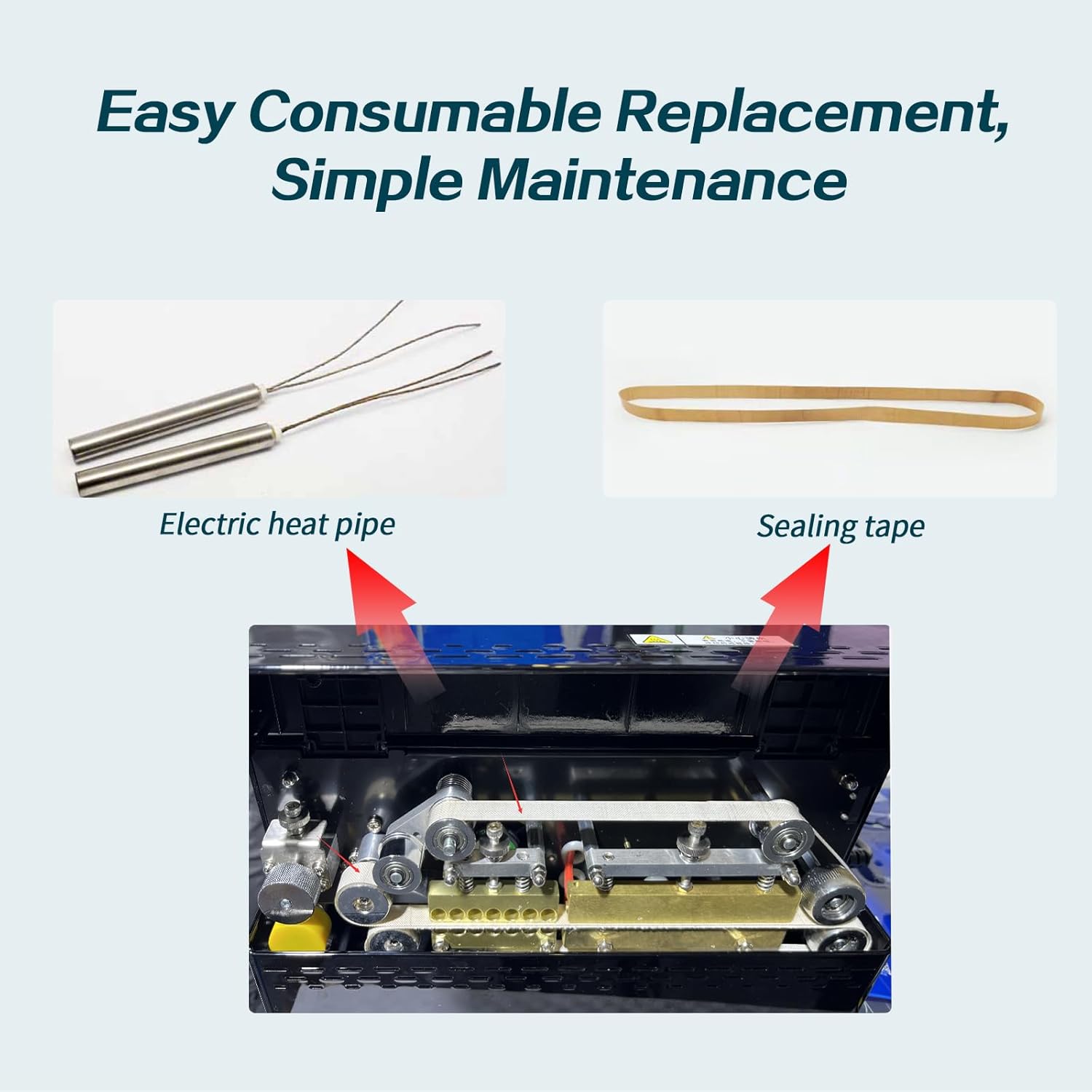
Image: Components for easy consumable replacement, including electric heat pipes and sealing tape, demonstrating the machine's simple maintenance design.
6. Troubleshooting
If you encounter issues with your Phezer PRB-640, refer to the following common troubleshooting steps:
- Poor or Incomplete Seal:
- Check the set temperature. It might be too low for the bag material. Increase the temperature gradually.
- Ensure the bag is clean and dry in the sealing area. Moisture or debris can prevent a proper seal.
- Inspect the sealing belt for wear or damage. Replace if necessary.
- Verify that the bag is fed straight and horizontally into the sealing slot.
- Machine Not Heating:
- Check if the machine is properly plugged into a working power outlet.
- Ensure the power button is pressed and the heat function is activated.
- If the heating tube was recently replaced, double-check all wire connections.
- Bags Not Moving Through:
- Ensure there are no obstructions in the sealing path.
- Check the conveyor belt for proper tension and alignment.
- Verify that the machine is powered on and the motor is running.
- Temperature Fluctuations:
- Ensure the machine is in a stable environment, away from drafts or extreme temperature changes.
- If the issue persists, the temperature sensor or control panel might require inspection by a qualified technician.
If these steps do not resolve the issue, please contact customer support for further assistance.
7. Specifications
| Brand | Phezer |
| Model | PRB-640 |
| Material | Iron, Plastic |
| Color | White |
| Product Dimensions | 7"L x 6"W x 14"H |
| Item Weight | 6.6 Pounds |
| Power Source | DC |
| Operation Mode | Automatic |
| Wattage | 28 watts |
| Voltage | 110V |
| Sealing Speed | 7 m/min |
| Sealing Width | 0.39 in (10 mm) |

Image: The compact dimensions of the Phezer PRB-640 heat sealer are illustrated, highlighting its portability and suitability for various workspaces.
8. Warranty and Support
Phezer products are manufactured to high-quality standards and are designed for reliable performance. For specific warranty details, please refer to the documentation included with your purchase or contact Phezer customer support.
Customer Support:
If you have any questions, require technical assistance, or need to report an issue, please contact Phezer customer support through the retailer where you purchased the product or visit the official Phezer website for contact information.
You can also visit the Phezer Store on Amazon for more information and support resources.


