
Important Safety Instructions
Please read all instructions carefully before using this appliance. Keep this manual for future reference.
- Do not use this appliance near water (e.g., in a bathtub, shower, or near a sink).
- Always unplug the appliance immediately after use.
- Do not place or store the appliance where it can fall or be pulled into a tub or sink.
- Do not place in or drop into water or other liquid.
- If the appliance falls into water, do not reach for it. Unplug immediately.
- This appliance is not intended for use by persons (including children) with reduced physical, sensory or mental capabilities, or lack of experience and knowledge, unless they have been given supervision or instruction concerning use of the appliance by a person responsible for their safety.
- Children should be supervised to ensure that they do not play with the appliance.
- Keep the power cord away from heated surfaces.
- Never block the air openings of the appliance or place it on a soft surface, such as a bed or couch, where the air openings may be blocked. Keep the air openings free of lint, hair, and the like.
- Never use while sleeping.
- Never drop or insert any object into any opening.
- Do not use outdoors or operate where aerosol (spray) products are being used or where oxygen is being administered.
- Do not use an extension cord with this appliance.
- Do not direct hot air towards eyes or other heat-sensitive areas.
- The nozzle may be hot during use. Allow to cool before handling.
- Always ensure the battery is fully charged before first use for optimal performance.
Product Overview
The Vikye Cordless Hair Dryer RT-305 is designed for portable and convenient hair drying. It features a powerful 200W motor, a 15000mAh rechargeable lithium battery, and multiple settings for temperature and wind speed.
Included Components:
- 1 x Hair Dryer Unit
- 1 x Charging Cable (USB/Type-C compatible)
- 1 x User Manual (this document)
- 1 x Concentrator Nozzle
- 1 x Power Plug

Figure 1: Included Components
Control Panel and Display:
The hair dryer features an intuitive control panel with buttons for power, temperature, and speed adjustments, along with a clear display screen to monitor settings and battery level.

Figure 2: Control Panel and Display Screen
Setup
1. Charging the Battery:
Before first use, fully charge the hair dryer. Connect the provided USB/Type-C charging cable to the hair dryer's charging port and plug the other end into the power adapter, then into a wall outlet. The display will indicate charging status. A full charge typically takes approximately 4 hours.

Figure 3: Charging and Usage Durations
2. Attaching the Nozzle:
Align the concentrator nozzle with the front opening of the hair dryer and gently push it into place until it clicks securely. The nozzle can be rotated 360 degrees to direct airflow as needed.
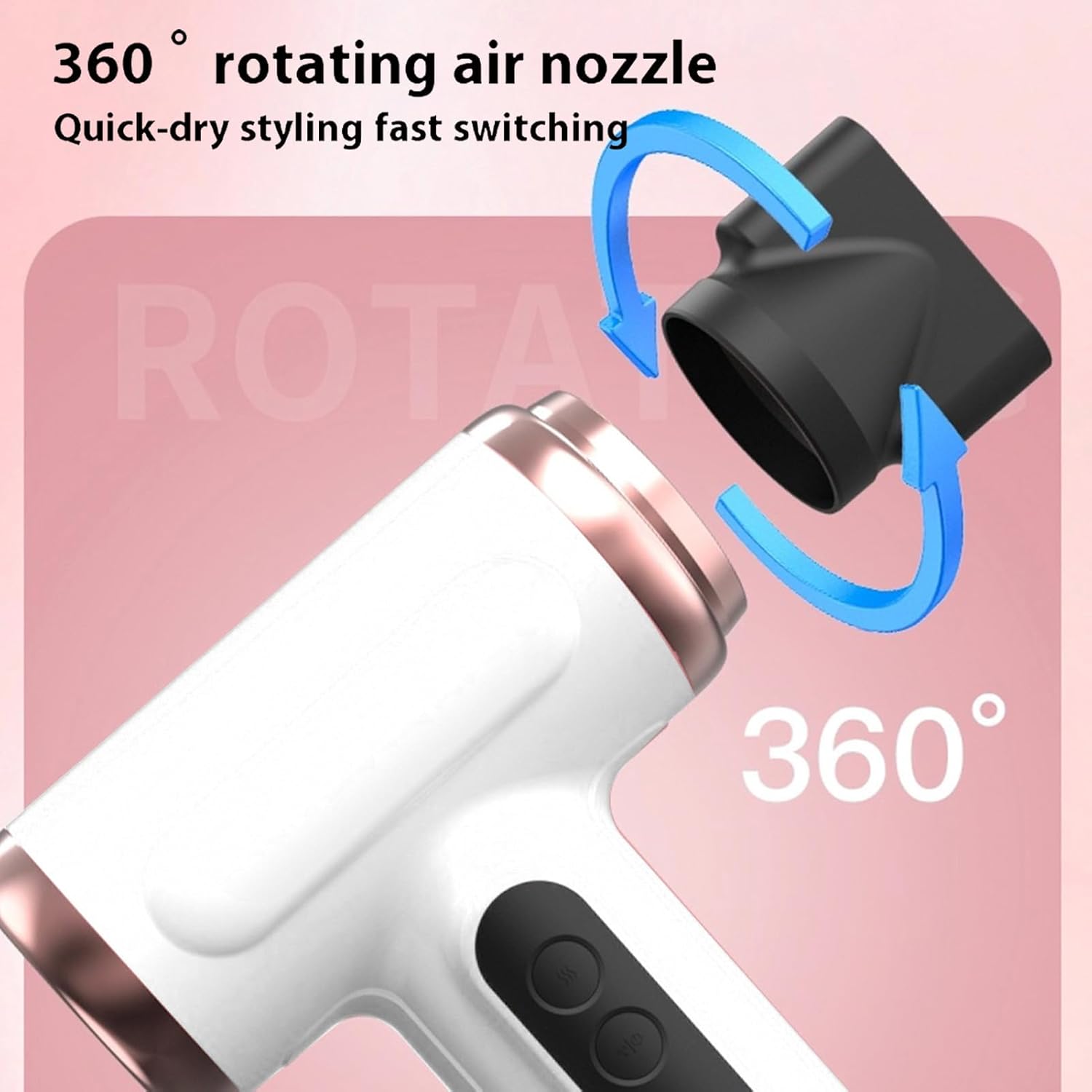
Figure 4: Attaching the Concentrator Nozzle
Operating Instructions
1. Power On/Off:
To turn on the hair dryer, long press the power button (usually the top button on the handle) for approximately 5 seconds until the display illuminates and the fan starts. To turn off, long press the power button again.
2. Adjusting Temperature:
Once powered on, press the temperature button (often indicated by a wavy line icon) to cycle through available temperature settings: Cold, Warm, and Hot air. The selected setting will be shown on the display.
3. Adjusting Wind Speed:
Press the wind speed button (often indicated by a fan icon) to cycle through different airflow speeds: Fine wind, Soft wind, and Strong wind. The current speed level will be displayed.

Figure 5: Hair Drying in Progress
4. Blue Light Hydrated Ions Feature:
This hair dryer incorporates a blue light feature that releases hydrated ions. This technology is designed to help reduce static electricity and promote smoother, shinier hair during drying. This feature operates automatically when the dryer is in use.

Figure 6: Blue Light Hydrated Ions Technology
5. Video Demonstration:
Watch this video for a visual guide on operating the Vikye Cordless Hair Dryer.
Video 1: Vikye Cordless Hair Dryer Features and Operation. This video demonstrates the product's features, including its cordless design, multi-mode settings, and ease of use.
Maintenance
Cleaning:
- Ensure the hair dryer is turned off and unplugged from any charging source before cleaning.
- Wipe the exterior of the hair dryer with a soft, damp cloth. Do not use abrasive cleaners or solvents.
- Regularly check and clean the air intake filter at the back of the dryer to prevent lint and dust buildup, which can affect performance. Gently remove any accumulated debris.
Storage:
- Store the hair dryer in a cool, dry place, away from direct sunlight and moisture.
- Do not wrap the charging cable around the appliance, as this can damage the cord.
Troubleshooting
| Problem | Possible Cause | Solution |
|---|---|---|
| Hair dryer does not turn on. | Battery is depleted or not charged. Incorrect power-on procedure. | Ensure the battery is fully charged. Long press the power button for approximately 5 seconds to activate. |
| Weak airflow or low heat. | Air intake filter is blocked. Battery charge is low. Incorrect settings. | Clean the air intake filter. Recharge the battery. Adjust wind speed and temperature settings to higher levels. |
| Battery drains quickly. | Using high heat/speed settings. Battery degradation over time. | Lower heat and speed settings to conserve battery. Ensure full charge before use. If battery life significantly decreases, consider contacting support. |
| Nozzle does not stay attached. | Nozzle not properly aligned or secured. | Re-attach the nozzle, ensuring it clicks firmly into place. |
Specifications
- Model Number: RT-305
- Power: 200W
- Battery Capacity: 15000mAh Lithium Ion
- Charging Time: Approximately 4 hours
- Cold Air Blowing Duration: Up to 3.5 hours (depending on speed setting)
- Hot Air Blowing Duration: 15-40 minutes (depending on heat/speed setting)
- Charging Interface: USB / Type-C
- Product Dimensions: 10.63 x 6.3 x 3.15 inches
- Item Weight: 1.5 pounds
- Manufacturer: Vikye
Warranty and Support
For warranty information or technical support, please refer to the product packaging or contact your retailer. Keep your purchase receipt as proof of purchase.