
Kircuit AC Power Cord
Instruction Manual: Kircuit AC Power Cord
Compatible with Schumacher Jump Starters
Product Overview
The Kircuit AC Power Cord is designed to provide reliable power to your compatible Schumacher jump starter and other devices. This adapter converts standard AC power from electrical outlets into the DC power required by your equipment, enabling operation and battery charging. It is a tested and validated accessory, ensuring compatibility and performance for various Schumacher models.
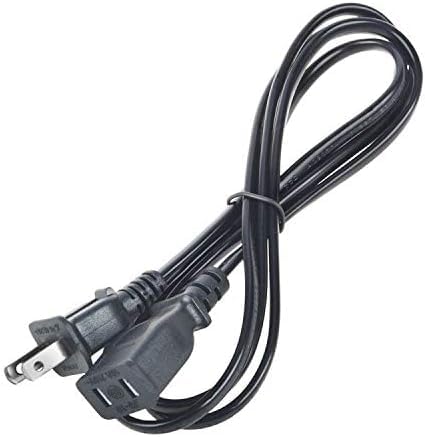
This image displays the Kircuit AC power cord, featuring a standard two-prong male plug designed for wall outlets and a three-slot female connector for connecting to compatible devices such as Schumacher jump starters. The cord is black and appears coiled for storage.
Specifications
| Brand | Kircuit |
| Input Voltage | 100 Volts (AC) |
| Connector Gender | Male-to-Male |
| Color | Black |
| Manufacturer | Shenzhen Waweis Technology Co., Ltd |
Compatibility
This Kircuit AC Power Cord is compatible with a wide range of Schumacher iNSTANT POWER Jump Starter and Air Compressor Series models, including but not limited to:
- Schumacher 600 Peak Amp Jump Starters
- Schumacher 800 Peak Amp Jump Starters
- Schumacher 1100 Peak Amp Jump Starters
- Schumacher 1200 Peak Amp Jump Starters
- Specific models: SJ1289, SJ1328, SJ1329, SJ1330, SJ1331, SJ1332, SJ1342, SJ1427, SL1435, SL1439, SL1519, SL1562, SL1567, SJ1583, SPR1631, XP2260, XP2260-ca, BE01253, BE01254, BE01255, FR01239, FR01240, FR01241, FR01337, FR01549.
Always verify the power requirements of your specific device to ensure proper compatibility.
Setup
- Inspect the Cord: Before first use, carefully inspect the entire length of the AC power cord for any signs of damage, cuts, or frayed insulation. Do not use if damaged.
- Connect to Device: Locate the AC input port on your Schumacher jump starter or compatible device. Align the three-slot female connector of the Kircuit power cord with the device's input port and firmly push it in until it is fully seated.
- Connect to Power Outlet: Insert the two-prong male plug of the power cord into a standard 100V AC electrical wall outlet. Ensure the outlet is functioning correctly and provides stable power.
- Verify Connection: Once connected, ensure both ends of the cord are securely plugged in. The device should now be receiving power or begin charging its internal battery, depending on its design.
Operating Instructions
The Kircuit AC Power Cord functions as a direct power supply for your compatible device. Once properly connected to both the device and a power outlet, it will supply the necessary AC power for the device's operation or charging functions. There are no user-adjustable settings on the power cord itself.
- For Charging: If your device has a rechargeable battery, connecting it via this power cord to an AC outlet will initiate the charging process. Refer to your device's specific manual for charging indicators and times.
- For Operation: For devices that can operate directly from AC power, the cord will provide continuous power as long as it remains connected to a live outlet.
Maintenance
Proper maintenance ensures the longevity and safe operation of your AC power cord.
- Cleaning: Disconnect the power cord from both the device and the wall outlet before cleaning. Wipe the cord and connectors with a soft, dry cloth. Do not use liquid cleaners or abrasive materials.
- Storage: When not in use, coil the power cord loosely. Avoid tight coiling or bending the cord sharply, especially near the connectors, as this can damage the internal wires. Store in a cool, dry place away from direct sunlight and extreme temperatures.
- Inspection: Periodically inspect the cord for any signs of wear, such as cracks, cuts, or discolored insulation. Check the plugs and connectors for bent pins or loose parts. Replace the cord immediately if any damage is observed.
- Handling: Always pull the plug from the outlet, not the cord itself, to avoid damaging the wiring.
Troubleshooting
If you encounter issues with your Kircuit AC Power Cord, consider the following:
- No Power to Device:
- Ensure both ends of the power cord are fully and securely plugged into the device and the wall outlet.
- Test the wall outlet with another known working appliance to confirm it has power.
- Check for tripped circuit breakers in your electrical panel.
- Inspect the power cord for visible damage. If damaged, discontinue use and replace.
- Loose Connection:
- If the cord feels loose in the device's port or wall outlet, ensure it is inserted correctly. If it consistently feels loose, the cord or the port/outlet may be worn and require replacement.
- Overheating:
- It is normal for power cords to feel slightly warm during use. However, if the cord becomes excessively hot to the touch, immediately disconnect it from power. This could indicate an overload or internal damage.
If troubleshooting steps do not resolve the issue, or if you suspect the cord is faulty, it is recommended to replace the power cord.
Warranty and Support
Information regarding specific warranty terms or direct customer support for this Kircuit AC Power Cord is not provided in the product details. For warranty claims or technical assistance, please refer to the documentation that came with your purchase or contact the seller directly through the platform where the product was acquired.
Ask a question about this manual
Ask about setup, troubleshooting, compatibility, parts, safety, or missing instructions. Manuals+ will review the question and use this page’s manual context to help answer it.