
heltec bms HT-RT01
Heltec HT-RT01 High Precision Battery Internal Resistance and DC Voltage Tester User Manual
Model: HT-RT01
1. Introduction
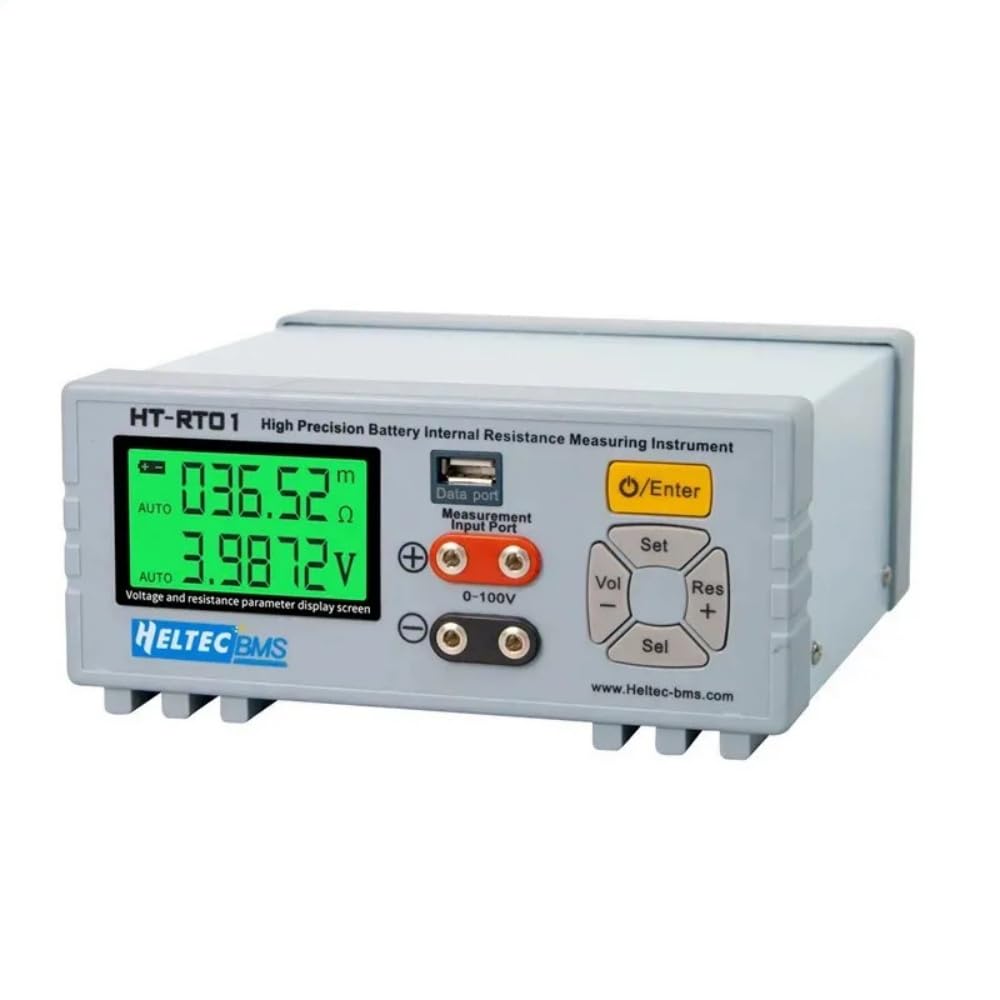
The Heltec HT-RT01 is a high-precision instrument designed for measuring the AC internal resistance and DC voltage of various battery types. Utilizing a 4-wire Kelvin clip probe, it ensures accurate and reliable data by minimizing interference from contact and wire resistance. This device is suitable for professional applications in battery research and development, manufacturing, quality inspection, and maintenance across a wide range of battery chemistries.
This manual provides essential information for the safe and effective operation, setup, and maintenance of your HT-RT01 tester. Please read it thoroughly before use.
2. What's in the Box
Carefully unpack the contents and ensure all items are present and undamaged:
- HT-RT01 Tester Unit
- 4-Wire Resistance Test Pen
- Test Fixture
- USB Data Cable
- Power Supply Cord
- User Manual

3. Key Features
- High-Precision Measurement: Achieves 0.5% accuracy for both AC resistance (0.001mΩ-200Ω) and DC voltage (0.001V-100VDC), powered by an 18-bit AD chip and 1.000KHz AC current signal.
- 4-Wire Kelvin Clip Probe: Equipped with balanced input Kelvin 4-wire clamps to eliminate contact and wire resistance interference, ideal for low-resistance measurements of high-capacity battery packs.
- Large Dot Matrix LCD Display: Features a clear display showing double 5-digit measured values instantly, with automatic polarity judgment for intuitive operation.
- Intelligent & User-Friendly Design: Supports automatic range switching, offers a fast test speed of 5 times/second, and includes a USB data cable for PC serial connection to expand analysis functions.
- Versatile Applications: Compatible with various battery types including LFP, NMC, LTO, lead-acid, lithium-ion, and alkaline, suitable for battery pack screening, performance testing, and daily maintenance.
4. Setup Instructions
- Unpacking and Inspection: Remove the HT-RT01 tester and all accessories from the packaging. Inspect for any visible damage.
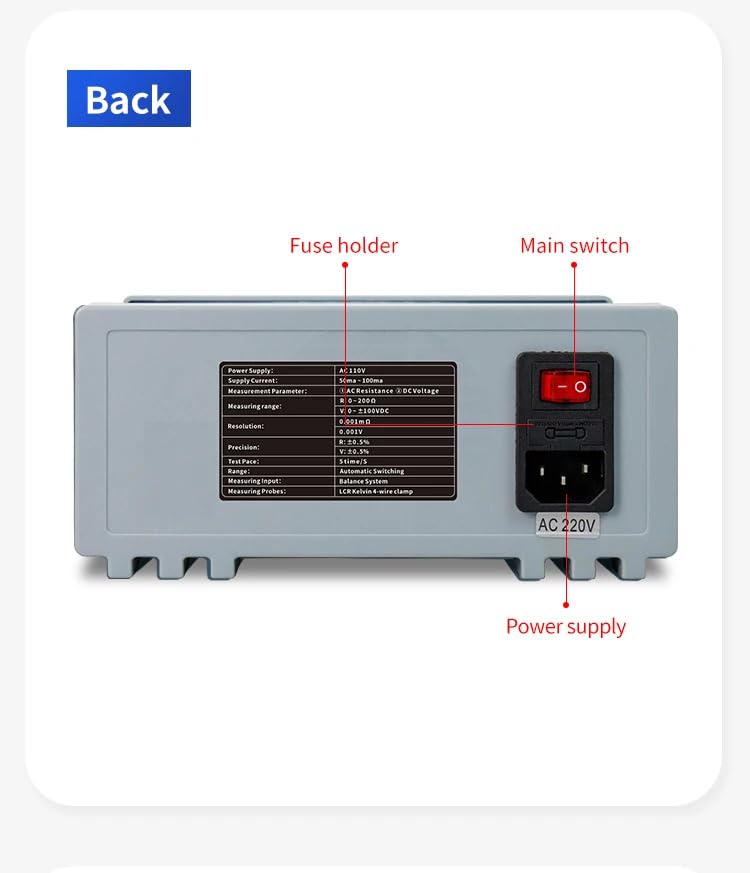
- Power Connection: Connect the provided power supply cord to the AC input port on the rear of the HT-RT01 unit. Plug the other end into a suitable AC power outlet (AC110V/AC220V compatible).
- Connecting Test Probes: Insert the 4-wire Kelvin clip probe into the designated measurement input ports on the front panel. Ensure a secure connection.
- Optional PC Connection: For advanced data analysis and logging, connect the USB data cable from the HT-RT01's USB port to your computer. Install any necessary drivers or software as instructed in the separate software guide (if applicable).

5. Operating Instructions
5.1 Basic Measurement
- Power On: Flip the main switch on the rear panel to the 'ON' position. The LCD display will illuminate.
- Connect Battery: Connect the 4-wire Kelvin clip probe to the battery terminals. Ensure proper contact for accurate readings. The device automatically judges and displays polarity.
- Read Measurements: The display will show the AC internal resistance (in mΩ or Ω) and DC voltage (in V) simultaneously. The unit features automatic range switching.
- Adjust Settings (Optional): Use the 'Set', 'Vol', 'Res', and 'Sel' buttons on the front panel to adjust measurement parameters or navigate menus if needed. Refer to the on-screen prompts for specific functions.
5.2 Measuring Different Battery Types
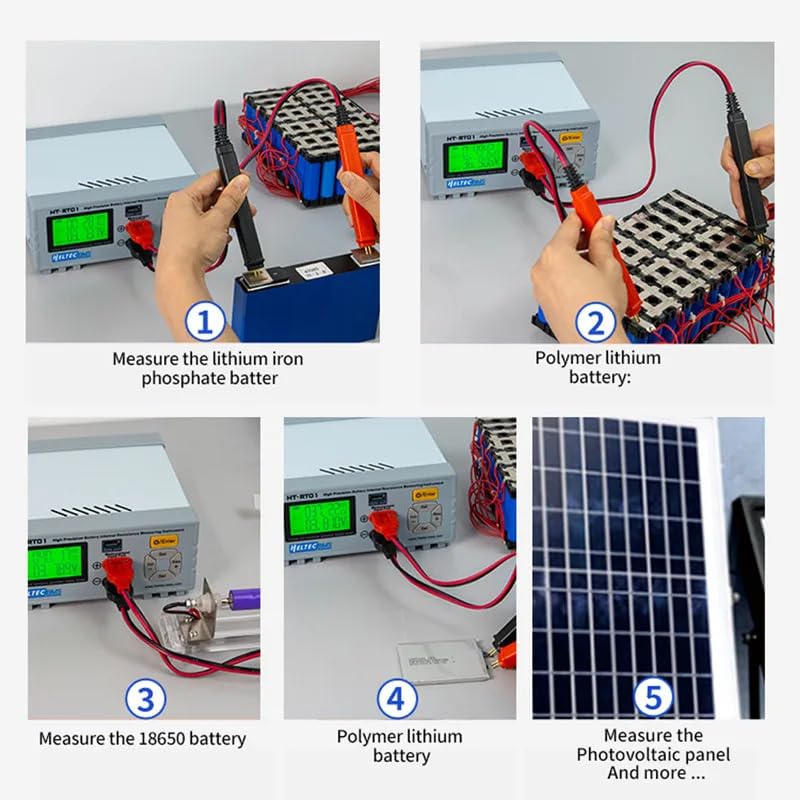
The HT-RT01 is versatile and can be used with various battery types. The 4-wire Kelvin clips ensure precise contact regardless of the battery's form factor.
- Lithium Iron Phosphate (LiFePO4) Batteries: Connect the clips to the positive and negative terminals.
- 18650 Batteries: Use the provided test fixture for secure contact and easy measurement.
- Polymer Lithium Batteries: Carefully connect the clips to the battery's contact points.
- Other Battery Types: The tester is compatible with LFP, NMC, LTO, lead-acid, and alkaline batteries. Ensure proper contact with the battery terminals.
5.3 PC Software Connection
When connected to a computer via the USB data cable, the HT-RT01 can interface with dedicated software for enhanced data logging, analysis, and visualization. This allows for detailed monitoring of battery performance over time and facilitates research and development tasks.

5.4 Video Demonstration
Watch this video for a visual guide on using the Heltec HT-RT01 tester for various battery types.
Video: A demonstration of the Heltec HT-RT01 battery tester, showcasing its use with different battery types and highlighting its versatile measurement capabilities.
6. Maintenance
- Cleaning: Keep the device clean and free from dust. Use a soft, dry cloth to wipe the exterior. Do not use abrasive cleaners or solvents.
- Storage: Store the HT-RT01 in a cool, dry place away from direct sunlight and extreme temperatures.
- Probe Care: Ensure the Kelvin clips are clean and free from corrosion. Damaged probes can affect measurement accuracy.
- Calibration: The device supports manual calibration for resistance and voltage. Refer to the detailed instructions in the full user manual for calibration procedures if required.
7. Troubleshooting
- No Power:
- Check if the power cord is securely connected to both the device and the power outlet.
- Ensure the main switch is in the 'ON' position.
- Verify the power outlet is functional.
- Check the fuse holder on the rear panel and replace the fuse if blown (refer to specifications for fuse type).
- Inaccurate Readings:
- Ensure the 4-wire Kelvin clips are making firm and clean contact with the battery terminals.
- Verify the battery is within the specified measurement range of the device.
- Perform a manual calibration if readings are consistently off.
- PC Connection Issues:
- Ensure the USB data cable is properly connected.
- Check if the necessary drivers are installed on your computer.
- Restart both the HT-RT01 and your computer.
8. Specifications
| Parameter | Value |
|---|---|
| Measurement Parameters | AC Resistance, DC Voltage |
| Precision (IR) | ±0.5% |
| Precision (V) | ±0.5% |
| Measuring Range (IR) | 0.001mΩ - 200Ω |
| Measuring Range (V) | 0.001V - 100VDC |
| Frequency | AC 1KHz |
| Signal Source Current (2mΩ/20mΩ gear) | 50mA |
| Signal Source Current (200mΩ/2Ω gear) | 5mA |
| Signal Source Current (20Ω/200Ω gear) | 0.5mA |
| Resistance Measurement Adjustment | 6 gear adjustment |
| Voltage Measurement Adjustment | 3 gear adjustment |
| Test Pace | 5 times /S |
| Calibration (Resistance) | Manual calibration |
| Calibration (Voltage) | Manual calibration |
| Power Supply | AC110V/AC220V |
| Supply Current | 50mA ~ 100mA |
| Range Switching | Automatic Switching |
| Measuring Input | Balance System |
| Measuring Probes | LCR Kelvin 4-wire clamp |
| Language | Switch language (Chinese/English) |
| USB Port | Connecting to computer |
| Size | 190 * 180 * 80mm |
| Weight | 1.1 kg |

9. Warranty and Support
For warranty information, technical support, or service inquiries, please contact Heltec BMS directly through their official website or the retailer from whom the product was purchased. Please have your model number (HT-RT01) and purchase details ready when contacting support.
For more information, visit the Heltec BMS Store on Amazon.
Related documentsHT-RT01


Ask a question about this manual
Ask about setup, troubleshooting, compatibility, parts, safety, or missing instructions. Manuals+ will review the question and use this page’s manual context to help answer it.