
1. Introduction
This user manual provides comprehensive instructions for the Brondi Amico Speciale 4G Senior Dual SIM Mobile Phone. It covers essential information regarding the device's features, setup, operation, and maintenance to ensure optimal use. The Amico Speciale 4G is designed with ease of use in mind, featuring large keys, an active flip design, and dedicated emergency functions.
Key features include:
- Remote Control: Allows family members to manage certain phone functions remotely.
- Active Flip: Answer and end calls by simply opening and closing the flip.
- Large Backlit Keys: Enhanced visibility and tactile feedback for easy dialing and navigation.
- SOS Button: Sends emergency SMS messages and automatically calls pre-stored numbers.
- Quick Dial Memories: 11 direct memories for rapid calling of frequently used contacts.
- 3 Quick Keys: Dedicated buttons for Camera, Messages, and Torch.
- Dual SIM 4G: Supports two Nano SIM cards for flexible network usage.
- Multimedia: Includes a 2 MP camera with LED flash, FM radio, and MicroSD slot for expandable memory up to 64 GB.
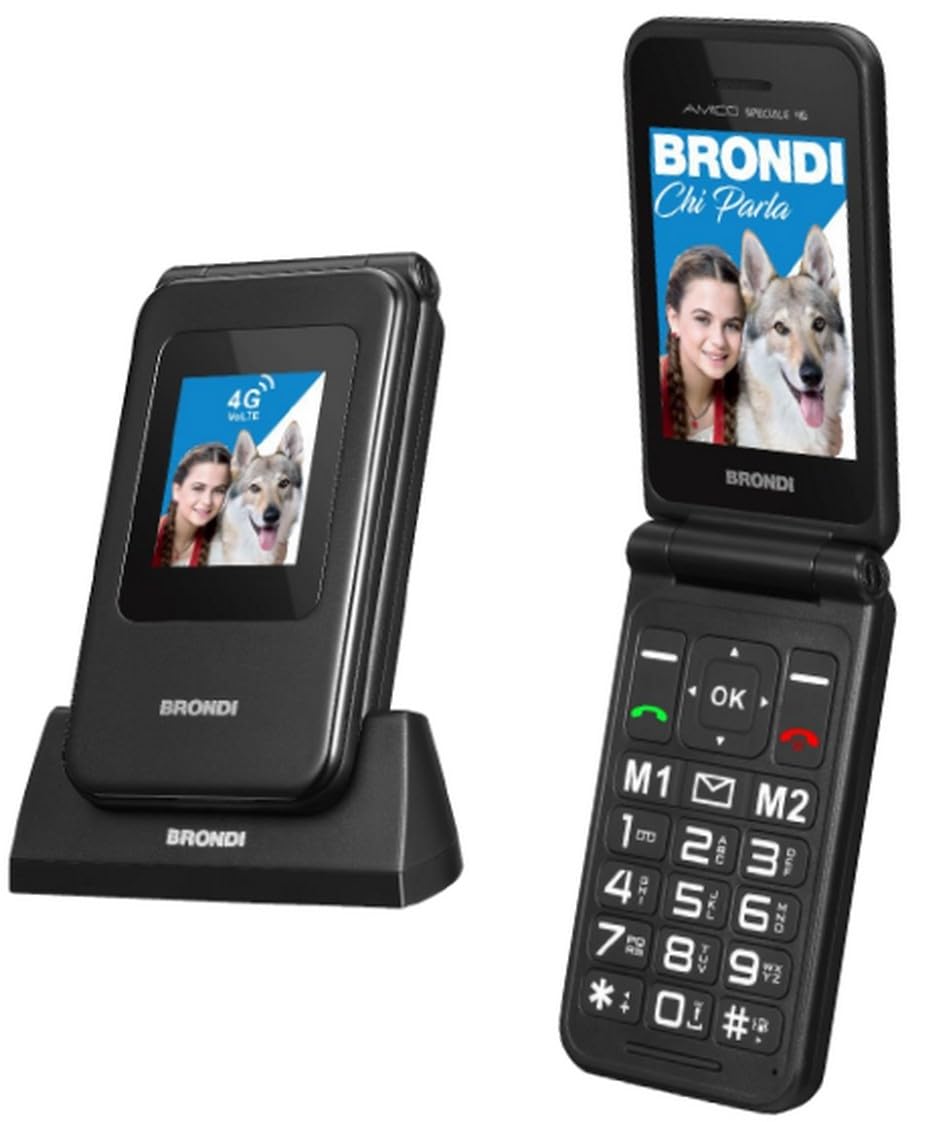
Figure 1: Brondi Amico Speciale 4G Senior Dual SIM Mobile Phone (Black Metal). This image shows the phone in its closed flip state, highlighting its compact design.
2. Package Contents
Please check the package contents upon unboxing. If any items are missing or damaged, contact your retailer.
- Brondi Amico Speciale 4G Mobile Phone
- Charging Cradle
- USB Cable
- Li-ion BL-5C 1000 mAh Battery
- User Manual (this document)
3. Device Overview
Familiarize yourself with the main components of your Brondi Amico Speciale 4G phone.
3.1 Front View (Closed)
- External Display: 1.77'' TN 128 x 160 pixels, shows time, date, and incoming call information.
- LED Indicators: For notifications (e.g., new message, missed call, charging).
3.2 Internal View (Open)
- Internal Display: 2.8'' QVGA 240 x 320 pixels, main screen for navigation and content.
- Navigation Keys: Up, Down, Left, Right, and OK/Confirm button.
- Call/End Keys: Green button to answer/make calls, Red button to end calls/power off.
- Numeric Keypad: Large, backlit keys for dialing and text input.
- Quick Keys: Dedicated buttons for Camera, Messages, and Torch.
- Direct Memory Keys: Programmable keys for quick dialing.
3.3 Side and Rear View
- SOS Button: Located on the rear for emergency calls and SMS.
- Camera: 2 MP camera with LED Flash on the rear.
- Volume Keys: On the side for adjusting call and media volume.
- Charging Port: USB-C connector.
- Charging Contacts: On the bottom for use with the charging cradle.
4. Setup
4.1 Installing the SIM Card(s) and MicroSD Card
- Ensure the phone is powered off.
- Remove the back cover of the phone.
- Carefully insert your Nano SIM card(s) into the designated SIM slots. The phone supports Dual SIM functionality.
- If desired, insert a MicroSD card (up to 64 GB) into the MicroSD slot for additional storage.
- Replace the back cover securely.
4.2 Installing the Battery
- With the back cover removed, align the contacts of the Li-ion BL-5C 1000 mAh battery with the contacts in the battery compartment.
- Gently press the battery into place until it is secure.
- Replace the back cover.
4.3 Charging the Phone
Before first use, fully charge the phone battery.
- Using the Charging Cradle: Place the phone into the charging cradle, ensuring the charging contacts align. The charging indicator will illuminate.
- Using the USB Cable: Connect the USB-C cable to the phone's charging port and the other end to a compatible USB power adapter or computer.
A full charge typically takes a few hours. The battery icon on the screen will indicate charging status.
5. Operating Instructions
5.1 Power On/Off
- To Power On: Press and hold the Red End Call/Power button until the screen lights up.
- To Power Off: Press and hold the Red End Call/Power button until the power off options appear, then confirm.
5.2 Making and Receiving Calls
- Making a Call:
- Dial the number using the numeric keypad. The phone announces the number being dialed.
- Press the Green Call button to initiate the call.
- Answering a Call (Active Flip): Simply open the phone's flip to answer an incoming call.
- Ending a Call (Active Flip): Close the phone's flip to end an active call. Alternatively, press the Red End Call button.
- Quick Dial: Press and hold one of the 11 direct memory keys (e.g., 2-9, *, #) to call a pre-assigned contact.
5.3 SOS Function
The SOS button is designed for emergencies.
- Setup: Before using, program emergency contact numbers in the SOS settings menu.
- Activation: In an emergency, press and hold the SOS button on the rear of the phone.
- The phone will automatically send an emergency SMS to the programmed numbers and then sequentially call them until one answers.
5.4 Messaging
Access the messaging function via the dedicated Quick Key or through the main menu to send and receive SMS.
5.5 Camera
The phone features a 2 MP camera with LED flash.
- Press the dedicated Camera Quick Key to open the camera application.
- Use the navigation keys to adjust settings if available.
- Press the OK/Confirm button to take a photo.
5.6 FM Radio
To use the FM Radio, access it from the multimedia menu. Headphones may be required to act as an antenna (not included).
5.7 Bluetooth
The phone supports Bluetooth 5.1 for connecting to wireless headsets or other compatible devices.
- Go to the Settings menu and select Bluetooth.
- Turn Bluetooth on and search for available devices.
- Select your desired device and pair it following the on-screen prompts.
5.8 Torch
Activate the built-in torch using the dedicated Torch Quick Key.
6. Maintenance
6.1 General Care
- Keep the phone dry. Moisture can damage electronic circuits.
- Avoid extreme temperatures. High temperatures can shorten the life of electronic devices and warp or melt certain plastics.
- Do not use harsh chemicals, cleaning solvents, or strong detergents to clean the phone. Wipe it with a soft, damp cloth.
- Handle the phone gently. Do not drop, knock, or shake it. Rough handling can break internal circuit boards and fine mechanics.
6.2 Battery Care
- Use only Brondi-approved batteries and charging accessories.
- Do not short-circuit the battery.
- Do not dispose of batteries in a fire.
- Recycle used batteries according to local regulations.
7. Troubleshooting
If you encounter issues with your phone, refer to the following common problems and solutions before contacting support.
| Problem | Possible Cause | Solution |
|---|---|---|
| Phone does not power on. | Battery is depleted or not installed correctly. | Charge the battery. Ensure the battery is correctly inserted. |
| Cannot make or receive calls. | No SIM card, SIM card not properly inserted, or no network signal. | Check SIM card installation. Move to an area with better network coverage. Contact your service provider. |
| Poor call quality or low volume. | Weak signal, speaker/microphone obstruction, or volume setting too low. | Adjust call volume. Ensure speaker/microphone are clear. Move to an area with better signal. |
| SOS function not working. | Emergency numbers not programmed or no credit/signal for SMS/calls. | Program emergency numbers in settings. Ensure sufficient credit and network signal. |
| Phone not charging. | Charger or cable faulty, or charging port/cradle contacts are dirty. | Check charger and cable. Clean charging contacts gently. Try charging via both USB cable and cradle. |
8. Specifications
| Feature | Detail |
|---|---|
| Brand | Brondi |
| Model Name | Amico Speciale 4G |
| Operating System | Proprietary (not Android) |
| Internal Display | 2.8 inches QVGA (240 x 320) LCD |
| External Display | 1.77 inches TN (128 x 160) |
| Processor | Mediatek Dimensity 900, 2 GHz |
| RAM | 4 GB (Note: This value appears unusually high for a feature phone with a proprietary OS, typically these devices have significantly less RAM.) |
| Internal Storage | 1 GB |
| Expandable Memory | MicroSD slot, up to 64 GB |
| SIM Card Type | Dual Nano SIM |
| Network Connectivity | 2G (Quadri band), 3G (900/2100), 4G (B1/B3/B7/B8/B20), VoLTE support |
| Bluetooth | 5.1 |
| Camera | 2 MP with LED Flash (Rear) |
| Battery | Li-ion BL-5C 1000 mAh |
| Talk Time | Up to 240 minutes |
| Standby Time | Up to 170 hours |
| Charging Port | USB-C |
| Special Features | Active Flip, Large Backlit Keys, SOS Button, Quick Dial, FM Radio, Torch, Remote Control |
| Color | Black Metal |
| Weight | 106g (with battery) |
| Water Resistance | Not water resistant |
Note: Specifications are subject to change without prior notice.
9. Warranty and Support
9.1 Product Warranty
The Brondi Amico Speciale 4G Mobile Phone comes with a 2-year product warranty from the date of purchase. This warranty covers manufacturing defects and malfunctions under normal use. Please retain your proof of purchase for warranty claims.
The warranty does not cover damage caused by:
- Accidents, misuse, or abuse.
- Unauthorized repairs or modifications.
- Exposure to liquids, extreme temperatures, or environmental conditions.
- Normal wear and tear.
9.2 Customer Support
For technical assistance, troubleshooting beyond this manual, or warranty inquiries, please contact Brondi customer support or visit the official Brondi website.
You can find more information and support resources on the Brondi Store on Amazon.