
Introduction
Thank you for choosing the Lacoste LC33 Quartz Basic Round Dial Men's Watch. This manual provides essential information for the proper setup, operation, and maintenance of your new timepiece. Please read these instructions carefully to ensure optimal performance and longevity of your watch.
Product Overview
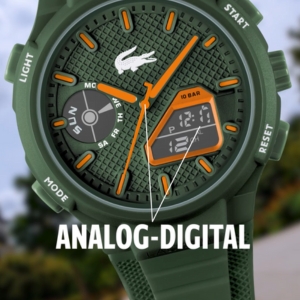
The Lacoste LC33 watch combines a classic analog display with modern digital functionalities, housed in a durable TR90 case with a comfortable silicone strap. It features a precise quartz movement and is designed for daily wear.


Setup
Your Lacoste LC33 watch comes with a pre-installed battery and is ready for initial setup. Before wearing, ensure the time and date are correctly set.
Initial Time and Date Setting
- Analog Time Adjustment: Pull the crown (the knob on the side of the watch) out to the first or second click position (refer to specific watch model for exact clicks). Rotate the crown to set the hour and minute hands. Push the crown back in to start the watch.
- Digital Time and Date Adjustment: Use the 'MODE' button to cycle through the digital display modes (Time, Date, Alarm, Chronograph). When in the desired setting mode (e.g., Time setting), use the 'RESET' or 'START' buttons to adjust the values. The 'LIGHT' button may be used to confirm selections or advance to the next setting parameter.
For detailed digital setting instructions, refer to the specific functions described in the 'Operating Instructions' section.
Operating Instructions
The Lacoste LC33 features a combination of analog and digital displays, offering various functions controlled by the crown and side buttons.
Button Functions
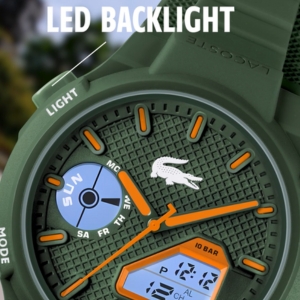
- LIGHT Button: Activates the LED backlight for the digital display. May also be used to confirm settings in certain modes.
- MODE Button: Cycles through the digital display modes: Time, Date, Alarm, Chronograph. Press and hold to enter setting mode for the current display.
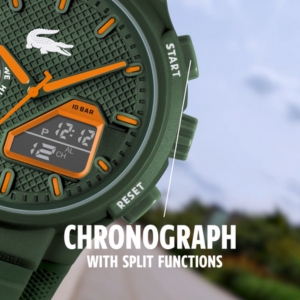
- START Button: Used to start/stop the chronograph, adjust values in setting modes, or toggle features.
- RESET Button: Used to reset the chronograph, adjust values in setting modes, or exit setting modes.
Setting Digital Time and Date
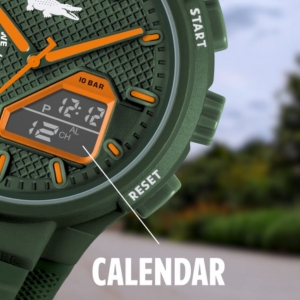
- Press the 'MODE' button until the digital time display is shown.
- Press and hold the 'MODE' button until the digits begin to flash, indicating setting mode.
- Use the 'START' or 'RESET' buttons to adjust the flashing digit (hours, minutes, seconds).
- Press the 'MODE' button again to move to the next setting parameter (e.g., minutes, then date, month, year).
- Once all settings are complete, press the 'MODE' button or wait for a few seconds for the watch to automatically exit setting mode.
Using the Chronograph (Stopwatch)
- Press the 'MODE' button until the chronograph display appears (usually indicated by 'CH' or 'STW').
- Press the 'START' button to begin timing.
- Press the 'START' button again to pause timing.
- Press the 'RESET' button to clear the timed value and return to zero.
Setting the Alarm
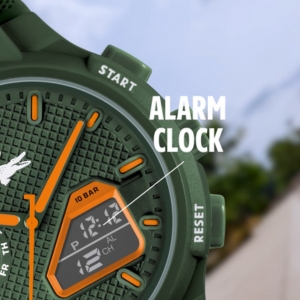
- Press the 'MODE' button until the alarm display appears (usually indicated by 'AL').
- Press and hold the 'MODE' button until the alarm time digits begin to flash.
- Use the 'START' or 'RESET' buttons to adjust the flashing digits for the desired alarm hour and minute.
- Press the 'MODE' button to move between hour and minute settings.
- To activate/deactivate the alarm, press the 'START' button while in the alarm display mode (not setting mode). An alarm icon will typically appear when activated.
Water Resistance
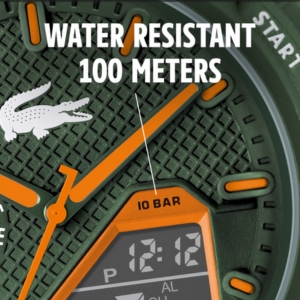
Your watch is water resistant up to 100 meters (10 BAR). This means it is suitable for swimming, snorkeling, and showering. However, it is not suitable for scuba diving. Do not operate the crown or buttons while the watch is wet or submerged, as this can compromise the water resistance.
Maintenance
Proper care will extend the life and appearance of your Lacoste LC33 watch.
Cleaning
- Wipe the watch case and strap regularly with a soft, dry cloth.
- For silicone straps, a mild soap and water solution can be used, followed by thorough rinsing and drying.
- Avoid using harsh chemicals, solvents, or abrasive cleaners, as these can damage the watch's finish and materials.
Battery Replacement
The watch is powered by 1 A battery. When the digital display becomes dim or the watch stops functioning, it is time to replace the battery. Battery replacement should ideally be performed by a qualified watch technician to ensure proper sealing and maintain water resistance.
Storage
When not wearing your watch, store it in a cool, dry place away from direct sunlight and extreme temperatures. Keep it away from strong magnetic fields, which can affect the accuracy of quartz movements.
Troubleshooting
If you encounter issues with your watch, refer to the following common problems and solutions:
| Problem | Possible Cause | Solution |
|---|---|---|
| Watch not running / Digital display blank | Battery depleted | Replace battery (professional service recommended). |
| Incorrect time / Date | Time/date not set correctly or accidentally changed. | Refer to 'Initial Time and Date Setting' and 'Operating Instructions' to reset. |
| Water inside the watch | Crown/buttons operated underwater or seals compromised. | Immediately take the watch to a service center. Do not attempt to dry it yourself. |
| Buttons not responding | Watch may be in a locked mode or battery low. | Try pressing the 'MODE' button to exit any special modes. If issue persists, consider battery replacement. |
If the problem persists after attempting these solutions, please contact customer support or a certified service center.
Specifications
| Feature | Detail |
|---|---|
| Model Name | LC33 |
| Model Number | 2011364 |
| Movement Type | Quartz |
| Display Type | Analog-Digital |
| Case Diameter | 43.75 Millimetres |
| Case Material | TR90 (Shatter-proof) / Stainless Steel (Case back) |
| Band Material Type | Silicone |
| Band Colour | White |
| Dial Colour | White |
| Crystal Material | Mineral Glass |
| Water Resistance Depth | 100 Metres (10 BAR) |
| Power Source Type | Battery Powered (1 A battery included) |
| Item Weight | 61 Grams |
| Product Dimensions | 1.5 x 4.5 x 2.6 cm |
Warranty and Support
Warranty Information
Your Lacoste LC33 watch comes with a Limited Warranty. Please retain your proof of purchase for any warranty claims. The warranty covers manufacturing defects under normal use. It does not cover damage resulting from improper handling, accidents, unauthorized repairs, or normal wear and tear.
Customer Support
For technical assistance, service, or warranty inquiries, please contact the manufacturer or authorized service center.
- Manufacturer: Movado Watch Company AG Bettlachstrasse 8, 2540 Grenchen Suisse, Swissam Products Limited, 29th Floor, Citicorp Centre, 18 Whitefield Road, North Point, HONG KONG
- Importer/Packer (India): IndiQube Epsilon, Amar Jyothi House Building, Domlur, 100 Feet Road, Bangalore, 560071.
You can also visit the official Lacoste store on Amazon for more product information: Lacoste Store