
Introduction
Thank you for choosing the Vieta Pro Way 4 Headband Headphones. These headphones are designed to provide a superior audio experience with advanced features such as Bluetooth 5.4 connectivity, an integrated microphone, a dedicated gaming mode, and dual pairing capabilities. This manual will guide you through the setup, operation, and maintenance of your new headphones.
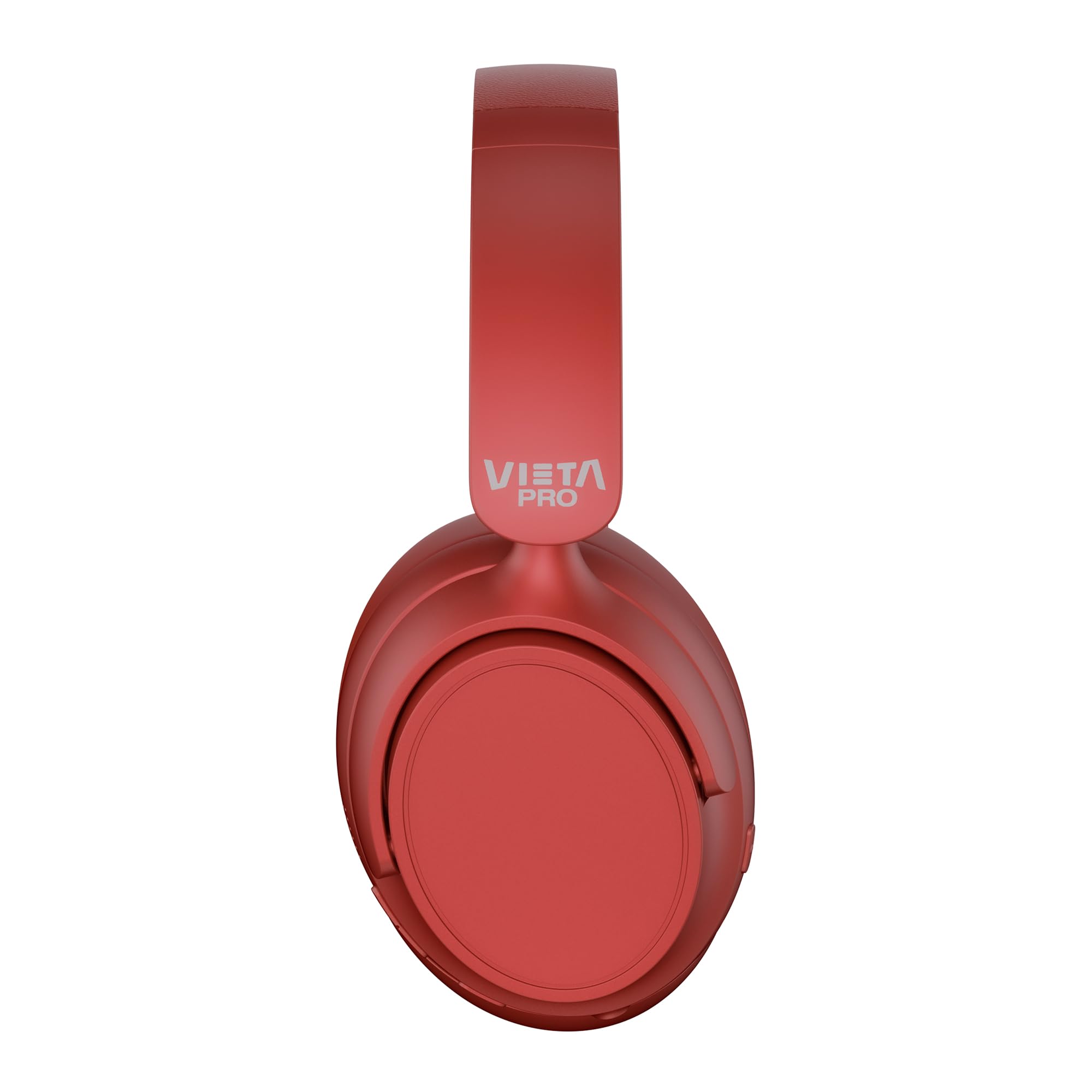
Image: Front view of the Vieta Pro Way 4 Headband Headphones in red.
Package Contents
Please check that all items are present in the package:
- Vieta Pro Way 4 Headband Headphones
- USB Charging Cable
- 3.5mm Audio Cable with integrated microphone
- User Manual (this document)
Product Overview
Familiarize yourself with the various parts and controls of your headphones.

Image: Right earcup with power button, volume controls, USB-C charging port, and 3.5mm audio jack.
- Power Button: Used to power on/off and initiate Bluetooth pairing.
- Volume Up/Next Track Button: Press briefly to increase volume, press and hold for next track.
- Volume Down/Previous Track Button: Press briefly to decrease volume, press and hold for previous track.
- Multi-function Button: For play/pause, answer/end calls, activate voice assistant.
- USB-C Charging Port: For charging the headphones.
- 3.5mm Audio Jack: For wired connection using the included audio cable.
- Integrated Microphone: For calls and voice assistant commands.

Image: Left earcup and adjustable headband of the Vieta Pro Way 4 headphones.
Setup
1. Charging the Headphones
Before first use, fully charge your headphones.
- Connect the USB charging cable to the USB-C port on the headphones.
- Connect the other end of the cable to a USB power adapter (not included) or a computer's USB port.
- The LED indicator will show charging status (e.g., red for charging, blue/off for fully charged).
- A full charge provides up to 50 hours of playback.
2. Powering On/Off
- To Power On: Press and hold the Power button for approximately 3 seconds until the LED indicator flashes.
- To Power Off: Press and hold the Power button for approximately 3 seconds until the LED indicator turns off.
3. Bluetooth Pairing
Pair your headphones with your device for wireless audio.
- Ensure the headphones are powered off.
- Press and hold the Power button for approximately 5-7 seconds until the LED indicator flashes red and blue alternately, indicating pairing mode.
- On your device (smartphone, tablet, computer), enable Bluetooth and search for available devices.
- Select "Vieta Pro Way 4" from the list of found devices.
- Once connected, the LED indicator will flash blue slowly or turn solid blue.
4. Dual Pairing
The Vieta Pro Way 4 headphones support dual pairing, allowing simultaneous connection to two devices (e.g., phone and computer).
- Pair the headphones with the first device as described in "Bluetooth Pairing".
- Disable Bluetooth on the first device. The headphones will re-enter pairing mode.
- Pair the headphones with the second device.
- Re-enable Bluetooth on the first device. The headphones should automatically connect to both devices.
- Audio will play from the device that is actively transmitting.
5. Wired Connection (Aux-in)
Use the included 3.5mm audio cable for a wired connection. This is useful when the battery is low or for devices without Bluetooth.
- Connect one end of the 3.5mm audio cable to the Aux-in port on the headphones.
- Connect the other end to the 3.5mm audio jack of your device.
- The headphones will automatically switch to wired mode. The integrated microphone on the cable can be used for calls in this mode.
Operating Instructions
Music Playback
- Play/Pause: Press the Multi-function button once.
- Volume Up: Press the Volume Up button once.
- Volume Down: Press the Volume Down button once.
- Next Track: Press and hold the Volume Up button.
- Previous Track: Press and hold the Volume Down button.
Call Management
- Answer/End Call: Press the Multi-function button once.
- Reject Call: Press and hold the Multi-function button for 2 seconds.
- Redial Last Number: Double-press the Multi-function button.
Voice Assistant
- Activate Voice Assistant (Siri, Google Assistant, etc.): Triple-press the Multi-function button.
Gaming Mode
Activate Gaming Mode to reduce Bluetooth latency for an optimized gaming experience.
- Activate/Deactivate Gaming Mode: Press the Power button twice quickly. The headphones will provide an audio cue.
Maintenance
- Cleaning: Wipe the headphones with a soft, dry cloth. Do not use abrasive cleaners or solvents.
- Storage: Store the headphones in a cool, dry place. The foldable design allows for compact storage.
- Battery Care: To prolong battery life, avoid fully discharging the headphones frequently. Charge them regularly.
- Water Resistance: These headphones are not waterproof. Avoid exposure to water or excessive moisture.

Image: The Vieta Pro Way 4 headphones in their foldable configuration, demonstrating portability.
Troubleshooting
| Problem | Possible Cause | Solution |
|---|---|---|
| Headphones do not power on. | Low battery. | Charge the headphones fully. |
| Cannot pair via Bluetooth. | Headphones not in pairing mode; Bluetooth disabled on device; too far from device. | Ensure headphones are in pairing mode (flashing red/blue). Enable Bluetooth on your device. Move headphones closer to the device (within 10 meters). |
| No sound or low volume. | Volume too low on headphones or device; incorrect audio source selected; headphones not connected. | Increase volume on both headphones and device. Check Bluetooth connection or 3.5mm cable connection. Ensure the correct audio output is selected on your device. |
| Microphone not working. | Microphone muted on device; incorrect input device selected; issue with 3.5mm cable microphone. | Check device settings to ensure microphone is not muted and "Vieta Pro Way 4" is selected as input. If using wired connection, ensure the cable's microphone is enabled/functional. |
| Audio delay in games. | Gaming Mode is not activated. | Activate Gaming Mode by double-pressing the Power button. |
Specifications
| Model Name | Vieta Pro Way 4 |
| Model Number | Silence 3 |
| Connectivity | Bluetooth 5.4, 3.5mm Aux-in |
| Battery Life | Up to 50 hours |
| Microphone | Integrated (for Bluetooth), In-line (for 3.5mm cable) |
| Special Features | Gaming Mode, Dual Pairing, Foldable Design, Passive Noise Reduction |
| Impedance | 32 Ohms |
| Ear Placement | Over-ear (Circumaural) |
| Material | Plastic |
| Water Resistance | Not waterproof |
| Compatible Devices | Mobile devices, computers, game consoles |
Warranty and Support
For warranty information and technical support, please refer to the warranty card included in your product packaging or visit the official Vieta Pro website.
Please retain your proof of purchase for any warranty claims.


