
Beyution CD-R510
Beyution CD-R510 Remote Control Instruction Manual
For Pioneer DEH-P7800MP, DEH-P8600MP, MVH-S622BS Car Receivers
1. Product Overview
This document provides instructions for the Beyution CD-R510 replacement remote control. This remote is designed to function with specific Pioneer car audio receivers, offering convenient control over various functions.
Compatible Models:
- Pioneer DEH-P7800MP
- Pioneer DEH-P8600MP
- Pioneer MVH-S622BS
The CD-R510 remote control utilizes infrared technology and operates effectively up to a maximum distance of 10 meters under optimal conditions.
2. Setup
The Beyution CD-R510 remote control is designed for immediate use with compatible Pioneer receivers and does not require any programming or pairing procedures.
Battery Installation
- Locate the battery compartment on the back of the remote control.
- Open the battery compartment cover.
- Insert one CR2025 coin cell battery, ensuring the positive (+) terminal is facing upwards as indicated inside the compartment.
- Close the battery compartment cover securely.
Once the battery is installed, the remote control is ready for operation.
3. Operating Instructions
Point the remote control directly at the infrared sensor on your Pioneer car receiver. Ensure there are no obstructions between the remote and the receiver.
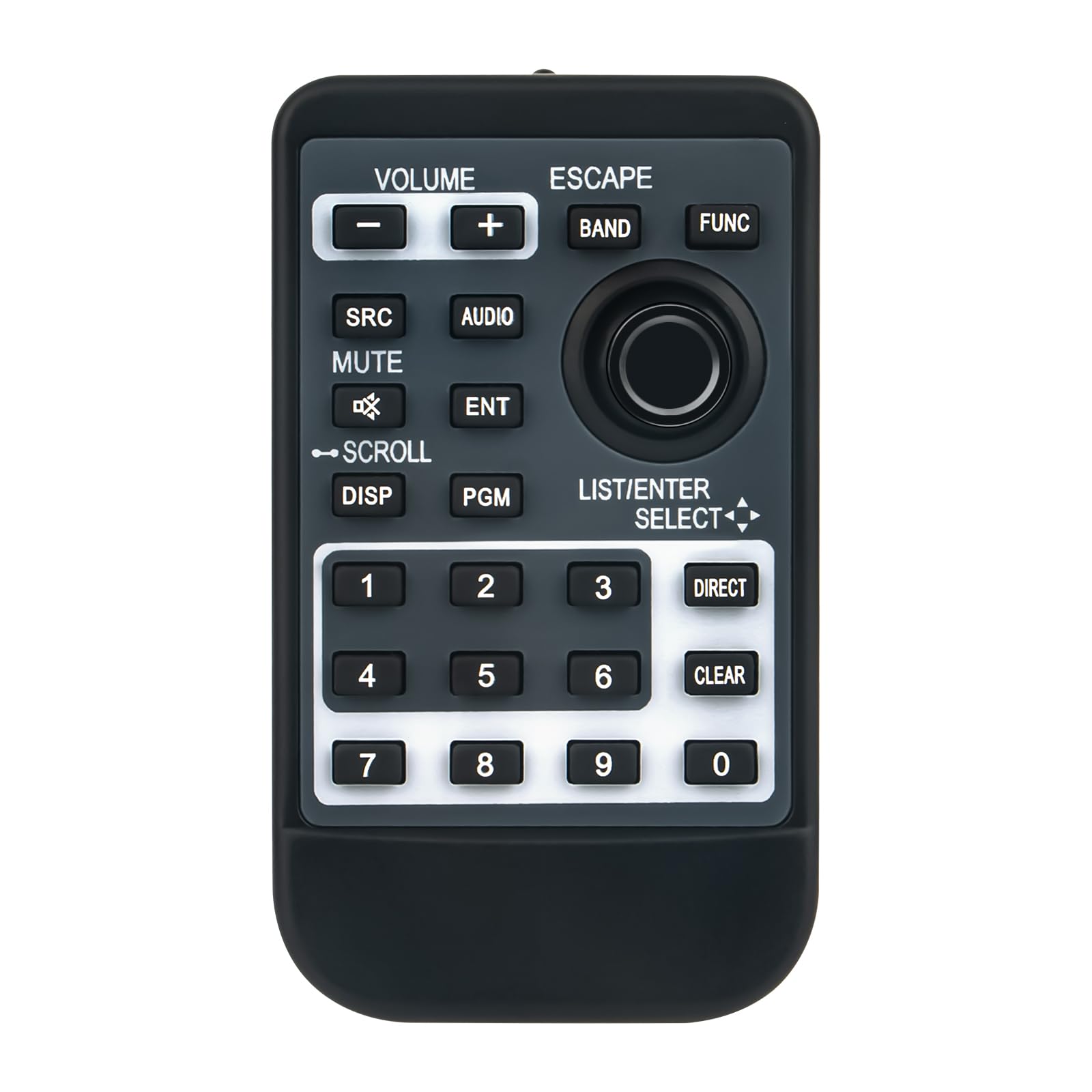
Image 1: Front view of the Beyution CD-R510 remote control. It features a dark gray body with black buttons and white text. Key sections include volume controls at the top left, navigation and function buttons in the center, and a numeric keypad at the bottom.
Button Functions:
- VOLUME (+/-): Increases or decreases the audio volume.
- ESCAPE: Exits the current menu or cancels an operation.
- BAND: Switches between radio bands (e.g., FM1, FM2, AM).
- FUNC (Function): Accesses various function menus or settings.
- SRC (Source): Selects the audio source (e.g., Radio, CD, USB, Bluetooth).
- AUDIO: Opens the audio settings menu (e.g., Bass, Treble, Balance).
- MUTE: Toggles the audio mute function on or off.
- ENT (Enter): Confirms a selection or enters a menu.
- SCROLL (with arrows): Navigates through lists, tracks, or menu options.
- DISP (Display): Changes the information shown on the receiver's display.
- PGM (Program): Activates a programmable function, specific to the receiver model.
- LIST/ENTER SELECT (with arrows): Used for navigating lists and making selections.
- Numeric Keypad (0-9): For direct input of numbers, such as radio station presets or track numbers.
- DIRECT: Provides direct access to a specific function or input.
- CLEAR: Clears current input or selection.
4. Maintenance
Cleaning
To clean the remote control, use a soft, dry cloth. Do not use liquid cleaners, abrasive pads, or chemical solvents, as these can damage the surface or internal components.
Battery Replacement
Replace the CR2025 battery when the remote's range decreases significantly or if it stops responding. Refer to the "Battery Installation" section for instructions.
Storage
Store the remote control in a cool, dry place away from direct sunlight and extreme temperatures. If storing for an extended period, it is advisable to remove the battery to prevent leakage.
5. Troubleshooting
- Remote not responding:
- Ensure the battery is correctly installed and not depleted. Replace if necessary.
- Check for any obstructions between the remote control and the receiver's infrared sensor.
- Verify that you are within the operational range (approximately 10 meters).
- Confirm the remote is pointed directly at the receiver.
- Specific buttons not working:
- Clean the remote control surface and buttons with a soft, dry cloth to remove any dirt or debris that might be interfering with button presses.
- If only certain buttons are unresponsive, the remote may be damaged.
- Compatibility issues:
- Ensure your Pioneer receiver model is listed as compatible (DEH-P7800MP, DEH-P8600MP, MVH-S622BS).
- If your model is not listed, the remote may not be compatible.
6. Specifications
| Model: | CD-R510 |
| Brand: | Beyution |
| Connectivity Technology: | Infrared |
| Maximum Operating Distance: | 10 meters (approx. 33 feet) |
| Material: | ABS Plastic |
| Product Dimensions: | 7 x 1.5 x 0.5 inches (approx. 17.8 x 3.8 x 1.3 cm) |
| Item Weight: | 1.9 ounces (approx. 54 grams) |
| Required Battery: | 1 x CR2025 coin cell (not included) |
7. Support Information
For further assistance or if you encounter issues not covered in this manual, please contact the seller or manufacturer directly. When contacting support, provide your product model (CD-R510) and the specific Pioneer receiver model you are using.
It is recommended to verify compatibility with your specific device model before purchase. If you have received a damaged or non-functional remote, please reach out to the point of purchase for a resolution.
Ask a question about this manual
Ask about setup, troubleshooting, compatibility, parts, safety, or missing instructions. Manuals+ will review the question and use this page’s manual context to help answer it.